



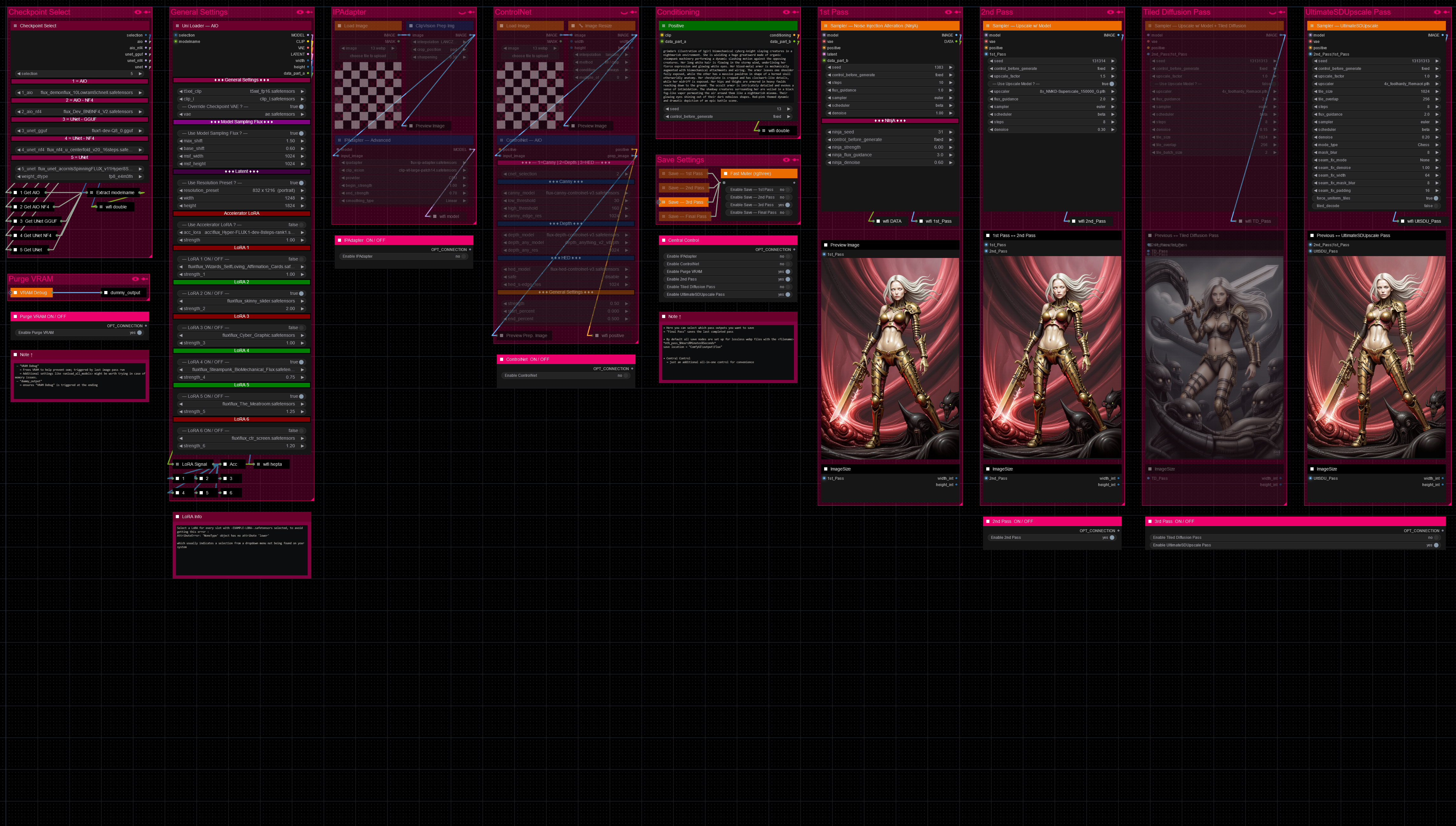

Hello there and thanks for checking out this workflow!
What's new in v27? : Major rework with new SubGraphs to streamline and compact the workflow even more, removal of outdated/broken nodes + fixes and optimizations all over!
—Purpose—
Built to provide an advanced, versatile and modular workflow for Flux with focus on efficiency, structure and information.
It comes with many notes explaining node settings and recommendations, as well as general guides from instructions to troubleshooting.
—Features—
Convenient loaders for all common versions of Flux and Clip models
Full metadata; recognized by CivitAI
LoRA support
SageAttention, EasyCache + Model Compile acceleration
ControlNet with Union support
Flux Tools LoRAs Canny + Depth (alt. to CNet based on LoRA)
Flux Redux (similar to IPAdapter)
PuLID (SVDQuant version only)
Wildcard prompting
Installation and download guide for models and nodes
multiple passes with optional upscales
— 1st : Detail Daemon + Variation Seed
— 2nd : DD. + Tiled Diffusion / UltimateSDUpscale
— ADetailer with dedicated LoRA Loader
— Inpainting
—Custom Nodes—
ComfyUI-nunchaku — SVDQuant version only
All of which can be installed through the ComfyUI-Manager
—Troubleshooting—
If nodes show up red (failing to load), check the 'Install Missing Custom Nodes' tab of the ComfyUI Manager for the missing node packs and install them.
Please check if all custom node packs load properly after installing, i.e. no
(IMPORT FAILED)messages next to any of them in the console upon ComfyUI startup.Always reload/drag'n'drop the original, downloaded workflow file into ComfyUI to reload an intact version of the workflow.
→ The last opened workflow that appears on startup shows a cached version of the workflow, "remembering" group nodes that failed due to missing nodes as failed, keeping them broken even after having everything installed correctly.
—Thanks—
The workflow would not be possible as is without these custom node packs. If you want to support the custom node creators, give them a ⭐ on their github repos! Thank you!
Feel free to ask questions, share improvements and suggestions in the comment section!
Let me know if you encounter confusing points I can elaborate on in the next update!
Description
v9_1
— reworked checkpoint name extraction process
— design changes
— active LoRA highlights and separators in one
— custom node pack changes :
+ : ComfyUI-List-Utils, ComfyUI_LayerStyle
• hotfix to save meta-data even when no lora is active
FAQ
Comments (16)
I have every node pack installed that you have listed and I have no "Missing Nodes" according to my Comfy Manager; but after over an hour of fighting with this workflow, I still have a giant list of nodes that Comfy cannot find. Loading a workflow should NOT be this difficult.
workflow/Save — Pass
workflow/LoRA Signal
workflow/ControlNet — AIO II
workflow/IPAdapter — Advanced
workflow/wifi hepta
workflow/wifi double
workflow/Extract modelname II
workflow/Sampler — Upscale w/ Model
workflow/Sampler — Upscale w/ Model + Tiled Diffusion
workflow/Sampler — UltimateSDUpscale
workflow/Uni Loader — AIO III
workflow/Checkpoint Select II
workflow/Positive
workflow/Sampler — Noise Injection Alteration (NInjA) II
You are right, that should not be the case. Sorry for the frustrating experience so far. It looks like every group node is affected, no others though.
1. Is your ComfyUI on the newest update?
2. Do all node packs load correctly when you start up ComfyUI? No (IMPORT FAILED) messages next to any custom node pack
3. Did you drag the original workflow file into Comfy after updating and got this error?
4. Can you provide a screenshot of the error and the Comfy log?
@redpinkretro Thank you for responding so quickly.
1. Yes sir. I update all my nodes and ComfyUI every day when I first start. Today, I've updated everything multiple times.
2. Everything seems to load correctly. There are no Import Failed notations in my custom nodes log at startup.
3. I deleted the workflow I had and dragged your json file back in after all my updates just to make sure I hadn't messed anything up by accident. I still get warnings for all the nodes in the list I posted here.
I'm not sure where I could post a screenshot for you. 🤷🏼
Here is my copy/pasted startup log. My apologies 😆
[START] Security scan
[DONE] Security scan
## ComfyUI-Manager: installing dependencies done.
** ComfyUI startup time: 2024-09-24 21:53:17.618315
** Platform: Windows
** Python version: 3.11.9 (tags/v3.11.9:de54cf5, Apr 2 2024, 10:12:12) [MSC v.1938 64 bit (AMD64)]
** Python executable: H:\ComfyUI\ComfyUI_windows_portable\python_embeded\python.exe
** ComfyUI Path: H:\ComfyUI\ComfyUI_windows_portable\ComfyUI
** Log path: H:\ComfyUI\ComfyUI_windows_portable\comfyui.log
Downloading SVD model: svd.safetensors...
'wget' is not recognized as an internal or external command,
operable program or batch file.
Downloading SVD model: svd_image_decoder.safetensors...
'wget' is not recognized as an internal or external command,
operable program or batch file.
Downloading SVD model: svd_xt.safetensors...
'wget' is not recognized as an internal or external command,
operable program or batch file.
Downloading SVD model: svd_xt_image_decoder.safetensors...
'wget' is not recognized as an internal or external command,
operable program or batch file.
Prestartup times for custom nodes:
0.0 seconds: H:\ComfyUI\ComfyUI_windows_portable\ComfyUI\custom_nodes\ComfyUI-Marigold
0.0 seconds: H:\ComfyUI\ComfyUI_windows_portable\ComfyUI\custom_nodes\rgthree-comfy
0.0 seconds: H:\ComfyUI\ComfyUI_windows_portable\ComfyUI\custom_nodes\ComfyUI-Easy-Use
0.4 seconds: H:\ComfyUI\ComfyUI_windows_portable\ComfyUI\custom_nodes\ComfyUI-Stable-Video-Diffusion
2.4 seconds: H:\ComfyUI\ComfyUI_windows_portable\ComfyUI\custom_nodes\ComfyUI-Manager
Total VRAM 12282 MB, total RAM 65463 MB
pytorch version: 2.4.1+cu124
Set vram state to: NORMAL_VRAM
Device: cuda:0 NVIDIA GeForce RTX 4070 Ti : cudaMallocAsync
Using pytorch cross attention
[Prompt Server] web root: H:\ComfyUI\ComfyUI_windows_portable\ComfyUI\web_custom_versions\Comfy-Org_ComfyUI_frontend\1.2.63
Adding extra search path checkpoints H:\Stable_Diffusion_Models\models/Checkpoints
Adding extra search path configs H:\Stable_Diffusion_Models\models/Checkpoints
Adding extra search path vae H:\Stable_Diffusion_Models\models/VAE
Adding extra search path loras H:\Stable_Diffusion_Models\models/Lora
Adding extra search path loras H:\Stable_Diffusion_Models\models/LyCORIS
Adding extra search path upscale_models H:\Stable_Diffusion_Models\models/upscale_models
Adding extra search path upscale_models H:\Stable_Diffusion_Models\models/BSRGAN
Adding extra search path upscale_models H:\Stable_Diffusion_Models\models/ESRGAN
Adding extra search path upscale_models H:\Stable_Diffusion_Models\models/GFPGAN
Adding extra search path upscale_models H:\Stable_Diffusion_Models\models/LDSR
Adding extra search path upscale_models H:\Stable_Diffusion_Models\models/RealESRGAN
Adding extra search path upscale_models H:\Stable_Diffusion_Models\models/SwinIR
Adding extra search path embeddings H:\Stable_Diffusion_Models\models/Embeddings
Adding extra search path hypernetworks H:\Stable_Diffusion_Models\models/hypernetworks
Adding extra search path controlnet H:\Stable_Diffusion_Models\models/ControlNet
Adding extra search path ipadapter H:\Stable_Diffusion_Models\models/IPAdapter
Adding extra search path clip_vision H:\Stable_Diffusion_Models\models/Clip_Vision
Adding extra search path clip H:\Stable_Diffusion_Models\models/Clip
Adding extra search path unet H:\Stable_Diffusion_Models\models/Unet
Adding extra search path svd H:\Stable_Diffusion_Models\models/Checkpoints/SVD
Adding extra search path deepbump H:\Stable_Diffusion_Models\models/Deepbump
Adding extra search path photomaker H:\Stable_Diffusion_Models\models/Photomaker
Adding extra search path inpaint H:\Stable_Diffusion_Models\models/Inpaint
Adding extra search path instantid H:\Stable_Diffusion_Models\models/InstantID
Adding extra search path layer_model H:\Stable_Diffusion_Models\models/layer_model
Adding extra search path stablesr H:\Stable_Diffusion_Models\models/StableSR
Adding extra search path image2text H:\Stable_Diffusion_Models\models/image2text
Adding extra search path llm_checkpoints H:\Stable_Diffusion_Models\models/LLM_checkpoints
Adding extra search path llavacheckpoints H:\Stable_Diffusion_Models\models/LLavacheckpoints
Adding extra search path ella H:\Stable_Diffusion_Models\models/Ella
Adding extra search path flux H:\Stable_Diffusion_Models\models/Flux
H:\ComfyUI\ComfyUI_windows_portable\python_embeded\Lib\site-packages\kornia\feature\lightglue.py:44: FutureWarning: torch.cuda.amp.custom_fwd(args...) is deprecated. Please use torch.amp.custom_fwd(args..., device_type='cuda') instead.
@torch.cuda.amp.custom_fwd(cast_inputs=torch.float32)
ASTERR config loaded successfully
[Allor]: No new updates.
[Allor]: 0 nodes were overridden.
[Allor]: 12 modules were enabled.
[Allor]: 98 nodes were loaded.
Adding H:\ComfyUI\ComfyUI_windows_portable\ComfyUI\custom_nodes to sys.path
Efficiency Nodes: Attempting to add Control Net options to the 'HiRes-Fix Script' Node (comfyui_controlnet_aux add-on)...Success!
Efficiency Nodes Warning: Failed to import python package 'simpleeval'; related nodes disabled.
Loaded Efficiency nodes from H:\ComfyUI\ComfyUI_windows_portable\ComfyUI\custom_nodes\efficiency-nodes-comfyui
Loaded ControlNetPreprocessors nodes from H:\ComfyUI\ComfyUI_windows_portable\ComfyUI\custom_nodes\comfyui_controlnet_aux
Loaded AdvancedControlNet nodes from H:\ComfyUI\ComfyUI_windows_portable\ComfyUI\custom_nodes\ComfyUI-Advanced-ControlNet
Could not find AnimateDiff nodes
Loaded IPAdapter nodes from H:\ComfyUI\ComfyUI_windows_portable\ComfyUI\custom_nodes\ComfyUI_IPAdapter_plus
Loaded VideoHelperSuite from H:\ComfyUI\ComfyUI_windows_portable\ComfyUI\custom_nodes\ComfyUI-VideoHelperSuite
### Loading: ComfyUI-Impact-Pack (V7.7.1)
### Loading: ComfyUI-Impact-Pack (Subpack: V0.6)
### Loading: ComfyUI-Impact-Pack (V7.7.1)
Loaded ImpactPack nodes from H:\ComfyUI\ComfyUI_windows_portable\ComfyUI\custom_nodes\ComfyUI-Impact-Pack
[Impact Pack] Wildcards loading done.
[Impact Pack] Wildcards loading done.
[Crystools INFO] Crystools version: 1.18.4
[Crystools INFO] CPU: Intel(R) Core(TM) i7-8700K CPU @ 3.70GHz - Arch: AMD64 - OS: Windows 10
[Crystools INFO] Pynvml (Nvidia) initialized.
[Crystools INFO] GPU/s:
[Crystools INFO] 0) NVIDIA GeForce RTX 4070 Ti
[Crystools INFO] NVIDIA Driver: 561.09
xFormers not available
xFormers not available
[ComfyUI-Easy-Use] server: v1.2.3 Loaded
[ComfyUI-Easy-Use] web root: H:\ComfyUI\ComfyUI_windows_portable\ComfyUI\custom_nodes\ComfyUI-Easy-Use\web_version/v2 Loaded
### Loading: ComfyUI-Impact-Pack (V7.7.1)
[Impact Pack] Wildcards loading done.
### Loading: ComfyUI-Inspire-Pack (V1.2.2)
Total VRAM 12282 MB, total RAM 65463 MB
pytorch version: 2.4.1+cu124
Set vram state to: NORMAL_VRAM
Device: cuda:0 NVIDIA GeForce RTX 4070 Ti : cudaMallocAsync
### Loading: ComfyUI-Manager (V2.51.1)
### ComfyUI Revision: 2727 [fdf37566] | Released on '2024-09-24'
[SD Prompt Reader] Node version: 1.3.4
[SD Prompt Reader] Core version: 1.3.5
[ReActor] - STATUS - Running v0.5.1-b2 in ComfyUI
[ComfyUI-Manager] default cache updated: https://raw.githubusercontent.com/ltdrdata/ComfyUI-Manager/main/alter-list.json
[ComfyUI-Manager] default cache updated: https://raw.githubusercontent.com/ltdrdata/ComfyUI-Manager/main/model-list.json
[ComfyUI-Manager] default cache updated: https://raw.githubusercontent.com/ltdrdata/ComfyUI-Manager/main/github-stats.json
[ComfyUI-Manager] default cache updated: https://raw.githubusercontent.com/ltdrdata/ComfyUI-Manager/main/extension-node-map.json
[ComfyUI-Manager] default cache updated: https://raw.githubusercontent.com/ltdrdata/ComfyUI-Manager/main/custom-node-list.json
Torch version: 2.4.1+cu124
no module 'xformers'. Processing without...
no module 'xformers'. Processing without...
(pysssss:WD14Tagger) [DEBUG] Available ORT providers: TensorrtExecutionProvider, CUDAExecutionProvider, CPUExecutionProvider
(pysssss:WD14Tagger) [DEBUG] Using ORT providers: CUDAExecutionProvider, CPUExecutionProvider
------------------------------------------
Comfyroll Studio v1.76 : 175 Nodes Loaded
------------------------------------------
** For changes, please see patch notes at https://github.com/Suzie1/ComfyUI_Comfyroll_CustomNodes/blob/main/Patch_Notes.md
** For help, please see the wiki at https://github.com/Suzie1/ComfyUI_Comfyroll_CustomNodes/wiki
------------------------------------------
# 😺dzNodes: LayerStyle -> Cannot import name 'guidedFilter' from 'cv2.ximgproc'
A few nodes cannot works properly, while most nodes are not affected. Please REINSTALL package 'opencv-contrib-python'.
For detail refer to https://github.com/chflame163/ComfyUI_LayerStyle/issues/5
[comfy_mtb] | INFO -> loaded 86 nodes successfuly
[comfy_mtb] | INFO -> Some nodes (2) could not be loaded. This can be ignored, but go to http://127.0.0.1:8188/mtb if you want more information.
Patching UNetModel.forward
UNetModel.forward has been successfully patched.
[rgthree] Loaded 42 fantastic nodes.
[rgthree] NOTE: Will NOT use rgthree's optimized recursive execution as ComfyUI has changed.
WAS Node Suite: OpenCV Python FFMPEG support is enabled
WAS Node Suite Warning: ffmpeg_bin_path is not set in H:\ComfyUI\ComfyUI_windows_portable\ComfyUI\custom_nodes\was-node-suite-comfyui\was_suite_config.json config file. Will attempt to use system ffmpeg binaries if available.
WAS Node Suite: Finished. Loaded 218 nodes successfully.
"Do not wait for the opportunity. Create it." - George Bernard Shaw
Import times for custom nodes:
0.0 seconds: H:\ComfyUI\ComfyUI_windows_portable\ComfyUI\custom_nodes\ComfyUI-LJNodes
0.0 seconds: H:\ComfyUI\ComfyUI_windows_portable\ComfyUI\custom_nodes\ComfyUI-Photopea
0.0 seconds: H:\ComfyUI\ComfyUI_windows_portable\ComfyUI\custom_nodes\websocket_image_save.py
0.0 seconds: H:\ComfyUI\ComfyUI_windows_portable\ComfyUI\custom_nodes\ComfyUI-Image-Selector
0.0 seconds: H:\ComfyUI\ComfyUI_windows_portable\ComfyUI\custom_nodes\ComfyUI_bnb_nf4_fp4_Loaders
0.0 seconds: H:\ComfyUI\ComfyUI_windows_portable\ComfyUI\custom_nodes\ComfyUI-mxToolkit
0.0 seconds: H:\ComfyUI\ComfyUI_windows_portable\ComfyUI\custom_nodes\ComfyUI-FBCNN
0.0 seconds: H:\ComfyUI\ComfyUI_windows_portable\ComfyUI\custom_nodes\sd-dynamic-thresholding
0.0 seconds: H:\ComfyUI\ComfyUI_windows_portable\ComfyUI\custom_nodes\Comfyui_TTP_Toolset
0.0 seconds: H:\ComfyUI\ComfyUI_windows_portable\ComfyUI\custom_nodes\ComfyUI_SUNoise
0.0 seconds: H:\ComfyUI\ComfyUI_windows_portable\ComfyUI\custom_nodes\ASTERR
0.0 seconds: H:\ComfyUI\ComfyUI_windows_portable\ComfyUI\custom_nodes\ComfyUI_Noise
0.0 seconds: H:\ComfyUI\ComfyUI_windows_portable\ComfyUI\custom_nodes\A8R8_ComfyUI_nodes
0.0 seconds: H:\ComfyUI\ComfyUI_windows_portable\ComfyUI\custom_nodes\cg-use-everywhere
0.0 seconds: H:\ComfyUI\ComfyUI_windows_portable\ComfyUI\custom_nodes\FreeU_Advanced
0.0 seconds: H:\ComfyUI\ComfyUI_windows_portable\ComfyUI\custom_nodes\ComfyUI_TiledKSampler
0.0 seconds: H:\ComfyUI\ComfyUI_windows_portable\ComfyUI\custom_nodes\SD-Advanced-Noise
0.0 seconds: H:\ComfyUI\ComfyUI_windows_portable\ComfyUI\custom_nodes\comfyui_segment_anything
0.0 seconds: H:\ComfyUI\ComfyUI_windows_portable\ComfyUI\custom_nodes\comfyui-previewlatent
0.0 seconds: H:\ComfyUI\ComfyUI_windows_portable\ComfyUI\custom_nodes\efficiency-nodes-comfyui
0.0 seconds: H:\ComfyUI\ComfyUI_windows_portable\ComfyUI\custom_nodes\ComfyUI_IPAdapter_plus
0.0 seconds: H:\ComfyUI\ComfyUI_windows_portable\ComfyUI\custom_nodes\ComfyUI-Inpaint-CropAndStitch
0.0 seconds: H:\ComfyUI\ComfyUI_windows_portable\ComfyUI\custom_nodes\ComfyUI-post-processing-nodes
0.0 seconds: H:\ComfyUI\ComfyUI_windows_portable\ComfyUI\custom_nodes\ComfyUI-List-Utils
0.0 seconds: H:\ComfyUI\ComfyUI_windows_portable\ComfyUI\custom_nodes\ComfyUI-Image-Saver
0.0 seconds: H:\ComfyUI\ComfyUI_windows_portable\ComfyUI\custom_nodes\ComfyUI-VideoHelperSuite
0.0 seconds: H:\ComfyUI\ComfyUI_windows_portable\ComfyUI\custom_nodes\ComfyUI-eesahesNodes
0.0 seconds: H:\ComfyUI\ComfyUI_windows_portable\ComfyUI\custom_nodes\ComfyUI-AutomaticCFG
0.0 seconds: H:\ComfyUI\ComfyUI_windows_portable\ComfyUI\custom_nodes\ComfyUI-WD14-Tagger
0.0 seconds: H:\ComfyUI\ComfyUI_windows_portable\ComfyUI\custom_nodes\ComfyUI-Stable-Video-Diffusion
0.0 seconds: H:\ComfyUI\ComfyUI_windows_portable\ComfyUI\custom_nodes\comfyui_controlnet_aux
0.0 seconds: H:\ComfyUI\ComfyUI_windows_portable\ComfyUI\custom_nodes\ComfyUI_JPS-Nodes
0.0 seconds: H:\ComfyUI\ComfyUI_windows_portable\ComfyUI\custom_nodes\execution-inversion-demo-comfyui
0.0 seconds: H:\ComfyUI\ComfyUI_windows_portable\ComfyUI\custom_nodes\Comfyui-StableSR
0.0 seconds: H:\ComfyUI\ComfyUI_windows_portable\ComfyUI\custom_nodes\comfy-plasma
0.0 seconds: H:\ComfyUI\ComfyUI_windows_portable\ComfyUI\custom_nodes\ComfyUI-SuperBeasts
0.0 seconds: H:\ComfyUI\ComfyUI_windows_portable\ComfyUI\custom_nodes\ComfyUI-Custom-Scripts
0.0 seconds: H:\ComfyUI\ComfyUI_windows_portable\ComfyUI\custom_nodes\ComfyUI-TiledDiffusion
0.0 seconds: H:\ComfyUI\ComfyUI_windows_portable\ComfyUI\custom_nodes\comfyui-inpaint-nodes
0.0 seconds: H:\ComfyUI\ComfyUI_windows_portable\ComfyUI\custom_nodes\steerable-motion
0.0 seconds: H:\ComfyUI\ComfyUI_windows_portable\ComfyUI\custom_nodes\ComfyMath
0.0 seconds: H:\ComfyUI\ComfyUI_windows_portable\ComfyUI\custom_nodes\ComfyUI_UltimateSDUpscale
0.0 seconds: H:\ComfyUI\ComfyUI_windows_portable\ComfyUI\custom_nodes\comfyui-various
0.0 seconds: H:\ComfyUI\ComfyUI_windows_portable\ComfyUI\custom_nodes\ComfyUI_essentials
0.0 seconds: H:\ComfyUI\ComfyUI_windows_portable\ComfyUI\custom_nodes\ComfyUI-Chibi-Nodes
0.0 seconds: H:\ComfyUI\ComfyUI_windows_portable\ComfyUI\custom_nodes\comfy-image-saver
0.0 seconds: H:\ComfyUI\ComfyUI_windows_portable\ComfyUI\custom_nodes\ComfyUI-Frame-Interpolation
0.0 seconds: H:\ComfyUI\ComfyUI_windows_portable\ComfyUI\custom_nodes\ComfyUI-Florence2
0.0 seconds: H:\ComfyUI\ComfyUI_windows_portable\ComfyUI\custom_nodes\ComfyUI-segment-anything-2
0.0 seconds: H:\ComfyUI\ComfyUI_windows_portable\ComfyUI\custom_nodes\Derfuu_ComfyUI_ModdedNodes
0.0 seconds: H:\ComfyUI\ComfyUI_windows_portable\ComfyUI\custom_nodes\x-flux-comfyui
0.0 seconds: H:\ComfyUI\ComfyUI_windows_portable\ComfyUI\custom_nodes\comfyui-prompt-reader-node
0.0 seconds: H:\ComfyUI\ComfyUI_windows_portable\ComfyUI\custom_nodes\ComfyUI-Advanced-ControlNet
0.0 seconds: H:\ComfyUI\ComfyUI_windows_portable\ComfyUI\custom_nodes\ComfyUI-Marigold
0.0 seconds: H:\ComfyUI\ComfyUI_windows_portable\ComfyUI\custom_nodes\ComfyUI-DepthAnythingV2
0.0 seconds: H:\ComfyUI\ComfyUI_windows_portable\ComfyUI\custom_nodes\ComfyUI-GGUF
0.0 seconds: H:\ComfyUI\ComfyUI_windows_portable\ComfyUI\custom_nodes\ComfyUI_ExtraModels
0.0 seconds: H:\ComfyUI\ComfyUI_windows_portable\ComfyUI\custom_nodes\rgthree-comfy
0.0 seconds: H:\ComfyUI\ComfyUI_windows_portable\ComfyUI\custom_nodes\ComfyUI-Impact-Pack
0.0 seconds: H:\ComfyUI\ComfyUI_windows_portable\ComfyUI\custom_nodes\ComfyUI_Comfyroll_CustomNodes
0.0 seconds: H:\ComfyUI\ComfyUI_windows_portable\ComfyUI\custom_nodes\ComfyUI_bitsandbytes_NF4
0.0 seconds: H:\ComfyUI\ComfyUI_windows_portable\ComfyUI\custom_nodes\ComfyUI-AnimateDiff-Evolved
0.1 seconds: H:\ComfyUI\ComfyUI_windows_portable\ComfyUI\custom_nodes\ComfyUI-FluxTrainer
0.1 seconds: H:\ComfyUI\ComfyUI_windows_portable\ComfyUI\custom_nodes\ComfyUI-Inspire-Pack
0.1 seconds: H:\ComfyUI\ComfyUI_windows_portable\ComfyUI\custom_nodes\comfy_mtb
0.1 seconds: H:\ComfyUI\ComfyUI_windows_portable\ComfyUI\custom_nodes\ComfyUI-KJNodes
0.2 seconds: H:\ComfyUI\ComfyUI_windows_portable\ComfyUI\custom_nodes\ComfyUI-SAM2
0.2 seconds: H:\ComfyUI\ComfyUI_windows_portable\ComfyUI\custom_nodes\comfyui-reactor-node
0.3 seconds: H:\ComfyUI\ComfyUI_windows_portable\ComfyUI\custom_nodes\ComfyUI_LayerStyle
0.4 seconds: H:\ComfyUI\ComfyUI_windows_portable\ComfyUI\custom_nodes\ComfyUI-Crystools
0.4 seconds: H:\ComfyUI\ComfyUI_windows_portable\ComfyUI\custom_nodes\ComfyUI_MileHighStyler
0.4 seconds: H:\ComfyUI\ComfyUI_windows_portable\ComfyUI\custom_nodes\ComfyUI-Easy-Use
0.5 seconds: H:\ComfyUI\ComfyUI_windows_portable\ComfyUI\custom_nodes\ComfyUI-SUPIR
0.5 seconds: H:\ComfyUI\ComfyUI_windows_portable\ComfyUI\custom_nodes\comfyui_dagthomas
0.6 seconds: H:\ComfyUI\ComfyUI_windows_portable\ComfyUI\custom_nodes\ComfyUI-CogVideoXWrapper
0.7 seconds: H:\ComfyUI\ComfyUI_windows_portable\ComfyUI\custom_nodes\ComfyUI-Manager
0.8 seconds: H:\ComfyUI\ComfyUI_windows_portable\ComfyUI\custom_nodes\comfyui-art-venture
0.8 seconds: H:\ComfyUI\ComfyUI_windows_portable\ComfyUI\custom_nodes\ComfyUI-AdvancedLivePortrait
1.3 seconds: H:\ComfyUI\ComfyUI_windows_portable\ComfyUI\custom_nodes\ComfyUI-Inspyrenet-Rembg
1.7 seconds: H:\ComfyUI\ComfyUI_windows_portable\ComfyUI\custom_nodes\ComfyUI-Allor
2.0 seconds: H:\ComfyUI\ComfyUI_windows_portable\ComfyUI\custom_nodes\was-node-suite-comfyui
Starting server
To see the GUI go to: http://127.0.0.1:8188
FETCH DATA from: H:\ComfyUI\ComfyUI_windows_portable\ComfyUI\custom_nodes\ComfyUI-Manager\extension-node-map.json [DONE]
[comfy_mtb] | INFO -> Found multiple match, we will pick the last H:\Stable_Diffusion_Models\models/SwinIR
['H:\\ComfyUI\\ComfyUI_windows_portable\\ComfyUI\\models\\upscale_models', 'H:\\Stable_Diffusion_Models\\models/upscale_models', 'H:\\Stable_Diffusion_Models\\models/BSRGAN', 'H:\\Stable_Diffusion_Models\\models/ESRGAN', 'H:\\Stable_Diffusion_Models\\models/GFPGAN', 'H:\\Stable_Diffusion_Models\\models/LDSR', 'H:\\Stable_Diffusion_Models\\models/RealESRGAN', 'H:\\Stable_Diffusion_Models\\models/SwinIR']
[]
[]
@97Buckeye No worries at all, I did find something in the log already. You are missing the ComfyUI_UNet_bitsandbytes_NF4 node pack, which is easy to miss, as it looks almost like ComfyUI_bitsandbytes_NF4 which it is expanding upon. And for some reason that one has to be installed manually like this :
"► For "ComfyUI_UNet_bitsandbytes_NF4" the installation looks like this:
Open a terminal in ComfyUI/custom_nodes and use this command to clone the repo:
git clone https://github.com/DenkingOfficial/ComfyUI_UNet_bitsandbytes_NF4.git
It has the same dependencies as "ComfyUI_bitsandbytes_NF4" so that should be all."
That could already be all it takes to make it work as intended. Let me know if that was the missing piece.
About file-sharing; you could use any kind of cloud drive like google drive or mega upload. Another service I just recently found that does not even require any account is https://wormhole.app/ which seems pretty impressive. But I only tested sending files to myself so far 😅
@redpinkretro Well, for whatever reason, when I went back to the workflow today, all of the nodes were found. I have no idea why. 🤷🏼 But now, when I run it, I get a giant list of "Return type mismatch" errors in my log:
got prompt
Failed to validate prompt for output 5002:6:
* (prompt):
- Return type mismatch between linked nodes: anything, STRING != *
* Anything Everywhere? 5002:6:
- Return type mismatch between linked nodes: anything, STRING != *
Output will be ignored
Failed to validate prompt for output 5002:1:
* (prompt):
- Return type mismatch between linked nodes: anything, CLIP != *
* Anything Everywhere? 5002:1:
- Return type mismatch between linked nodes: anything, CLIP != *
Output will be ignored
Failed to validate prompt for output 5002:4:
* (prompt):
- Return type mismatch between linked nodes: anything, INT != *
* Anything Everywhere? 5002:4:
- Return type mismatch between linked nodes: anything, INT != *
Output will be ignored
Failed to validate prompt for output 3317:0:
* (prompt):
- Return type mismatch between linked nodes: anything, INT != *
* Anything Everywhere? 3317:0:
- Return type mismatch between linked nodes: anything, INT != *
Output will be ignored
Failed to validate prompt for output 3317:1:
* (prompt):
- Return type mismatch between linked nodes: anything, STRING != *
* Anything Everywhere? 3317:1:
- Return type mismatch between linked nodes: anything, STRING != *
Output will be ignored
Failed to validate prompt for output 3332:1:
* (prompt):
- Return type mismatch between linked nodes: anything, STRING != *
* Anything Everywhere? 3332:1:
- Return type mismatch between linked nodes: anything, STRING != *
Output will be ignored
Failed to validate prompt for output 5002:0:
* (prompt):
- Return type mismatch between linked nodes: anything, MODEL != *
* Anything Everywhere? 5002:0:
- Return type mismatch between linked nodes: anything, MODEL != *
Output will be ignored
Failed to validate prompt for output 3332:0:
* (prompt):
- Return type mismatch between linked nodes: anything, CONDITIONING != *
* Anything Everywhere? 3332:0:
- Return type mismatch between linked nodes: anything, CONDITIONING != *
Output will be ignored
Failed to validate prompt for output 5002:3:
* (prompt):
- Return type mismatch between linked nodes: anything, LATENT != *
* Anything Everywhere? 5002:3:
- Return type mismatch between linked nodes: anything, LATENT != *
Output will be ignored
Failed to validate prompt for output 5002:2:
* (prompt):
- Return type mismatch between linked nodes: anything, VAE != *
* Anything Everywhere? 5002:2:
- Return type mismatch between linked nodes: anything, VAE != *
Output will be ignored
Failed to validate prompt for output 5002:5:
* (prompt):
- Return type mismatch between linked nodes: anything, INT != *
* Anything Everywhere? 5002:5:
- Return type mismatch between linked nodes: anything, INT != *
Output will be ignored
@redpinkretro After the errors, ComfyUI actually crashes to a point of "Press any key to continue". I have never had this much trouble getting a workflow to run before. 😆
@97Buckeye
• So you installed the ComfyUI_UNet_bitsandbytes_NF4 node pack manually, correct?
• Those return type mismatch errors are the result of merging the anything everywhere(wifi) nodes together, which never caused trouble when they received the signal via connection as opposed to from within a group node. I can break those open real quick and give you a link to that to see if that makes an actual difference in your case, but I doubt it would. At least I never managed to make a workflow break/function because of that.
@97Buckeye This link leads to the v9_1 version with the only difference being that all anything everywhere (wifi) nodes are no longer grouped, which leads to all type mismatch errors disappearing without any additional difference on my end https://drive.proton.me/urls/XAQVSWP5RG#vurxCqvz7MJM
It is also important to, in addition to picking a LoRA in every slot that has an EXAMPLE-LoRA selected, select a model/checkpoint/unet in all loaders, so none of them refer to a non existing path on your system.
Again, I apologize for the inconvenience. I want to see this resolved as soon as possible just as you do. Thank you for bearing with the process.
Every user having a unique system environment in addition to the experimental nature of so many involved factors, make building reliable workflows impossible without user reports on such issues 🙏
Probably a tiny bug, but it doesnt save the result.
And the new AOI doesnt allow for a CLIP model with GGUF and loads 2 sets in if you bypass it.
Hey there! Thank you for your report!
• The results should always be saved when a corresponding save node is switched on.
• Bypassing is really not meant to be done with this workflow as so many things chain into one another that unforeseeable stuff happens when using anything but the switches I put in place 😅
• What do you mean by CLIP model with GGUF? The GGUF loader (choice 3) uses your selections from <t5xxl_clip> and <clip_l>
I enabled save on Final pass but nothing. For good measure also tried to enable everything, but no go on that one. It seems its bugged somewhere in the 1st pass, because after generating it clear out the generated picture leaving it empty. No errors.
Currently im using for my clip the GGUF conversion of Google's T5 v1.1 XXL encoder model: https://huggingface.co/city96/t5-v1_1-xxl-encoder-gguf/resolve/main/t5-v1_1-xxl-encoder-Q8_0.gguf
So instead of the conventional t5xxl_clip models. *Which is supported by the Dual CLIP GGUF loader but not in all the others.
ah found the bug... if any of the unused nodes revers to a non existing path, the new workflow seems to crash. Filling them all in seems to fix the problem for me around it not being able to store the image.
Same for the unused Lora's, which gives a clear error if any of them unused ones are empty.
But strange that it crashes on unused nodes.
@MrToon Oh, I was not aware .gguf versions for t5 existed. Very nice to know, thanks!
I will include that option in the workflow of course!
Really? Having models with non-existing paths selected does not result in an error and simply sabotages the workflow instead? Ridiculous enough that LoRA HAVE to be selected, which is why I made the EXAMPLE LoRA a thing. Setting it to "None" should just do the trick, but throws the same error, no idea why that has to be so inconvenient.
But good to know now. I will make another dummy-EXAMPLE file for all models then to make sure every mandatory selection is made. Wish I could at least enter something to automatically select the first available model within its corresponding folder or something.
So, is everything (aside from the preferred t5.gguf) working correctly for you then?
@redpinkretro yup the GGUF works great in my setup, I always use it with https://huggingface.co/zer0int/CLIP-GmP-ViT-L-14/blob/main/ViT-L-14-TEXT-detail-improved-hiT-GmP-TE-only-HF.safetensors as the text clip instead of the standard clip-L.
@MrToon Very nice to know! I will try it out and link to it into the installation section 👌
Btw. GGUF clip support is built into the upcoming update already, in addition to an ADetailer pass, an Inpainting setup and the introduction of display options to show stats beneath the previews, to finally get rid of the "get image size" nodes beneath each pass that take up way too much space for what little they do 😄
Just need to polish everything up and make some showcase images and it should be up soon