


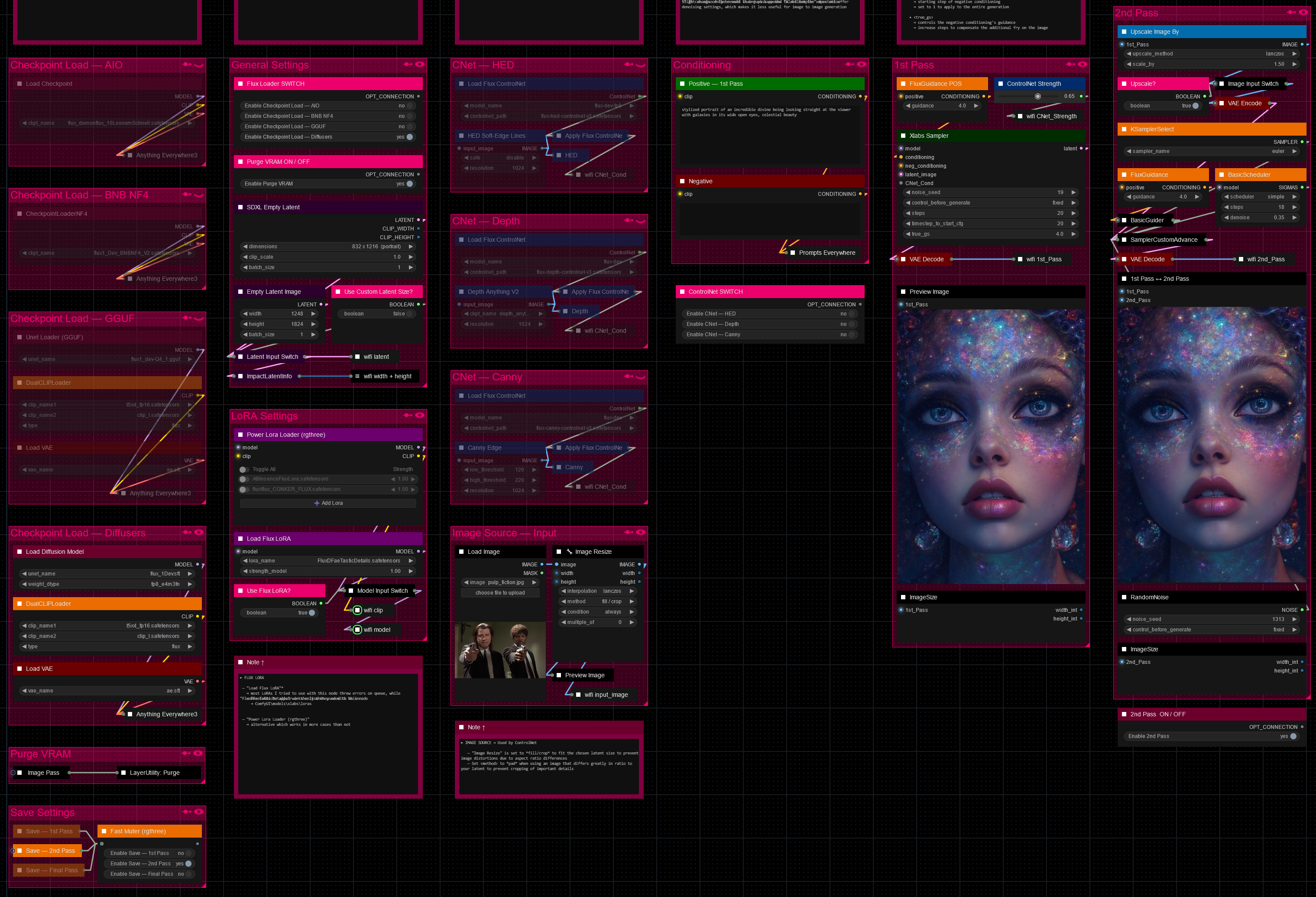
Hello there and thanks for checking out this workflow!
What's new in v27? : Major rework with new SubGraphs to streamline and compact the workflow even more, removal of outdated/broken nodes + fixes and optimizations all over!
—Purpose—
Built to provide an advanced, versatile and modular workflow for Flux with focus on efficiency, structure and information.
It comes with many notes explaining node settings and recommendations, as well as general guides from instructions to troubleshooting.
—Features—
Convenient loaders for all common versions of Flux and Clip models
Full metadata; recognized by CivitAI
LoRA support
SageAttention, EasyCache + Model Compile acceleration
ControlNet with Union support
Flux Tools LoRAs Canny + Depth (alt. to CNet based on LoRA)
Flux Redux (similar to IPAdapter)
PuLID (SVDQuant version only)
Wildcard prompting
Installation and download guide for models and nodes
multiple passes with optional upscales
— 1st : Detail Daemon + Variation Seed
— 2nd : DD. + Tiled Diffusion / UltimateSDUpscale
— ADetailer with dedicated LoRA Loader
— Inpainting
—Custom Nodes—
ComfyUI-nunchaku — SVDQuant version only
All of which can be installed through the ComfyUI-Manager
—Troubleshooting—
If nodes show up red (failing to load), check the 'Install Missing Custom Nodes' tab of the ComfyUI Manager for the missing node packs and install them.
Please check if all custom node packs load properly after installing, i.e. no
(IMPORT FAILED)messages next to any of them in the console upon ComfyUI startup.Always reload/drag'n'drop the original, downloaded workflow file into ComfyUI to reload an intact version of the workflow.
→ The last opened workflow that appears on startup shows a cached version of the workflow, "remembering" group nodes that failed due to missing nodes as failed, keeping them broken even after having everything installed correctly.
—Thanks—
The workflow would not be possible as is without these custom node packs. If you want to support the custom node creators, give them a ⭐ on their github repos! Thank you!
Feel free to ask questions, share improvements and suggestions in the comment section!
Let me know if you encounter confusing points I can elaborate on in the next update!
Description
v2
— addition of GGUF unet loader
— addition of LoRA loader
— addition of ControlNet options
— replaced 1st pass sampler with Xlabs Sampler
— addition of negative conditioning
— removal of 3rd pass
— custom node pack changes :
+ : ComfyUI-GGUF, comfyui-mxtoolkit, x-flux-comfyui
- : ComfyUI-TiledDiffusion, ComfyUI_UltimateSDUpscale
FAQ
Comments (9)
Another nice workflow, but I do notice a pretty big reduction in speed. I'll need to experiment to see if the problem is on my end but I've gone from 3-4s/it on V1 to 40-70s/it which is a pretty big difference. (And personally I was fond of the tiled diffusion 3rd pass in the initial version, I may reintegrate it when I have speed sorted out)
Definitely the XLabs sampler, for whatever reason it runs at an absolute snails pace compared to other samplers for me.
@Art3mas I was thinking the same thing but got exactly the same speed with the XLabs sampler compared to the custom sampler setup I used before.
I had this rather unsightly combo of Tiled Diffusion and Ultimate Upscale going which stopped working because of Comfy's new update. And fixing it like I first had would likely have gotten more complicated looking and just felt too ugly to be considered a "solution". Was hoping some immediate fixes and patches would come in first before putting that back in place, alongside hoping for the speed to pick up again. I feel like low-VRAM mode is not doing its job properly, too. Many obscure issues as of now. At some point I could not even perform the 1.5x upscale on the 2nd Pass without going oom. Ridiculous and frustrating. I want to integrate the UNET only loader for NF4 today and hope things will go a bit smoother soon.
The xlabs sampler is in general a little odd as it has a kind of preprocessing step when you look at the progress bar of the node during execution. It does not even show its it/s in the console. The controlnet being tied to it instead of getting an own node to tweak it with. The denoise being locked at 1.0 and hidden as if to discourage attempting multi-pass workflows with flux. Odd in many ways. Will likely be replaced by more versatile samplers soon I think.
@redpinkretro I haven't updated ComfyUI yet so...I'm going to continue having fun with V1 since ComfyUI isn't my usual software I just like to have fun with it when new models drop until they're finetuned and easy to use in other softwares. It's all character reference and in-house materials for storyboarding TTRPG elements anyway for me, I don't need STELLAR results. It's also just nice to see how things are progressing in terms of technology.
In all honesty however I think it's time to move away from the realm of results, to the realm of efficiency. AI is taking huge tolls on power grids haha. We can start to dial it back now!
@Art3mas That makes sense. It always comes down to use case of course. Flux shines with singe nice images, but not with mass producing anything to cherry-pick from. SDXL is by far more efficient and specialized for that.
But it is nice to see what the different model types out there are capable of and where their strengths and quirks lie.
I would appreciate some faster less power hungry models as well though. PixArt using small models with the nice T5 encoder was very interesting for instance. Especially considering how much better it got by raising its parameters from 600M to 900M. It could become really great and very versatile I believe. It just needs some more love. Same with Kolors.
The large models like Flux and AuraFlow are just still rather unwieldy for consumer hardware. I hope AI-cards with analog built will solve those problems
Hello! Could you please tell me how you changed the label to 1st_Pass?
If you right click on nodes you can rename them in "title". Inputs/Outputs you can rename by right clicking and chosing "rename slot". For the group backgrounds right click and "add group" naming it what you'd like to.
@Art3mas I unfortunately do not have input and output available (not active).
@funnygametv2456 What do you mean with "not active"?
1st_Pass is an input/output slot name I use in conjunction with the "Anything Everywhere?" nodes I call "wifi". As @Art3mas described, you can right-click on inputs/outputs and rename the slot that way. The names used simply have to match the one in the corresponding "wifi" node to catch the signal. Sender - Receiver concept