






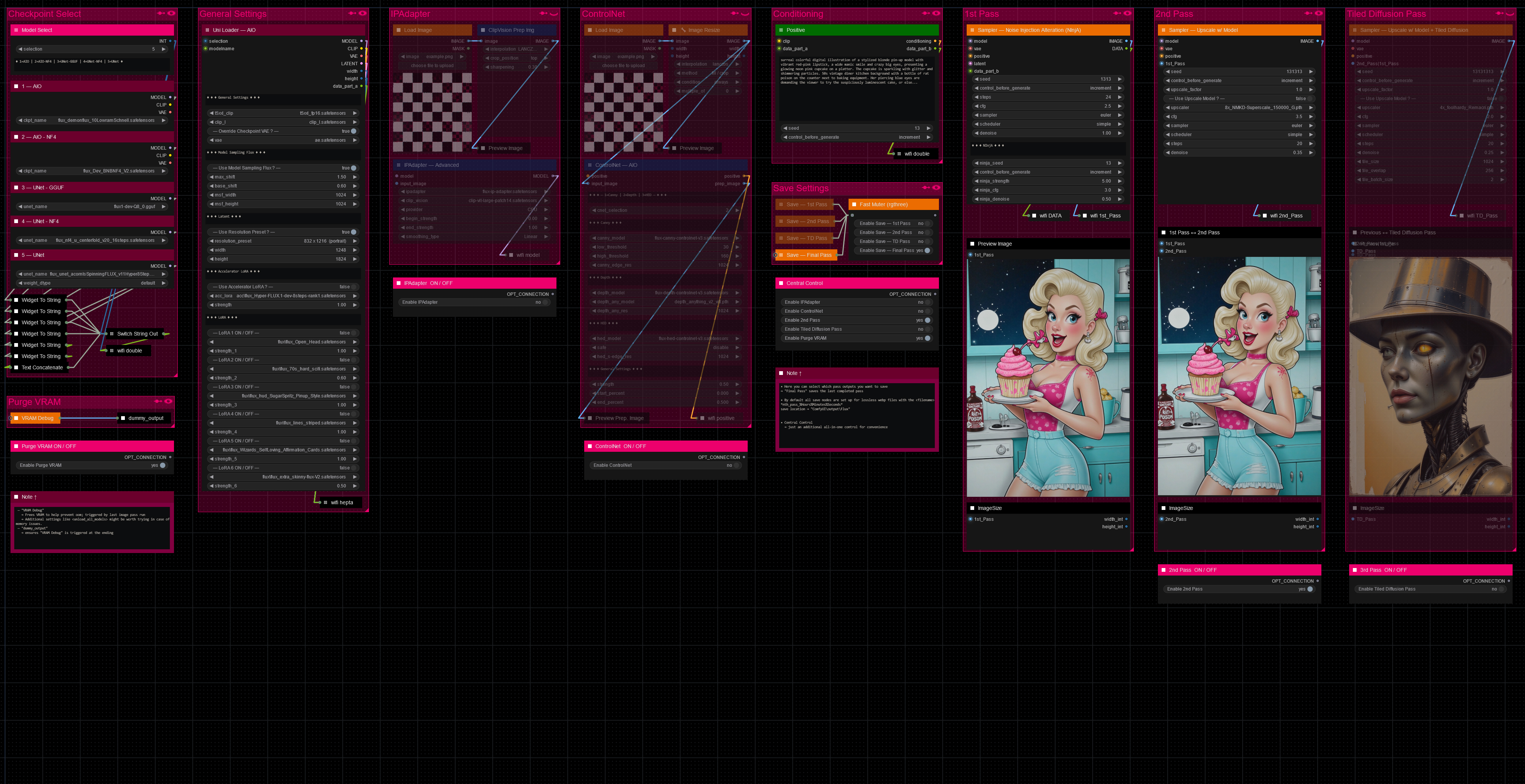


Hello there and thanks for checking out this workflow!
What's new in v27? : Major rework with new SubGraphs to streamline and compact the workflow even more, removal of outdated/broken nodes + fixes and optimizations all over!
—Purpose—
Built to provide an advanced, versatile and modular workflow for Flux with focus on efficiency, structure and information.
It comes with many notes explaining node settings and recommendations, as well as general guides from instructions to troubleshooting.
—Features—
Convenient loaders for all common versions of Flux and Clip models
Full metadata; recognized by CivitAI
LoRA support
SageAttention, EasyCache + Model Compile acceleration
ControlNet with Union support
Flux Tools LoRAs Canny + Depth (alt. to CNet based on LoRA)
Flux Redux (similar to IPAdapter)
PuLID (SVDQuant version only)
Wildcard prompting
Installation and download guide for models and nodes
multiple passes with optional upscales
— 1st : Detail Daemon + Variation Seed
— 2nd : DD. + Tiled Diffusion / UltimateSDUpscale
— ADetailer with dedicated LoRA Loader
— Inpainting
—Custom Nodes—
ComfyUI-nunchaku — SVDQuant version only
All of which can be installed through the ComfyUI-Manager
—Troubleshooting—
If nodes show up red (failing to load), check the 'Install Missing Custom Nodes' tab of the ComfyUI Manager for the missing node packs and install them.
Please check if all custom node packs load properly after installing, i.e. no
(IMPORT FAILED)messages next to any of them in the console upon ComfyUI startup.Always reload/drag'n'drop the original, downloaded workflow file into ComfyUI to reload an intact version of the workflow.
→ The last opened workflow that appears on startup shows a cached version of the workflow, "remembering" group nodes that failed due to missing nodes as failed, keeping them broken even after having everything installed correctly.
—Thanks—
The workflow would not be possible as is without these custom node packs. If you want to support the custom node creators, give them a ⭐ on their github repos! Thank you!
Feel free to ask questions, share improvements and suggestions in the comment section!
Let me know if you encounter confusing points I can elaborate on in the next update!
Description
v8
— complete overhaul of structure and node groups
— full meta-data processing and saving built in
— simplified IPAdapter and ControlNet use
— removed xlabs "Load Flux LoRA" node
— addition of wildcard support for prompts
— custom node pack changes :
+ : ComfyUI-Allor, ComfyUI-Image-Saver, ComfyUI_Comfyroll_CustomNodes
FAQ
Comments (30)
Thanks for sharing!
Hello :) I dl everything, but I have an error just after the model (5) :
WidgetToString
WidgetToString.get_widget_value() got an unexpected keyword argument 'any_input'
Have you an idea for this ? Thank you for your work.
Hello there :)
Thank you for reporting that first of all!
— Recap: You
• installed all the custom node packs,
• restarted ComfyUI and
• reloaded the original workflow file you downloaded
without any error messages about missing nodes, correct?
So you went through the process of switching to the "Dev-Channel" for the ComfyUI_bitsandbytes_NF4 and execution-inversion-demo-comfyui node packs. And after that also installed the ComfyUI_UNet_bitsandbytes_NF4 manually?
(I wish there was a way I could wrap all node packs up as a small installer for ease of use to avoid this inconvenience)
— Is WidgetToString connected to the respective loader? "5 — UNet" if I interpret the "(5) correctly in your message.
— Does selecting a different loader with another Flux model type result in the same error?
(in case you have a different type of Flux model available)
→ So far I was not able to get that error by sabotaging different points coming to mind, so I am not sure what the actual cause of it is as of yet. But we will get it solved!
→ The WidgetToString node is a little finicky and "extra" unfortunately, otherwise I would have been able to include the entire [Checkpoint Select] group into the ♦Uni Loader — AIO (group node), which would have been perfect and far more convenient.
@redpinkretro Yes same error with different model. I try the exact same workflow on your example : acornisspinningFlux_V11Hyper8step, I try another, always this error :/
@Monsieur_Raphael Can you provide a screenshot of the error and the workflow to see how it exactly looks on your end?
@redpinkretro Here :) https://drive.google.com/drive/folders/1vLD-OiIOX27nwQXor8gBlS6uZK48zOrc?usp=sharing
@Monsieur_Raphael Thank you. All looks normal to me.
I isolated the few starting nodes to see if this is really just the "WidgetToString" node not working on your end.
https://drive.proton.me/urls/0YS9HVDFMM#YZbsXTrjraTf
See if this results in the same error.
@redpinkretro yes same error
@Monsieur_Raphael Really odd that the node itself is so finicky. After taking a closer look at the error log I also noticed that a node pack failed to import properly which is an indicator for something else not functioning properly on a deeper level. So maybe there is some dependency issue caused by some node pack combination being not fully compatible.
But because of all that I have been looking around for potential workarounds and believe I may have found one that should allow me to realize the convenience I initially planned for, while also solving your issue completely. It will take a bit to implement and test, but I might have it up tomorrow and it will no longer rely on reading out the widgets.
@redpinkretro Thank you very much :)
@Monsieur_Raphael Thank you for your patience! It is always frustrating when things refuse to work the way they should.
As a little update, I believe to have found a node pack and configuration that is stable and reliable enough so far and will update the model very soon.
The planned fusion of the first two groups is still not possible unfortunately as it came down to going through a different kind of widget reader. But I have high hopes that this one should prove more compatible due to its more general approach.
Unfortunate however that I could not find a single one that worked reliably from within a group node.
@redpinkretro Thank you I will wait for the update :)
@Monsieur_Raphael There it is! Please let me know if this executes alright for you.
@redpinkretro Hello :) Everything is working with no error.
But it didn't save anything anywhere, and i didn't see preview... Everything run, until done and after nothing :/
Sorry to bother you :D
@Monsieur_Raphael
Glad it worked! Sorry it did not work fully 😅
• Did you select models in every dropdown menu? Checkpoints/UNets I believe do not even give you an error if they do not exist, but can lead to this issue as far as I am aware. ComfyUI is very particular about that
• What does the log say, when it managed to fully run it should have saved corresponding to your selection in the [Save Settings] group.
No bother whatsoever btw. I want this to work perfectly for everyone!
Hi I love what you’ve done here - I was about to try and make something similar but this answers most of my needs. But The ControlNet section isn’t behaving how I would expect - the only choices appearing in the drop downs for models are OpenPose - and the tensor for controlnetunion. It’s not looking for the Xlabs/controlnet folder (where the 3 tensors for do-etc/canny/hed are sitting) what am i doing wrong? (As a work around I have duplicated the Xlabs tensors to the normal controlnet folder - but that adds 4.5Gb to my online image)
Hey there, thank you very much! Glad it is helpful to you!
I try not to use any xlabs nodes if I can avoid it, due to their janky nature, so I put all flux_controlnet files into the regular folder a while ago, when it became possible.
There is however a simple workaround that solves the issue without the need to move/copy any files, by modifying the "extra_model_paths.yaml" file located in "ComfyUI\ComfyUI"
changing this line :
# controlnet: models/controlnet/
to :
controlnet: models\xlabs\controlnets\
results in the contents of the xlabs' controlnets folder appearing in dropdown lists for regular controlnet nodes upon restarting ComfyUI.
In case the "extra_model_paths.yaml" file was never edited before, it will have the name "extra_model_paths.yaml.example" in the ComfyUI folder and needs to be renamed to get rid of the ".example" extension to take effect.
Additionally the base path to your ComfyUI location has to be set as well.
All modifications needed to make it work are :
#comfyui:
# base_path: path/to/comfyui/
to :
comfyui:
base_path: DRIVE:\your_path_to_comfy\ComfyUI\ComfyUI\
@redpinkretro thank you - I'm not sure how this would work in the cloud in MimicPC - as I don't know what the root paths would be - but I'll have a go lol
I’ve been trying to get this working for about 4 hours now - I just get error after error. Currently it’s mainly about the node error. “ AttributeError: 'NoneType' object has no attribute 'lower'“ which may be linked to Anything Everywhere nodes somehow? 2024-09-21 13:27:50,497 - root - ERROR - Failed to validate prompt for output 3317:1: 2024-09-21 13:27:50,497 - root - ERROR - (prompt): 2024-09-21 13:27:50,498 - root - ERROR - - Return type mismatch between linked nodes: anything, STRING != 2024-09-21 13:27:50,498 - root - ERROR - Anything Everywhere? 3317:1: 2024-09-21 13:27:50,498 - root - ERROR - - Return type mismatch between linked nodes: anything, STRING != 2024-09-21 13:27:50,498 - root - ERROR - Output will be ignored 2024-09-21 13:27:50,527 - root - ERROR - Failed to validate prompt for output 3316:6: 2024-09-21 13:27:50,527 - root - ERROR - (prompt): 2024-09-21 13:27:50,527 - root - ERROR - - Return type mismatch between linked nodes: anything, STRING != 2024-09-21 13:27:50,527 - root - ERROR - Anything Everywhere? 3316:6: 2024-09-21 13:27:50,527 - root - ERROR - - Return type mismatch between linked nodes: anything, STRING != 2024-09-21 13:27:50,527 - root - ERROR - Output will be ignored 2024-09-21 13:27:50,527 - root - ERROR - Failed to validate prompt for output 3316:3: 2024-09-21 13:27:50,527 - root - ERROR - (prompt): 2024-09-21 13:27:50,527 - root - ERROR - - Return type mismatch between linked nodes: anything, LATENT != 2024-09-21 13:27:50,527 - root - ERROR - Anything Everywhere? 3316:3: 2024-09-21 13:27:50,527 - root - ERROR - - Return type mismatch between linked nodes: anything, LATENT != 2024-09-21 13:27:50,527 - root - ERROR - Output will be ignored 2024-09-21 13:27:50,527 - root - ERROR - Failed to validate prompt for output 3332:0: 2024-09-21 13:27:50,527 - root - ERROR - (prompt): 2024-09-21 13:27:50,527 - root - ERROR - - Return type mismatch between linked nodes: anything, CONDITIONING != 2024-09-21 13:27:50,527 - root - ERROR - Anything Everywhere? 3332:0: 2024-09-21 13:27:50,527 - root - ERROR - - Return type mismatch between linked nodes: anything, CONDITIONING !=
Thank you for reporting!
AttributeError: 'NoneType' object has no attribute 'lower' is the usual error when a selection, like a LoRA or a ControlNet or anything from a dropdown menu, can not be found within your library.
Even if not in use that error still comes up, even when I set all LoRA slots to "None" it happens with that as well. Unfortunately there is no "example.safetensors" I could set it to as some default value.
Just go through all dropdown selections and select something you have there and this error will disappear.
@redpinkretro thanks so much for coming back To me. I’m trying to get it working on MimicPC cloud version. If I do, are you happy for me to share the working image there? (I have put your name in big Gold banner across the middle lol)
@redpinkretro so, filling in random Lora stopped the node issue - and now controlnet works and 1st and 2nd Pass - but the tiled diffusion pass appears to run, but leaves that final section black at the end - no errors but nothing happens. If I turn on IPAdapter and turn off Controlnet - it crashes with error - ApplyAdvancedFluxIPAdapter
ApplyAdvancedFluxIPAdapter.applymodel() missing 1 required positional argument: 'image' (I have added an image into that group and it processes the preview of the image
@redpinkretro I think I have got this one - fingers crossed - somehow there was no actual connection between the ClipVIsion Prep cropping and the IPAdapter Advanced... i added that connection - and it's running again
@KurtcP Yeah sure, a reference or link would be perfectly fine! 😄👌
I work locally so I have no idea how different it might behave with an online service, so all issues you are running into are helping me to make better and more reliable workflows.
The tiled diffusion pass not working is odd, especially without an error. Looking into that right now.
The issue you had with the IPAdapter was my fault. An oversight on my end after I last restructured the workflow. So good catch there, thank you!
I already have another update in the works and will also add in guides for all the issues reported in a kind of FAQ section from now on.
@redpinkretro Apparently we have no viability of the config json’s to change - but i showed them the use case and they are considering how/if they could surface them somehow. I’m wondering if i can work out how to add SD Ultimate Upscaler as the 3rd pass instead - and get it to see your pass1 / pass2 input if that’s even possible. Also - Even though i have got the IPAdapter to run now - that first pass is always really shocking - so must be something with the settings that’s getting lost in translation. I will try and compare with your actual photo of the workflow above if I can and check the sampler/scheduler steps etc. Am I right in that where it says CFG in the workflow - (which I would always set to 1 for Flux unless I am trying to do a negative prompt, then I would use 1.1) it’s actually referring to the FluxGuidance number instead - this is quite confusing as a user…
@KurtcP I see, well if they allow pooling resources that way they basically save space themselves as the ones providing it, so it would be in their interest as well to make something like that possible.
I can add UltimateSDUpscale instead no problem. I could not find an issue with TiledDiffusion, so I am not sure what is wrong exactly.
I will add the UltimateSDUpscale as another column taking the same 1st/2nd_Pass input and make it mutually exclusive with the Tiled Diffusion Pass.
The reason why using the IPAdapter results in taking a long time even for a single pass is because of the way xlabs handles it unfortunately. I have no idea what is happening during that processing, but it takes far too long and also only randomly caches the memory, resulting in every other pass taking that long processing time again even when not changing the input image.
One of the reasons I avoid xlabs nodes wherever possible. Each and every one of their nodes performs bad and comes with lots of "extra" incompatibilities. The fact that their "Load IPAdapter node" spells "IPAdapter" three times differently without one being spelled correctly, does not look all that professional either.
The CFG value is the same as FluxGuidance, used quite the same way so I named it CFG in my group nodes as that is what most are familiar with already, but renaming it to FluxGuidance would work just as well.
I will upload a v8.1 shortly containing all the changes. Should take no longer than an hour
@KurtcP when you re-download v8, you will find the v8_1 version
@redpinkretro thanks for doing that - Ultimate Upscaler ran but didn’t save an image
Ultimate Upscaler took - 17 minutes to run 10 steps / 4x-Ultrasharp
In total Large Pro - A10G 24GB VRAM 32GB RAM 20.5 minutes to complete with no IPAdapter or ControlNet, using your Birthday Card prompt. I’m going to run that as a comparison with standard simple image workflow in flux with SDU and see what the difference is - but it seems super long - and will make it very expensive to generate.
@KurtcP Yeah 17 minutes is unacceptable, definitely way too long. I believe it took about 2 minutes on the first run, with initial loading of the LoRA for that prompt and all. And less than 90 seconds on consecutive runs, with 1st Pass→2nd Pass→UltUpscale while setting all upscale factors to 1.0, just to speed it up. I just wanted to see it execute. Saving works without issue on my end as well with UltUpscale.
Your configuration could be a bit imbalanced with 32gb of system RAM in conjunction with 24gb VRAM.
I have 64gb RAM and a 4080 with 16gb of VRAM, so I would expect it to run faster on your end due to less dependency on low-VRAM fallbacks, but you might be bottlenecked by RAM use.
Something else I found was a memory leak that occured when using "Default" for the "weight_dtype" with models that are compressed already, like most models are. That leak does not always occur though for some reason. When I built this version and made showcase images I would have noticed that for sure.
So maybe try a run with "weight_dtype" set to "fp8_e4m3fn" to see if that runs as it should.
@redpinkretro thanks I've fed that back to MimicPC support - see if they can work out whats going on.