WAN 2.2 💠 T2V / I2V / S2V / T2I🔹4-6 steps🔹Loop 🔹SVI Video extend 🔹WanVideoWrapper Workflow🔹K3NK

NOTICE: IF YOU ARE NEW TO COMFYUI, I DONT RECOMMEND STARTING WITH THIS WORKFLOW, IS AN ALL IN ONE WORKFLOW YOU WILL GET CONFUSED.
I UPDATED v2.3, YOU CAN CHOOSE IF YOU WANT RES4LYF OR WVW SIGMA SPLITTING
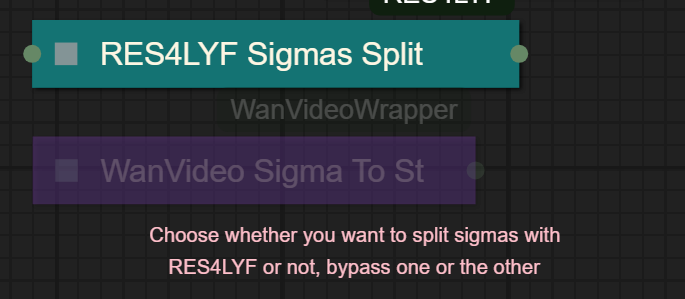
Since v1.8 im using subgraphs, you need latest comfyui with the latest frontend updates, also probably you will need to update Comfyui Manager.
For me was: setting nightly vers on the manager then update confy from the manager too.
* i allways leave the image overlay enabled, it will error if you dont have an image on it, sorry :S
v2.0
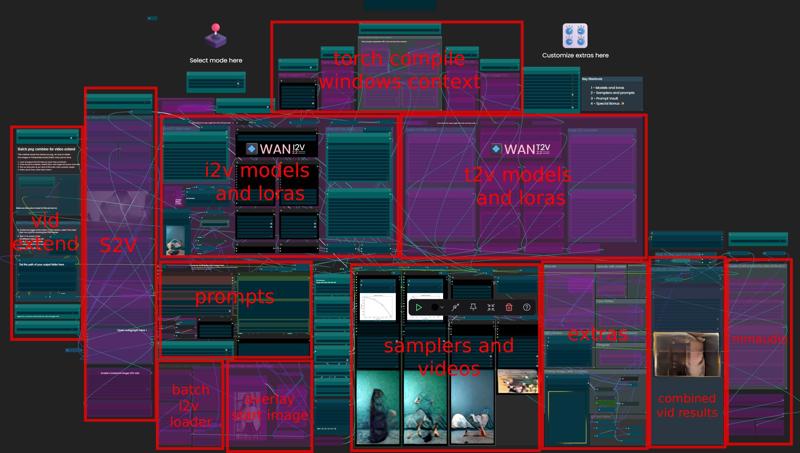
You can choose whether to merge with the loras or not, change the lora connection from the model loader to the set loras node, after that uncheck merge_loras
The toggled i added for radial sage, requieres Sage Attention to be installed, if you dont have it you should unplug the conexion i made to the attention type on the model loaders..
Be sure to update WanVideoWrapper nodes ..
The workflow works just fine with Wan2.1 if you bypass first sampler and model loader
This workflow is included with all my uploads as metadata, drag and drop a vid to comfyui.
I run a 4090 locally

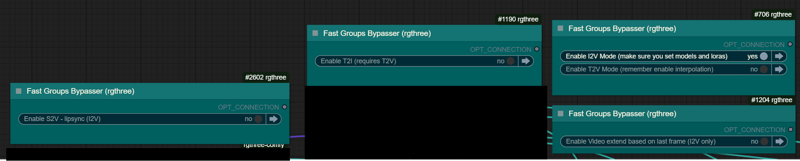
You can use it as other modes if you activate this option for enabling the required nodes.
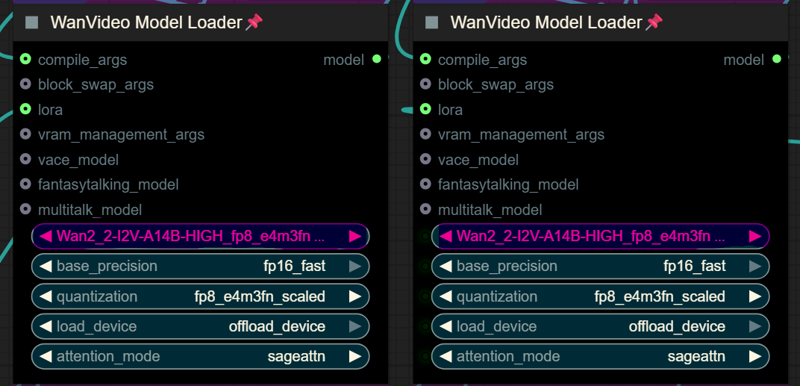
Make sure you load the correct models on the model loaders
Kijai's WanVideoWrapper Node
Wan2.2 Kijai's models
Lightx2v LoRa needed for lower steps (faster generations)
Wan22-Lightning Lightx2v alternative, newer and better in some scenarios
NSFW Clip Vision (not really needed in wan2.2)
RES4LYF Nodes
MMAUDIO
https://huggingface.co/Kijai/MMAudio_safetensors/tree/main
once installed replace nodes.py file in the mmaudio node folder with this one: https://github.com/phazei/ComfyUI-MMAudio/blob/master/nodes.py
WAN 2.2 💠 T2V / I2V
MMAUDIO NSFW
https://huggingface.co/phazei/NSFW_MMaudio (download and rename it to "mmaudio_nsfw_large_44k_v2_fp16.safetensors")
BOYONODES
K3NK IMAGE GRAB

Description
FAQ
Comments (19)
Is the wan22-spitonanother-27epoc-i2v-high.safetensors used in the example not released yet or is it posted somewhere other than this website?
im testing it, prolly train more the high tonight and release tomorrow
it's a bloody mess but it works, except for bloody K3NKImageGrab.grab_latest_images() missing 1 required positional argument: 'directory_path'
I have setup output directories, wtf this node wants?
You have absolute path? Or relative? Have set the path for your output folder in the concat text node?
I have this issue as well. I created the 1 folder inside the /output/ folder, but nothing ever goes in there? Do I need to manually move the .png files from /output/ in there, or is it a change I need to make in python?
@pr1medebauchery573 when using that kind of path, they should go to your default /output folder, if they don't , maybe some in your confy config ?
As I allways say... And imgur screenshot of the issue, or even shared the workflow with your changes, helps me debug..
@K3NK I'll get some screenshots together. I didn't change anything, set the counter to 1 like the instructions said, but the original output doesn't go to /workspace/ComfyUI/output/1/ folder, goes to output. Then when you activate the extension with the buttons, it says /1/ is empty and stalls out.
https://imgur.com/a/tvGhhzR
Top image is original generation, that works. 2nd image is after turning on the custom nodes, and doesn't work.
Hi great workflow with awesome results. i am using 2.5.3 but struggling to get the sampler to preview whilst generating :D i have enabled "Display animated previews when sampling" but doesnt seem to help. anyone got ideas? thanks!
I had to enable it via launch arg, but as for the lastest update i dont need anymore, try updating the comy manager as well
in 2.5.3 I2V only there is some problem with rendering interpolated output even without extensions: Prompt execution failed
Prompt has no outputs
or if concantenate PNG enabled: K3NKImageLoaderWithBlending
No files found in ''
Also seems like there is missing group bypasser on group: "Multi PNG extend on last frame and combine (I2V only)".
Thank you for simplified workflow BTW
i left toggles on , you need to activate the particular toggles depending on what you want to do,, download again, now is just basic i2v, you need to activate other stuff if needed.
Make sure to add the path to your output folder if you wanna extend video.
Can it run on multiple GPUs? I have 8 H200's I'm playing with
Quite enjoying this workflow - been trying out the SVI stuff here! Unfortunately, it seems to be falling at the last hurdle. Whenever I get to the Concantenate switch to combine all the PNGs generated, it gets to the top K3NK Image Loader, but throws an error about "unsupported operand type(s) for -: 'int' and 'str" - no idea how on earth to parse that error or what went wrong here, or if I have to turn some feature off or on to get it to work correctly. Any ideas?
Is your K3NK image loader properly installed? double check the path at the bottom of Multi PNG Extend and make sure your Math Expression is wired correctly inside Interpolation
@ghosttori426 Been trying the new 2.5.4 version to see if that helped any...getting different issues now. Lots of stuff about differences in tensor values - one being 576 and the other 640. The Math Expression seems to be hooked up correctly in 2.5.3, though it is muted if you have Interpolation turned off. It got swapped to an Overlap Frames node in 2.5.4, but that seems to have a NaN in it for some weird reason. I set it to "10" to match the output for the Math Expression node, but the tensors are still different in values...also, is there any reason why the button for the "Extend via SVI" Node Group is missing in the 2.5.4 version of the I2V Only workflow?
@Skunkylicious you have latest versions of the wf and my nodes i assume? can you share screenshots in imgurl or similar?
Is SVI extend expected to combine the resulting 5s videos somewhere? Might be missing a toggle or something.
yeah, you need to enable the png sequence nodes to save the sequences as png, then enable togles for combining, theres instructions inside as text within the node groups..
@K3NK Found the issue, I accidentally deleted the K3NK Image Loader inside the combine group, so it was only working when NO SVI Load Images was enabled. Cool workflow. Ty for the reply and your work on this :)