


WAN 2.2 💠 T2V / I2V / S2V / T2I🔹4-6 steps🔹Loop 🔹SVI Video extend 🔹WanVideoWrapper Workflow🔹K3NK

NOTICE: IF YOU ARE NEW TO COMFYUI, I DONT RECOMMEND STARTING WITH THIS WORKFLOW, IS AN ALL IN ONE WORKFLOW YOU WILL GET CONFUSED.
I UPDATED v2.3, YOU CAN CHOOSE IF YOU WANT RES4LYF OR WVW SIGMA SPLITTING
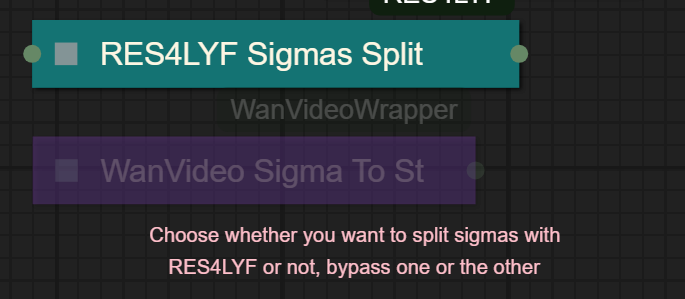
Since v1.8 im using subgraphs, you need latest comfyui with the latest frontend updates, also probably you will need to update Comfyui Manager.
For me was: setting nightly vers on the manager then update confy from the manager too.
* i allways leave the image overlay enabled, it will error if you dont have an image on it, sorry :S
v2.0
You can choose whether to merge with the loras or not, change the lora connection from the model loader to the set loras node, after that uncheck merge_loras
The toggled i added for radial sage, requieres Sage Attention to be installed, if you dont have it you should unplug the conexion i made to the attention type on the model loaders..
Be sure to update WanVideoWrapper nodes ..
The workflow works just fine with Wan2.1 if you bypass first sampler and model loader
This workflow is included with all my uploads as metadata, drag and drop a vid to comfyui.
I run a 4090 locally

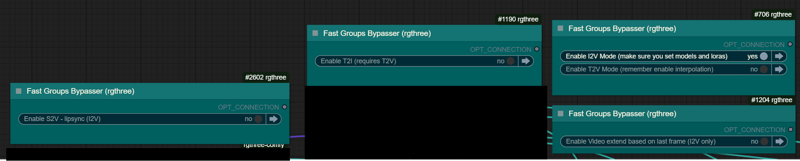
You can use it as other modes if you activate this option for enabling the required nodes.
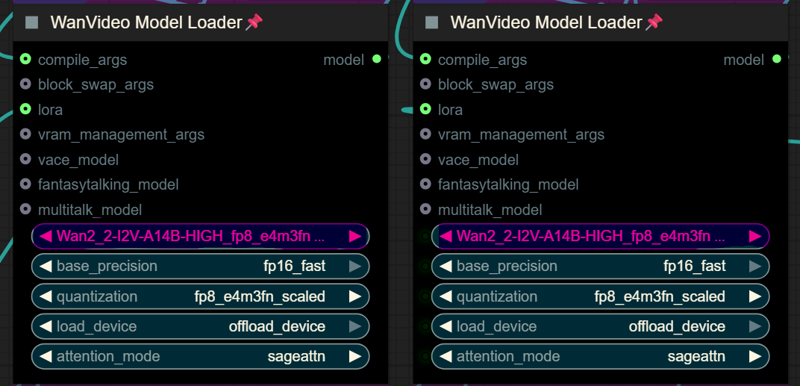
Make sure you load the correct models on the model loaders
Kijai's WanVideoWrapper Node
Wan2.2 Kijai's models
Lightx2v LoRa needed for lower steps (faster generations)
Wan22-Lightning Lightx2v alternative, newer and better in some scenarios
NSFW Clip Vision (not really needed in wan2.2)
RES4LYF Nodes
MMAUDIO
https://huggingface.co/Kijai/MMAudio_safetensors/tree/main
once installed replace nodes.py file in the mmaudio node folder with this one: https://github.com/phazei/ComfyUI-MMAudio/blob/master/nodes.py
WAN 2.2 💠 T2V / I2V
MMAUDIO NSFW
https://huggingface.co/phazei/NSFW_MMaudio (download and rename it to "mmaudio_nsfw_large_44k_v2_fp16.safetensors")
BOYONODES
K3NK IMAGE GRAB

Description
Added T2I native workflow as subgraph (this images will have metadata that will be autofilled in civitai).
Re-organized the Boyo nodes extension, you can extend from a T2V to I2V
Moved Color correct as extra disabled by default
FAQ
Comments (75)
ha ha, i can run Q4 model with my 4060ti 8GB at 720x480 81frames or 1280x720 33 frames, just loading this workflow will instant kill my computer lol, or maybe by tweaking a bit it will take hours to generate more than 5s, good job for those who can :)
not sure how to fix when running t2v error: "!!! Exception during processing !!! 'NoneType' object has no attribute 'lower' " and the node highlighted is "Extended Video Ready"
it might be had something to do with the t2v muter /bypasser nodes, i just reuploaded the latest, download again and try again
think i got it fixed, tried updating comfy to nightly like u mentioned and now that node is no longer highlighted red
k that didnt fix it i redownloaded and set up your latest. could it be where i changed the lora in the bottom loader from jellyhips to none?
ya not having any luck. : "NoneType' object has no attribute 'lower'" -and as soon as i hit run 2 nodes turn red highlight one is the preview on the far left of workflow and the other is the one i mentioned earlier
Alright, Double posting because I need to know.
How the hell do I combine the videos? I am using "enable video extend with last frame" but it goes through and never combines the two parts. It also doesnt save the output of the second part.
i recomend you using the method that uses the nodes at the left top, the other stuff will overload your memory, you have instructions inside the workflow, i might remove the bottom part on next versions..
@K3NK I assume you mean the "batch png combine for video extend" option? (its the nodes I see on the upper left) its 4am here for me so I can't confirm my usage problems being fixed anytime soon once you confirm or deny.
If that other method was supposed to overload me, it never did. God bless my 5090.
@K3NK well I "fixed" the issue. Apparently you need all three extend option enabled for combine to work. Thank you for your help, I appreciate it. much love.
Hi, @badhandproductions . I enable the upper left button, and run a task. Why can I not find the folder storing the PNG files? Where did you store them? Or how can I specify the directory?
What I like is a bunch of nodes I already had that I didn't know existed, also the included prompts, a lot to explore. It's just that I don't like to download tons of new custom nodes, I have heard it can slow things down. That said, thanks for the workflow, I will learn from it!
You have a low noise LoRA loaded in the default settings of the 1.9.2 workflow, filename "wan22-Yurim4-34epoc-low-k3nk.safetensors". What is it for, and how can we find that file?
Thanks.
Is a character lora, is in my latina characters, you can use it in the high for a bit of conditioning faces, but it mostly won't do much in the high by itself
@K3NK Do you have like a discord or some way you prefer to chat on the topic of this workflow? There are some paths, like the Extend sections I just cannot get to work, that I would love to pick your brain on regarding settings to get the best outcome.
For example, anytime I try ANY of the extend sections, I get an OOM error, even though my system has RTX 5090 and 48 GB DDR 5. I also have a VERY generous pagefile allocation. I have also tried shrinking the resolution LOW..we're talking 256x256 or 240x360, etc and still having no luck. It gets to the part where it outputs the last frame as the input for Extend_01, but then never gets past it. I love this workflow, the complexity is growing on me and making more and more sense every day, but I just can't get the extended sequence stuff working unfortunately.
@stellarcosanostra0 Im in banodoco's discord, join and find me
It looks like amazing results, but I'm afraid it will break my Comfyui, he uses every single custom node ever released
Hi, I’m running your workflow on an RTX 3090 (24 GB VRAM) with WAN I2V 14B (GGUF Q5).
I constantly get CUDA out of memory during the low-noise sampler stage, even at very low settings (e.g. 33 frames @ 256×384 with 3 steps).
From the logs it looks like the OOM happens when WanVideo low noise sampler tries to move blocks with block.to(self.offload_device) during the second pass. On 4090 (24 GB) it seems to work for you, but on my 3090 (also 24 GB) it crashes.
I already tried:
Reducing resolution down to 256×384
Reducing frames to 24–33
Enabling VAE tiling (128×128, stride 64)
Using only one LoRA (rank32, strength 0.7)
Setting force_offload = true
Disabling block prefetch and non-blocking offload
Muting the high-noise branch
Still, the OOM persists on the low-noise sampler.
It seems like the GGUF Q5 model causes temporary VRAM spikes when swapping/offloading blocks, and 3090 can’t handle them even though it has the same 24 GB as 4090.
Could you check if there are hidden differences in how the workflow handles VRAM on 4090 vs 3090? Maybe there is a specific offload_device or block_swap setting that needs to be tuned for 3090?
Thanks!
have you tried reducing the number of blocks being swaped? i might forgot to reduce it.. blockswap can oom if you dont have enough ram, i have 128gb
@K3NK figured it out, thank you very much)
now everything works as it should, this is a great workflow, thank you very much
@mr1sokoo230 can you please share what have you changed in the workflow for best results (and no oom) on a 3090 ?
@cucurucu i believe the error is in the Wan I2V extend 1 section. Both the high and low samplers there have 32 blocks of swap, which might be draining the system Ram. Drop that to 20 or less and it should work
@Melty1989 i will remove that extend sections, try using the png method, i find it muuuch better and will not hogh your resources coz is just regular jobs
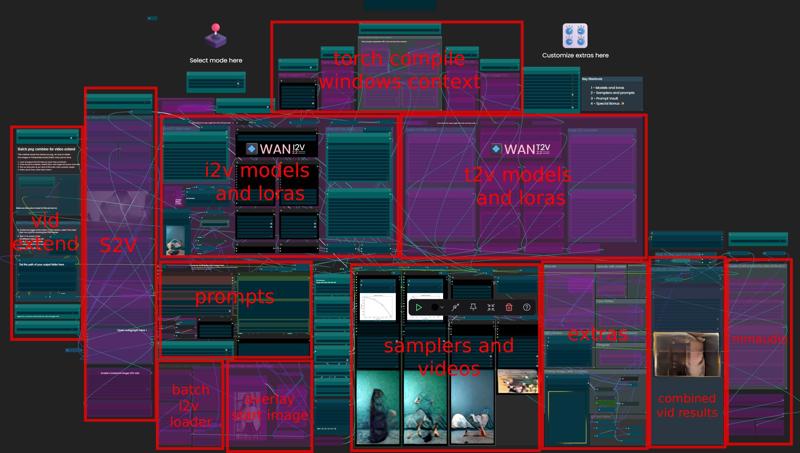
Man, this workflow is such a mess. The interface is so cluttered and confusing, you’d have to try really hard to make something this inconvenient.
Yeah we all know, there's a screenshot on the workflow description if you checked it.. I won't be changing it any time soon, I like to have AIO workflows..
Got the error.
'NoneType' object has no attribute 'lower'
This one has me completely stumped.
check the models and lora you have are the same in the nodes. since in the template there is a lora that i could not find just make sure you remove thigns you dont have or load your own. and yes its tons of new stuff but download what its on the workflow and it shuold work is not that hard.
@bahaba7208305 Ok fixed It wanted to update Wan Rapper and obense or something in the manage issue resolved on the the next.
为什么生成的视频特别模糊 而且一抽一抽的?Why is the generated video so blurry and jerky?
are you mixing too many loras? i think you sudnt get avobe 1.5 str in total on non-speed loras on each sampler, if your loras str in total is more than 1.5 str it will blur things up,, this is not official, is something that i think occurs.. do your testing, also speed loras can mess things up..
First, thank you for sharing your hard work.
1. I'm struggling to install the ReActorRestoreFace node. I have a manual install of comfyui and already have insightface. Can anyone point me to resources to install this node (ideally without the filter).
2. Is there any way to run a GGUF text encoder with this workflow? I was able to load the Q8 models into the Wan Video Model Loader, but I can't figure out how to use associate a Q text encoder with the WanVideo TextEncode Cached node.
Thank you for any and all help.
Please forgive me as I'm still learning a lot about comfy and the various nodes and workflows but I'm trying to research without a ton of questions to the community. I'm stumped also on being able to run this workflow with many runs qued. Typically I'm able to just adjust the run count at the bottom, run, then load a new input select the run count run and stack up a bunch of runs. On this model, it seems to drop out many of the runs or do a single run per image. Any advice on what to change within the workflow would be greatly appreciated. Thank you!
you can safely delete reactor node if you dont want to use it, i rarely use it actually.
about the gguf , i dont use gguf, but you should be able with the wanvideowrapper i guess
i also had the issue where the comfy window becomes unresponsive, at the point that you cannot queue jobs, idk if is a core comfy issue with the latestss updates or some of the custom nodes.. please tell me if you find any other info in this regard... what i do when this happens is to open a new cofmy in a new browsertab, and closing the previous
@K3NK I don't think my issue with the que's is from freezing or becoming unresponsive. It seems as if when the load image node isn't activated or reloaded between runs, that the run jumps straight through to the preview/save image step and skips everything else. If i toggle in a new image, click run, load new image, run I can get a que going. Thoughts on what might be happening?
I had the same issue from point 1. You can replace it with the FaceRestoreCFWithModel node from the "Facerestore CF (Code Former)" pack.
Im also running 4090 but cant seem to make GIMM-VFI to work no matter how many times i delete and pull from git, think its a numpy error. What python and frontend you running on comfy?
I had a dimension mismatch error when using the context option node. Turns out, the problem was that I was feeding resized images to wanvideo encode latent batch node in context windows but unresized images to the context option. It works perfectly now! Thank you for this awesome workflow ^^7.
Ty for the heads-up, I'll connect it correctly for the next vers
I dont get it. I get the same error when using context windows. What do I need to do to fix that?
Sizes of tensors must match except in dimension 0. Expected size 80 but got size 128 for tensor number 1 in the list.
Think I figured it out. I needed to connect the "Resize Image V2" node to the "Wan Video Encode Latent" in the context option and now it works.
Graet work. I am sure you spend hour on it and then some more hours placing the nodes in a way that it is impossible to see what is connected to what and why. In the engineering world "workflow" is a diagram explaining the proces of doing something and explaining in a way that even e dummy can follow. In the world of comfy "workflows" it is apparently about cocking noodle soups. Be assured that i will never try your soup because i need to know the logic. If i head to spend more hours untangling this incredible maze i would loos any interest. so, no I will not try that at all.
i used a bunch of switches in order to have aio the functionalities, i mean, why would you start ungangling stuff and moving things arround? select your mode, load the loras and models, inputo the prompt and run, theres also annotations inside the workflow...
Dude at least i post a screenshot of the workflow.. just move on if you dont like it..
@podhusklon432 lol, you guys are so salty, you should try online dating platforms..
im pretty sure you tried this wf coz the videos i made, so , you liked the quality and all, but now is not worth it? dude! XDD youre not fooling anyone.. im posting a screenshot and you still download it, coz the sample videos were good right? also the fucking nodes in the workflow are grouped so it can toggle between modes, if you cant manage to move those, you should quit comfyui...
@K3NK i suppose i could like it if i could understand it. Maybe there are som interesting creative ideas. You know, not all people are here for a quicky. You could be a better engineer if you had ability to present your work in a correct way. But maybe you dont care. if so OK .
@wylmquest Seems more likely that you're just a fucking noob
I seem to get
ValueError("type fp8e4nv not supported in this architecture. The supported fp8 dtypes are ('fp8e4b15', 'fp8e5')")
when I reach the sampler, which I think is because of triton and the fact that I have a 3090. Has anybody else encountered this?
Yes your 3090 runs on the Ampere architecture which doesn’t support that
@Melty1989 So how are people running it on Ampere? Do I have no option other than switching to a GGUF workflow or turning off triton and sageattention?
update: gguf works just fine
@jonnoel145658 You just change to fp8e5 in the quantisation dropdown in the model node: I had a 3080 and did just that. GGUF isn’t needed for you since you have good VRAM
@Melty1989 Thanks! Fair enough, a bit of a shame Ampere does not have acceleration for fp8, but it is what it is.
Some loras seem to have low movement when using this workflow, any tips to nudge movement along?
Using float list to reduce the lora str on the first steps seems to work, I will upload the v2.0 of the workflow once I get the mmaudio nodes not messing with the order of the workflows either that or I remove mmaudio and upload in couple of hours...
@K3NK Sounds great! Do you think you could also make v2.0 of this advanced workflow run on 24 GB RAM by default so it’s easier for regular users to use?
@K3NK I also solved the problem of quality loss from segment to segment - how can I get this edited workflow to you?
@m0no1 upload a media with the WF attached
@juliusmartin
> 24 GB
> Regular User
wtf did I just read
@m0no1 Now I am interested. How did you solve it?
@haenlesn937 Reference frame reinjection in every segment based off the I2V image and upscaled/interpolated -2 frame crop from GIMM as the first frame starting point, though RIFE 49 is better for this task to be frank, with x2 upscale before interpolation you get cleaner details. I’ll post and link a video later tonight.
@K3NK haha, was just looking at MMAudio for the last step audio dub + muxing.
@haenlesn937 To be frank, I went to 32GB vram and feel limited. I can use fp16 models without quantisation (MUCH better quality) but even then I need to use sage attention and I still OOM sometimes past 720*1280 if I bump fps past 20. 80GB in ram with some workflows. K3nk’s workflow keeps my overhead much lower and I can power through 4x81 frames at 512*860 in 13 minutes, I’d still consider 96gb+ vram card for LLMs
https://civitai.com/posts/22429354 - edited workflow is embedded. Thanks @K3NK
@m0no1 404 for me. Ty for sharing
@juliusmartin https://civitai.com/images/101096736
@m0no1 still 404 🤣🤣
@K3NK Then Civitai is buggered. Go to my profile and my videos and the latest one of the redhead strapped to a chair
@m0no1 cant see that vid in your profile, i only see 10 vids , noone with a chair
@m0no1 pastebin or continue having fun with us
@K3NK https://civitai.com/images/101227924 - last try before I use pastebin
@m0no1 404 but i see the video in your profile now
@m0no1 i actually removed that "in one go" method, coz it was very ram hungry, with the png frames method with the clip vision on the encoder works fine
@K3NK yeah, that's not the reason I removed the interpolation in one go - I added interpolation to scale up the last frame x2 and then inject the reference frame (you'll see x2 load image nodes) into the latent at the start so that wan is reminded what the subject looks like between segments. as you can see from my video the subject remains pretty constant throughout.
@m0no1 @K3NK
hey guys, i waited a few days so you could double check your workflows 🙂 now i got a few small questions if that’s ok:
the seeds, sometimes fixed, sometimes random. how do you pick? why not just one seed for both samplers or even the whole 20s clip?
did you try the workflow from m0no1? did you get better face consistency, movement or color?
is there a switch i’m missing if i only want to work on extend video1 (like 5-10s, the second part)?
the lighting loras, like the 256 lora from wan2.1 on the noise model only, do you choose by eye/gut or some script?
if you had a local 4090 with 24gb vram what would you change on the wf?
i’m following along and like many others really interested in your results, so feel free to share 🙂 most of these q’s go to whoever reads this, anyone can jump in with their experience
@BrAInB0t hi, have you updated your frame injecting wf or only your username? what image would you load as second/ref image? a close up from the face, the same image again, a new portrait. ty
Hey and thanks for the workflow. I use the method top left with the combine and it works quite good. The only thing is, the color degradation from one video to the next is quite noticeable.
It doesn't really help to activate "color correct". The color overall gets darker and darker with each video.
Am I doing it wrong?
Edit: I might found a solution. Instead of that color correction node, if you use kj's Color Match node with the original ref image and the target as the last frame, set algorithm to "hm-mvgd-hm" and strength to 1.0, the results are much better in terms of color degradation.
Is it possible to show me your workflow? I didnt really understand how to use this Kj's node.