WAN 2.2 💠 T2V / I2V / S2V / T2I🔹4-6 steps🔹Loop 🔹SVI Video extend 🔹WanVideoWrapper Workflow🔹K3NK

NOTICE: IF YOU ARE NEW TO COMFYUI, I DONT RECOMMEND STARTING WITH THIS WORKFLOW, IS AN ALL IN ONE WORKFLOW YOU WILL GET CONFUSED.
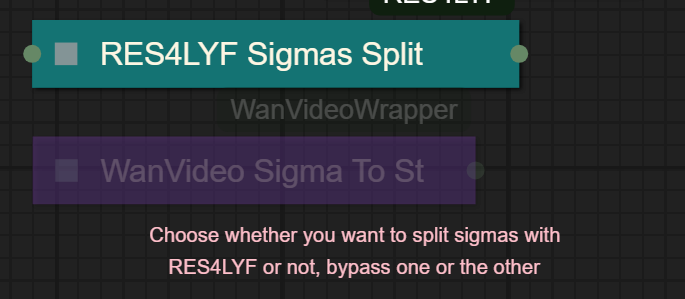
I UPDATED v2.3, YOU CAN CHOOSE IF YOU WANT RES4LYF OR WVW SIGMA SPLITTING
Since v1.8 im using subgraphs, you need latest comfyui with the latest frontend updates, also probably you will need to update Comfyui Manager.
For me was: setting nightly vers on the manager then update confy from the manager too.
* i allways leave the image overlay enabled, it will error if you dont have an image on it, sorry :S
v2.0
You can choose whether to merge with the loras or not, change the lora connection from the model loader to the set loras node, after that uncheck merge_loras
The toggled i added for radial sage, requieres Sage Attention to be installed, if you dont have it you should unplug the conexion i made to the attention type on the model loaders..
Be sure to update WanVideoWrapper nodes ..
The workflow works just fine with Wan2.1 if you bypass first sampler and model loader
This workflow is included with all my uploads as metadata, drag and drop a vid to comfyui.
I run a 4090 locally

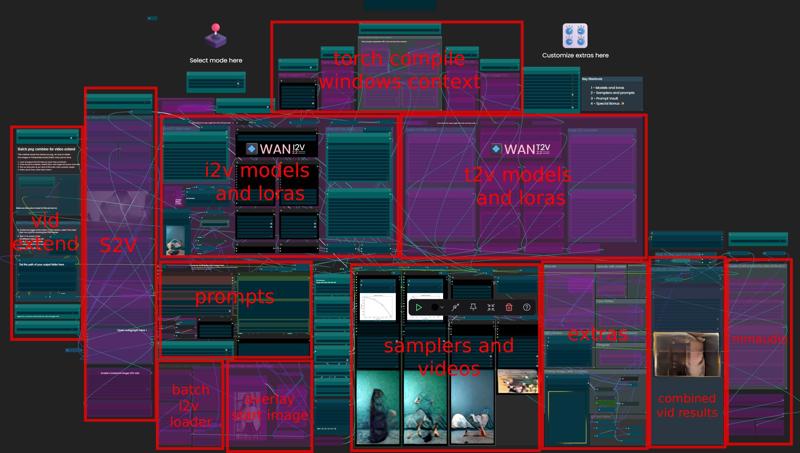
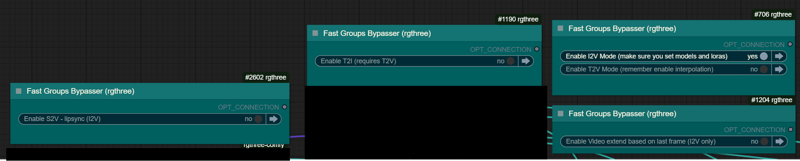
You can use it as other modes if you activate this option for enabling the required nodes.
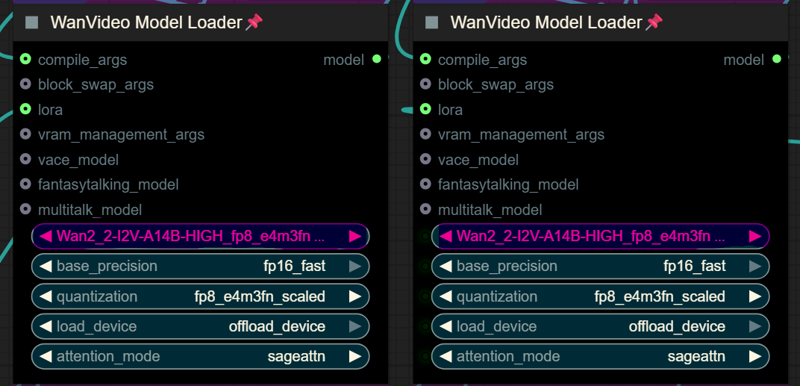
Make sure you load the correct models on the model loaders
Kijai's WanVideoWrapper Node
Wan2.2 Kijai's models
Lightx2v LoRa needed for lower steps (faster generations)
Wan22-Lightning Lightx2v alternative, newer and better in some scenarios
NSFW Clip Vision (not really needed in wan2.2)
RES4LYF Nodes
MMAUDIO
https://huggingface.co/Kijai/MMAudio_safetensors/tree/main
once installed replace nodes.py file in the mmaudio node folder with this one: https://github.com/phazei/ComfyUI-MMAudio/blob/master/nodes.py
WAN 2.2 💠 T2V / I2V
MMAUDIO NSFW
https://huggingface.co/phazei/NSFW_MMaudio (download and rename it to "mmaudio_nsfw_large_44k_v2_fp16.safetensors")
BOYONODES
K3NK IMAGE GRAB

Description
FAQ
Comments (28)
This is really slow on my rig. I changed the res to even 480and it's taking 30 minutes to do 10%. I can render wan2.1, a 10 second vid, at 720 using sageattention in under 3 minutes normally. WAN2.2 must be for 5000 series cards for local runs.
for me the wan 2.1 workforce took forever as well with my 3080ti. it's probably a VRAM issue. there's a way faster workflow I'm currently using in wan2.2 that's really fast. like a couple if minutes for 5 sec video. I'll look it up if you want once I'm at my computer.
oh yeah I listed the workforce under resources in my videos
i forgot to reduce the number of steps before saving the json, is at 10 steps, that will take longer, have you tried using 4 steps or 6? i just updated the zip - json file
I noticed it too - this workflow is crazy slow on 12gb gpu + 64 GB RAM. It even does not help if I change models to gguf
guy33 12 GB Vram only possible with gguf native multigpu otherweise it takes ages to render.
sikasolutionsworldwide709 Not true, I have 12 GB Vram and use the 2.2 Q4_KS gguf models with the Kija wrapper. It's just as fast or even faster than native.
funscripter627 System 64 GB Ram, 4070 12 GB...using sageattn, Q8 checkpoints multigpu, lightxv2, fusionx and 3 character Loras gentime is for 5 sec video 960x560 between 400-420 secs, 8 steps 4/4. Even 3 sampler method is quite fast and I can generate 1280x720 4 secs in 11 mins. Very complex scene: https://huggingface.co/lightx2v/Wan2.2-Lightning/discussions/20#6897529022ebf7a1e53df7c7
@K3NK is it easy to use? looks pro :(, i dont know how to play around with the strength of loras ! and also strength for wan2.1 loras , help me
I've seen more complex workflows, this in is relatively simple, no control, no vace, just plain t2v with some basic improvements as extras, upscale, film grain, face refiner, and the image overlay I always use
K3NK ok.... how you use the strength of the loras ?? for wan2.2 and 2.1
CharlieBrown0115 im using the weights that are on the workflow, some times i change to lightx2v and use 0.8 on the high one, as for the loras, usually 1.00 str or 0.95 if i feel theres a quality downside when using 1.00
K3NK for both k samplers? you use the same weights?
CharlieBrown0115 it depends on what you want to generate, but you can go up to 2.0 with the loras in the high one, the low one use it as usuall, very similar to wan2.1, the high one on the other side needs 2.0 str on character loras in case you want some of the facial features on the first samplers, but is almost unperceptible, even tho i guess it might help with the low one, low sampler will create the rensemblance that for sure.
as for m4crom4sti4 lora i intend to release in short time, it helps a lot creating the movement of the breasts and dynamics when used on the high model. i have high and low at 10epoc atm, so i might release it soon
K3NK thanks for the update!! one question , what is Overlay Image (after firmgrain), how do you use it? I'm just doing i2v generations
What Lora is that "Sh433n4" that you are using in your example Videos?
I couldn't get the workflow to work out of the box. If you disable the overlay via the bypasser it will not save the interpolated video, I had to connect the output from the film grain node to the save interpolated node to finally work. I also activated remove first 5 frames, block swap and radial attention and changed the attention mode in the model loader to radial sage attention, after that I get some decent results with everything enabled except window context, I2V and the overlay ~450 secs / RTX 3090. 9:16 / resolution: 768
with a higher resolution I'm going oom
context window is quite slow and i cudnt get it to work as i've seen others..
idk why some nodes when bypassed wont passtrought the signal, i think is the clean vram one.. ty for the headsup
can you share your wf?
CharlieBrown0115 here you go https://pastebin.com/eDjuAhrS
CRAZYAI4U CRAZYAI4U ty
K3NK thanks for fixing the issue in 1.1.
I tested it and the "clear vram" node is red under the "WanVideo Decode" node (ID#46) so I'm guessing it's not working. Other then that I get weird morphing hair which looks pretty awful in this one and some morphs around the face/mouth region and the gen time is around 1000s. When I enable block swap and radial attention again the gen time is again around ~400 - 450s and it's much better with the hair/face morphs, but still noticable, I tried other workflows with I2V and it looks much better... idk if thats the a T2V model problem or something else. Tested it with 3 generations.
After that I tried to increase the res. beyond 768 with partial success. I increased block swap to 40 with Target_Size: 1080 but the interpolated video does render too long (1hour) so its not viable. I disabled interpolated and tried 1080 (715s) 3090 / 64GB RAM
1080 https://streamable.com/3rcfqo
CharlieBrown0115 tell me if it helps your gen speed
CRAZYAI4U The truth is, I don’t use the set radial attention option, I have sage attention. My generations are fast — videos take about 10 minutes each a 10 second videos with a good resolution i run a 5090. The workflow is amazing. The only thing that’s getting boring is the image scaling issue. I don’t work with T2V, only with I2V, and I don’t use a standard size. Here, you have to check that the image matches one of the aspect ratios so that the photo size fits, and many times it doesn’t match. This causes my videos to be either squashed in height or width or stretched. I wish it could be fixed so the workflow automatically adjusts the image size, and also lets you choose the final video resolution. i tried to use chatgpt to fix the issue so i hope @K3NK could fix this issue , if he wants
CharlieBrown0115 hey, yea youre right, the nodes i used for resizing the i2v mode were crap, i added the "nearest bucket" that i was using in framepack, just set the number and the aspect ratio will be mantained
K3NK thank you thankyou than kyou thank you x 10000000000000