


WAN 2.2 💠 T2V / I2V / S2V / T2I🔹4-6 steps🔹Loop 🔹SVI Video extend 🔹WanVideoWrapper Workflow🔹K3NK

NOTICE: IF YOU ARE NEW TO COMFYUI, I DONT RECOMMEND STARTING WITH THIS WORKFLOW, IS AN ALL IN ONE WORKFLOW YOU WILL GET CONFUSED.
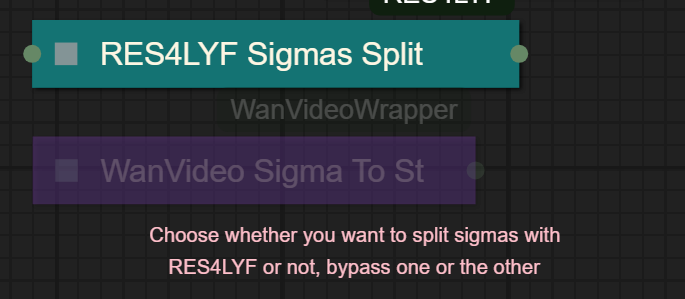
I UPDATED v2.3, YOU CAN CHOOSE IF YOU WANT RES4LYF OR WVW SIGMA SPLITTING
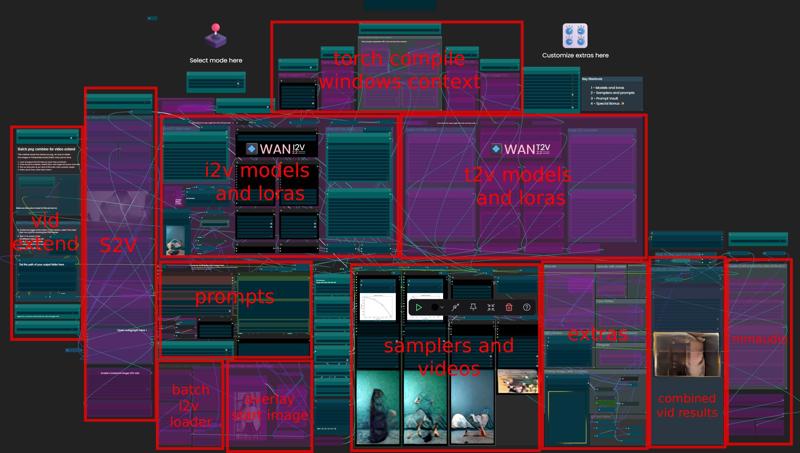
Since v1.8 im using subgraphs, you need latest comfyui with the latest frontend updates, also probably you will need to update Comfyui Manager.
For me was: setting nightly vers on the manager then update confy from the manager too.
* i allways leave the image overlay enabled, it will error if you dont have an image on it, sorry :S
v2.0
You can choose whether to merge with the loras or not, change the lora connection from the model loader to the set loras node, after that uncheck merge_loras
The toggled i added for radial sage, requieres Sage Attention to be installed, if you dont have it you should unplug the conexion i made to the attention type on the model loaders..
Be sure to update WanVideoWrapper nodes ..
The workflow works just fine with Wan2.1 if you bypass first sampler and model loader
This workflow is included with all my uploads as metadata, drag and drop a vid to comfyui.
I run a 4090 locally

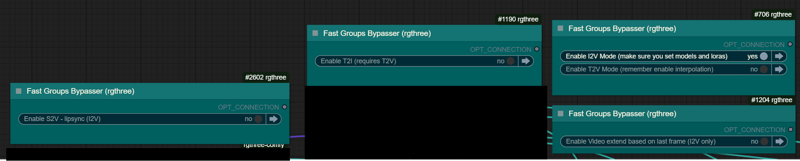
You can use it as other modes if you activate this option for enabling the required nodes.
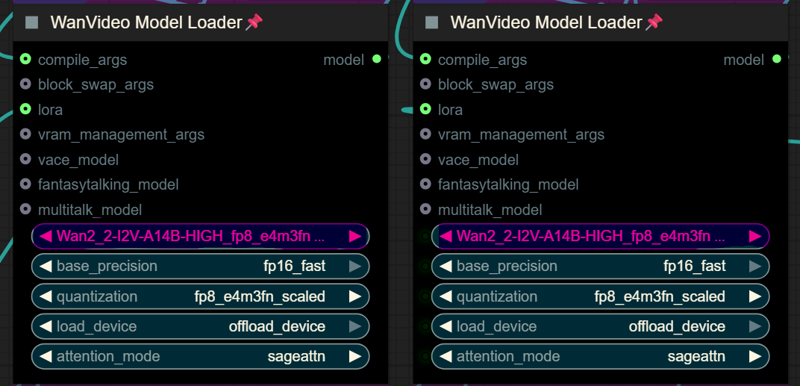
Make sure you load the correct models on the model loaders
Kijai's WanVideoWrapper Node
Wan2.2 Kijai's models
Lightx2v LoRa needed for lower steps (faster generations)
Wan22-Lightning Lightx2v alternative, newer and better in some scenarios
NSFW Clip Vision (not really needed in wan2.2)
RES4LYF Nodes
MMAUDIO
https://huggingface.co/Kijai/MMAudio_safetensors/tree/main
once installed replace nodes.py file in the mmaudio node folder with this one: https://github.com/phazei/ComfyUI-MMAudio/blob/master/nodes.py
WAN 2.2 💠 T2V / I2V
MMAUDIO NSFW
https://huggingface.co/phazei/NSFW_MMaudio (download and rename it to "mmaudio_nsfw_large_44k_v2_fp16.safetensors")
BOYONODES
K3NK IMAGE GRAB

Description
Float list node swapped with floatCFG node so it is more dynamic, based on the actual steps
Added vrgamedevgirl node for colormatch, KJNodes one will mess the loop coz the first imput is ref_image instead of the actual image.. so it cannot by bypassed..
Added double sampler for fully featured wan2.2 T2I Subgraph
FAQ
Comments (59)
Does MMAUDIO's audio and video out of sync issue stem from the model's limitations?
yeah i supose too.. the audio matches the seconds in duration, but the prompting, steps and cfg is very tricky with mmaudio, sometimes you get great audio, other times will be out of sync and making woman moan when she is closed mouth.. xD
also i tried to add audio to a 49sec video and i was getting oom :S
is there a specific template to use this on runpod without any issues? which one do you recommend?
Took a bit to get it all setup and I've only tested one flow so far but looks pretty impressive. QQ: I cannot for the life of me figure out how to change the resolution of the output video - any advice? I get OOM trying the upscaler but fundamentally, I just want to also try to compare performance/results with another workflow where I've been outputting higher res videos natively. There are a few nodes I see that reference resolution but fiddling around with them has not resulted in different resolutions at all so I must be blind/dumb/etc. 😆
Thanks for your work and sharing it with us!
The sizes are determined with 2 "nearest bucket" nodes, so you don't need to adjust every image in the i2v mode.. the i2v size is above the image input and the t2v one is in the center section above the steps node
@K3NK TYVM - seems to work. It also seems counter-intuitive as the value I have selected under 'base resolution' is (for example) 896 which ends up mapping to 1152x640, which I suppose is 2x896 = 1152+640. Unsurprising from the perspective that certainly aspect ratio plays a part but wasn't sure what convention you were using as otherwise '720p' and its like are the vertical res so that's what I had thought before. Thanks!
@K3NK Got through a lot of comparing and am really liking your workflow.
Another question: what's the intended workflow with the florence model which is bypassed? It seems to be 'manually' activated if you want to do batch work? The workflow I was previously using has it 'native' such that it was always active (for I2V) thus saving a lot of prompting efforts when describing the general start of a scene. I've been doing my previous prompting where I just describe the action or what changes when I noticed eye colour changed without any prompting so I assume without the base info, the model defaults to higher probabilistic eye colours (going from blue to brown in this case).
@sykep florence is just a prompt improver as it analyzes the image and adds to the prompt, in case your image is cartoon, 3d render, is great to enable florence to get the same style.. but isnt guaranteed
@K3NK So I guess I should be able to activate the nodes without issue?
Also, trying to figure out how I can change the scheduler as I think at least compared to another workflow, euler might have done a better job at maintaining the integrity of a face. Unfortunately, I get this error when I switch it:
```ValueError: sigmas and timesteps should have the same length as num_inference_steps, if num_inference_steps is provided```
I'm still working back through the workflow to understand what's going on - I suspect some calculation that put in sigmas and timesteps becomes inconsistent but figured I'd ask in the meantime if you have any insights. Thanks again!
Is there a way to select which loras will be available when using context windows? Or a way to enable certain ones only for certain prompts?
if theres a way to call loras the old school way, it should be able to be done adding them in the prompt and separated with |
does it not work with native workflows? there's too much stuff going on. just looking for a video extender
I keep getting a "no module named triton" error. Does this workflow just straight up not work on Windows?
you need to instal triton / sage..
@K3NK How would I do that on Windows? Isn't Triton specifically for Linux?
@anotheranon2 thats super duper complicated. need to google it
@anotheranon2 There is triton for windows, just google it. Easy to install.
@Melty1989 Ok, took care of that. Now I'm getting an "access denied" error:
Error during sampling: PermissionError: [WinError 5] Access is denied
@anotheranon2 Are you running comfyui portable or desktop? It seems to be folder permission related.
@Melty1989 Desktop. I switched from portable a while back.
@Melty1989 Here's the error:
File "C:\Users\X\AppData\Roaming\uv\python\cpython-3.12.11-windows-x86_64-none\Lib\subprocess.py", line 1538, in executechild
hp, ht, pid, tid = _winapi.CreateProcess(executable, args,
^^^^^^^^^^^^^^^^^^^^^^^^^^^^^^^^^^^^^^^
torch._inductor.exc.InductorError: PermissionError: [WinError 5] Access is denied
Please help.
WanVideoSetRadialAttention
WanVideoSetRadialAttention.loadmodel() missing 1 required positional argument: 'model'
What does it want me to do?
have you enabled radial att?
@K3NK radial sage attention? No, should I? It was off. First time I'm trying such complex workflow, I'm kind of new to this.
Does it make sense to try your workflow if I only have a 5070-12g and 32g of memory?
@lirmakay429 yeah, you may need to reduce block swap and target resolution, in your first error it says, missing model, something got unhooked?
lol figured this out, you gotta make sure that the radial dials for the other modes (I2V or T2V) are disabled cause its trying to load a model from the disabled workflow
Ok. I'm going to figure this thing out if I die trying.
you still alive lol?
I had one successful generation but am now getting this:
Error during sampling: list index out of range
!!! Exception during processing !!! list index out of range
You changed shift or steps number? Try restarting comfy or unhook the float list from the fast lora strength, that's causing it, it shouldn't, but sometimes happens, idk really why.. since the float lists are based on the steps divided by 2..
@K3NK yep. thx for the help. Disconnecting the float list from the lora strength fixed it.
This is just a bit of speculation but I'd guess it's related to a node that the 'steps' are connected to which takes an int as an argument and divides by 2. If you put in an odd number of steps, it... will give you a result that's not predictable. I'm not sure if it does cast to a float (doubt) or returns a rounded result but that's probably what's going on.
had to mute the overlay section to not produce static videos
also could you give us an advice on how to automate your WF when processing batch image with multi prompts
hey, can someone explain what the overlay image (after firm grain) section is doing?
after muting that section i could finally make combo videos with audio while keeping the current index in sync, super helpful
is there a way to make the workflow run in one pass so it only combines smoothly without errors, good for automation
do you plan to add a way to use pre written sequenced prompts, maybe even with combined florence
thanks a lot for your work, this workflow is a great base for others like m0no1 to build on 🙏
I always get the following error: 'NoneType' object has no attribute 'lower'
can someone please help me?
Check the LORAs. I had the alternate lightning model to change there.
are you getting that error from the text encoder node? I was missing the umt5_xxl_fp16 file and got the same error, adding it fixed it.
Thanks for the tips, but as soon as I do that, I get other errors. Unfortunately, I can't get it to work :(
@Delatsche did you remove the loras i had? you might have a lora that is not found in the lora loader list. im sorry im too lazy to clean everything up before uploading
Multi PNG extend nodes need delimiter changed to / below where the path to save pngs is. And also just below it there is concatenate node with \0 should be /0 so it works on operating systems that don't suck.
works great i just switched torch compile off and enabled sageattention
You can use torch compile and sage attention at the same time.
I'm getting a loop error as well when trying to do a basic I2V: "Loop (2944,2643,2834,2911,2904,2846,2845,2451,795,557,254,246,244,236,1977,2599,2005) - not submitting workflow"
Any idea how to fix this?
Those are node IDs, but I have no idea which one, have you enabled nodes via toggles or manually?
same error
@K3NK same error here
Please help, how can i Change CFG in this workflow , Like change of ~3.5 for high-noise sampling and 5-7 for low noise sampling
When I generate videos around 10 seconds, right at around 5 seconds, he pulls out, and they start over. It's so weird. And if I put in the prompt that he shouldn't take it out, it still happens. It's as if there's no point in generating 10 seconds since it's doing the same thing in 5 second blocks.
wish somebody would add this on RunPod, I can't get it orking on there
I am able to run this and the results look great (wan2.2) excepppt there is like an afterimage of the subject on all the I2V's, it starts after about a second, its like there are two videos playing on top of eachother but one is faded out
thats the CFG 🤣
brahh the only cfg value I see is on the low noise sampler and its at 1 lmao
ah I figured it out, the high noise sampler cfg was connected to the create cfg scheduler which was bypassed so it was using the steps value of '4' for cfg lmao jeeez buddy following these wires is ROUGH but the results are great. Thanks!
@bobthebuildor yeah that node helps with the movement, but in some cases can produce extra noise depending on the lora, the resolution and the quality of the source image in i2v
so I have the same issue, I have temporarily removed the link to the schedu
le float list and reverted the CFG on the first sampler to 1 but I'm still getting ghosting. Any other advice?
@4crap301if you bypass the float cfg list it should run at 1.00 or set 1.00 on both inputs at the float CFG