
WAN 2.2 💠 T2V / I2V / S2V / T2I🔹4-6 steps🔹Loop 🔹SVI Video extend 🔹WanVideoWrapper Workflow🔹K3NK

NOTICE: IF YOU ARE NEW TO COMFYUI, I DONT RECOMMEND STARTING WITH THIS WORKFLOW, IS AN ALL IN ONE WORKFLOW YOU WILL GET CONFUSED.
I UPDATED v2.3, YOU CAN CHOOSE IF YOU WANT RES4LYF OR WVW SIGMA SPLITTING
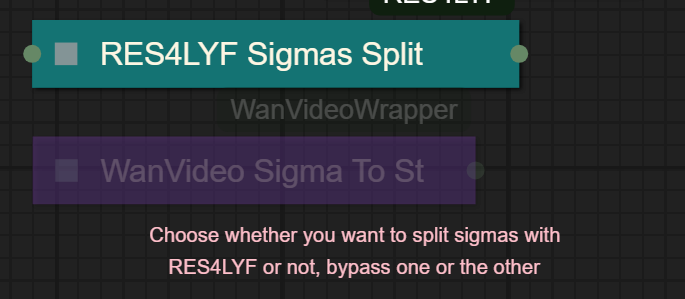
Since v1.8 im using subgraphs, you need latest comfyui with the latest frontend updates, also probably you will need to update Comfyui Manager.
For me was: setting nightly vers on the manager then update confy from the manager too.
* i allways leave the image overlay enabled, it will error if you dont have an image on it, sorry :S
v2.0
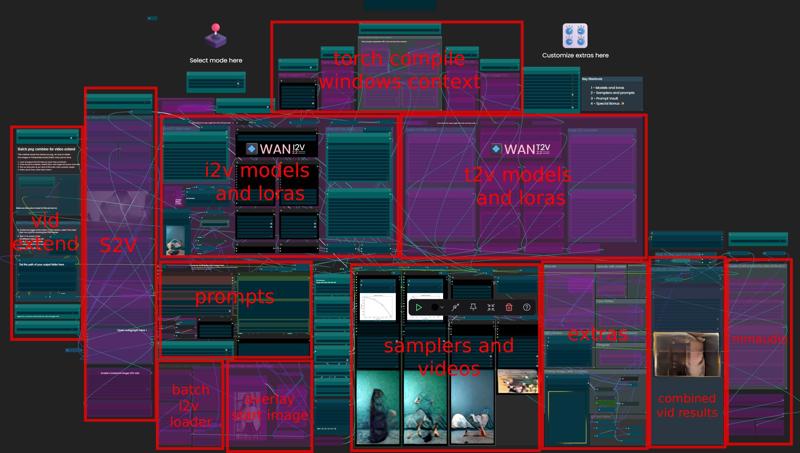
You can choose whether to merge with the loras or not, change the lora connection from the model loader to the set loras node, after that uncheck merge_loras
The toggled i added for radial sage, requieres Sage Attention to be installed, if you dont have it you should unplug the conexion i made to the attention type on the model loaders..
Be sure to update WanVideoWrapper nodes ..
The workflow works just fine with Wan2.1 if you bypass first sampler and model loader
This workflow is included with all my uploads as metadata, drag and drop a vid to comfyui.
I run a 4090 locally

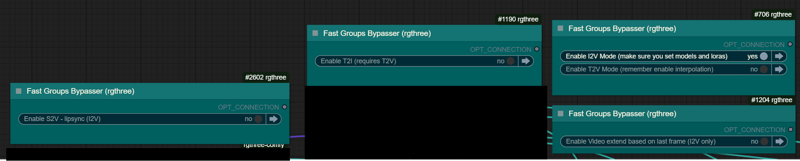
You can use it as other modes if you activate this option for enabling the required nodes.
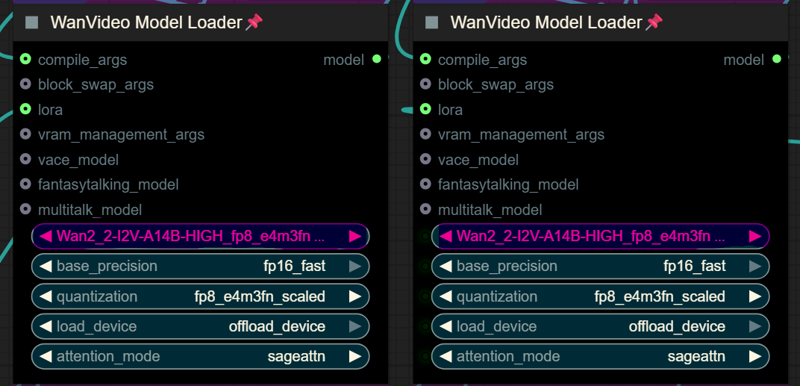
Make sure you load the correct models on the model loaders
Kijai's WanVideoWrapper Node
Wan2.2 Kijai's models
Lightx2v LoRa needed for lower steps (faster generations)
Wan22-Lightning Lightx2v alternative, newer and better in some scenarios
NSFW Clip Vision (not really needed in wan2.2)
RES4LYF Nodes
MMAUDIO
https://huggingface.co/Kijai/MMAudio_safetensors/tree/main
once installed replace nodes.py file in the mmaudio node folder with this one: https://github.com/phazei/ComfyUI-MMAudio/blob/master/nodes.py
WAN 2.2 💠 T2V / I2V
MMAUDIO NSFW
https://huggingface.co/phazei/NSFW_MMaudio (download and rename it to "mmaudio_nsfw_large_44k_v2_fp16.safetensors")
BOYONODES
K3NK IMAGE GRAB

Description
Added "Continue from Video (I2V btched PNG only)"
You can now save the frames of a video as PNG to continue the video and save it with mmaudio into a single video with your extensions included
FAQ
Comments (31)
hi, great update, ty for working on it on your weekend
can you share cloth_v11_000031000.safetensors and more infos about the updates like: Continue from Video (I2V btched PNG only)
cloth is a lora that someone uploaded to improve on clothing removal without shirt ripping off and so,, is not mine i downloaded when i saw it, i gues is deleted now.. ? :S
about the continue from video, you load a video, select the number for the folder to be created, then when the pause node pauses the wf, you have to enable boyo and run from that so it takes the last frame, basically it converts a video to png then continues i2v from that last frame
Would it be possible for you or someone to setup a runpod template with all the requirements so we can deploy it and use it? thank you
workflow works, great, but i am new to comfyui, would it be possible to create a simple tutorial on how to use your workflow,
If you are new, don't use this workflow or other workflows on CivitAI. My advice is to use the packaged templates with Comfy and KJnodes (if you installed it) and learn those simple workflows until you understand the process and the nodes. Once you do, these complex workflows become less obnoxious and they work well as guidance in making your own workflows that work for you (which is why I browse them from time to time).
@MrSmols well, youre right, but theres really awesome workflows for begginers like the ones form @UmeAiRT his are sleek and clean, really good workflows if you ask me
@K3NK I didn't really mean to say yours was bad, it's just ComfyUI is packaging some really nice templates that are super easy to read and get your head around. A sort of 'Hello World' for various models above and beyond the default workflow.
I don't think ComfyUI had those until recently and they are worth pointing out to beginners. Particularly for workflows like Wan2.2 with two samplers, high/low models, etc.
@K3NK , @MrSmols thanks for the tips, <3
I am getting this error
!!! Exception during processing !!! sigmas and timesteps should have the same length as num_inference_steps, if num_inference_steps is provided
Traceback (most recent call last):
File "D:\AI\ComfyUI_windows_portable\ComfyUI\execution.py", line 496, in execute
output_data, output_ui, has_subgraph, has_pending_tasks = await get_output_data(prompt_id, unique_id, obj, input_data_all, execution_block_cb=execution_block_cb, pre_execute_cb=pre_execute_cb, hidden_inputs=hidden_inputs)
^^^^^^^^^^^^^^^^^^^^^^^^^^^^^^^^^^^^^^^^^^^^^^^^^^^^^^^^^^^^^^^^^^^^^^^^^^^^^^^^^^^^^^^^^^^^^^^^^^^^^^^^^^^^^^^^^^^^^^^^^^^^^^^^^^^^^^^^^^^^^^^^^^^^^^^^^^^^^^^^^^^
File "D:\AI\ComfyUI_windows_portable\ComfyUI\execution.py", line 315, in get_output_data
return_values = await asyncmap_node_over_list(prompt_id, unique_id, obj, input_data_all, obj.FUNCTION, allow_interrupt=True, execution_block_cb=execution_block_cb, pre_execute_cb=pre_execute_cb, hidden_inputs=hidden_inputs)
^^^^^^^^^^^^^^^^^^^^^^^^^^^^^^^^^^^^^^^^^^^^^^^^^^^^^^^^^^^^^^^^^^^^^^^^^^^^^^^^^^^^^^^^^^^^^^^^^^^^^^^^^^^^^^^^^^^^^^^^^^^^^^^^^^^^^^^^^^^^^^^^^^^^^^^^^^^^^^^^^^^^^^^^^^^^^^^^^^^^^^^^^^^^^^^^^^^^^^^^^^^^^^^^^
File "D:\AI\ComfyUI_windows_portable\ComfyUI\custom_nodes\comfyui-lora-manager\py\metadata_collector\metadata_hook.py", line 165, in async_map_node_over_list_with_metadata
results = await original_map_node_over_list(
^^^^^^^^^^^^^^^^^^^^^^^^^^^^^^^^^^
...<2 lines>...
)
^
File "D:\AI\ComfyUI_windows_portable\ComfyUI\execution.py", line 289, in asyncmap_node_over_list
await process_inputs(input_dict, i)
File "D:\AI\ComfyUI_windows_portable\ComfyUI\execution.py", line 277, in process_inputs
result = f(**inputs)
File "D:\AI\ComfyUI_windows_portable\ComfyUI\custom_nodes\ComfyUI-WanVideoWrapper\nodes.py", line 2092, in process
sample_scheduler, timesteps,_,_ = get_scheduler(scheduler, steps, start_step, end_step, shift, device, transformer.dim, flowedit_args, denoise_strength, sigmas=sigmas, log_timesteps=True)
~~~~~~~~~~~~~^^^^^^^^^^^^^^^^^^^^^^^^^^^^^^^^^^^^^^^^^^^^^^^^^^^^^^^^^^^^^^^^^^^^^^^^^^^^^^^^^^^^^^^^^^^^^^^^^^^^^^^^^^^^^^^^^^^^^^^^^^^^^^^^^^^^^^^^^^^^
File "D:\AI\ComfyUI_windows_portable\ComfyUI\custom_nodes\ComfyUI-WanVideoWrapper\wanvideo\schedulers\__init__.py", line 60, in get_scheduler
sample_scheduler.set_timesteps(steps, device=device, sigmas=sigmas[:-1].tolist() if sigmas is not None else None)
~~~~~~~~~~~~~~~~~~~~~~~~~~~~~~^^^^^^^^^^^^^^^^^^^^^^^^^^^^^^^^^^^^^^^^^^^^^^^^^^^^^^^^^^^^^^^^^^^^^^^^^^^^^^^^^^^
File "D:\AI\ComfyUI_windows_portable\ComfyUI\custom_nodes\ComfyUI-WanVideoWrapper\wanvideo\schedulers\scheduling_flow_match_lcm.py", line 306, in set_timesteps
raise ValueError(
sigmas and timesteps should have the same length as num_inference_steps, if num_inference_steps is provided"
)
ValueError: sigmas and timesteps should have the same length as num_inference_steps, if num_inference_steps is provided
I get an "access denied" error while sampling:
File "C:\Users\X\AppData\Roaming\uv\python\cpython-3.12.11-windows-x86_64-none\Lib\subprocess.py", line 1538, in executechild
hp, ht, pid, tid = _winapi.CreateProcess(executable, args,
^^^^^^^^^^^^^^^^^^^^^^^^^^^^^^^^^^^^^^^
torch._inductor.exc.InductorError: PermissionError: [WinError 5] Access is denied
No idea, have you ask chatGPT or Deepseek about that error...?
I couldn't get it to work using t2v got to wanvideosamplers and just got an error i can't seem to fully make heads or tails of lol
WanVideoSampler
CompilationError: at 1:0: def triton_poi_fused__to_copy_mul_0(in_ptr0, in_ptr1, out_ptr0, xnumel, XBLOCK : tl.constexpr): ^ ValueError("type fp8e4nv not supported in this architecture. The supported fp8 dtypes are ('fp8e4b15', 'fp8e5')") Set TORCHDYNAMO_VERBOSE=1 for the internal stack trace
Download and use fp16 models for wan2.2 T2V, and in the loader change quantization to fp8_e5m2
Thanks, bro! This is the best workflow!
From vrgirldev nodes I'm missing filmgrain and color match to reference nodes, on github it is listed but in the files there's no reference to these nodes even existing, does someone have a fix for this?
If someone else is having the same problem like me, here's the following steps I took that fixed it:
1. Go to comfy manager, custom nodes in workflow and search for "VRGameDevGirl Video Enhancement Nodes"
2. Hit that uninstall button if it's installed, then restart ComfyUI
3. Go back to "Install missing custom nodes", install "VRGameDevGirl Video Enhancement Nodes"
4. Fixed
Ps.: Don't forget to install the requirements as described on the github page.
Does this include frame interpolation?
Yes it does! Default I use 2x
@androsny Thanks so much! The whole workflow works like a charm!
im kinda new and confused, how do i get the video generation to continue?
you need to enable the left section for enabling the extension nodes, then you should follow the instructions that i added inside the wf
@K3NK thank you i got it!
@K3NK also how do you loop from last frame? do i just follow the steps or do i have to upload the last png from the previous run?
So somehow my brain just clicked today and I finally managed to set everything up and make my first generation, it's like my brain muscles finally get around to something that now seems so simple, I guess I just needed to strain myself and sleep on it a few nights, like a workout XD
Anyway I always get an error with ComfyUi-Reactor, every time I get an error for the missing node. I've tried installing nightly, latest but no go it always gives the error. I go and manually delete the folder, redownload it and still error. I even installed the comfyui-reactor-node extension by the same author but still doesn't work.
--edit: I even tried installing it through the github git pull method, then running install.bat and I get an error. On the manager it gives an option to fix it, I run it and it doesn't work.
the reactor i have is the nsfw one, i think that doesnt really matter, that only will check if the images are sfw or not ,, but it might be the cause.. you can remove the reactor node tho, is not really needed if your settings are correct.. is something that i used to enable in wan2.1 i carried over to this wf coz is very lightweight and fast to "restore the face" but you guys having troubles with it, just delete the node
@K3NK Finally I got my first successful 20 sec video and it came out very well! Surprisingly fast speed too in the extended parts of the video. What I did for the reactor is I went on Gemini which gave me the right steps to fix the error to about half way (had me install extra libraries in my Python installation that I didn't know I had to click during the installation process). Then it started hallucinating and wanted me to reinstall an older python version where I realized it made no sense, it had already had installed the missing stuff. I deleted the new nodes embedded folder and used the original one I backed up and everything works now, no errors!
I’m also running 4090 locally, what does your generation times look like?
I’m particularly interested in the I2V generation times
120 seconds or less depending on resolution (around 100 seconds for 85 frames at 640*768) and blockswap values I use