WAN 2.2 💠 T2V / I2V / S2V / T2I🔹4-6 steps🔹Loop 🔹SVI Video extend 🔹WanVideoWrapper Workflow🔹K3NK

NOTICE: IF YOU ARE NEW TO COMFYUI, I DONT RECOMMEND STARTING WITH THIS WORKFLOW, IS AN ALL IN ONE WORKFLOW YOU WILL GET CONFUSED.
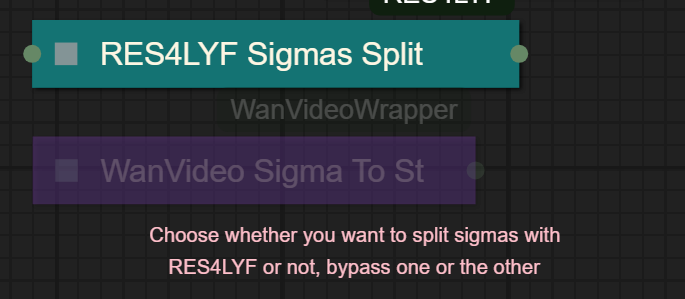
I UPDATED v2.3, YOU CAN CHOOSE IF YOU WANT RES4LYF OR WVW SIGMA SPLITTING
Since v1.8 im using subgraphs, you need latest comfyui with the latest frontend updates, also probably you will need to update Comfyui Manager.
For me was: setting nightly vers on the manager then update confy from the manager too.
* i allways leave the image overlay enabled, it will error if you dont have an image on it, sorry :S
v2.0
You can choose whether to merge with the loras or not, change the lora connection from the model loader to the set loras node, after that uncheck merge_loras
The toggled i added for radial sage, requieres Sage Attention to be installed, if you dont have it you should unplug the conexion i made to the attention type on the model loaders..
Be sure to update WanVideoWrapper nodes ..
The workflow works just fine with Wan2.1 if you bypass first sampler and model loader
This workflow is included with all my uploads as metadata, drag and drop a vid to comfyui.
I run a 4090 locally

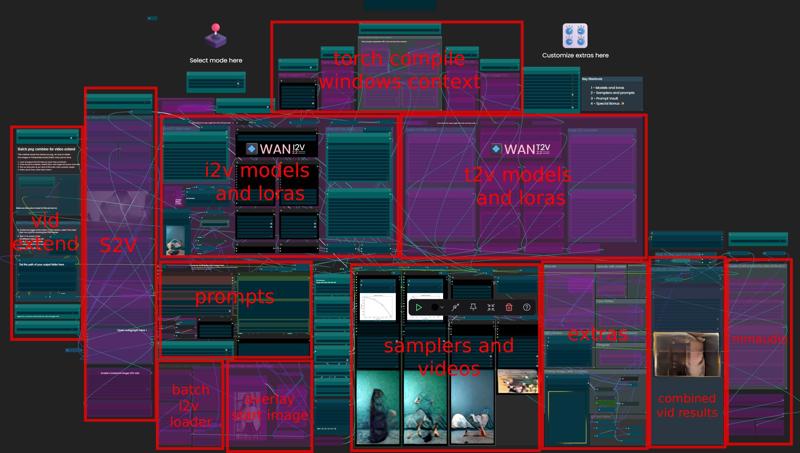
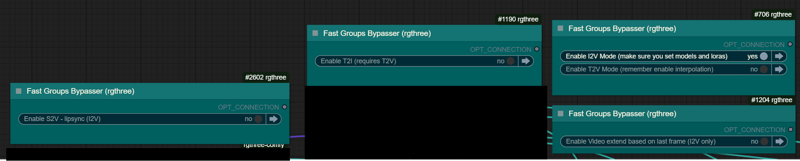
You can use it as other modes if you activate this option for enabling the required nodes.
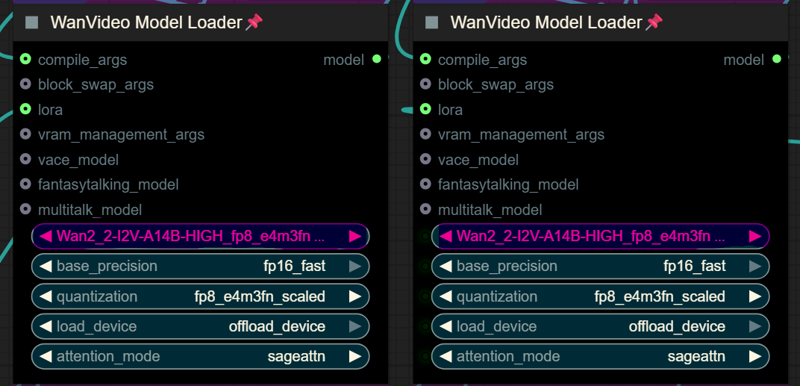
Make sure you load the correct models on the model loaders
Kijai's WanVideoWrapper Node
Wan2.2 Kijai's models
Lightx2v LoRa needed for lower steps (faster generations)
Wan22-Lightning Lightx2v alternative, newer and better in some scenarios
NSFW Clip Vision (not really needed in wan2.2)
RES4LYF Nodes
MMAUDIO
https://huggingface.co/Kijai/MMAudio_safetensors/tree/main
once installed replace nodes.py file in the mmaudio node folder with this one: https://github.com/phazei/ComfyUI-MMAudio/blob/master/nodes.py
WAN 2.2 💠 T2V / I2V
MMAUDIO NSFW
https://huggingface.co/phazei/NSFW_MMaudio (download and rename it to "mmaudio_nsfw_large_44k_v2_fp16.safetensors")
BOYONODES
K3NK IMAGE GRAB

Description
Added nearest bucket selector for easy i2v size management
FAQ
Comments (26)
Really great workflow, thanks for this. I think there might be a memory leak somewhere, though, and I swear it wasn't there last week in the earlier versions. I can generate one video just fine, but if I try a second without restarting ComfyUI, my 64GB of system RAM quickly fills up and ComfyUI gets killed.
Playing with it a bit right now to see if any of the clean VRAM nodes help, but I'm pretty sure it's a system RAM problem for me.
yeah i think is happening with the latest versions os wanvideowrapper, when that happens you need to click the vacuum cleaner icons near the manager button, that will unload everything, it happens mostly if you interrupted the 2nd sampler while is working, idk why.. we should ask kijai.. xD
Hmm, yeah it's even worse trying I2V with your latest version of the workflow. 3/4 gens crash during Interpolation because I run out of RAM. How much system RAM do you have?
dngstn32 128gb :S i might add the traditional rife interpolation becasuse even having 128gb when i was generating long vids i was getting that error too..
K3NK Yeah... literally just clicked "Buy" on another 64GB of RAM for myself. :-D I was thinking about doing it anyway... thanks.
dngstn32 if youre using xmp or the amd boost it might not boot until you disable it, that was my case.. is not needed with 4ch anyway
@K3NK Welp, more RAM absolutely did the trick, I'm chaining together runs like hell now!
... still can't get Model Upscaling to work though, I keep getting a "CUDA ran out of VRAM" error. I have a 4090 with 24GB... do you ever have that problem?
@dngstn32 yeah, i dont upscale lately really, most of the time the "high res" output is good enough
@K3NK Figured it out, it was the upscaler I was using. I changed to the one you've got in the workflow and it's working great now. Thanks!
I've got it running through the whole generation for I2V, but the video that it gives me shows the original image for a brief moment before going super bright to the point of washing out all the detail. Any idea what I need to adjust to fix this?
I left low model lora at 2,0 strength, please make sure is at 1.00, can't fix it rn I'm at work
Look at the structure, beautiful. Can't wait to mess it up and feel bad about it
Update: 3 pages of libraries to install :( is there a TLDR somewhere maybe? I dont want to inflate my comfyui that much
craftbin583 yeah, sadly a lot of functionalities nodes are not in the base comfy.. but it should not affect your install, also most of the nodes are very lightweight
craftbin583 can you share a screenshot of what is asking to install to check if i can replace something what details nodes..
Works great! Just one question, what is Overlay Image (after firmgrain)?
I use it to add the frame you see in my vids, overlaying a transparent PNG with the frame I want to have, you can overlay a logo or text, I wish I knew how to overlay animations or gifs...only works with PNG or JPG
Actual settings will stretch the image to the size of the video
The "width and height from aspect ratio" (addoor) node is misbehaving. When I put in an aspect ratio of 16:9, target size of 1024, and a multiple of 64 it was outputting 1344 x 768. Changing the target size to as low as 1 didn't fix it. I think we'd prefer a node there that is more flexible and would permit totally valid and reasonable dimensions like 1024 x 576.
I ended up swapping it for a basic height/width node in my workflow and that resolved the issue.
I can't seem to get this workflow to work.
All the videos turn out all black for the entire duration.
I can get the default wan 2.2 to work from the comfyui templates.
Not sure what is going on.
same
fadog74502638 whats your SHIFT? have you try lowering it?
also same
youre usin kijai's models? or comfy ones?
mine also black. tried everything
Wan2.2 Kijai's Scaled models
https://huggingface.co/Kijai/WanVideo_comfy_fp8_scaled/tree/main
same problem on my end. I'll try to download the KJ scaled to see if that fixes it.