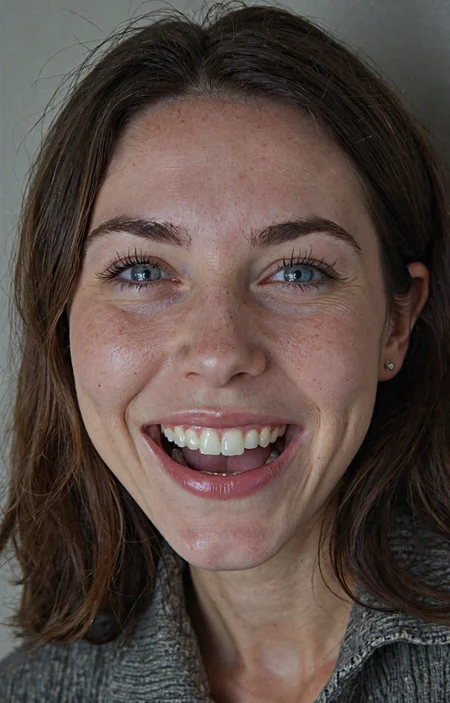


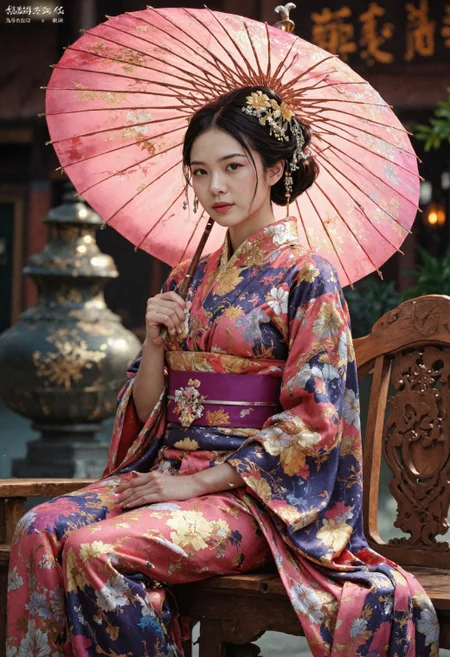



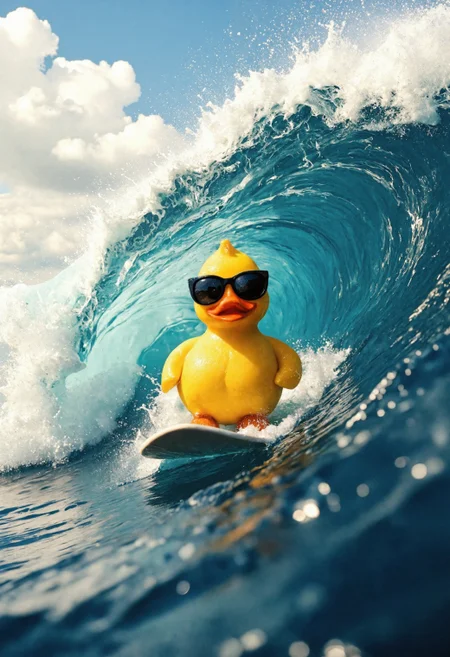



I have trained Flux Dev on my SDXL dataset and merged loras, correcting anatomy censorship and excessive bokeh/blurred backgrounds.
V12 - Merge with SRPO model and some loras, a bit cleaner looking than previous models, might want to use some grain loras if you want that amateur look.
I think not as good at NSFW so might want to use my lora for that: https://civarchive.com/models/652791/jibs-flux-nipple-fix
Jib Mix Flux v8-Flash! SVDQuant-4bit
Update 06/04/2025 - NOW WITH CONTROLNET AND NATIVE LORA SUPPORT!
This new SVDQuant format currently requires ComfyUI and an Nvidia 2000 series+ GPU.
I recommend;
Guidance scale = 2.5-3.5
Sampler = dpmpp_2m.
Scheduler = Sgm_uniform, Beta or Custom Stigmas.
This model is a new format that is a little tricky to first get setup but it is worth it as you can make flux images super fast (5 seconds on a 3090, 2.5 sevonds on a 4090 and 0.8 seconds on 5090! at 10 steps) ,
You need to install the nunchaku project following the instructions there.
and the nunchaku ComfyUI custom nodes to get it to work.
Download and unzip the archive from Civitai to: \comfyui.git\app\models\diffusion_models\jib-mix-svdq\
This is the Nunchaku workflow I am using: https://civarchive.com/models/617562
Thanks a lot to theunlikely for running the Quantization which takes an H100 GPU 6 hours!
Unfortunately, it seems the NSFW capabilities are reduced by the quantisation but can be bought back with my NSFW Lora you need to use the Nunchaku lora loader in the node pack and it will auto convert the lora for use the first time (and optionally can be saved).
There is currently a size limit above 2 million pixels 1024 x 2048 that causes a crash in ComfyUI, so if you get that lower your gen/upscale resolution, The Developers say a fix will be released this week.
Jib Mix Flux Version 8 AccentuEight
Much better Skin texture than Jib Mix Flux V7 but without the bad Flux Lines of Jib Mix V6.
NSFW anatomy is slightly lacking so I have uploaded a separate NSFW model that has very slightly reduced details / artstyles or loras can be used.
The V8 Pruned Model nf4 (6.33 GB) model is actually the Q4_0.gguf
The V8 Pruned Model bf16 (11.84 GB) model is actually the Q8_0.gguf
15/04/2025 - The new fp16 version of V8 provides very slightly better details and anatomical and image consistency, if you have the VRAM for it....
Jib Mix Flux Version 8 AccentuEight NSFW
Better female anatomy with a slight loss in skin details.
The V8 NSFW Pruned Model nf4 (6.33 GB) model is actually a Q4_0.gguf
Jib Mix Flux Version 7.8 Clear Text Focus
This version focuses on having more readable text generation.
The Skin texture may not be generally as realistic as Jib Mix v6 or v7.
It has less nipple flashing through clothes.
The 2000s Analog Core @0.6 weight, removes some of the plastic Fluxness of this merge without hurting the text.
Jib Mix Flux Version 7.2 Pixel Heaven
7/7.2 mainly fixes "Flux Line" caused by merging some effected lora's, this has caused some drop in photo realism but an increase in drawn/concept ability and general details.
It also tones down obsessive amounts of freckles (especially red freckles).
The V7.2 Pruned Model nf4 (6.33 GB) model is actually the Q4_0.gguf
The V7.2 Pruned Model bf16 (11.84 GB) model is actually the Q8_0.gguf
Jib Mix Flux version 7 PixelHeaven - beta
The main change is it removes "Flux lines" that plagued V6 and the original Flux Dev to some extent.
It may be overdoing freckles a lot but I wanted to see what people think of it. hence the Beta name.
I really recommend using Movie Portrait Lora on quite a high weight for a less plastic look, but I couldn't merge it into the model as in testing it was a Lora that can cause "Flux Lines"
Jib Mix Flux Version 6.1 Real Pix Fixed
6.1 mainly tries to fix small stubby hands or massively distorted hands/arms.
(If you still have problems with hands and you are using a low step count around 8 then increasing the step count usually fixes it alternatively applying a low weight (< 0.10) of the Hyper Flux lora pretty much always fixes hands, although you may find it lowers details).
V6.1 is more realistic on the CFG / more natural faces.
I think it actually does art/cartoon styles a bit better than the original v6 as well.
The V6.1 Pruned Model nf4 (6.33 GB) model is actually the Q4_0.gguf
The V6.1 Pruned Model bf16 (11.84 GB) model is actually the Q8_0.gguf
V6 still has the most detailed backgrounds in my testing.
The V6 Pruned Model nf4 (11.84 GB) model is actually Q8_0.gguf
The V6 Pruned Model bf16 (6.33 GB) model is actually a Q4_0.gguf
Jib Mix Flux Version 5 - It's Alive:
Improved photorealism. (Less likely to default to painting styles)
Fixed issues with wonky text.
More detailed backgrounds
Reconfigured NSWF slightly
fp8 V4 Canvas Galore:
better fine details and much better artistic styles, and improved NSFW capabilities.
fp8 V3.0 V3.1 - Clarity Key
I initially uploaded the wrong model file on the 21/10/2024, it was very similar but the new file since 22/10/2024 has slightly better contrast and was used for the sample images.
This version Improves detail levels and has a more cinematic feel like the original flux dev.
reduced the "Flux Chin"
Settings - I use a Flux Guidance of 2.9
Sampler = dpmpp_2m.
Scheduler = Beta or Custom Stigmas.
FP8 V2 - Electric Boogaloo: Better NSFW and skin/image quality.
Settings:
I find the best settings are a guidance and 2.5 and a CFG of 2.8 (although CFG does slow down the generation).
When using Loras these values may/will change.
Version: mx5 GGUF 7GB v1
This is a quantized version of my Flux model to run on lower-end graphics cards.
Thanks to @https://civarchive.com/user/chrisgoringe243 for quantizing this, it is really good quality for such a small model.
There are larger-sized GGUF versions available here: https://huggingface.co/ChrisGoringe/MixedQuantFlux/tree/main
for mid-range graphics cards.
Version 2 - fp16:
For those with high Vram Cards who want maximum quality I have created this merge with the full fp16 Flux model. if you "only have 24GB of Vram" you will need to force the T5 text encoder onto the CPU/System RAM with this force node on this pack: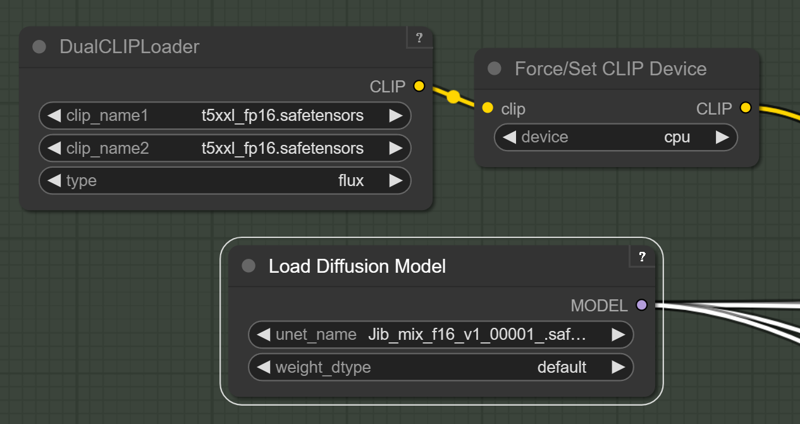 https://github.com/city96/ComfyUI_ExtraModels
Those people waiting for a smaller quantized model I am still looking into it.
Version 2:
Merged in 8 Step Hyper Lora and some others.
Settings:
I like a Guidance of 2 and 8-14 steps.
Resolution: I like a around 1280x1344
Version 1 : brings some of the benefits and look of SDXL with the massive prompt adherence benefits of Flux.
Settings:
I like a Guidance of 2 and 20-40 steps.
Description
Amazingly fast mit-han-lab nunchaku SDVQuant format can make 10 step Flux images in 5 seconds each!
FAQ
Comments (94)
great model, Thanks, any suggestions for best settings in forge?
The best setting in Forge to take advantage of this model is to write lllyasviel a letter: “Hi lllyasviel, make Nunchaku engine support in Forge”.
Although... wait a second...
@tigerart I was actually referring to the v8AccentueightNSFW version, which works great with forge. Anyway, thanks for the nice reply.
@tigerart I was actually referring to the v8AccentueightNSFW version, which works great with forge. Anyway, thanks for the nice reply.
Thank you for sharing your SVDQuant model.
When ur releasing the workflow? Can u notify me? What loras u recommend for realism*
I published my Nunchaku workflow https://civitai.com/models/617562?modelVersionId=1601234
Cool! Very fast model while generating a high quality image!
nice, is quality same as flux normal version ? And is it Lora compatible ? Thanks you
Quality seems to be on par with the fp8 version. It's lora compatible if you use the lora loader included in the nunchaku nodes.
@theunlikely wow so it's all benefits :O
Ah ok it's only for few gpu, sadly I have an 4080
@Zojix Just tested on a 4060 Ti and it worked fine. The 4000 series all share the same architecture (Ada Lovelace).
@Zojix I think it is anything Nvidia 3000 series+
@theunlikely ok thanks you!
Nowadays its funny to call something Nsfw, when it can do a vagina slit.
Well if I showed that kind of image in my office I would probably get fired so I think NSWF is appropriate .It is no Pony V6, but that could be described more as depraved. But it is better than Flux Dev or my other v8 model that does better details.
I dont know abou tthis model, but the regular svdquant model can't handle regular loras.
The ComfyUI node supplied with the Nunchaku pack automatically converts the selected lora into 4bit format the first time you use it which takes seconds (and even gives you the option to save it for later use).
I have been using Loras just fine with it.
Please make the V8 Pruned Model fp8 Q8_0.gguf.
Yeap, it is already here:https://civitai.com/api/download/models/1389019?type=Model&format=GGUF&size=pruned&fp=bf16
under bf16 , I wish Civitai would sort out/expand their Quantisation option picker!
seems the version 0.2 of nunchaku is way more easy to install https://github.com/mit-han-lab/nunchaku
I am not sure about way easier, as it took me and ChatGPT a while to upgrade!. I think mainly because they have renamed their Comfyui node names and I didn't realise and thought it was broken until I downloaded thier new workflow version, I will upload a new version of my workflow once I test out Control Nets :)
I have posted my new version of the Workflow: https://civitai.com/models/617562
I am loving this update, I never thought I could make FLux images in 3.6 Seconds without dropping £3,000 on a RTX 5090.
@J1B awesome
any helpful tips? wish i had better experience. running on windows. do i pip install in the python_embedded folder on portable version of comfy? A video or short article would be awesome!
@katsumend
If you are using a virtual enviroment for Comfyui start it and pip install the the right pre compiled wheel for your installed version of torch and Python from here: https://huggingface.co/mit-han-lab/nunchaku/tree/main
I used this one as I have torch 2.6 and Python 3.12 installed https://huggingface.co/mit-han-lab/nunchaku/blob/main/nunchaku-0.2.0%2Btorch2.6-cp312-cp312-win_amd64.whl
e.g Run: pip install https://huggingface.co/mit-han-lab/nunchaku/resolve/main/nunchaku-0.2.0+torch2.6-cp311-cp311-linux_x86_64.whl
If you have Python 3.11 and torch 2.6.
Then install the Nunchaku nodes (You might need to install via git URL in comfyUI manager.)
https://github.com/mit-han-lab/ComfyUI-nunchaku
My best advise is to talk though any errors with ChatGPT.
@J1B Thanks so much for the detailed response!!
Would you mind sharing how to convert a fp8 checkpoint to this new SVDQuant format?
You have to use the https://github.com/mit-han-lab/deepcompressor toolbox.
It pretty much requires a cloud GPU, I think, as it takes 6 hours to quantize (around 20$-$40) on a powerful 89GB Vram H100 with the "fast" settings file and 12 hours with the standard.
https://github.com/mit-han-lab/deepcompressor/issues/24
I didn't run the quantization myself, another user kindly ran it for me, as I am not that great at quickly setting up Python environments on cloud services yet.
I'm trying to load the V8 Accentu8 model but it just isn't showing up in my interface. Does it need to go somewhere other than the usual models/checkpoints directory or do I need something else to make it work?
In ComfyUI my Flux models are in models/unet/ you didn't say what interface you are using?
the nunchaku is very fast and quality is good but its give me a lot of anatomy fails with my lora's, any solution for reduce this ?
depends on your workflow. changing the first level cache from 0.15 to something lower or even 0 can help (on the cost of speed) or you can try bypassing the pertubed attention and lying sigma nodes (on the cost of image quality). the cache for me had the biggest impact, so i prefer to leave the rest on
@aitrancer Ok I will upload a Full fp16 model to Huggingface soon.
Thankk !
u need to use the nunchaku lora loader the lora it will be converted into nunchaku format but multiple lora use is not possible so i will stay with gguf multigpu tensorrt and sage attention. Issue report: https://github.com/mit-han-lab/ComfyUI-nunchaku/issues/71
This is Insane Speed! It's ALMOST like going back to SD1.5!!! Nvidia 2060 Mobile 6gb FYI :D
Oh good, I haven't heard from anyone with such a low spec card (no offence) using it. Good to know.
Absolutely crazy, can't recommend mor, it's like faster than 1.5 with prompt following and details from FLUX... Really recommend following the mit-han-lab github and making sure you're using version 0.2 both on your python (or portable python) and on the node
Yeah, I went and used a "normal" Flux model for a few hours the other day after using this SVDQuant for a few weeks and the normal Flux generation time felt painful slow after using something 4x faster for a while. Glad you like it.
@J1B do the generations take a noticeable hit in quality?
@J1B I guess its 4x faster for a good gpu, even though i'm comparing with the non quantized fp16, which was way too much for my pc, its 5x faster with double resolution for me actually.
For Lora's, only the nunchaku loader should work? Normal stacks from rgthree or others don't actually apply the loras?
@cutetodeath78409597 no , I cannot really tell the difference between them. I will post some comparisons. But I'm away from my PC for a few days.
@J1B awesome, i may take the time to do this then. flux is painfully slow which really makes things a lot less fun. often ill just revert back to SDXL just for the speed
@cutetodeath78409597 I did some comparisons to my V8 fp8 and I think the Nunchaku versions actually look better in most cases: https://civitai.com/images/69621193
sometimes the eyes are less well defined in the Nunchaku version if they are small, that is the only difference I have noticed.
which sampler, scheduler should I use for this??
and how many steps??
12 - 20 steps should be good. Dpmpp_2m with sgm_uniform is good for detail but Dpmpp_2m/beta can be good as well but look a bit cleaner. I have a workflow with my prefered settings https://civitai.com/models/617562/comfyui-workflow-jib-mix-flux-official-workflow
@J1B thank u so much bro, I am new in the game and need for advises haha :)
It works fine with 1 lora but multiple lora is not possible I have reported this issue to the devs. https://github.com/mit-han-lab/ComfyUI-nunchaku/issues/71
That is weird, I don't seem to have any trouble chaining loras, I think I have used 4-5.
I do have trouble with some particular loras not working with Nunchaku (none of these work: https://civitai.com/user/Random_Maxx/models because of the workflow he uses to create them)
@J1B Playing around with Fluxdev and Fluxatomicmerge has shown me another issue. Embedding the loras directly in the prompt like <lora:Flux-UltraRealPhoto:0.6> is giving much better in 99% perfect hands results than loading them through lora loader.
@sikasolutionsworldwide709 Is that a custom prompt input node you are using to do that?
because by default Comfyui's implementation does not natively parse embedded LoRA tokens directly from the prompt in the same way that some other frontends (for example, AUTOMATIC1111’s WebUI) do.
You have to use a dedicated loader node.
But it may be picking up some of the tokens from the lora name and applying that style from the name.
@J1B The node is from the impact pack: https://github.com/ltdrdata/ComfyUI-Impact-Pack its called positive prompt encode (impactwildcardencode in properties). To clarify the outputs are from the pattern the sdame no matter using the extra lora loader or the node from the impact pack but hands and fingers are properly generated with the impact node.
@sikasolutionsworldwide709 intresting I will have to test that. There is something strange with there lora implementation as some don't work that do on Flux. They seem to be doing quite regular releases so hopefully they can fix it.
@sikasolutionsworldwide709 Loras for that 4bit format must be converted which happen when use using their Lora loader (as it should be). How Impact pact ever do it?
I guess - your loras just do nothing at all.
Because I have perfect hands in 99% cases without any loras.
@littlefluffyball I already have explained that I used their Lora and a conversion process could be found in the cmd. But for the 5 Lora chain I have had selected I got the reported error. As for fingers a bunch of Loras can influence that in a bad way.
@littlefluffyball in version 0.2 of Nunchaku nodes the loras do not get converted (or it is done seamlessly). make sure all your nodes and the Nunchaku package are on the latest versions.
hi! just asking if there is any update on the possible fp16 full model release on huggingface for v8? Its really great, so I would like to fine-tune it with my lora in it
I have done that for you here: https://huggingface.co/jibhug/Jib_Mix_Flux-V8-AccentuEight_fp16/tree/main
Thank you! Do you know by any means if this is full or pruned model? Also, is this the nsfw or normal version?
@aitrancer It is the Full model, it is the V8 normal version.
I have notice in my testing that the fp16 version does very slightly better details and anatomy proportions some times.
UPD: nope, nothing to do with sage attention, had to restart Comfy backend in SwarmUI when changing SVDQuant models.
For some reason, SVDQuant version doesn't work with "--use-sage-attention" (with latest SwarmUI I was getting a red checkerboard-like pattern instead of any generations).
Flux-dev in SVDQuant format released by Nunchaku authors works properly tho.
I am currently getting the checkerboard-like pattern instead of any generations with all SVDQuant models. Also using SwarmUI; cannot solve the problem. How did you manage to make it work?
@civit77899 force-restarting comfyui backend from swarmui web UI fixed this for me, I had this happen a few times since.
@civit77899 I had the Checkerbord pattern the other day when using https://civitai.com/models/1330309/chroma , it turned out I wasn't using the special custom node needed by that model. are you sure you are using the latest Nunchaku ComfyUI Custom model loader node to load the model in the Comfyui backend?
@J1B I'm using SwarmUI, which in turn uses the Nunchaku ComfyUI Custom model loader node. Confirmed it's the latest version by doing git pull. No difference.
It's actually a SwarmUI issue. Reported to developer, waiting for a fix.
SwarmUI issue resolved. To anyone who's still experiencing this, update SwarmUI, restart, then hit Utilities->Reset All Metadata after updating swarm for it to reprocess your existing nf4 file and recognize it as nunchaku-fp4.
Please also add SDVQuant in fp4 format for Blackwell GPUs. Currently you ony have SDVQuant int4, which is fine with older architectures but not compatible with Blackwell (RTX 50xx cards).
Oh , I didn't know that I will have to look into it.
I am hoping to buy a 5090 soon, but cannot find one that isn't being sold by a scalper.
I have 22sec with this mode. But many broken details, like face looks perfect but arm blended into background.
With "normal" Flux Q4 checkpoint I have almost perfect images in 15 steps, but it takes 150 sec.
Are you using Loras? Someone else said they has problems when combining it with loras, I don't see much difference between it and my fp8 models, but yeah they probably are a bit more unstable than Flux Dev base, that's what makes them more intresting to me.
@J1B Without loras still have "messy" images, they look like "non completely trained". Other models from this page are fine but I run them with normal/default Flux workflow not with "nunchaku". Maybe that nunchaku requires some tweaking, I copied minimal setup from nunchaku GitHub.
@littlefluffyball I have a rather complicated workflow here: https://civitai.com/models/617562/comfyui-workflow-jib-mix-flux-official-workflow
But I don't think it will create cleaner images than the default as one of the paths has a lot of noise injectors.
Which converter application did you use to convert the model to svdq-int4? where can I download it?
https://github.com/mit-han-lab/deepcompressor
It currently takes 6-12 hours to Quantize a Flux modle on a 80GB vram cloud H100.
I wonder, did author merge style Loras? I made test run with "SDXL styles" and many of them actually do work, anime/comic/illustration/watercolor etc.
I tried other Flux dev checkpoints, but styles not very good there, only photorealistic.
Yes there are a lot of art focused models merged in, I like my models to be as flexible as possible while still capable of realism.
Is it expected that most celebrity FLUX lora don`t work with the SVDQuant models? For my upscaler node with that model i feel like the realskin, detailifier, and other general "quality" LORAs make a difference, but i feel they don't actually make a difference (in a perceivable manner) on the txt to img KSampler?
SVDQuants can reduce the likeness slightly, but it should still be pretty good about 80% of the time, which Loras are you having trouble with?
Sadly I can't seem to be able to run the Flash SVDQuant-4bit variant on 8 GB VRAM. I thought I was able to but every time I hit generate I get an out of memory error in ComfyUI.
What's odd is that I can load regular Flux models just fine, even bigger ones. I'm confused.
ComfyUI should be able to spill over into system RAM if you run out of VRAM, do you have "CUDA - Sysmem fallback Policy" set to "Prefer Sysmem Fallback" in Nvidia control panel?
@J1B I use Linux so I don't have the control panel. But I think it works like this by default since Flux works fine and it's bigger?
@hen There is 3 out of memory fixes you could try here on thier FAQ: https://github.com/mit-han-lab/nunchaku/blob/main/docs/faq.md
Try upgrading CUDA version is the first one.
I am running it on a laptop with 6gb of vram, did you ever get it working?
Make sure to use the int4 t5 node also! also try to put t5 and clips to cpu
Are these designed to work with Forge? I've tried using jibMixFlux_v8AccentueightNSFW (nf4) and jibMixFlux_v8FlashSvdquant4bit but just get a "Failed to recognise model type error" when trying to generate an image.
I tried the Accentueight fp16 nf4 aka Q4 and Q8 and those work - even on my 2nd PC with AMD Zluda Forge: version: f2.0.1v1.10.1-1.10.1 • python: 3.10.11 • torch: 2.3.1+cu118 . Not sure if there is a difference with the nsfw Q4.
SVDQuant-4bit is only supported in ComfyUI. All other files should work in Forge I think but you will need to add in the Text encoders and VAE:
https://www.reddit.com/r/StableDiffusion/comments/1exboc8/how_to_use_gguf_file_formats_with_forge_ui/
@J1B Thanks. I do use other Flux models in Forge fine so do have clip_l, t5xxl and ae encoders there to be loaded/used.
Looks like it might be something to do with the NSFW (nf4) model. I downloaded the Now (NF4) and it worked fine in Forge.
Edit: downloaded the NSFW FP8 and it worked in Forge. Redownloaded NSFW NF4 and it then worked. So can only assume something happended when downloaded it the first time.
Details
Available On (1 platform)
Same model published on other platforms. May have additional downloads or version variants.