


I have trained Flux Dev on my SDXL dataset and merged loras, correcting anatomy censorship and excessive bokeh/blurred backgrounds.
V12 - Merge with SRPO model and some loras, a bit cleaner looking than previous models, might want to use some grain loras if you want that amateur look.
I think not as good at NSFW so might want to use my lora for that: https://civarchive.com/models/652791/jibs-flux-nipple-fix
Jib Mix Flux v8-Flash! SVDQuant-4bit
Update 06/04/2025 - NOW WITH CONTROLNET AND NATIVE LORA SUPPORT!
This new SVDQuant format currently requires ComfyUI and an Nvidia 2000 series+ GPU.
I recommend;
Guidance scale = 2.5-3.5
Sampler = dpmpp_2m.
Scheduler = Sgm_uniform, Beta or Custom Stigmas.
This model is a new format that is a little tricky to first get setup but it is worth it as you can make flux images super fast (5 seconds on a 3090, 2.5 sevonds on a 4090 and 0.8 seconds on 5090! at 10 steps) ,
You need to install the nunchaku project following the instructions there.
and the nunchaku ComfyUI custom nodes to get it to work.
Download and unzip the archive from Civitai to: \comfyui.git\app\models\diffusion_models\jib-mix-svdq\
This is the Nunchaku workflow I am using: https://civarchive.com/models/617562
Thanks a lot to theunlikely for running the Quantization which takes an H100 GPU 6 hours!
Unfortunately, it seems the NSFW capabilities are reduced by the quantisation but can be bought back with my NSFW Lora you need to use the Nunchaku lora loader in the node pack and it will auto convert the lora for use the first time (and optionally can be saved).
There is currently a size limit above 2 million pixels 1024 x 2048 that causes a crash in ComfyUI, so if you get that lower your gen/upscale resolution, The Developers say a fix will be released this week.
Jib Mix Flux Version 8 AccentuEight
Much better Skin texture than Jib Mix Flux V7 but without the bad Flux Lines of Jib Mix V6.
NSFW anatomy is slightly lacking so I have uploaded a separate NSFW model that has very slightly reduced details / artstyles or loras can be used.
The V8 Pruned Model nf4 (6.33 GB) model is actually the Q4_0.gguf
The V8 Pruned Model bf16 (11.84 GB) model is actually the Q8_0.gguf
15/04/2025 - The new fp16 version of V8 provides very slightly better details and anatomical and image consistency, if you have the VRAM for it....
Jib Mix Flux Version 8 AccentuEight NSFW
Better female anatomy with a slight loss in skin details.
The V8 NSFW Pruned Model nf4 (6.33 GB) model is actually a Q4_0.gguf
Jib Mix Flux Version 7.8 Clear Text Focus
This version focuses on having more readable text generation.
The Skin texture may not be generally as realistic as Jib Mix v6 or v7.
It has less nipple flashing through clothes.
The 2000s Analog Core @0.6 weight, removes some of the plastic Fluxness of this merge without hurting the text.
Jib Mix Flux Version 7.2 Pixel Heaven
7/7.2 mainly fixes "Flux Line" caused by merging some effected lora's, this has caused some drop in photo realism but an increase in drawn/concept ability and general details.
It also tones down obsessive amounts of freckles (especially red freckles).
The V7.2 Pruned Model nf4 (6.33 GB) model is actually the Q4_0.gguf
The V7.2 Pruned Model bf16 (11.84 GB) model is actually the Q8_0.gguf
Jib Mix Flux version 7 PixelHeaven - beta
The main change is it removes "Flux lines" that plagued V6 and the original Flux Dev to some extent.
It may be overdoing freckles a lot but I wanted to see what people think of it. hence the Beta name.
I really recommend using Movie Portrait Lora on quite a high weight for a less plastic look, but I couldn't merge it into the model as in testing it was a Lora that can cause "Flux Lines"
Jib Mix Flux Version 6.1 Real Pix Fixed
6.1 mainly tries to fix small stubby hands or massively distorted hands/arms.
(If you still have problems with hands and you are using a low step count around 8 then increasing the step count usually fixes it alternatively applying a low weight (< 0.10) of the Hyper Flux lora pretty much always fixes hands, although you may find it lowers details).
V6.1 is more realistic on the CFG / more natural faces.
I think it actually does art/cartoon styles a bit better than the original v6 as well.
The V6.1 Pruned Model nf4 (6.33 GB) model is actually the Q4_0.gguf
The V6.1 Pruned Model bf16 (11.84 GB) model is actually the Q8_0.gguf
V6 still has the most detailed backgrounds in my testing.
The V6 Pruned Model nf4 (11.84 GB) model is actually Q8_0.gguf
The V6 Pruned Model bf16 (6.33 GB) model is actually a Q4_0.gguf
Jib Mix Flux Version 5 - It's Alive:
Improved photorealism. (Less likely to default to painting styles)
Fixed issues with wonky text.
More detailed backgrounds
Reconfigured NSWF slightly
fp8 V4 Canvas Galore:
better fine details and much better artistic styles, and improved NSFW capabilities.
fp8 V3.0 V3.1 - Clarity Key
I initially uploaded the wrong model file on the 21/10/2024, it was very similar but the new file since 22/10/2024 has slightly better contrast and was used for the sample images.
This version Improves detail levels and has a more cinematic feel like the original flux dev.
reduced the "Flux Chin"
Settings - I use a Flux Guidance of 2.9
Sampler = dpmpp_2m.
Scheduler = Beta or Custom Stigmas.
FP8 V2 - Electric Boogaloo: Better NSFW and skin/image quality.
Settings:
I find the best settings are a guidance and 2.5 and a CFG of 2.8 (although CFG does slow down the generation).
When using Loras these values may/will change.
Version: mx5 GGUF 7GB v1
This is a quantized version of my Flux model to run on lower-end graphics cards.
Thanks to @https://civarchive.com/user/chrisgoringe243 for quantizing this, it is really good quality for such a small model.
There are larger-sized GGUF versions available here: https://huggingface.co/ChrisGoringe/MixedQuantFlux/tree/main
for mid-range graphics cards.
Version 2 - fp16:
For those with high Vram Cards who want maximum quality I have created this merge with the full fp16 Flux model. if you "only have 24GB of Vram" you will need to force the T5 text encoder onto the CPU/System RAM with this force node on this pack: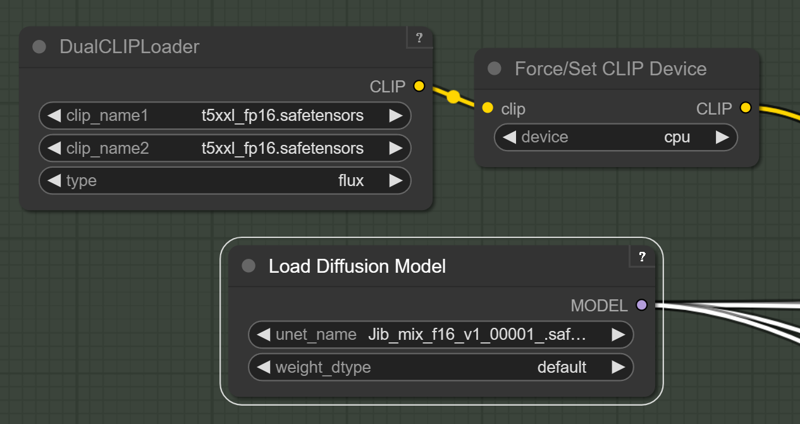 https://github.com/city96/ComfyUI_ExtraModels
Those people waiting for a smaller quantized model I am still looking into it.
Version 2:
Merged in 8 Step Hyper Lora and some others.
Settings:
I like a Guidance of 2 and 8-14 steps.
Resolution: I like a around 1280x1344
Version 1 : brings some of the benefits and look of SDXL with the massive prompt adherence benefits of Flux.
Settings:
I like a Guidance of 2 and 20-40 steps.
Description
Jib Mix Flux Version 5 - It's Alive:
Improved photorealism. (Less likely to default to painting styles)
Fixed issues with wonky text.
More detailed backgrounds
Reconfigured NSWF slightly
FAQ
Comments (52)
Wow! V3.1 was great... V5 rocks!! Well done, I love this checkpoint. Thank you!
Thank you.
Initial testing seems like this is really good, thanks!
Can this make female and male anatomy?
Apart selected few models, majority does female.
I haven't tested male anatomy yet, I will do that, but you can always use a lora if needed.
Can V5 be used with turbo 8-step LORA?
It should work ok, it used to be baked into the model so still might have some in it ( I haven't tested low steps without the lora in a while), I usually run at around 14 steps without it, but have noticed that using the 8 Step lora can get more "everyday realistic" type looking images.
When on tensor?
V4 is up there already:https://tensor.art/models/790321841555280590/Jib-Mix-Flux-fp8-V4-Canvas-Galore
I am just uploading V5 It's Alive for you now, it will take around 20 mins.
@J1B thanks, one more thing. Is there any platform (email, discord or any thing) where we can share feedback and tips for future models?
@aleemawan118373 V5 has been uploaded now. share feedback here, or DM me, or I hang out on the AI Revolution Discord server a lot.https://www.youtube.com/redirect?event=video_description&redir_token=QUFFLUhqbF9jTE5Uc0Q5RWZpbmEwOG5aS3ZudERmdUY0Z3xBQ3Jtc0trd3ZVb09OLVhwdjNBakE0bHhsVjNIV3JILS1ualFRWHRxb19EdVJhcUVxRko1Q1dhcTlRSi1qMmQxOEl6QVFwWmlXWmlyU1pvRlZfUE5LRVhyNmZ2eWNTZ24zLWxjRkhWeU40UmZXSHN4RTNwNXJWbw&q=https%3A%2F%2Fdiscord.gg%2FXKAk7GUzAW&v=jfbqlSaRIPI
Would You offer instructions for Auto1111 and using this in auto1111.... i don't think i stand alone with not knowing how this is being done and used within auto1111... You would make many many many people very very happy, if you would be able to show instructions
You want to switch to forge then watch youtube videos.
@rikuman36250 Yes, I was going to say this Forge looks almost exactly the same (some extensions might not work), Automatic 1111 has not added Flux support (last time I looked) and most people have switched to Forge because of the lack of updates.
But my main advice to @akos would be to learn Comfyui, it is a lot more powerful when you get used to it. to start off, just use a workflow downloaded from Civitai and use the prompt box just like you would Automatic 1111/Forge.
@J1B Amazing work by the way
@J1B already doodling in comfyui, but adding adetailer and using face loras is not easy...in auto1111 i am in control, its so easy with detailer and then using a trained face lora there.... forge i tested and sawa that image quality was degraded with same prompt etc as in auto1111
@akos Try this comfy workflow https://civitai.com/models/642589 it has almost every thing adeatiler,lora,Inpaint,Ultimate SD Upscaler,and lut with a easy on and off switch of stuff you dont need.
Effortless attractive nipples in Flux,
FINALLY, THANK YOU!
Thanks, they are not always perfect, but most of the time they are natural looking enough.
I'm not seeing any weiners here Bro.
I haven't actually tested that, to be honest, I will try it out , but it may need a lora.
Very poor with the lower half of nudes.
No Flux checkpoint has managed consistent full frontal nudity yet without LoRA's, but there are plenty of loras that can help it along.
Yes!!!!! Yes!!!! Finally a quality FLUX!!! Thanks!!!!!!
The V5 FP8 model still displays clear signs of FLUX CHIN, which nearly always appears. Is there a problem?
I haven't noticed it too badly, but I may have just got used to it! There is a anti flux chin lora that I merged into the model previously, but it may have gotten "diluted" too much with other merges, you can use the lora for now and I will do some testing and probably included it again in a future release. You could also try using my workflow with Lying Sigma and Custom Samplers, maybe that is the reason I don't see it too much?
I made 20 images with your prompt here:https://civitai.com/images/40053827
and only got 1.5 "Flux Chins", so I am not sure why you get so many, I would need to look at your full generation settings.
@J1B "There is a anti flux chin lora that I merged into the model previously".
Did you merged my Lora? https://civitai.com/models/798559/antiflux-chin
If so, I hope you like the lora! And I'm happy to be part of your project :D
Are you able to provide fp16 version checkpoint? I found fp8 version very good on its own, but will not work well with lora. Lora works but randomly will cause issue such as extra limbs or fingers.
Hi, I don't think an fp16 sized model will help with that, I was doing some testing earlier to see if a fp16 was faster , but it was actually slower for me . I will do some testing and probably upload a fp16 version, but you might find you just need to turn the lora weight down even to 0.25 sometimes and often around 0.8.
nice, cannot wait for the v6
Thanks, It is getting closer to release, I don't think V6 is a huge leap in quality but an incremental improvement , seems to have more contrast and better poses.
@J1B nice! cannot wait, thanks for your work
@J1B Hi there! Any date for the release of the V6 ? :D Also do you plan to add the diffusers files into HF for be able to train this model with ostris ai toolkit ? :D Thanks
@Zojix work in my day job has gotten a bit crazy lately and I have been doing 14 hour days sometimes but it should calm down soon and I can work on V6 more, just wasn't 100% happy that it was much better than V5, but I have a few new ideas. I will look into the diffusers format file on HF.
@J1B Alright :D thanks a lot, your checkpoints ( flux / sdxl ) are clearly the best on civitai
Awsome model, probably the best so far overall. It can destroy some of my lora but in most case it work well with EULER A and Beta when used with another lora, it smooth up the arsh created if used with the recommanded setting. Around 30 steps is great and the guidance to 3, or 2.9 ;)
Thanks, 30 steps is quite a lot, I usally use between 14-20, you can go as low as 8 steps but the quality will reduce slightly. I have posted a workflow that uses Lying Sigma node which can really boost the detail/noise. If you are happy to wait, then 30 steps does look great, as shown by the images you have posted to the gallery, thanks.
Any plans for a hyper model?
The current version does as low as 8 steps, as it has some hyper built in. I tried to make a specific 6 Step merge but I wasn't happy with consistency of making good images.
@J1B Thanks! This is by far the best Flux checkpoint available.
It's really good one thank you very much, but i think it need some fix when it comes to the character poses in realistic image ..
You could try adding this Dynamic Poses FLUX https://civitai.com/models/332248/dynamic-poses-flux-sdxl
I might try baking something like that into my next Merge and test how it goes.
@J1B Thank you (:
Please give us fp16 version. I tend to use FP16 to generate best image and easier to modify and convert into GGUF or other format. Thank you so much
Yes, we need Q8 model so bad
I am uploading a fp16 version of my latest v6 flux model now but Civitai is on a go slow I think, so will take several hours.
Awesome model. I would reeeeallly like a Q8 GGUF for this. Please?
Yeah sure, I can do a Q8 (now that I have learned how), I find fp8 best personally, as it is faster than Q8 and a similar size.
@J1B yes faster and same qualitiy and much more better lora compatible
Details
Files
Available On (1 platform)
Same model published on other platforms. May have additional downloads or version variants.