




Searge-SDXL: EVOLVED v4.3.2
Version 4.x is here.
I made a convenient install script that can install the extension and workflow, the python dependencies, and it also offer the option to download the required models.
Please read the install instructions in the readme file for more information about the install script and how to use it.
Description
Some custom nodes for ComfyUI and an easy to use SDXL 1.0 workflow. A detailed description can be found on the project repository site, here: Github Link
Installing
Detailed install instruction can be found here: Link to the readme file on Github
Usage Notes
The workflow is in the workflow folder, please load it from the JSON files to make sure you are using the latest versions of it.
The images in the examples folder have workflows embedded.
How to use this workflow
Here is an amazing Youtube video that Nerdy Rodent made about version 3.4 of the workflow. Many things have changed in v4.0 but the basics still apply. And while you are watching it, don't forget to subscribe to the channel.

Link to the Nerdy Rodent video
Updates
What's new in v4.3.2?
This is a minor update to make the workflow and custom node extension compatible with the latest changes in ComfyUI.
What's new in v4.3.1?
This is a minor update to make the workflow and custom node extension compatible with the latest changes in ComfyUI.
What's new in v4.3?
This update added support for FreeU v2 in addition to FreeU v1.
New Features
Support for FreeU v2 has been added and is included in the v4.3 workflow
Added more presets for FreeU and a selector to switch between v1 and v2
Updated the example images to embed the v4.3 workflow
What's new in v4.2?
This update contains bug fixes that address issues found after v4.0 was released.
Bug Fixes
A recent change in ComfyUI conflicted with my implementation of inpainting, this is now fixed and inpainting should
work again
New Features
Support for FreeU has been added and is included in the v4.2 workflow
Note: the images in the example folder are still embedding v4.1 of the workflow, to use FreeU load the new
workflow from the.jsonfile in theworkflowfolder
What's new in v4.1?
This update contains bug fixes that address issues found after v4.0 was released.
Bug Fixes
The high resolution latent detailer was not properly set up in the processing pipeline and did nothing
The debug printer node was broken - I didn't notice that because it was not connected in any of the v4.0 workflows
A bug related to generating with batch sizes larger than 1 has been fixed, it's now working properly
Other Changes
The images in the
examplesfolder have been updated to embed the v4.1 workflow
What's new in v4.0?
A complete re-write of the custom node extension and the SDXL workflow
Highly optimized processing pipeline, now up to 20% faster than in older workflow versions
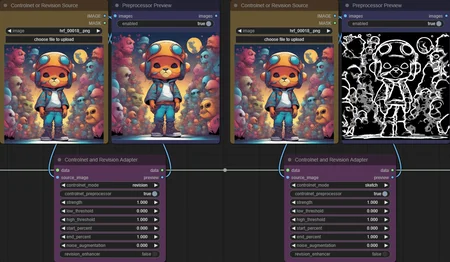
Support for Controlnet and Revision, up to 5 can be applied together
Multi-LoRA support with up to 5 LoRA's at once
Better Image Quality in many cases, some improvements to the SDXL sampler were made that can produce images
with higher qualityImproved High Resolution modes that replace the old "Hi-Res Fix" and should generate better images
... many more things, too many to mention them all here
Description
What's new in v4.0?
A complete re-write of the custom node extension and the SDXL workflow
Highly optimized processing pipeline, now up to 20% faster than in older workflow versions
Support for Controlnet and Revision, up to 5 can be applied together
Multi-LoRA support with up to 5 LoRA's at once
Better Image Quality in many cases, some improvements to the SDXL sampler were made that can produce images
with higher qualityImproved High Resolution modes that replace the old "Hi-Res Fix" and should generate better images
FAQ
Comments (36)
Hi! I seem to be getting an error with the new v4. I'm getting several missing node error when I load the new workflow, also when I start comfyui it says:
** ComfyUI start up time: 2023-09-01 02:25:49.925937
Prestartup times for custom nodes:
0.0 seconds: G:\ComfyUI\custom_nodes\ComfyUI-Manager
Total VRAM 8192 MB, total RAM 32536 MB
xformers version: 0.0.21
Set vram state to: NORMAL_VRAM
Device: cuda:0 NVIDIA GeForce RTX 3070 : cudaMallocAsync
VAE dtype: torch.bfloat16
Using xformers cross attention
### Loading: ComfyUI-Manager (V0.26.2)
### ComfyUI Revision: 1381 [cfe1c54d]
Searge-SDXL v4.0 in G:\ComfyUI\custom_nodes\SeargeSDXL
Traceback (most recent call last):
File "G:\ComfyUI\nodes.py", line 1698, in load_custom_node
module_spec.loader.exec_module(module)
File "<frozen importlib._bootstrap_external>", line 883, in exec_module
File "<frozen importlib._bootstrap>", line 241, in callwith_frames_removed
File "G:\ComfyUI\custom_nodes\SeargeSDXL\__init__.py", line 35, in <module>
from .searge_sdxl import SEARGE_CLASS_MAPPINGS, SEARGE_DISPLAY_NAME_MAPPINGS
File "G:\ComfyUI\custom_nodes\SeargeSDXL\searge_sdxl.py", line 32, in <module>
from .modules.controlnet_adapter import SeargeControlnetAdapterV2
File "G:\ComfyUI\custom_nodes\SeargeSDXL\modules\controlnet_adapter.py", line 31, in <module>
from .controlnet import canny
File "G:\ComfyUI\custom_nodes\SeargeSDXL\modules\controlnet\__init__.py", line 4, in <module>
from .canny import CannyDetector
File "G:\ComfyUI\custom_nodes\SeargeSDXL\modules\controlnet\canny\__init__.py", line 2, in <module>
import cv2
ModuleNotFoundError: No module named 'cv2'
Cannot import G:\ComfyUI\custom_nodes\SeargeSDXL module for custom nodes: No module named 'cv2'
Import times for custom nodes:
0.2 seconds (IMPORT FAILED): G:\ComfyUI\custom_nodes\SeargeSDXL
0.2 seconds: G:\ComfyUI\custom_nodes\ComfyUI-Manager
Starting server
To see the GUI go to: http://127.0.0.1:8188
Can you help please?
It looks like you didn't use the install script. I just added a line in the readme file to make it more clear that a manual install requires you to run python -m pip install opencv-python at least once in the python environment for ComfyUI.
This flow is bleeding fast! Thanks for all the hard work!
Glad to hear that you enjoy it. And generation speed was one of the goals, so it's good to hear that this part of the workflow seems to work well.
You're doing some great frontier work Searge. Literally doing stuff no-one is doing, and I appreciate it a lot.
Thank you. Glad to hear that you like the workflow.
Wonderful work as always, however I can't see the '1x-ITF-SkinDiffDetail-Lite-v1' when trying to select it in the 'upscale models selector'. I have put the downloaded file in the ComfyUI/models/upscale_models as suggested but it's not showing as an option as it should. Any ideas please Searge ??
try to run the installer script and it will verify the models, including upscalers, and it offers to download missing ones
try to run the installer script and it will verify the models, including upscalers, and it offers to download missing ones
@searge isn't it a bat file ?? I use a Mac, bat files are widows only are they not ???
In that case re-download the upscaler from the link in the readme file, please
@searge That did it...cheers..
This is my go-to workflow. Thank you!~
One remark: Custom controlnet for openposeXL does not work as custom!
Did you feed it the "stick figure" version of the image for controlnet when you used openpose as custom cn? The workflow doesn't have an openpose pre-processor, so just feeding a normal image would not work.
@searge you are right I did not use the stick figure! Also, I add Openpose Pose Recog..and all works perfectly for feeding a normal pic that gets processed as stickfigures and used for CN!
Error occurred when executing SeargeMagicBox: 'NoneType' object has no attribute 'model' File "C:\ComfyUI\ComfyUI\execution.py", line 151, in recursive_execute output_data, output_ui = get_output_data(obj, input_data_all) File "C:\ComfyUI\ComfyUI\execution.py", line 81, in get_output_data return_values = map_node_over_list(obj, input_data_all, obj.FUNCTION, allow_interrupt=True) File "C:\ComfyUI\ComfyUI\execution.py", line 74, in map_node_over_list results.append(getattr(obj, func)(**slice_dict(input_data_all, i))) File "C:\ComfyUI\ComfyUI\custom_nodes\SeargeSDXL\modules\magic_box.py", line 269, in process (data, stage_result) = self.run_stage(stage, data, stage_input) File "C:\ComfyUI\ComfyUI\custom_nodes\SeargeSDXL\modules\magic_box.py", line 248, in run_stage (data, stage_result) = stage_processor.process(data, stage_input) File "C:\ComfyUI\ComfyUI\custom_nodes\SeargeSDXL\modules\stage_latent_detailer.py", line 92, in process latent = self.detailer(latent, 5, "bicubic", base_model, base_positive, base_negative, seed, cfg) File "C:\ComfyUI\ComfyUI\custom_nodes\SeargeSDXL\modules\stage_latent_detailer.py", line 135, in detailer latent = sampler(base_model, seed, 100, cfg, sampler_name, scheduler, File "C:\ComfyUI\ComfyUI\custom_nodes\SeargeSDXL\modules\node_wrapper.py", line 108, in common_sampler result = nodes.common_ksampler(model, seed, steps, cfg, sampler_name, scheduler, positive, negative, File "C:\ComfyUI\ComfyUI\nodes.py", line 1172, in common_ksampler previewer = latent_preview.get_previewer(device, model.model.latent_format)
Hello, I'm getting this error:
"When loading the graph, the following node types were not found:
SeargePreviewImage
SeargeTextInputV2
etc etc
Nodes that have failed to load will show as red on the graph."
Since I'm using Ubuntu, the recommended script was not an option, so I uploaded all required and recommended models manually and then did:
(1)
python -m pip install opencv-python
then
(2)
git clone https://github.com/SeargeDP/SeargeSDXL.git
(3)
restart comfyui
Any idea how I could fix this?
I'm running ComfyUI 3.0 using this Docker image:
https://hub.docker.com/r/runpod/stable-diffusion/
Did you run the git clone command in the custom_nodes folder of ComfyUI? It needs to be used in that folder so the extension ends up in the correct place.
@searge yes, I ran the git code inside custom nodes. Done that a few times already with fresh installations using that Docker image, but it always gives the same error. V3 was working fine for me, however.
@searge ok it worked now, I think the issue is that I wasn't using the latest version of ComfyUI. Created another instance with ComfyUI 3.01 instead of 3.00 and now it's working.
hi searge. thx for your big work here, the workflow is amazing but there's an issue with controlnet apparently, at least for myself on google colab. the problem is as follows: i'm having troubles using some preprocessors, depth map gives error e.g., which i'm able to solve by reinstalling the "auxiliary" nodes from the manager; after that everything works. not so with your workflow, however. below is what i get:
Error occurred when executing SeargeControlnetAdapterV2:
stat: path should be string, bytes, os.PathLike or integer, not NoneType
File "/content/drive/MyDrive/ComfyUI/execution.py", line 151, in recursive_execute
output_data, output_ui = get_output_data(obj, input_data_all)
File "/content/drive/MyDrive/ComfyUI/execution.py", line 81, in get_output_data
return_values = map_node_over_list(obj, input_data_all, obj.FUNCTION, allow_interrupt=True)
File "/content/drive/MyDrive/ComfyUI/execution.py", line 74, in map_node_over_list
results.append(getattr(obj, func)(**slice_dict(input_data_all, i)))
File "/content/drive/MyDrive/ComfyUI/custom_nodes/SeargeSDXL/modules/controlnet_adapter.py", line 149, in get_value
(stack_entry, image) = self.create_dict(
File "/content/drive/MyDrive/ComfyUI/custom_nodes/SeargeSDXL/modules/controlnet_adapter.py", line 110, in create_dict
cn_image = self.process_image(cn_image, controlnet_mode, low_threshold, high_threshold)
File "/content/drive/MyDrive/ComfyUI/custom_nodes/SeargeSDXL/modules/controlnet_adapter.py", line 84, in process_image
image = leres(image, low_threshold, high_threshold, self.leres_annotator_full_path)
File "/content/drive/MyDrive/ComfyUI/custom_nodes/SeargeSDXL/modules/controlnet/__init__.py", line 23, in leres
annotator = LeresDetector.from_pretrained(annotator_model).to(model_management.get_torch_device())
File "/content/drive/MyDrive/ComfyUI/custom_nodes/SeargeSDXL/modules/controlnet/leres/__init__.py", line 23, in from_pretrained
if os.path.isdir(pretrained_model_or_path):
File "/usr/lib/python3.10/genericpath.py", line 42, in isdir
st = os.stat(s)
jfyi. again thx for the great job you're doing on this ✌🏾
Did you create the annotators directory in the ComfyUI models folder and copied the models into it that are mentioned in the readme file?
@searge dam! i was giving for granted everything there would be for the local install and skipped assuming the manager would show the missing components, sorry for that and thanks for your reply!
since we're at it, there're two other smaller issues i noticed:
1) the recolor net isn't generating a proper map in the preview. it just duplicates the input image. it does seem to work properly though.
2) the save to "output" isn't working, i have to use other options, otherwise no image is generated except those retrievable in "temp" (which btw were coming from the now removed gallery, i believe? so...) if i use that option i get the error printed below.
again many thanks for the huge work and keep it up! ✌🏾🙌🏾
Error occurred when executing SeargeMagicBox: string index out of range File "/content/drive/MyDrive/ComfyUI/execution.py", line 151, in recursive_execute output_data, output_ui = get_output_data(obj, input_data_all) File "/content/drive/MyDrive/ComfyUI/execution.py", line 81, in get_output_data return_values = map_node_over_list(obj, input_data_all, obj.FUNCTION, allow_interrupt=True) File "/content/drive/MyDrive/ComfyUI/execution.py", line 74, in map_node_over_list results.append(getattr(obj, func)(**slice_dict(input_data_all, i))) File "/content/drive/MyDrive/ComfyUI/custom_nodes/SeargeSDXL/modules/magic_box.py", line 269, in process (data, stage_result) = self.run_stage(stage, data, stage_input) File "/content/drive/MyDrive/ComfyUI/custom_nodes/SeargeSDXL/modules/magic_box.py", line 248, in run_stage (data, stage_result) = stage_processor.process(data, stage_input) File "/content/drive/MyDrive/ComfyUI/custom_nodes/SeargeSDXL/modules/stage_image_saving.py", line 123, in process for filenum in [fn[0:5] for fn in files if fn[5] == '-' and fn[0:5].isnumeric()]: File "/content/drive/MyDrive/ComfyUI/custom_nodes/SeargeSDXL/modules/stage_image_saving.py", line 123, in for filenum in [fn[0:5] for fn in files if fn[5] == '-' and fn[0:5].isnumeric()]:
@grebenshyo The recolor pre-processor is working as intended, it's supposed to just use the image as-is. And regarding the output folder issue, does it work when you select another option as output folder?
@searge yes, using another option for saving works fine.
re: recolor preprocessor, the preview should show a black and white image, since what should get fed to the preprocessor is a picture with no color. at least that's what the default workflow looks like. not sure if that affects the workings in any way though
Question, can you explain the difference between Normal vs Simple - Fast in HighRes mode?
Normal uses upscale models for better quality, simple is faster because it just does a plain upscale without using any upscale models.
Love your workflow and custom nodes... However the way v4 seems to pack everyting into a giant "data" structure, and iterate on the inputs, it kinda defeats much of the point of ComfyUI, with the interoperability with other nodes - How would you feel about creating a couple giant "data input" and "data output" nodes that could break it all down to the individual parts, so we can insert our own additions anywhere, then plug it all back into your workflow pieces... Or at least give access to some common basic inputs/outputs such as the Latent data. Thanks!
Adding input and output nodes is planned for a future update. In v4.0 the goal was to create an efficient workflow that is optimized and fast, but it's not easy to extend (for now)
Whats up with batches? Errors out with anything over 1