






Searge-SDXL: EVOLVED v4.3.2
Version 4.x is here.
I made a convenient install script that can install the extension and workflow, the python dependencies, and it also offer the option to download the required models.
Please read the install instructions in the readme file for more information about the install script and how to use it.
Description
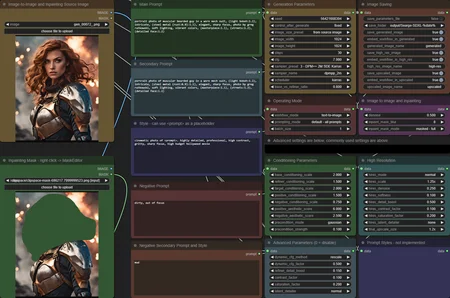
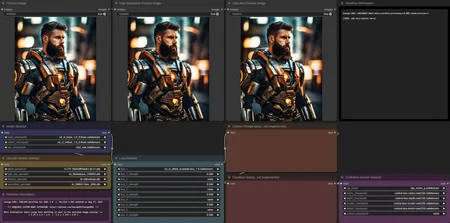
Some custom nodes for ComfyUI and an easy to use SDXL 1.0 workflow. A detailed description can be found on the project repository site, here: Github Link
Installing
Detailed install instruction can be found here: Link to the readme file on Github
Usage Notes
The workflow is in the workflow folder, please load it from the JSON files to make sure you are using the latest versions of it.
The images in the examples folder have workflows embedded.
How to use this workflow
Here is an amazing Youtube video that Nerdy Rodent made about version 3.4 of the workflow. Many things have changed in v4.0 but the basics still apply. And while you are watching it, don't forget to subscribe to the channel.
Link to the Nerdy Rodent video
Updates
What's new in v4.3.2?
This is a minor update to make the workflow and custom node extension compatible with the latest changes in ComfyUI.
What's new in v4.3.1?
This is a minor update to make the workflow and custom node extension compatible with the latest changes in ComfyUI.
What's new in v4.3?
This update added support for FreeU v2 in addition to FreeU v1.
New Features
Support for FreeU v2 has been added and is included in the v4.3 workflow
Added more presets for FreeU and a selector to switch between v1 and v2
Updated the example images to embed the v4.3 workflow
What's new in v4.2?
This update contains bug fixes that address issues found after v4.0 was released.
Bug Fixes
A recent change in ComfyUI conflicted with my implementation of inpainting, this is now fixed and inpainting should
work again
New Features
Support for FreeU has been added and is included in the v4.2 workflow
Note: the images in the example folder are still embedding v4.1 of the workflow, to use FreeU load the new
workflow from the.jsonfile in theworkflowfolder
What's new in v4.1?
This update contains bug fixes that address issues found after v4.0 was released.
Bug Fixes
The high resolution latent detailer was not properly set up in the processing pipeline and did nothing
The debug printer node was broken - I didn't notice that because it was not connected in any of the v4.0 workflows
A bug related to generating with batch sizes larger than 1 has been fixed, it's now working properly
Other Changes
The images in the
examplesfolder have been updated to embed the v4.1 workflow
What's new in v4.0?
A complete re-write of the custom node extension and the SDXL workflow
Highly optimized processing pipeline, now up to 20% faster than in older workflow versions
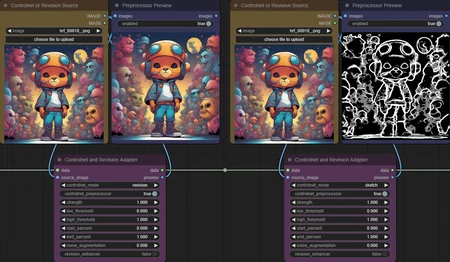
Support for Controlnet and Revision, up to 5 can be applied together
Multi-LoRA support with up to 5 LoRA's at once
Better Image Quality in many cases, some improvements to the SDXL sampler were made that can produce images
with higher qualityImproved High Resolution modes that replace the old "Hi-Res Fix" and should generate better images
... many more things, too many to mention them all here
Description
Version 3.999 - Release Candidate for v4.0
FAQ
Comments (42)
The only additions I'd still like to see implemented in your workflow would be an optional Face Detailer and an optional Hand Detailer. Those two items so often need to be cleaned up that I've just added the two directly into my current workflow.
Right now the goal for v4.0 is to provide a stable foundation for future additions. And apart from the new controlnet, revisions, and multi-lora support, the first priority is to finish implementing the remaining missing features that were present in v3.4
Other additions like face detailer are on my "maybe-todo" list for the future. I'll either integrate advanced features like that directly in the workflow or make it really easy for anyone to hook into the workflow and add more features to it.
@searge I appreciate what you're doing. When I first looked at your workflow, I was completely lost. But as I've used it and traced through it, I've been able to add my own additions the flow that have been really helpful. WIth your new additions, I can remove some of the duct taped changes I had made for ControlNet and Loras. Guess I'll keep my rigged Face and Hand Detailers for now. :)
@97Buckeye out of curiosity, which specific detailers are you using and how are you adding them to this version's workflow?
A face detailer would be a blast, hope to see it in future version!
I can use Sergae 3.4, but when trying this version (with all the models properly installed and filenames selected in UI), I get this error... thoughts?
Error
===
Error occurred when executing SeargeMagicBoxDev:
get_additional_models() takes 2 positional arguments but 3 were given
File "C:\AI\ComfyUI_windows_portable\ComfyUI\execution.py", line 151, in recursive_execute
output_data, output_ui = get_output_data(obj, input_data_all)
File "C:\AI\ComfyUI_windows_portable\ComfyUI\execution.py", line 81, in get_output_data
return_values = map_node_over_list(obj, input_data_all, obj.FUNCTION, allow_interrupt=True)
File "C:\AI\ComfyUI_windows_portable\ComfyUI\execution.py", line 74, in map_node_over_list
results.append(getattr(obj, func)(**slice_dict(input_data_all, i)))
File "C:\AI\ComfyUI_windows_portable\ComfyUI\custom_nodes\SeargeSDXL-Test\modules\magic_box.py", line 259, in process
(data, stage_result) = self.run_stage(stage, data, stage_input)
File "C:\AI\ComfyUI_windows_portable\ComfyUI\custom_nodes\SeargeSDXL-Test\modules\magic_box.py", line 238, in run_stage
(data, stage_result) = stage_processor.process(data, stage_input)
File "C:\AI\ComfyUI_windows_portable\ComfyUI\custom_nodes\SeargeSDXL-Test\modules\stage_sampling.py", line 126, in process
latent = sampler(base_model, base_positive, base_negative, latent, seed, steps, cfg,
File "C:\AI\ComfyUI_windows_portable\ComfyUI\custom_nodes\SeargeSDXL-Test\modules\node_wrapper.py", line 92, in sdxl_sampler
result = sdxl_ksampler(base_model, refiner_model, noise_seed, base_steps, refiner_steps, cfg, sampler_name,
File "C:\AI\ComfyUI_windows_portable\ComfyUI\custom_nodes\SeargeSDXL-Test\modules\custom_sdxl_ksampler.py", line 304, in sdxl_ksampler
samples = sdxl_sample(base_model, refiner_model, noise, base_steps, refiner_steps, cfg, sampler_name, scheduler,
File "C:\AI\ComfyUI_windows_portable\ComfyUI\custom_nodes\SeargeSDXL-Test\modules\custom_sdxl_ksampler.py", line 127, in sdxl_sample
base_models, inference_memory = comfy.sample.get_additional_models(base_positive, base_negative, base_model.model_dtype())
You are not using the latest version of ComfyUI. If you update it, that should solve this issue
Thanks for the super fast reply. I was using cu118. Now I downloaded cu121 with python 3.11, ran it, and get the same error.
I sounds like you updated some python dependencies, but not ComfyUI. I'm also not sure if updating from cu118 to cu121 and python 3.11 is a good idea unless that's what the ComfyUI update scripts do for you.
If I remember it correctly, Comfy has a update folder with a .bat file to update it.
@searge that worked ! thank you
I got it running, but when I try to use any lora even after including the prompt I get this error... tried it with 4-5 different loras:
lora key not loaded lora_unet_up_blocks_3_attentions_2_transformer_blocks_0_attn1_to_k.alpha
lora key not loaded lora_unet_up_blocks_3_attentions_2_transformer_blocks_0_attn1_to_k.lora_down.weight
lora key not loaded lora_unet_up_blocks_3_attentions_2_transformer_blocks_0_attn1_to_k.lora_up.weight
lora key not loaded lora_unet_up_blocks_3_attentions_2_transformer_blocks_0_attn1_to_out_0.alpha
lora key not loaded lora_unet_up_blocks_3_attentions_2_transformer_blocks_0_attn1_to_out_0.lora_down.weight
lora key not loaded lora_unet_up_blocks_3_attentions_2_transformer_blocks_0_attn1_to_out_0.lora_up.weight
lora key not loaded lora_unet_up_blocks_3_attentions_2_transformer_blocks_0_attn1_to_q.alpha
lora key not loaded lora_unet_up_blocks_3_attentions_2_transformer_blocks_0_attn1_to_q.lora_down.weight
lora key not loaded lora_unet_up_blocks_3_attentions_2_transformer_blocks_0_attn1_to_q.lora_up.weight
lora key not loaded lora_unet_up_blocks_3_attentions_2_transformer_blocks_0_attn1_to_v.alpha
lora key not loaded lora_unet_up_blocks_3_attentions_2_transformer_blocks_0_attn1_to_v.lora_down.weight
never mind I figured out what was the problem :) I wasn't using the SDXL loras
I really love this workflow a lot, thanks for that! Could you by chance make it so multiple loras can be used? Thanks!
In the public test version 3.991 up to 5 loras can be used by default.
You need a custom module that will decode your "data" pipe into the various settings you have stored there. I need this so I can insert my own modules before returning the results back into your flow for additional processing. For example, I would like to be able to pull the image out of your flow before it hits the HiRes processing so that I can run a Face Detailer and Hand Detailer process on it. Then, after fixing the details, I would like to insert the image BACK into your flow for the HiRes and Upscale processing.
And in the same respect, you need another module that will take all the existing and modified details and turn them BACK into your data pipeline. Much like how the ImpackPack has a ToDetailerPipe and a FromDetailerPipe module. Without these type of modules, you're really negating the whole customization potential of the ComfyUI interface.
Thank you for reading.
The is indeed planned for the future. But right now the focus is to finish the v4.0 update and get it all working properly. Once the workflow is complete and the missing features are implemented I'll start looking into the best way to let anyone customize it and hook into the data processing pipeline.
The HiRes option in your most recent workflow doesn't seem to upsize the image at all. I've chosen 1.5x for both my hires_scale and final_upscale_size, but the hires image is still the same size as my initial generated image.
Do you have the upscale models installed and selected? If the upscalers are not set up completely, they of course won't be able to do any upscaling.
@searge You're 100% correct. I missed that entry for the high_res_upscaler. Thank you.
A related question... In what folder do I need to put my detail_processor for your workflow to be able to find it for the drop-list?
How to modify the save image file to include seed number? What should I enter in "generated_image_name" field?
Is it possible to use Adetailer with this pipeline? If not can you add Adetailer as a custom node ability?
I plan to look into adetailer in the future, after the v4.0 release is done and published. I've not looked into it so far, so I can't really help much with tips how to integrate it. I need to first check it to understand how it works and how it would fit into the processing pipeline.
V3.991 Is awesome! The best workflow for ComfyUI gets even better. Everything I added to your 3.4 has been added with a much better interface. Only thing I am wondering is how to set up/use the ControlNet Mode: Custom, to add other controlnets beyond the 5 preloaded from StabilityAI?
I saw 97Buckeyes question about a decoding module to be able to add custom workflow bits to whatever step, and that it would be after a stable 4.0 release, that could be used to do this but I saw that Custom mode and wondered if that was an option available for the controlnets to do something similar already. Thanks.
@CFSStudios Custom controlnet could be openpose for example. I don't have a pre-processor for it right now, but if you feed the image of a stick figure it should work
thx for your work, very nice workflow !
Glad to hear that you like it
Is there an option to enable the Upscale function? For the life of me, I can't get upscale to work. Hires works fine. Thanks for this excellent workflow!
It's the final_scale_size in the High Resolution settings and as long as you have the primary and secondary upscale models installed and selected correctly, it should work
@searge After restarting ComfyUI a second time, it started working. Thanks!
@Searge
does not work with dreamshaperXL10_alpha2Xl10.safetensors
Error occurred when executing SeargeMagicBox: Expected all tensors to be on the same device, but found at least two devices, cuda:0 and cpu! File "g:\Python\ComfyUI_windows_portable\ComfyUI\execution.py", line 151, in recursive_execute output_data, output_ui = get_output_data(obj, input_data_all) File "g:\Python\ComfyUI_windows_portable\ComfyUI\execution.py", line 81, in get_output_data return_values = map_node_over_list(obj, input_data_all, obj.FUNCTION, allow_interrupt=True) File "g:\Python\ComfyUI_windows_portable\ComfyUI\execution.py", line 74, in map_node_over_list results.append(getattr(obj, func)(**slice_dict(input_data_all, i))) File "G:\Python\ComfyUI_windows_portable\ComfyUI\custom_nodes\SeargeSDXL\modules\magic_box.py", line 269, in process (data, stage_result) = self.run_stage(stage, data, stage_input) File "G:\Python\ComfyUI_windows_portable\ComfyUI\custom_nodes\SeargeSDXL\modules\magic_box.py", line 248, in run_stage (data, stage_result) = stage_processor.process(data, stage_input) File "G:\Python\ComfyUI_windows_portable\ComfyUI\custom_nodes\SeargeSDXL\modules\stage_latent_detailer.py", line 105, in process latent["samples"] = new_samples noise_mask + old_samples (1.0 - noise_mask)
any idea?
I can't reproduce it. Are you using the latest version of ComfyUI? And did you try to restart ComfyUI to see if the problem still occurs?
I was able to reproduce it now and replied to a reported issue on Github about it. If you used the install script I provide, you should be able to use that to get the latest update on the test branch where it should be fixed.
BY FAR the best workflow in terms of usability, results, and optimization. LOVE IT
Thanks, glad to hear that you like it
Any idea what might be happening here
Error occurred when executing SeargeMagicBox: 'NoneType' object has no attribute 'decode' File "D:\ComfyUI_windows_portable_nvidia_cu118_or_cpu\ComfyUI_windows_portable\ComfyUI\execution.py", line 151, in recursive_execute output_data, output_ui = get_output_data(obj, input_data_all) File "D:\ComfyUI_windows_portable_nvidia_cu118_or_cpu\ComfyUI_windows_portable\ComfyUI\execution.py", line 81, in get_output_data return_values = map_node_over_list(obj, input_data_all, obj.FUNCTION, allow_interrupt=True) File "D:\ComfyUI_windows_portable_nvidia_cu118_or_cpu\ComfyUI_windows_portable\ComfyUI\execution.py", line 74, in map_node_over_list results.append(getattr(obj, func)(**slice_dict(input_data_all, i))) File "D:\ComfyUI_windows_portable_nvidia_cu118_or_cpu\ComfyUI_windows_portable\ComfyUI\custom_nodes\SeargeSDXL\modules\magic_box.py", line 269, in process (data, stage_result) = self.run_stage(stage, data, stage_input) File "D:\ComfyUI_windows_portable_nvidia_cu118_or_cpu\ComfyUI_windows_portable\ComfyUI\custom_nodes\SeargeSDXL\modules\magic_box.py", line 248, in run_stage (data, stage_result) = stage_processor.process(data, stage_input) File "D:\ComfyUI_windows_portable_nvidia_cu118_or_cpu\ComfyUI_windows_portable\ComfyUI\custom_nodes\SeargeSDXL\modules\stage_vae_decode_sampled.py", line 77, in process image = NodeWrapper.vae_decoder.decode(vae_model, latent)[0] File "D:\ComfyUI_windows_portable_nvidia_cu118_or_cpu\ComfyUI_windows_portable\ComfyUI\nodes.py", line 242, in decode return (vae.decode(samples["samples"]), )