








Since CivitAI is going down THE DRAIN
I won't be updating this workflow here anymore, and I won't post any more models from now on.
I hope to find interest from people to keep updating this. Thanks everyone!
Keep following this workflow development and more on my new Discord server: https://discord.gg/EwKE8KBDqD
Get new releases from GitHub: https://github.com/diodiogod/Comfy-Inpainting-Works
Now there is a "simple/compact" version that I will update together with the normal one.
Read "about this model" on the right panel please!! I recommend reading v6.0, v5.0, v5.1 as well.
This is a proper inpainting with alimama control-net + Flux Fill + Flux Tools (Depth an Canny) support from V7 and above.
I try my best to avoid hiding the workflow flow, while balancing keeping it clean and user-friendly.
This workflow will make sure your image is composited in the end to prevent VAE degradation AND from v5 will make sure your image is a multiple of 8 (so it doesn't get resized by ksampler) at the same time it avoids resizing at all (unless you want to) since resizing will degrade the original image as well.
For inpainting that leaves a face and changes the whole background and character, Alimama works way better. Alimama also works better for LoRas. Alimama is terrible at outpainting and Flux Fill is amazing. You should test both. My comfyUI OOM or crashes when switching from one to the other IF my system memory page file is not large enough. With a pagefile of 50GB I can freely switch from Flux Fill to normal Flux Dev now.
It does use a lot of custom nodes to make life easier and workflow cleaner. Use manager to install the missing ones.
Supports loading of an external mask (need to match the image size) or doing the inpainting within the right-click "Open MaskEditor" on the image itself.
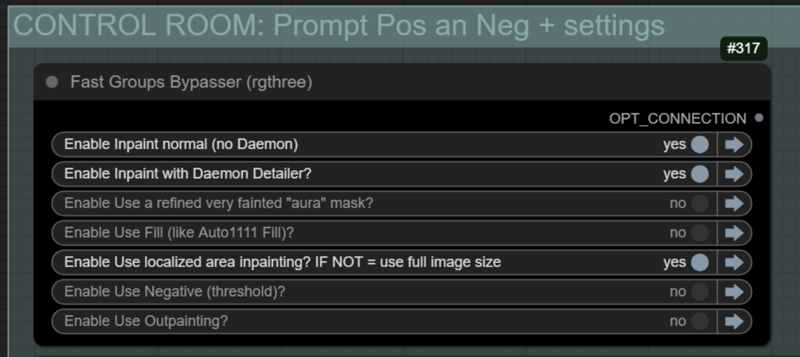
Supports FILL -the normal fill, like Auto1111- (use FastBypasser - black node)
Supports area inpaiting x full image inpaiting (use FastBypasser - black node)
Supports variable denoise (Change denoise on the CONTROL ROOM)
Supports Negative (use FastBypasser - black node)
Proper composite so no VAE degradation
Support for Flux Tools (Depth an Canny) with Alimama
I added LoRa support and Daemon Detailer support (both are optional)
Description
v7.0 Video: https://youtu.be/cPg49GoHpSI
🔹 New: Flux Tools LoRA Depth and Canny "control-net" support
(Works with Alimama — ❗❗ it will NOT work Flux Fill ❗❗
❗ a) Add new group for Loading each LoRA model.
• They should be loaded all the time and will be dynamically used.
• You can control each LoRA strength — recommended: 0.75
❗ b) New toggles on the control-room group:
• Choose between Depth OR Canny (not both)
❗ c) Depth and LoRA groups for LoRA InstructPixToPixConditioning:
• Allows you to choose when Depth or Canny will start and stop
• Conditioning falls back to standard Alimama inpainting
d) New group for preprocessing the image for Depth or Canny
e) Canny or Depth reference image for Outpainting
• Depth: fast-fill in a more complex way
• Canny: pads outpainting with black
f) Canny or Depth works with localized area option
🔹🔹 New: Aura Mask implemented back on the COMPACT workflow with convenient easy to use toggle and sliders.
🔹🔹🔹 A bunch of smaller Changes:
1. Fixed old to new “✂️ Inpaint Crop (Improved)”
2. LoAd Loras: now using "Lora Stacker (LoraManager)" node
→ It’s better and everyone should use LoraManager — fantastic custom node
3. Fixed: “GrowMask” 5 px not connected on the outpainting fast-fill for better blending
4. Added a slider for “Image Resize Resolution”
5. Nodes cleanup:
→ Replaced some “crystools” switch nodes with “easy-use” switches
→ Reducing dependency on custom nodes (some “crystools” may remain)
→ Same gradual cleanup plan for “Logic” nodes
→ Updated control-room logic nodes to “easy-use”
6. “Logic operator” > “easy-use” for negative thresholding
→ Uses index instead of bool
7. “Logic operator” > “easy-use” for localized area inpainting
→ Uses index instead of bool
8. “✂️ Inpaint Stitch (Improved)” moved outside localized area inpainting group (not on COMPACT)
→ It is now auto-muted by a muter
9. “Get LoRAs names and process it do Get metadata” group updated:
→ Evaluates if LoRAs are in use in a different way
→ Adds clean LoRA names to the positive prompt with 🖌️ and 🎯 for full LoRA syntax
10. Fixed saving negative prompt on metadata: will first save the retrieved original negative prompt and if that is OFF, it will only save inpainting negative IF using thresholding.
11. It will always evaluate if Positive is empty (if retrieving the original positive prompt fails) and if it is, it uses the inpainting prompt to save in the metadata.
12. Fixed: for Compact: "SD Prompt Reader" won't error when retrieving loaded image original metadata that used SAM Detector to make a mask.
FAQ
Comments (17)
Big update for v7 and v7c.
Video for Compact
Video for Expanded
Added LoRa control with Flux Tools which barely increases VRAM and it's very effective for controlling inpaint.
PULID with face inpaint possible ?
I don't see why not. I didn't try it because PULID didn't look very impressive to me with Flux. I could look into it.
Let me ask you something, what comfyui node have you tested for Pulid? I see this one: GitHub - lldacing/ComfyUI_PuLID_Flux_ll
And this one alos looks like a nice option: GitHub - GraftingRayman/ComfyUI-PuLID-Flux-GR: PuLID for Flux
Do you have any experience with them?
@diogod this one >> GitHub - lldacing/ComfyUI_PuLID_Flux_ll
@noorhamadani I've just tested it, and it works perfectly, you can inpaint a face and even add that person lora on top of it (using Alimama, I have not tested with Flux Fill, probably won't work). Just hijack the model noodle at some point, like this for example: https://civitai.com/images/71603667
Only problem I encountered was that after using one face, I had to reboot to use another because even loading a different image it was still using the old face. From what i see it's a bug on Pulid
Also remember to right click on the PulID node and reject UE links
Yeah I've just tested and It doesn't work with Flux Fill, a LoRa has more effect that PulID with Flux Fill (and LoRas sucks with Flux Fill)... So just stick with Alimama. Alimama with depth is fantastic.
@diogod thanks for putting effort.. let me try this .
@noorhamadani The pulid version II node had no problem to change faces or disactivating it. The others did.
latest v7 (non compact) seems broken since comfyui updates?
Yes. it is... comfyui update is so f. up. Things disconnecting on queue... nodes getting crazy... update is completely broken. I don't even know what to do at this stage... better to downgrade and wait they solve their sht
I'll have to downgrade, I'll check the better commit to downgrade and suggest it to you guys here. But I won't update the workflow at this stage. It will be a waste of my time.
After I analyzed it again on the updated version, I think it's fixable... I'll probably try to fix it tomorrow. I'll have to add some unnecessary nodes because some "Anything Everywhere" are disconnecting by simply queuing with some groups bypassed. But I can fix it.
@tazztone try v7.1 see if everything is working now for you!
@diogod tried v7.1 but still broken
Exception Type: Loading aborted due to error reloading workflow data
- Exception Message: TypeError: Cannot read properties of undefined (reading 'type')
## Stack Trace
```
TypeError: Cannot read properties of undefined (reading 'type')
at http://127.0.0.1:8188/extensions/rgthree-comfy/reroute.js:301:87
at Array.map (<anonymous>)
at RerouteNode.onConnectionsChange (http://127.0.0.1:8188/extensions/rgthree-comfy/reroute.js:301:57)
at RerouteNode.configure (http://127.0.0.1:8188/assets/index-CJpGM-n7.js:116141:35)
at RerouteNode.configure (http://127.0.0.1:8188/extensions/rgthree-comfy/base_node.js:75:15)
at RerouteNode.configure (http://127.0.0.1:8188/extensions/rgthree-comfy/reroute.js:283:15)
at LGraph.configure (http://127.0.0.1:8188/assets/index-CJpGM-n7.js:125438:16)
at LGraph.configure (http://127.0.0.1:8188/assets/index-CJpGM-n7.js:256920:26)
at LGraph.configure (http://127.0.0.1:8188/extensions/comfyui-custom-scripts/js/reroutePrimitive.js:14:29)
at ComfyApp.loadGraphData (http://127.0.0.1:8188/assets/index-CJpGM-n7.js:257170:18)
i fixed it by changing reroute.js in rgthree node https://github.com/rgthree/rgthree-comfy/issues/484
works now
@tazztone ComfyUI is such a mess with these updates on the frontend... they don't care they are breaking a lot of custom nodes apparently. I'm glad you found a solution.