


kegant
workflows (comfyui):
✨ v4 (NAI) ✨ https://civarchive.com/models/1856037?modelVersionId=2100596
✨ v4 (CHROMA) ✨ https://civarchive.com/models/2300447?modelVersionId=2588510
✨ v1-v3: ✨ https://civarchive.com/models/861472?modelVersionId=963859
if you aren't using comfyui, GL!
V4 CHROMA UPDATE: Due to popular request, I have trained the model Chroma upon the v4 dataset. I don't know this model as well as SDXL but I figured I'd release it for public consumption either way. It is drastically different than the previous versions of kegant as this is not an AIO but a raw UNET, which means you'll need the clips associated with flux/chroma. The clip locations of the ones I'm using can be found in the workflow posted above.
V4 NAI UPDATE: V4 is a lot of the V3 dataset, although some images were pruned, but most importantly it is a switch from pony to noobai-vpred as the base model. As such, follow conventions appropriate to how noobai was trained with proper danbooru tags. For help, view some of my published images for tagging styles that I usually put at the start of my prompts. The main reason for comfyui usage is to tone down the saturation and contrast of vpred. While the showcase images are all at full denoise, it is highly recommended to turn the main ksampler down to .8 denoise. The reason for this is due to the way the denoising patterns work on vpred models is much different than eps (or epsilon models). This version is not perfect and likely will need a revision as some tags like blur and depth of field are still a bit of an issue. Use things like 'blur' or 'depth of field' in negatives if it keeps going too strong for your tastes and it should fix it up right for you. If you're stuck using the generator and can't make manual sampler changes such as what I'm doing in the attached comfyui workflow for V4, then putting things like 'red_theme' AND 'blue_theme' in negatives can help, but honestly, if you're using this checkpoint, you probably should just use the attached workflow and see how I am using it.
With that said, none of the showcased images were photoshopped or editted post comfy, nor i2i'd, but I AM using a face detailer. This checkpoint struggles harder than the previous pony ones with far away shots, such as 'full_body' or 'wide_angle' for faces, so a face detailer is highly recommended for this version. There is a face detailer attached to the v4 workflow. Its really not hard to set up and they run faster than a full latent anyway and very much so improve faces from far away. I'm using this guys guide here (and it works great):
https://www.youtube.com/watch?v=gDBeKIa4sHA
V3 UPDATE: V3 is mostly a monsters update, with a few cameos but more importantly it is a finer grain control over artistic elements. I have done some obscene things with this version such as manually editting a lot of the source images by hand in gimp to remove as many jpeg artifacts as humanly possible. Watermarks are non existent and aren't necessary to negatively tag, plants and fauna issue has been rectified, and hopefully males are easier to generate as I added a lot. To see the full tag list of the images I've included in this update its under 'about the version'. Many images in v3 have been tagged with very powerful monikers, namely 'film grain, halftone effect, dark fantasy, muted colors, sepia'. You may see me frequently use them because the source images my prompts are pulling from contained those elements within the source. If you don't wish to see any of those and standard anime, use those in negatives. The style is so strong in some cases that it may bleed if no prompt is issued. Some weapons were added, namely swords, guts's 'massive sword', and katana work (from Cis). Generating images with weapons is always going to be painful no matter how good you are at prompting due to SDXL's limitations, but hopefully some of those added images of katanas and swords will help guide the model into more accurate poses with them.
V2 UPDATE: V2 is the first version I have trained and influenced myself manually. It is still mostly the same stack as V1, however some weights have been lowered and the images I have added and trained fixed a few issues V1 was having. V2 focuses more upon desert style lighting and effects, as well as changed the artistic style slightly for a bit smaller eyes and a bit smaller lips. The lighting has only gotten more ridiculous in this version and I feel if I try to do much more with lighting the whole thing will collapse. I guess we can call this the kegant dune update.
kegant PDXL is a pony based model focused on mutating pony to a more retro and gritty appearance while focusing heavily upon lighting effects.
It primarily focuses around the baked version of 5 separate loras and 1 embedding into the ponyv6 model. These models are:
https://civarchive.com/models/366990/pony-custom-styles?modelVersionId=454703
https://civarchive.com/models/341353/expressiveh-hentai-lora-style?modelVersionId=382152
https://civarchive.com/models/550871/bss-styles-for-pony?modelVersionId=669776
https://civarchive.com/models/122359/detail-tweaker-xl?modelVersionId=135867
https://civarchive.com/models/118418/negativexl?modelVersionId=134583
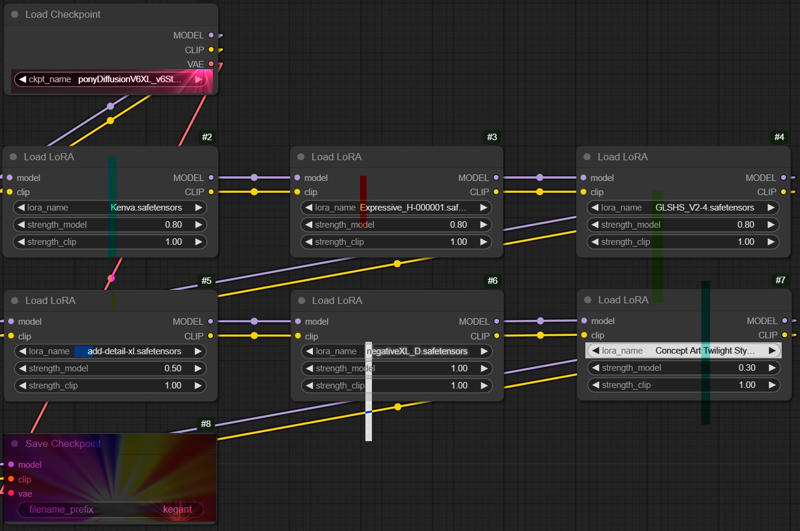 If you can't see the image the following settings were used during the bake:
Kenva: .8
ExpressiveH: .8
GLSHS: .8
add_detail: .5
negativeXL_D: 1
Concept Art Twilight: .3
Please note that this model has biases in generating females, and prefers to keep subjects not too far away, and not too close. Producing full body may be a little difficult but keep in mind if you specify things like 'shoes', 'boots' or 'feet'/'toes', it will much more be inclined to give you those full body examples you desire. Remember -- This is a pony based checkpoint. It much prefers danbooru style tagging instead of plain english. Sometimes, less is more. Overloading a prompt with too many tags makes it harder for it to understand what to do. If full body is important to you, tag that at the start of your prompt as the higher up in the prompt something is, the more importance it gives it. You can also weight it manually which will help further. I leave all my prompts open on this checkpoint if you are seeking guidance on how to use it.
With that said, this checkpoint isnt as flexible as the goat (aka v6), however what you pay for in flexibility, you gain the additional lighting, artstyle, and speed of generation. To gen the same stack of images with all of the associated loras baked in is about 3 times the speed vs if you did it with v6 and the entire stack, which was the primary focus of this checkpoint.
✨ Please Share Your Cool Creations Below! ✨
Thank you all so much for trying out my first checkpoint.
Please refer to Pony V6 model page for more detailed prompting guidelines.
☄️ Generation Recommendations
* All preview images were generated with no LORA's except for the final two with Haruko Haruhara and Lain as pony has no concept of these characters and they are highly stylized characters that would be very difficult to prompt alone. No other resources were used, just pure text to image with a second pass of latent upscaling only (no pixel upscaling was involved).
Most sample images were generated with ancestral samplers of these types for the initial pass:
Sampler: Euler A / DPM++A
Schedule Type: Karras
Steps: 20 - 30
CFG: 2 - 6
Clip Skip: 2
Denoise: 1
The latent upscaler used was very similar to above, usually opting for a Euler variant as they are typically faster to produce images.
Sampler: Euler A / DPM++A
Schedule Type: Karras
Steps: 15
CFG: 2 - 6
Denoise - 0.5
Upscale By: 1.5-2.0
For some tips on generation, the lower your CFG on the latent upscaler (and steps), the more 'painted' look its going to have, with softer less defined features which creates the 'mist' look in some of the images. Vice versa, the more cfg added, the more 'baked' and shiny it looks. 3.0 cfg is perhaps the closest medium between all the loras that emphasizes each of them the best. For the Harley Quinn image attached, I went nuts with a 10cfg setting to show as well what that looks like, however its highly abstract.
PLEASE look at my attached workflow as it details how you can manipulate kegant to the fullest whether you prefer the sleak glossy design, or the softer extreme retro vibes with film grain effects.
One last note - this checkpoint tends to add 'jpeg artifacts' and various fauna such as 'plants' and 'flowers'. Also it tends to add 'cyberpunk' elements. Add those to the negative prompt if you care to not see those, and it should handle removing them fairly well if so desired. For male work, specifying '1girl' in negative extremely helps it, although the checkpoint as previously mention highly prefers females.
Description
FAQ
Comments (13)
Nothing makes manly characters as hard as Kegant!
V2 has lots of cool new shit and is less "rigid" then V1. Kegant is still my favorite model by far. For people new to kegant. Try low CFG like 1.8-2.5 you can go higher of course. Euler, Dpm, Hyper all work well. V2 works really well with loras, don't be afraid to experiment with lightning loras, realism loras or armor loras. Kegant is good with cyborg, retro, futuristic and adding more of that can make it crazy in a good way. Biggest drawback as I see it personally: its very hard to make furry/anthro without human hair. Adding expressive and glshs loras and reducing them can help with this (around -50%) but some style is lost of course in the process.
Don't delay, try today!
You won't regret, it's simply amazing
This is an amazing model that will do almost everything you want with minimal need. Also supports most LoRA's, but output may vary on how harsh they go on style thus overloading the model. 11/10 running this as main model.
Kegant belongs on every checkpoint list and has become a staple of creative and impressionable art styles. Version 2 improves upon the first, in every aspect - more detail, better lighting and shadows, new hairstyles, faces, scenes and themes. You can't go wrong with Kegant.
some tags to be careful of in v2, 'glowing eyes' and 'detailed eyes'. i advise to not use these. it is due to how the training data was tagged specifically with cybernetic and close up eye shots and the model doesn't fully understand sometimes the difference and pairs them together. you will see me frequently using 'glowing eyes' in negative prompt with v2. if your colors are going haywire especially in the eyes i recommend putting 'glowing eyes' in negative. its unfortunate and hopefully ill have a solution to this issue in v3.
Muito foda;^ gostei cara
Super looking forward to have it as on-site generation option!
while it would be cool to see, given civitais current system for what checkpoints they allow to be genned on site is a losing battle. if you wish to see this on site, voice your concerns to civitai. i have no control over it, and its a popularity contest currently.
seems you got your wish! i created an image using just civitai from the checkpoint!
Beautiful model. It just sometimes behaves a bit unruly 😅. But what matters is the result, and it creates amazing pictures 😍✨
Saw a lora that used this model and was impressed, the colors looked great. I love checkpoints that do interesting things with the lighting like this one.
This is my favorite checkpoint so far. Looks beautiful and the example workflow is very handy. Like it says in the description it has a female tendancy which can be a bit of a challenge with male characters. To balance that a bit better would be on my wishlist for the next version. Strongly recommended!