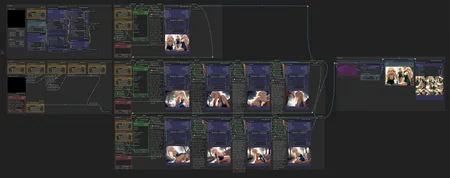
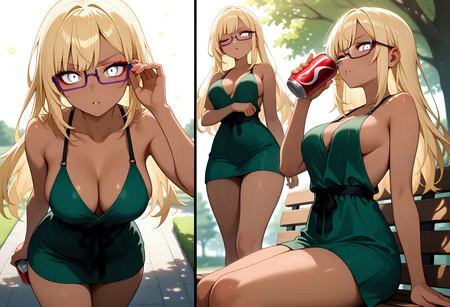








Note: the last version of the workflow has been greatly simplified to use the ComfyUI sub-workflow system. In consequence, it has less features than the previous ones, but is more stable. I will try to re-include these features over time.
Introduction
Here's my Scene Composer worklfow for ComfyUI.
The main goal is to create short 5-panels stories in just one queue. For that, it chose randomly parts of the prompt that are used for generation, like:
Character (e.g. hair, eyes, attitude)
Clothes & Underwear
Sexual position and action
To keep consistency, it also keeps certain parts of the prompt to inject it across all scenes (like the environment, the main character and their clothes). You can read my Overview & Usecases article for more explanations!
If you're looking for a simpler workflow, check my Main ComfyUI Workflow. I also suggest to have a look at my Prompt Notebook to better understand how I structure tags.
If you have any comment or request, please feel free to share!
Features
Note: features in gray are in progress and need to migrate to v1.x
Random procedural generation of prompts
Main character (e.g. body, hair, eyes, tattos, piercing, horns, tail,…)
Attire (e.g. clothes, swimsuit, underwear, uniform, accessories.…)
Environment (e.g. place, daytime, nighttime, weather,…)
Action in scene (e.g. starting scene, sexual encounter, ending scene,…)
Predefined personas (demon, goblin, furry, slime, etc)
One place to control all scenes parameters
Seed, steps, CFG, image size, etc.
HighRes-Fix (2nd Pass)
LoRA stacker
Keep control over scenes
Re-generate one or many elements by changing its seed
Re-generate one or many scene by changing its seed
Overwrite and compose the final prompt with variables
Scenes consistency
Tags update dynamically according to the scene (e.g.
wetis added if there's rain)Attire state stay across scenes (if character lose clothes, it stay lost)
If clothes are torned, they stay so
Bondage ropes stay on character, with clothes
Output
Upscaling, pre-processing
Images scene merged into one
CivitAI metadatas & workflow embedded
Setup
Simply import the workflow.json file attached to this article in ComfyUI. You can also drag-and-drop the workflow image directly in the interface.
I personally don't have a very powerful computer. For people in the same situation, check my environment on my Main ComfyUI Workflow article, I explain how I rent and setup machines on remote.
Models
In theory, the workflow can work with any models that use Danbooru-like tags. I personally use Illustrious/NoobAI/Pony-based models and mix with some anime-oriented LoRAs. Have a look at my last images metadatas if you're curious!
Custom nodes
To achieve this workflow, I developed the comfyui-scene-composer extension. You can use as standalone in your own workflow. If you have trouble setting things up, check the repository.
Description
V1.1 is out!
Handle 3 different scenes and can generate up to 9 images.
Include a lot of variables and improve consistency.
Easy access to different seed to regenerate single components or whole scene!
Merging the images together is not available in this version, but the sure will be back
Image recolorization is available in output group
FAQ
Comments (54)
Hello, the new version doesn't work here, it tells me that the following nodes are missing even after I've updated everything
expression
sfw
negative
CleanupPrompt
ApplyRules
intercourse
camera
preliminaries
environment
protagonists
attitude
eyes
hair
positive
character
sexual_attributes
fluids
style
dynamic
body
clothes
Hi! Have you tried to run it with the workflow, or did you installed the custom nodes in your custom workflow ? Do you have an error in the log ? Try to update your python package after update. Also, try to switch the custom nodes to the "nightly" version. Let me know if any of this work
@taches sorry for the delay in replying, I'm using your workflow, here's the error I'm getting when I try to update the node: Error message occurred while importing the '🎞️ Scene Composer' module.
Traceback (most recent call last):
File "G:\CONFYUI_NEW\ComfyUI\nodes.py", line 2131, in load_custom_node
module_spec.loader.exec_module(module)
File "<frozen importlib._bootstrap_external>", line 991, in exec_module
File "<frozen importlib._bootstrap_external>", line 1129, in get_code
File "<frozen importlib._bootstrap_external>", line 1059, in source_to_code
File "<frozen importlib._bootstrap>", line 488, in callwith_frames_removed
File "G:\CONFYUI_NEW\ComfyUI\custom_nodes\comfyui-scene-composer\__init__.py", line 40
>>>>>>> 39bc22e213d24efb52ac0a836211f84565c3f963
^
SyntaxError: invalid decimal literal
@AI_Waifus_ No problem. I don't really receive notifications for messages from my side, weird. I don't know where your error come from, I don't have it with the workflow. the __init__.py have less than 40 lines normally, so I can't target where the error come from. Have you changed anything in the workflow or in the custom nodes ? Does your ComfyUI version is at the last update ?
Olá saudações do Brasil, excelente workflow!! você teria uma versão fazer cenas não NSFW ? como correr, nadar, dirigir um carro etc.
Love the workflow! If you're like me and like a specific clothing style, hair-style etc. you can add it to the variables by editing the json files found in [ComfyUI folder]\custom_nodes\comfyui-scene-composer\config.default\nodes\character. I use vscode. :)
Thank you for your comment! I think I will add a little tutorial to handle the config files to allow more customisation :)
It's a great workflow, but I'm having a problem.
ver 1.1 changes the style of the first and second to fourth pictures of scene2,3.
I have tried to fix it on my own but to no avail.
If anyone has more information, I would appreciate your advice on how to fix it.
Maybe it's because of the dynamic keywords. You can try to diable them. Try to disable LoRAs if you have any or switch checkpoints to see if the problem persist
taches Hi, I got the same problem here, the style changes in the first picture for each scene, but 2nd 3rd 4th are staying in the same style and enviroment.
(Even the showcase picture in this v1.1 page shows that problem, the girl's style is different if u check scene2's 1st and 2nd picture)
I‘m not a pro, but from my trying, it's absolutely not dynamic keywords, loras or checkpoints' issus; more likely something is wrong in seed, especially the “ADD node” for the first ksample in each scene.
Hope you can fix it, ty.
semiramisa27215 thank you for your inputs and insights, I'll look into it!
Hello, if you want to use character lora with this workflow, How do you keep the output images consistent? For example I want all the prompts to be made of the trigger words and then the poses or scenes stay random, not the character design (hair, clothes...) Thx in advance
Hi! This would typically act inside the Variables group. You can change the seeds of the concepts/variables you want to change and keep the same
It dosn't work in my comfyUI, a have problem to find some nodes. Manager don't install it.
Some Nodes Are Missing:
SimpleMathFloat+
SaveImageWithMetaData
OUTSTANDING! One of thevery best, adapted it for Wan 2.2 Text 2 image! Great fun cheers!
Thank, glade you like it! Never used Wan 2.2 but hear a lot of it, I should give it a try
Spend a few hours trying to install this piece of... workflow, because 1/3 of the nodes refuse to install through default interface and ComfyUI manager. And even with all this, two nodes from Eden-art still don't work properly.
Hi! Sorry you have this much trouble. I want to use the new sub-graph feature to make things a bit cleaner and not dependent of so much libraries. I would suggest to check error coming from the console; sometime you have to install extra python packages in order to work.
@taches yeah, I tried it already. Really, dude, idea is awesome, but realisation... v1.1 at least have problem with one SDAnyType only (after 3 hours of suffering), v.0.4 has problem with 10+ still. Main problem - Eden-art has only one version available.
Sed to say, but the "Denoise" node is dead. Can it be replaced, and what is its primary function of it was? Replacing any kind of connection to it with manual becomes another error: "401 Client Error: Unauthorized for url: https://huggingface.co/city96/SD-Latent-Upscaler/resolve/main/latent-upscaler-v2.1_SDxl-x1.25.safetensors (Request ID: Root=1-68cb44d5-734568d44835d2ec2d5910d8;365153a9-b516-4a18-8aa6-c706ccf21800) Invalid credentials in Authorization header" and it strange a little bit.
I mean, why doesn`t use another installed upscale models?
Hi! I realise lot of custom node slowly die. I have to rework the workflow with the new comfyui approach (subgraph). I don't have so much time to do this, but will try to
@taches I made some changes and logged in to the HuggingFace hub, so it works pretty well now. I have some ideas for optimization, but not sure because of the additional sampler nodes for body parts recognition and fix.
@JanusK Nice, glade you could fix it. Don't hesitate to share what you add/change to the workflow :)
@taches , OK. However, I only delete the "Denoise" node, change the upscaler node, and plan, but I'm not sure for necessary to add UltralyticsDetectorProvider with the element detailer.
@taches Also, alsou I think about sfw adaptation for some story illustration.
@JanusK SFW variant could be nice, yes!
This is some of the most extraordinary workflows I've ever seen. The sheer amount of control of prompts makes this a must have for me. I'll meticulously adapt and fuse this with my current workflow (that is already a monstruosity btw) Thank you so much, I really appreciate the work you put into this!
Thank you so much for your kind comment!
Thanks for sharing this workflow! I’m running into one issue: the HighRes-Fix Script node always shows a red outline when I hit Run, but no error message is displayed. If I bypass the node, the workflow completes, but the results feel like the high-res step is missing. Any idea what might cause a red outline without an error?
Yeah, users often have trouble with it. I need to rework the workflow without it. In the meantime, try to "Fix node", put 1 as the refiner seed. It sometimes fix the issue
@taches will wait for your new version and i will follow you too
thanks for caring <3
For anyone having issues with the "HighRes-Fix Script" due to ComfyUi new V3 schema, the solution is outlined below:
1. Delete the old "HighRes-Fix Script".
2. Add the same "HighRes-Fix Script" node (from "efficiency-nodes-comfyui") back (put it where the old one was).
3. Now in the Sampler Configuration node ("rgthree-comfy"), connect the "REFINER_STEP" on the right to the "hires_steps" on the left (down slightly past the middle) of the "HighRes-Fix Script" node.
4. Connect "SCRIPT" from the right top side of the HighRes-Fix Script node to the "{script}" box that should be directly to the right of the node you are connecting from.
5. Run it!
---TL;DR:
In short, a specific formatting glitch was occurring so that even if you did a "Fix/Recreate", it would still be broken. Deleting the old and adding it back manually fixes it just fine.
If anyone still has trouble or if the author wants the patched workflow, just let me know!
you might also need to select a new seed
Thank your for your help!
Eres el mejor me funciono, no tenia ni idea de que estaba pasando
Hi, great job but is it possible to upload existing images to the workflow?
Hi. Yes, I do it via the drawing canvas node. Open it in new tab. Top-left should have a selector, select "New image". You can then, from ComfyUI, drag-and-drop your image in the canvas node.
Otherwise, simply replace this node with a Upload image node. Hope it helps !
EDIT: I mixed up with my other workflow. It's not possible to use image as reference at the moment. I will work on it. Thank you
你好请问插入图像的节点在呢,我没有找到他,还有如何输入生成自己想要的动漫角色,五张图片一个一个弄太麻烦了
怎么做出自己想要的角色
使用变量覆盖没有效果v1版本和0.x版本我用过了
hi everyone, I'm new to comfyui, I use forge on a regular basis, but I'm interested in Scene Composer. And I can't run this workflow because of node conflicts, who can help, which versions of nodes should be installed and in what order? I can't figure it out in any way
P.S. or maybe someone will throw off a link to the archive from comfyui with a working Scene Composer.
Hi. I've not worked on it since a long time. I need to re-do it with new ComfyUI standards to make it more stable and user-friendly. Could take a while
@taches Thank you for your response, I look forward to the new version, your work is unique
@fidanAkai I have some questions to understand how you use the workflow. Do you often change parameters/variables or do you let everything on random ? How convenient it is to change stuff with dropdowns directly in nodes ? Would you change something from a user experience point of view to change variables ?
@taches Hey , I was using your previous version and loved your work. I even started modifying your code to extend it and make it more story-like, but I couldn’t manage to control the second character in the scene, and then I ended up deleting ComfyUI 😅
Now I’m back because I just saw that you released a new version but I’m getting a node conflict too ((
For me, the real challenge is having the right, consistent prompts for each position.
Do you have an easy way to create consistent, illustrious-compatible position prompts with danbooru tags?
I'm not sure what you mean. A scene is supposed to chain couple of images with the same position,but with different "stages" (imminent,climax,after,etc)
@taches Sorry about my earlier comment, I wrote it before properly studying the workflow.
From what I understand now, you’ve basically created most of the standard parameters as selectable options, so there’s no need to build tons of different prompts.
For expanding the character’s poses? I would need to edit the .json file to add more entries to the preconfigured lists in the nodes?
It’s a really professional workflow… I’ve honestly never seen anything like this. It can be a bit intimidating at first, though.
@REgenerationSD thank you for your comment, glade you like it! I try to simplify the workflow as much as I can. The new one will us the subgraph system, that should help.
Yes, the options can be changed in the json files. It's not optimal in my opinion, I would prefere to change everything inside the workflow, but it's harder to achieve.
Help please! Open your workflow, install all castom nodes except:
SDAnyConverter
SimpleMathFloat+
I tried updated it, fix it - don't work.
Same thing is happening to me