
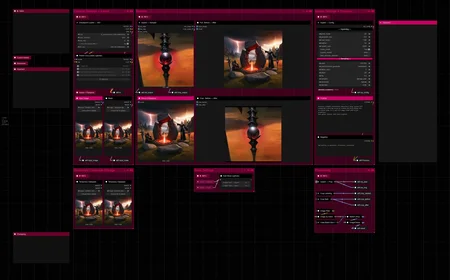
Hello there and thanks for checking out this workflow!
What's new in v12? : Fixes and SubGraphs compatible with the latest ComfyUI Updates!
—Purpose—
This workflow provides a simple, solid and reliable way to efficiently inpaint images to perfection!
I hope this proves to be a useful tool to you!
—Features—
LoRA support
Batch Processing
Flexible Before/After Preview for any batch size and mask amount
Image Filter to cherry pick
Tutorial guide for nodes and settings in dedicated ►INFO boxes
—Common Issues—
ValueError: Width and height must be >= 0
→ Make sure you masked an area on the node named "Mask"
—Custom Nodes—
All of which can be installed through the ComfyUI-Manager
—Troubleshooting—
If nodes show up red (failing to load), check the 'Install Missing Custom Nodes' tab of the ComfyUI Manager for the missing node packs and install them.
Please check if all custom node packs load properly after installing, i.e. no
(IMPORT FAILED)messages next to any of them in the console upon ComfyUI startup.Always reload/drag'n'drop the original, downloaded workflow file into ComfyUI to reload an intact version of the workflow.
→ The last opened workflow that appears on startup shows a cached version of the workflow, "remembering" group nodes that failed due to missing nodes as failed, keeping them broken even after having everything installed correctly.
—Thanks—
The workflow would not be possible as is without these custom node packs. If you want to support the custom node creators, give them a ⭐ on their github repos! Thank you!
Feel free to ask any questions, share improvements or suggestions in the comment section!
Also let me know if you encounter any confusing points I can elaborate on and focus on improving for the next update!
Description
v9
- layout changes due to frontend updates
→ cg-image-picker no longer works; cg-image-filter is the alternative
- fully reworked loop handling
- custom node pack changes :
+ : ComfyUI-Inspire-Pack
+ : ComfyUI-KJNodes
+ : cg-image-filter
- : ComfyUIFill-Nodes
- : cg-image-picker
- : execution-inversion-demo-comfyui
v9.1
- purged old/experimental group nodes from workflow file which caused 'missing node' issues
v9.2
- bugfix in inpaint sampler
FAQ
Comments (15)
Hey I'm having a super weird bug where nodes cannot be found for "workflow>..." because for some reason they are actually located inside "group nodes>workflow". This happened to me with another of your workflows. For the other workflow, I was able to fix things (though I cannot really tell how), but I'm not being able to do it for this one. I'm using version 9. Thanks for your help!
Hey there, thank you for pointing my attention to it! 🙏
Remnant group nodes from the previous version as well as some experimental ones caused missing node pack issues without even being present in the workflow. I cleaned all those up and reuploaded as 9.1, which should load without issues if you have the listed custom node packs installed and functional 👌
@RedPinkRetro Thank you! you are the best!!!
Actually @RedPinkRetro , I'm still having the same issue with 9.1. Do you by any chance know of a possible fix? thanks a lot for your time.
@andresmunozj995 Hey there, no worries.
Have you gone through the steps in the troubleshooting section and checked if all required custom node packs are installed properly?
@RedPinkRetro Yes I did. All nodes are installed and loaded successfully :(
@RedPinkRetro Ok I was able to find and fix one of the problems. There is a node called Comfyui-RVTools that seems to be required by the workflow, but it is not in your list of required nodes and was taken down by the author. I found a reddit link to it, but who knows how long it will be up:
https://www.reddit.com/r/comfyui/comments/1j5b6t4/comfyuirvtools/
@RedPinkRetro Actually that solved all my problems. That reddit has also a link to a github repository:
https://github.com/whitmell/ComfyUI-RvTools
@andresmunozj995 Can you send me the list of your loaded custom node packs upon startup so I can double check? https://wormhole.app/
Having all required node packs and not the "LatentClamp" pack, should be all it takes to successfully load the original workflow.
Note that ComfyUI-RvTools is definitely NOT part of this workflow.
I keep getting this error:
Create Grid Image from Batch
Width and height must be >= 0
...but can't find this node in use or settings for width/height to change. I've tried different models and source images with masks set and changed nothing else but the positive prompt.
Hey there,
a solution to this is now in the newly added —Common Issues— section 🙌
Node is not defined. That's it, no more information. That's the first time I've ever seen that
Hey there, yeah that's no surprise unfortunately.
Comfy's new updates come with a newer frontend version which breaks the group node functionality, before they implemented the replacement feature.
Even custom node packs such as the Impact Pack insist on updating the frontend despite this functional downgrade.
As I made great use of group nodes to streamline lots of complexity into compact nodes in just about all my workflows, I now have to find new ways to do all I did without this crucial feature.
While also trying my best to not let my workflows suffer any more than necessary because of that.
Effectively this I'm in damage-control mode, having to rebuild every single workflow under worse conditions, while trying to stick to my updates being upgrades.
For this workflow I would estimate I'll manage that in a few days, after finishing figuring out all solutions for my advanced workflows, but likely within this week.
@RedPinkRetro First of all, thank you for your time and effort! Recently I was using this workflow very much, but even with downgrading the fronted and some of the libraries to make them compatible again I was not able to produce the amazing inpainting quality as before. I hope you might be able to update this workflow soon. Despite me being an acceptable coder, I am unfortunately not good enough in comfy to fix the nodes on my own.
@sl1d123123301
@Psy_pmp
Just updated to v10 and it works with the latest updates of ComfyUI and all custom node packs now 👌