
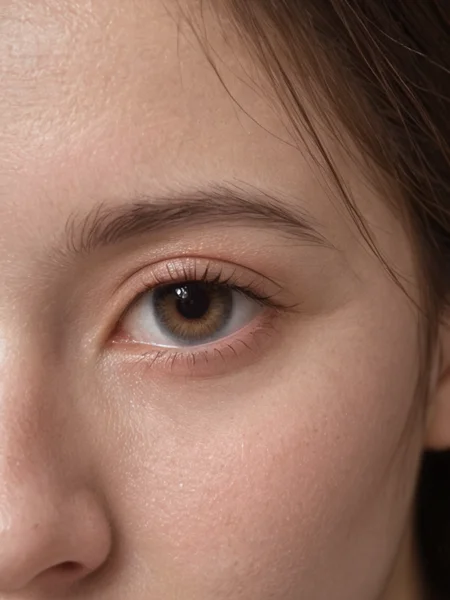
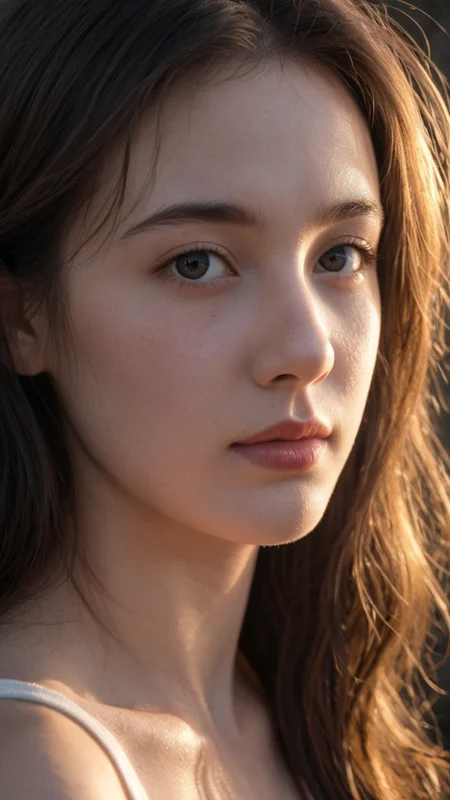
A model with a highly realistic feel, optimized for Asian girls. It performs well with girls from various countries and diverse styles, capturing intricate details of the body.
Recommended resolutions: 768, 1024, 1280 for the best visual experience.
真实感非常强烈的模型,针对亚洲女孩进行优化。各国女孩和多种风格都不错,身体细节都有。 建议768、1024、1280最佳分辨率。各路大神可以+VX:jinngame ,请备注C站 ,期望共同成长互通有无。
comfyUI 工作流下载 workflows download: Pony 、Flux
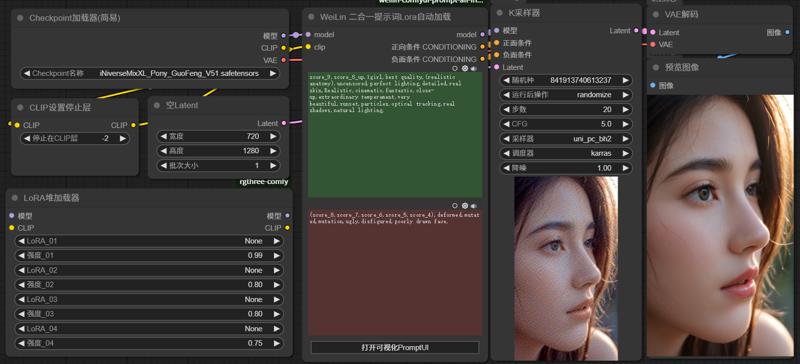
这里包括了Flux.1、Pony、XL 等不同模型,各版本有递进和分支关系,请酌情下载不同版本。
This collection includes various models such as Flux.1, Pony, and XL, each with progressive updates and branching versions. Please choose and download the version that best suits your needs.
Pony 5.1 在之前版本的基础上修正了一些问题,进一步提升了细节表现,并且依然保持了完全避免卡通画风格的脸型等问题。我们加强了身体上的细节处理和光源的表现,使得整体画面更加真实、自然。
Pony 5.1 builds upon the previous version by addressing several issues and continuing to fully avoid cartoon-style faces. We have enhanced the details on the body and improved the lighting effects, making the overall visuals more realistic and natural.
Pony 5.0A 是 Pony 4.9 的升级版本,彻底解决了脸部存在卡通画的问题,经过大规模优化,成为专为亚洲人设计的特化版本。早期下载国Pony 5.0A的朋友们可以重新下载这个模型,他已经更新到了最新的版本。
Pony 5.0C 是 Pony 5.0A 的稳定升级版本,面部表现更为丰富,无论是东方人还是西方人的面部表现都非常出色。
Pony 5.0A is an upgraded version of Pony 4.9, thoroughly resolving the cartoon face issues. After extensive optimization, it has become a specialized version designed specifically for Asians. Friends who downloaded Pony 5.0A early can re-download this model, as it has been updated to the latest version.
Pony 5.0C is a stable upgrade of Pony 5.0A, offering a richer facial expression, with outstanding representations for both Eastern and Western facial features.
Pony Real GuoFeng v4.9 是一个具有历史意义的版本。该版本在不影响 Pony 对多种“听话”姿态表现的前提下,显著增强了真实的面部表现,无论是东方人还是西方人,面部细节的还原都无限接近完美。同时,对于中国古代服饰的材质表现也得到了提升,细腻地展现了传统服饰的质感。此外,该版本在光影处理上有了质的飞跃,特别是在阴影和暗部的光影表现方面,对整体画质带来了显著提升。
值得一提的是,Pony 版本的优化已达成熟阶段,因此 v4.9 大概率将是 Pony 的最后一个重要更新版本。希望大家在这一版本中能体验到极致的画质效果。
Pony Real GuoFeng v4.9 is a milestone release. This version enhances facial realism to an unprecedented level, capturing near-perfect details for both Western and Eastern features without compromising Pony's characteristic ability to render a wide range of "obedient" poses. Additionally, material textures of traditional Chinese attire have been refined to showcase authentic quality.
Notably, there is a substantial improvement in lighting and shadow performance, especially in darker areas, leading to an overall enhancement in image quality. This update marks a significant evolution of the Pony model series, and it is likely that v4.9 will be the final major update for the Pony line. We hope this version brings users the ultimate visual experience.
F1D Real GuoFeng fp8 v2.0 是一个具有里程碑意义的版本。该版本在强化亚洲面孔方面有显著提升(如果没有特别指定,默认会生成亚洲面孔),同时丰富了面部变化,使得人物形象更加多样化。国风特色得到完美强化,色彩表现也更为出色。但需注意,NSFW的表现效果相比之前有所下降。
F1D Real GuoFeng fp8 v2.0 is a historic release. This version offers a highly enhanced focus on Asian facial features (defaulting to Asian faces if unspecified) and introduces greater diversity in facial variations. The model achieves a perfect enhancement of GuoFeng (Chinese-inspired) style and improved color depth. However, please note that NSFW performance has seen a slight decrease.
最近我更新了两个版本,分别是Flux_1D nsfw fp8 v1.0和Flux_1D nsfw fp16 v.12。这两个版本都把必要的t5xxl、clip和EAV放进了模型文件里边了,所以下载的模型会大一些,但这免除了新手的麻烦。对于老手来说也不影响正常使用,实际显存的消耗没有任何增加。
如果你希望下载更小的正常版本,请在下载的时候选择对应的版本。
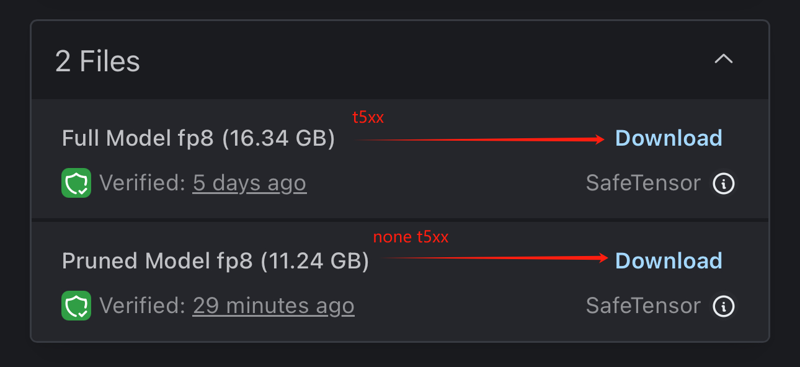
如果你已经下载了更大的包含T5XXL版本,但不想再次下载更小的正常版本,我提供了Python代码,你可以使用该代码将已下载模型内的keys删除,生成更小的正常版本。
FP16版本下载链接:[这里]
FP8版本下载链接:[这里]
以下是版本对应显存的建议:
>= 24G 显存:下载fp16版本。
12-16G 显存:下载fp8版本。
< 12G 显存:pony GuoFeng v4.3 or GuoFeng XL v1.5
工作参数:
步数(Steps):20
采样器(Sampler):Euler
时间表类型(Schedule type):Simple
CFG比例:1
蒸馏CFG比例(Distilled CFG Scale):3.5
Version Update Description
I have updated two versions: Flux_1D nsfw fp8 v1.0 and Flux_1D nsfw fp16 v.12. Both versions now include necessary files like t5xxl, clip, and EAV within the model, which makes the download size larger. However, this removes hassle for beginners and doesn't affect advanced users. There's no actual increase in VRAM consumption.
If you prefer downloading a smaller, normal version, please choose the corresponding version during download.
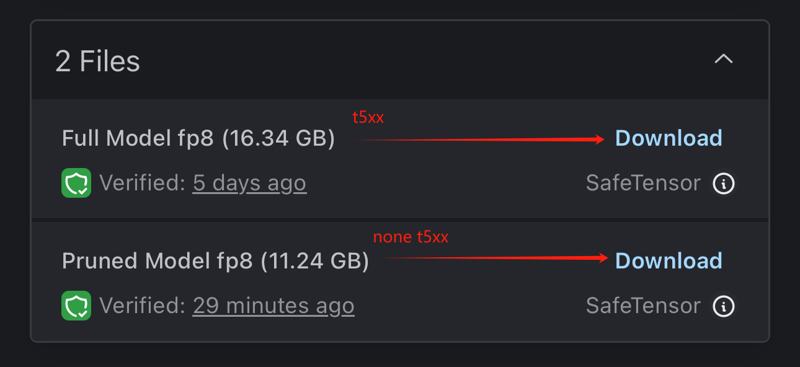
If you’ve already downloaded the larger version that includes T5XXL but don’t want to download the smaller normal version again, I’ve provided Python code that you can use to remove the keys from the downloaded model and reduce it to a smaller, normal version.
FP16 version download link: [here]
FP8 version download link: [here]
Recommended VRAM for each version:
>= 24G VRAM: Download the fp16 version.
12-16G VRAM: Download the fp8 version.
< 12G VRAM:pony GuoFeng v4.3 or GuoFeng XL v1.5
Working Parameters:
Steps: 20
Sampler: Euler
Schedule type: Simple
CFG scale: 1
Distilled CFG Scale: 3.5
Pony GuoFeng 4.3 版本加强汉服表现、真实感、优化光源、加强低光照质感。过度版本懒得传了:)
Pony GuoFeng 3.0 版本终于解决了Pony的汉服问题。这也是第一个支持汉服(hanfu)提示词的NSFW版本。虽然表现不是很完美,但这是一个好的开始。此外,我花了几周时间处理Flux之后回来继续开发Pony,发现相比之下Pony真的很快,对于硬件配置中低的用户来说,是最好的选择。
Pony GuoFeng 4.3 version enhances Hanfu representation, realism, optimizes lighting, and improves texture quality in low-light conditions.I’m too lazy to upload the transitional versions :)
Pony GuoFeng 3.0 has finally addressed the issue with Hanfu in Pony. This is also the first NSFW version that supports the 'hanfu' keyword. Although its performance is not perfect, it marks a good start. Additionally, after spending several weeks on Flux and returning to work on Pony, I've found that compared to Flux, Pony is really fast and remains the best choice for users with low to medium hardware configurations.
iNiverse Version Explanation:
In the entire iNiverse series, the versions are not all progressive upgrades. The model you need might be in an earlier version, so please pay attention to the version numbers.
The Pony beta is an initial trial version primarily aimed at addressing compatibility issues. The current challenge is that most of the existing Pony models are not compatible with previously trained XL Lora. Therefore, this version is dedicated to developing a Pony model that is compatible with the older XL version of Lora. We are committed to ensuring that the new Pony model can seamlessly integrate existing training data so that users can continue to utilize their current resources while also benefiting from the new features and improvements of the Pony model.
The V7 series is the realism series, with 7.1 improving skin depiction based on 7.0 and 7.4 better understanding prompt words. Each version has its own tendencies.
GuoFeng is a branch version, also based on the V7 model. GuoFeng adds more Chinese elements and clothing, such as the outstanding performance of hanfu in this version. Version 1.1 is a trimmed version; if you need higher precision and larger images, you can try versions before 1.05.
The Turbo version is another branch version, capable of producing very high-quality images within 8-12 steps. However, subsequent versions have generally continued the Turbo characteristics, so they are no longer explicitly labeled.
The Cartoon version is another sub-branch. It depicts a cartoon style and includes elements from Genshin Impact. You can use prompts like NAHIDA\(genshin impact\) to find these characters. If you enjoy this style, please give me more suggestions, and I will continue to experiment.
Finally, thank you all for your support. Your likes and feedback are my greatest motivation. I hope you enjoy Chinese culture.
iNiverse版本讲解:
在整个iNiverse系列模型里边版本并不都是渐进升级的,可能你需要的模型在之前的版本里边,请各位注意观察版本号。
Pony beta 是一个初试版本,主要目的是解决兼容性问题。目前的问题在于,大多数现有的 Pony 模型无法兼容之前训练的 XL Lora。因此,此版本旨在开发一个能够与老的 XL 版本 Lora 兼容的 Pony 模型。我们正在努力确保新的 Pony 模型可以无缝集成既有的训练数据,以便用户能够继续使用他们现有的资源,同时也享受到Pony模型的新功能和改进。
V7系列是真实系列,基于7.0刻画出皮肤更好的7.1和更理解提示词的7.4,每个版本都有所倾向。
GuoFeng是个分支版本,也是基于V7模型的,GuoFeng增加了更多的中国chinese元素和服饰,你可以看到例如hanfu在这个版本里非常出色的表现。而1.1是一个裁剪版本,如果你需要更大精度更高的图片可以尝试1.05以前的版本。
Turbo版本是另外一个分支版本,可以在8-12个Steps里的到非常高质量的图片,然而之后的版本都基本延续Turbo,就没有再刻意写入版本里。
Cartoon版本是一个分支里的另外一个分支。卡通风格刻画,并加入了原神的角色元素,你可以使用NAHIDA\(genshin impact\)等提示词找到这些角色,喜欢此风格的朋友们可以给我更多建议,我会继续尝试。
最后感谢各位的支持,您的点赞和反图是我最大的动力,希望各位喜欢中国文化。
Description
FAQ
Comments (90)
肋骨太明显了
"You do not have CLIP state dict!" - Do I need to download anything else besides this checkpoint? Vea enconder? Sorry but I am new and learning.
Follow these instructions.
https://github.com/lllyasviel/stable-diffusion-webui-forge/discussions/1050
大佬可以提供视频生产的工作流学习一下吗
你把我发布的图片直接拖到comfy里边就可以看到完整工作流了
@JinnGames 想要视频,佬,不是图的
@JinnGames 好的谢谢
@JinnGames 我下载了多张视频旁边的图片导入后均提示无工作流😂
@JinnGames 我又明白了,点图片右下角感叹号可以复制工作流😁
I use your workflow but can't load F1D RealNSFW with the Load Diffusion Model node since its a checkpoint. I try to load it with the Load Checkpoint node and get an error "CLIPTextEncode 'NoneType' object has no attribute 'tokenize'"
What am I missing? Thanks
The answer is to not hook up the vae for the simple checkpoint loader and to keep the original clip connection along with hooking up the simple loader's clip connection
The civitai interface shows a checkpoint but it's an unet.
我使用了您图片附带的工作流进行学习研究,但是我只能生出图片没有看到视频产出的方法😂
你可以用这个模型生图,再用比如混元图生视频。
Great checkpoints, still one of my favorite, but still way to much bias to the Asian look. I needs more balance... Just saying :)
我试试,但是很难达到平衡点。所以GuoFeng元素可能更多一些。
axesome
mmm thats so hot
这个大佬的模型真的无敌,不但真实,而且泛化性还高,期待FLUX的新版本
谢谢夸奖,我目前算力吃紧,基本集中在pony上,FLUX的训练暂时没有计划。
I used your workflow, but quite often generated cartoon image, how to avoid this
use a negative prompt like comic
downloaded workflow missing StringFunction|pysssss
git clone https://github.com/pythongosssss/ComfyUI-Custom-Scripts.git from your 'custom_nodes' folder in ComfyUI folder.
我提示缺少Pony51_00001_.safetensors这个模型去那里找呢?
就是V51
你点开你要抄的那个图片,在屏幕的右边的提示词的上面就是生成该图片使用过的模型,挨个点开就找到了
Motion module 'v3_sd15_mm.ckpt' is intended for SD1.5 models, but the provided model is type SDXL.
提示这样的错误 大佬这是什么原因
Insurmountable Asian bias
You're allowed to have other models too. Every new prompt idea I have, I run by all of the models on my SSD. I give each one of them four chances and then pick one to run with for a while. Besides, I see a bunch of models that spit out the same face that looks like Tawnee Stone. I've got three of them myself. Having a model that favors something completely different is a feature, not a bug.
there is an asian bias, but it is very much NOT insurmountable. At least for the SDXL/Pony models (I haven't used Flux yet so I can't claim knowledge there). If you just put "chinese" at the end of a reasonably-sized negative prompt (50-75 tokens), it will completely resolve it. Heck if you do anything stronger, such as putting it at the start of the negative or having it alone in negative, it goes too hard and everyone looks like ugly Brits with Swedish blonde hair. So the asian bias here is definitely not insurmountable.
@shapeshifter83 That might be part of the difference, I've gone all-in on Flux and no longer use any SDXL models at all. Flux doesn't accommodate negative prompts. If there's a box to type them in, it goes nowhere.
I'm Asian.
You're probably not talking about this generative AI or model (*'ω'*)
Try talking to some "unbiased" Asian people.
The feedback from Asians about this model is that they think it's a good model.
I'm Asian. You're probably not talking about this generative AI or model (*'ω'*) Try talking to some "unbiased" Asian people. The feedback from Asians about this model is that they think it's a good model.
@lesjo funny story. I misclicked and ended up here again by accident, ended up re-skimming this comment thread for just a moment, noticed your mention of Tawnee Stone, then ran a google image search out of curiosity. You are SO RIGHT - she's like, THE face of SDXL generation. She's completely indistinguishable from AI. Hilarious!
你不喜欢亚洲风格可以用别的模型 我们亚洲人还不喜欢欧美风格的脸呢
What does hanfu means?
大佬,能练一个noobai的realistic版本吗
how do i use this
please give me a detailed explanation im very new
If you're very new, go seek some tutorial. Google and LLM like chatGPT are your friends.
you should learn how to use sd webui first, not comfyui, search for free courses in youtube or bilibili
我看你在libibiai上发布的有一个是加速模型和这个除了速度其他区别大么,我看那边返图都比较平滑
区别很大
iNiverse Mix(SFW & NSFW)5.1 这个模型在comfyui推荐步数采用调度器是什么我没在介绍中找到
看说明,我补充了
how do I make consistency on the face? Only the face I dont wanna overcomplicated stuff, im pretty new to this. Its easier to make a Lora? If yes how many images and how do I replicate the person to make the lora?
ReActor plugin is nice and easy
...much quicker trained then lora good results
20-30张不同面部角度的图片即可
@JinnGames How can I do that? Has a Workflow to help me with it? 😥, theres a way to make with lighting too?
@TropicalCat its easy
use automatic1111 - install reactor plugin
first you take a bunch of pics- no matter the size or 16:9 stuff , drag it into the interface
Reactor - tools tab - face models - blend --put in the face model name -->Build and save
-> done takes a minute or so
and then just select it and choose when you create a txt2img or img2img thing
amazing results even with low cost hardware (like mine LUL)
Try the PuLID control, put a source face on the moodboard, run the control on balanced at about 90% and have the control start at about 15-20% on the start/end slider to get more variety. I've found it works almost as good as trained character loras.
(edit: this has since been actioned and 404'd.) @JinnGames: did you see this? I think someone is trying to rip you off: https://civitai.com/models/1346576/inversefinalswfnsfw?modelVersionId=1520837
What else do you expect? The writing is in mandarin, after all.
@kushdaddygoku987 ? i think you must have replied to the wrong comment accidentally
佬,这个可用于基础模型训练lora吗,还是说用v6训练,这你的这个底膜上用也有不错的效果
我的模型都可以用来训练lora。当然如果你想更通用,我建议是官方公布的的SDXL。
大佬,你的FP16的FLUX模型(2.1)怎么删掉了?请问还有下载渠道吗?
国产模型最大的问题就是怎么去掉majic衍生物标签
The F1D Real GuoFeng fp8 v2.0 version is a weird one 🤔. Good variety and coherency, but sometimes outright ignores some words from the prompt, even when it's the very first word in the prompt 😤
男性总是下垂,很难竖起
AssertionError: You do not have VAE state dict!
I have the same issue
The "AssertionError: You do not have CLIP state dict!" error in Forge UI usually means that Forge UI can't find the necessary CLIP (Contrastive Language–Image Pre-training) model files or that they are not correctly specified [1][2]. Here's a breakdown of the causes and how to solve it:
1. Missing or Incorrectly Placed Model Files
CLIP, VAE, and T5 Models: When using models like FLUX, you need additional files like clip_l.safetensors, ae.safetensors, and t5xxl_fp16.safetensors [2].
Location: Place ae.safetensors in the models/VAE folder and clip_l.safetensors and t5xxl_fp16.safetensors in the models/text encoder folder [2].
Forge's VAE/Text Encoder Selection: After placing the files, in the Forge UI, to the right of the checkpoint/base model selector, there's a "vae/textencoder" option. Make sure all three files are selected [2].
@ljm42531345 thanks! I'll give it a shot again!
What's the base resolution for this model? 512, 768 or 1024?
iNiverseMix_F1D_fp8_real_V20.safetensors 这是什么模型呢。
Flux.1D 的fp8 NSFW
Why is this piece of junk model so highly downloaded, the characters are severely distorted, and it has changed the appearance of lora
74 was the last version I used if that helps. 75 was ok, the guofeng ones weren't my style. I still merge 74 into other models pretty much all of the time. It was able to take creative concepts that would tend to make things more cartoonish in most models with very little or no effort to keep it from doing so.
是不是CFG太高了
Nice to see a new model publication from you. Always loved your fine models when I used SDXL.
谢谢
Are you sure you uploaded the correct checkpoint? Real XL v1 feels like a realistic Pony-based model - not even remotely close to an SDXL-based one.
Flux LoRA Fine-Tune Causing Weird Hands/Legs — How Do I Fix Anatomy Issues?
I used the Flux Dev LoRA Trainer on Replicate as my base model to fine-tune an image generation model using my own dataset. My goal was to generate both SFW and NSFW images. These are the training parameters I applied:
30 high-resolution images (mixed SFW + NSFW)
input_images: open("C:/actress verify images minimal captions v2.zip", "rb")
steps: 2500
learning_rate: 0.0004
trigger_word: “Jahnvrix”
lora_rank: 16
caption_dropout_rate: 0.05
resolution: 1024
optimizer: adamw8bit
batch_size: 1
autocaption: False (I used my own captions)
The fine-tuning completes successfully, and normal prompts generate good results. However, when prompts involve legs, hands, or similar anatomy, the output contains distorted or incorrect anatomy (weird hands, broken legs, incorrect fingers, etc.).
I'm looking for guidance on how to fix this issue.
Is there any solution that can help improve anatomical accuracy during or after fine-tuning?
Can you please split your models into separate pages? One for Flux with each version, one for SDXL and etc? I get the reason why you are doing it but I'm starting to ignore your models because of that reason.
这是个两年前的历史遗留问题(在这里分享模型本是一个意外,最早是一些朋友喜欢我的模型,挨个给他们传模型太过于麻烦,所以23年就随意找到了这个社区上传模型,让朋友们在这里下载,省得挨个传给他们),我又是比较懒切随意的人,所以一直没有分开上传,只注明了模型到名称。大概以后也不会分享模型了,给大家带来麻烦,表示抱歉,谢谢支持。
Drecksteil das sich weigert das zu Erstellen was ich will!
Details
Files
iniverseMixSFWNSFW_ponyRealGuofengV51.safetensors
Mirrors
iniverseMixSFWNSFW_ponyRealGuofengV51.safetensors
iniverseMixSFWNSFW_ponyRealGuofengV51.safetensors
iniverseMixSFWNSFW_ponyRealGuofengV51.safetensors
iniverseMixSFWNSFW_ponyRealGuofengV51.safetensors
iniverseMixSFWNSFW_ponyRealGuofengV51.safetensors
iniverseMixSFWNSFW_ponyRealGuofengV51.safetensors
iniverseMixSFWNSFW_ponyRealGuofengV51.safetensors
iniverseMixSFWNSFW_ponyRealGuofengV51.safetensors
iniverseMixSFWNSFW_ponyRealGuofengV51.safetensors
Available On (2 platforms)
Same model published on other platforms. May have additional downloads or version variants.