

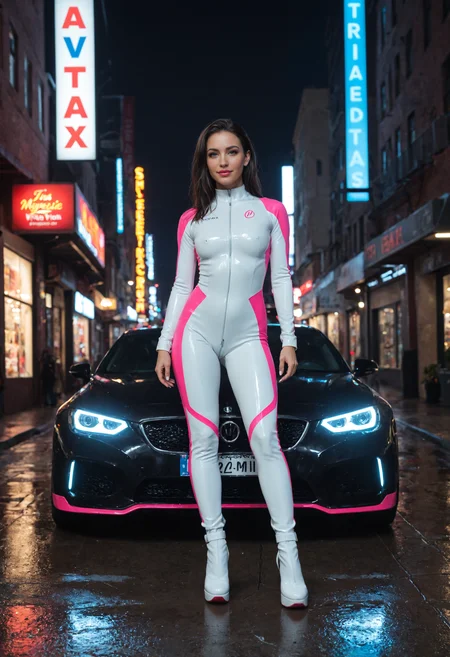

ReaPony – High-Quality Quasi-Realistic AI Model ✨🎨
ReaPony is a finely tuned quasi-realistic checkpoint model designed for Pony, delivering sharp details, natural lighting, and lifelike aesthetics. Ideal for both SFW and NSFW creations, this model offers excellent control over your prompts and seamless integration with other LoRAs for enhanced versatility.
💎 Love this model? Show your support by placing a bid to feature it on Civitai’s Generation Service
https://civarchive.com/auctions 😊
🌟 Key Features:
🔥 Striking Realism – Generates detailed and natural-looking characters with impressive depth and texture
🚀 Efficient Performance – Produces high-quality outputs even at lower steps, saving time and resources
🔁 HiRes Fix Compatible – Enhances details effectively while maintaining sharpness and clarity
🧩 Plays Nice with Others – Seamless blending with several LoRAs for even more diverse results
🎯 High Prompt Adherence – Accurately captures the details of your prompts for precise creative control
🛠 Optimised for DPM++ 2M and Euler A – Works smoothly across different schedulers and sampling methods
Whether you're crafting elegant portraits, artistic concepts, or captivating fantasy visuals, ReaPony is designed to enhance every aspect of your AI-generated art.
Try it now and share your stunning results! 💖🚀✨
For a useful comparison, read this superb article from lizardon1024
If you like my models, please consider tipping, pressing on 👍 or leaving ⭐⭐⭐⭐⭐ on model review
Feel free to use, download, merge, remix my models. But please, do not sell them as they are meant to be freely used by the AI community and not be restricted to the benefit of a limited number of people
Recommended settings:
VAE: recommended SDXL VAE, Pony Standard VAE
Sampling method: DPM++ 2M (SDE) Karras or Euler A (DPM++ 3M SDE also works fine)
Sampling steps: 20 - 40 (too high will not add any extra value, too low... you know)
CFG Scale: 3 - 6 (recommended 4)
Width: 832 (any SDXL standard size is ok)
Height: 1216 (any SDXL standard size is ok)
HiRes.Fix Setting:
Hires upscale: 1.5
Hires steps: 15
HiRes Upscaler: Remacri
Denoising strength: 0.3 - 0.4
Tips and tricks
Use light prompts as much as possible, Pony models work wonders with few tokens
Avoid using many textual inversions, they will hijack your main prompt
Using ADetailer for faces is STRONGLY RECOMMENDED, you will thank me looking at results
Use PAG (Perturbed Attention Guidance) or SAG (Self Attention Guidance) for sharper details and enhanced prompt adherence (anatomy benefits of it especially). Set PAG between 1 and 2. Set SAG between 0.8 and 1.5. Experiment to find your sweet spot
You can randomise seed, but I like to use these two batches on XYZ plots, they work decently:
42, 123456789, 51234, 987654321
1234, 54321, 2023, 7777, 8080, 314159, 8675309, 666666, 101010, 424242
This model is intended for artistic, educational, and entertainment purposes only. By downloading or using this model, you acknowledge and agree that you are solely responsible for how you choose to use it. The creator of this model does not endorse, support, or take any responsibility for misuse, unethical, or illegal applications of the model, including but not limited to the generation of harmful, inappropriate, or unauthorised content. Please adhere to all applicable laws, platform policies, and community guidelines when using this model. The model has no inherent bias or specific intent, and any content generated using it reflects the inputs provided by the user, not the creator.
Use this model responsibly and in compliance with all applicable laws and regulations.
Description
🐴 ReaPony v8 – Precision Perfected ✨
We’ve heard you loud and clear, and your feedback shaped this new release. ReaPony v8 is built for creators who demand excellence, merging ultra-sharp details, lifelike realism, and unmatched versatility to craft crisp, stunning visuals every time. It is the perfect blend of Pony and SDXL.
🐎 What’s New:
🔥 Razor-sharp detail for realistic results
🎯 Smarter prompt interpretation for effortless control
💃 Natural skin texture, anatomy & expressive faces
🌈 Versatile output, from glamour to cinematic perfection
Refined, powerful, and ready to impress. ReaPony v8 delivers. 💖
FAQ
Comments (33)
Can you please release SDXL version?
Not fan of Pony models & their prompting, too confusing & complicated :(
thanks for the feedback, I'll try to work on something if I have time!
I use to think that until I actually looked into it and really, you just have to copy/paste "score_9, score_8, score_7_up" to the beginning of every positive prompt and everything else is pretty much like every other model, IMO
@phlesh you can use embeddings in the positive prompt to avoid always adding scores at the beginning. otherwise, try without scores, results are different but equally decent
@SassyAI yea I know, I was trying to keep it simple
Images seem incredibly bleached out, almost colorless with v8.0. Using all the correct settings so not sure what the issue is. v7.0 works fine too
mmhh interesting, thanks for the feedback. from the testing I did, they seemed fine. quality was better than v7. I'll try to improve for v9
Seems no VAE is baked in this time. All previous models worked fine.
@BuffyDusk yep, VAE is not baked in, you can use the standard SDXL VAE or the Pony one
@SassyAI TY, definitely was the issue
@SassyAI Unfortunatley I am using mage.space and cannot import VAE there. Hopefully a version 7.x or 8.x will return with VAE baked in.
@BuffyDusk I'll bake it in for v9, thanks for letting me know!
Pleasantly surprised by this one!
thanks! happy you like it!
Easily one of the best Checkpoints on the site. Great results with this one. Also works well when used with another Checkpoint like Cyberrealistic Pony when using in a Refiner workflow.
thanks!!
Can you tell what is refiner workflow?
@abhiraj320 It's a workflow that tends to get really sharp results by using two checkpoints (or the same checkpoint, but twice). It generates a primary image from the first checkpoint and then puts a little bit of noise into the image so that when the second checkpoint runs, it has to "refine" the image (ie: remove the noise) and basically sharpens what the first generation already did. Google "refiner workflow comfyui" and you'll find one for download. Highly recommended.
Now If I want to train my character Lora, should I download this checkpoint and train over that? or should I train over base pony?
Can you help me?
you can try both, but usually it's better (and safer) to train on the base pony model. Unless you only want to use this model to generate. Training on the base pony makes your LoRA more flexible
@SassyAI OstrisAI don't have PONY base model to train for. How to train on OstrisAI?
@abhiraj320 Can't you download/upload it and train on it? Otherwise try training on this one and see results
OK model. Nice rendering. Not so true to the prompt.
I'm getting white spots all over the generated image. Anyone having the same issue or am i missing something ?
Sounds like a missing VAE to me?
Yeah, @gman_umscht has a point.
Try generating with a VAE. This model doesn't have a baked-in VAE
If it still doesn't work, hmu on Discord https://discord.gg/MCM5c2bka4
This is my favorite checkpoint of all time. Everything feels polished but not overly. A little resistant to exact adherence. But man. Such great results sometimes.
Thanks a lot! Happy that you manage to harness the real power of this checkpoint 😉
Kinda hype about this.
Thanks! Keep posting your creations 😊