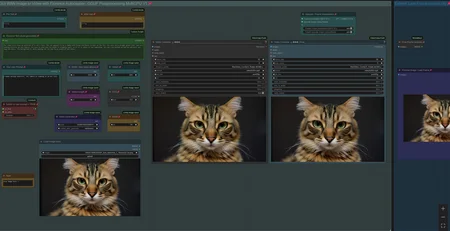
Workflow: Image -> Autocaption (Prompt) -> WAN I2V with Upscale and Frame Interpolation and Video Extension
Creates Video Clips with up to 480p resoltion (720p with corresponding model)
There is a Florence Caption Version and a LTX Prompt Enhancer (LTXPE) version. LTXPE is more heavy on VRAM
LTX Prompt Enhancer (LTXPE) might have issues with latest Comfy and Lightricks update
MultiClip: Wan 2.1. I2V Version supporting Fusion X Lora to create clips with 8 steps and extend up to 3 times, see examples posted with 15-20sec of length.
Workflow will create a clip on Input Image and extends it with up to 3 clips/sequences. It uses a colormatch feature to ensure consistency in color and light in most cases. See the notes in worflow with full details.
There is a normal version which allows to use own prompts and a version using LTXPE for autoprompting. Normal version works well for specific or NSFW clips with Loras and the LTXPE is made to just drop an image, set width/height and hit run. The clips are combined to one full video at the end.
update 16th of July 2025: A new Lora "LightX2v"has been released as an alternative to Fusion X Lora. To use, switch Lora in black "Lora Loader" node. It can create great motion with only 4-6 steps. : https://huggingface.co/lightx2v/Wan2.1-I2V-14B-480P-StepDistill-CfgDistill-Lightx2v/tree/main/loras
More info/tips & help: https://civarchive.com/models/1309065/wan-21-image-to-video-with-caption-and-postprocessing?dialog=commentThread&commentId=869306
V3.1: Wan 2.1. I2V Version supporting Fusion X Lora for fast processing
Fusion X Lora: process the video with just 8 Steps (or lower, see notes in workflow). It does not have the issues like the CausVid Lora from V3.0 and does not require a color match correction.
Fusion X Lora can be downloaded here: https://civarchive.com/models/1678575?modelVersionId=1900322 (i2V)
V3.0: Wan 2.1. I2V Version supporting Optimal Steps Scheduler (OSS) and CausVid Lora
OSS is a newer comfy core node to allow lower no. of steps with a boost in quality. Instead of using 50+ steps you can receive same result with like 24 steps. https://github.com/bebebe666/OptimalSteps
CausVid uses a Lora to process the video with just 8-10 steps, it is fast at a lower quality. It contains a Color Match option in postprocessing to cope with the increased saturation, the lora is introducing. Lora can be downloaded here: https://huggingface.co/Kijai/WanVideo_comfy/tree/main
(Wan21_CausVid_14B_T2V_lora_rank32.safetensors)
Both have a version with FLorence or LTX Prompt Enhancer (LTXPE) for Caption, can use Loras and have Teacache included.
V2.5: Wan 2.1. Image to Video with Lora Support and Skip Layer Guidance (improves motion)
There are 2 version, Standard with Teacache, Florence caption, upscale, frame interp. etc. plus a version with LTX Prompt Enhancer as an additional captioning tool (see notes for more info, requires custom nodes: https://github.com/Lightricks/ComfyUI-LTXVideo).
For Lora use, recommend to switch to own prompt with Lora trigger phrase, complex prompts might confuse some Loras.
V2.0: Wan 2.1. Image to Video with Teacache support for GGUF model, speeds up generation by 30-40%
It will render the first steps with normal speed, remaining steps with higher speed. There is a minor impact on quality with more complex motion. You can bypass the Teacache node with Strg-B
Example clips with workflow in Metadata: https://civarchive.com/posts/13777557
Info and help with Teacache: https://civarchive.com/models/1309065/wan-21-image-to-video-with-caption-and-postprocessing?dialog=commentThread&commentId=724665
V1.0: WAN 2.1. Image to Video with Florence caption or own prompt plus upscale, frame interpolation and clip extend.
Workflow is setup to use a GGUF model.
When generating a Clip you can chose to apply upscaling and/or frame interpolation. Upscale factor depends on upscale model used (2x or 4x, see "load upscale model" node). Frame Interpolation is set to increase frame rate from 16fps (model standard) to 32fps. Result will be shown in "Video Combine Final" node on the right, while the left node shows the unprocessed clip.
Recommend to "Toggle Link visibility" to hide the cables.
Models can be downloaded here:
Wan 2.1. I2V (480p): https://huggingface.co/city96/Wan2.1-I2V-14B-480P-gguf/tree/main
Clip (fp8): https://huggingface.co/Comfy-Org/Wan_2.1_ComfyUI_repackaged/tree/main/split_files/text_encoders
Clip Vision: https://huggingface.co/Comfy-Org/Wan_2.1_ComfyUI_repackaged/tree/main/split_files/clip_vision
VAE: https://huggingface.co/Comfy-Org/Wan_2.1_ComfyUI_repackaged/tree/main/split_files/vae
Wan 2.1. I2V (720p): https://huggingface.co/city96/Wan2.1-I2V-14B-720P-gguf/tree/main
Wan2.1. Text to Video (works): https://huggingface.co/city96/Wan2.1-T2V-14B-gguf/tree/main
location to save those files within your Comfyui folder:
Wan GGUF Model -> models/unet
Textencoder -> models/clip
Clipvision -> models/clip_vision
Vae -> models/vae
Tips:
lower framerate in "Video combine Final" node from 30 to 24 to have a slow motion effect
You can use the Text to Video GGUF Model, it will work as well.
If video output shows strange artifacts on the very right side of a frame, try changing the parameter "divisible_by" in node "Define Width and Height" from 8 to 16, this might better latch on to the standard Wan resolution and avoid the artifacts.
see this thread if you face issues with LTX Prompt Enhancer: https://civarchive.com/models/1823416?dialog=commentThread&commentId=955337
Last Frame: If you face issues finding the pack for that node: https://github.com/DoctorDiffusion/ComfyUI-MediaMixer
Full Video with Audio example:
Description
Wan I2V with Teacache
FAQ
Comments (50)
thanks man , but i have an idea , can you edit your workflow and add something that catch the last frame and automatically start creating the next video , and double system by 2-3 , with this we can create long video automatically
currently you can manually extend a clip. Thought of creating a chain as you proposed, but it has some issues, like if the endframe of clip1 is crap, all follow clips will be crap. Plus it adds a lot of complexity to the workflow. I find it better as it currently is: create a clip, if endframe is good manually extend it or drop it if it is bad.
@tremolo28 hmm you have fair point , ya i think you right , better to stick with your advise
@tremolo28 can you add vision models like qwen vl or from api to qualify the quality of last frame and decide whether to generate upcoming frames
@for1096 I am running out of capacity, feel free to add your proposal to the workflow and release it
@tremolo28 how to extend clip?
@romanfmz373 there is a note in the workflow with detailed description. in short: Right Click last frame and select "Send to workflow" / "Current Workflow" => Last frame becomes new Input frame...
@tremolo28 can see only ¨save workfow image¨. Where to find this?
can't see wan in teacache. kijai write i have to "Do cond and uncond separate for Wan". is there a manual on what to do here exactly?
here is a link to Kijai´s comment with screenshot and repo link: https://github.com/welltop-cn/ComfyUI-TeaCache/issues/58
most likely you have the non Kijai Teacache repo installed. i have deleted it and git cloned the one from Kijai into comfy/custom_nodes
thx. deinstallation in comfy manager does not work. always shows me as import failed. deleting the directory directly didn't not work either
I have the same issue. I've tried git pulling and no go still. Any solution found?
Seems like kijai link not working anymore. Where can i get Kaji TeaCache node?
@GrandpaFrost workflow is updated with Teacache node from KJnodes custom node (also by Kijai)
which node do we add our own prompt to add to the florence output? Also, would this workflow handle Lora inputs to help with generating?
To pre text and after text node
@tremolo28 in the value section? Ok, Ill give it a try, thank you! So far the workflow is great. The upscale seems to degrade faces somewhat, not sure how I can keep details without them getting overly sharpened and looking compressed. Seems to look better in the output prior to upscaling.
@tremolo28 Trying with an input in the value of the pre text, the string never updates with the prompt and in the command window, it shows the Florence prompt with none of my text input. Any idea why the Florence text never adds the text it generates? It continues to show the prompt from your workflow example.
@woodenpickle start generating and it is supposed to update the prompt with pre and after text
@tremolo28 Yeah, but it isn't. I've ran 10+ generations and the prompt from your workflow example stays in the Florence 2 prompt each time. I'm not sure why, the one thing I haven't tried is to replace the node. I'll give that a shot. If it doesn't change then I am out of ideas.
@woodenpickle strange, should work, just uploaded some clips with workflow in metadata in, where pre and after text was applied for some of the clips: https://civitai.com/posts/13777557
Anyone have any idea why the GGUF loader gives me errors? Unexpected architecture type in GGUF file, expected one of flux, sd1, sdxl, t5encoder but got 'pig'
I've tried updating everything, but the error persists
what GGUF model are you trying to load?
@woodenpickle im getting something similar but in trying to load https://huggingface.co/city96/Wan2.1-T2V-14B-gguf/tree/main
@tremolo28 which sampler settings are you using? if i use the uni_pc i got really bad quality and glitching video results. Can you share your settings what you normally use to get good results?
I am using the settings more or less as it is delivered, uni-pc, 20-22 steps, cfg 6, 384p-432p resolution, 65 or 81 video length. Upscaler 2x. I can upload a clip with metadata later.
Try to change your resolution to fit within the recommended requirement resolution of your model. Like a 480p model should not go outside of a 480p resolution. Change the width and height variables to meet the requirements. It's similar to fitting in an SDXL output within the training of the SDXL model.
These clips include workflow in metadata with resolutions between 304 - 432p to drag and drop into comfy. Might add some more to this batch. It is done with teacache worklfow, using Q4_K_M model with 2x upscale and frame interpolation.
@tremolo28 see my post, everytime i have somehow bad quality and a shaking camera
i noticed when adding in the prompt "steady fixed camera" the issue of the shaking camera is fixed
Anyone know why it generates great until about 5-7 steps before it hits 20 and then starts turning into rainbow noise? I've tried lowering the steps, but no matter what, it starts falling apart just before completing. I've used a few different samplers and they all seem to do the same thing.
For anyone having this issue, it's due to the new updated Tea Cache For Vid Gen node. If you select i2v_420p and leave the rel_l1_refresh value at 0.15, it will result in rainbow noise. You have to lower it down significantly or raise it up to 0.26. However, raising it to the recommended 0.26 will result in a loss of movement. If anyone has any other tips on resolving this issue, please let me know.
@blastermaster123 I can confirm that the rainbow shimmering happens without teacache. It does seem worse with it, though. Running in comfyui on a 7800xt.
I've got strange results, while generating vids under 480p. Everything up will produce normal results
480p is flawless for me. But if I try 780p; it is a complete shit show. rainbow, weird movements, video transforms into a freakshow.
I got no wan_video on Teacache for Vid Gen
You'll need to update that node. The only way it would update for me is to go into your Comfyui/custom_nodes folder and delete the teacache folder and then restart Comfyui and install it again through Install Missing Custom Nodes in the Manager. Make sure to read my other comment regarding the settings for that node.
Teacache Settings and nodes help:
There are now several custom nodes dealing with Teacache to speed up render time:
Custom nodes from Comfyui manager: https://github.com/welltop-cn/ComfyUI-TeaCache
Kijais nodes: https://github.com/kijai/ComfyUI-TeaCache
"WanVideo Tea Cache (native)" node from KJnodes: https://github.com/kijai/ComfyUI-KJNodes
The node from KJnodes has an additional parameter "coefficients" and appears to be the fastest one with following setting:
rel_I1_thresh = 0.25 - 0.3
start_percent = 0.1 (or 0.0 = faster, less stable)
end_percent = 1
cache_device = offload_device
coefficients = I2V_480 (or 720 if you use that model)
you can just replace the purple teacache node in workflow.
additional infos: https://github.com/kijai/ComfyUI-KJNodes/issues/210
https://github.com/kijai/ComfyUI-TeaCache not working anymore. Where can i get it?
@GrandpaFrost the repo seems to be deleted, have update workflow with Teacache from KJnodes (custom node pack from Kijai)
@tremolo28 Yeah, i add node from ComfyUI-KJNodes . Now 5 sec video renders in 15 min instead 30 m earlier. Thnx
comfy update screwed Teacache again ("rel_l1_thresh" error), see solution here :https://github.com/kijai/ComfyUI-KJNodes/issues/227
after 2x comfy update, it worked again for me
@tremolo28 How do i update with this commit? Have no idea how to pull commits into my ComfyUI. Just installed the latest version and this workflow and getting the rel thresh error.
@zeal2games549 goto Comfy manager and update all / update comfyUI. Had to do it twice to make teacache running again.
@tremolo28 Thanks for the reply. Did not work for me, ComfyUI just give error, can't update. Solved it by git pulling the latest ComfyUI from the site instead.
Didnt have issue. Using "Stability Matrix"
Skip Layer Guidance has been added to KJnodes to improve animation:
https://github.com/kijai/ComfyUI-KJNodes/issues/228
Node can be added after Model loader or before Ksampler.
I've installed teacache, but TeaCacheForVidGen node is still missing.
@tremolo28 Is there any intstrucions on how to use it? Or i need to do tries and errors. Maybe you already tested it.
@GrandpaFrost it needs testing still. On that github link I gave, they are discussing settings