All in One, Wan for All
We are excited to introduce our latest model to our talented community creators:
Wan2.1-VACE, All-in-One Video Creation and Editing model.
Model size: 1.3B, 14B License: Apache-2.0
If we are in Wan Day, what will it be like? 如果我们在万相世界,会是什么样子?
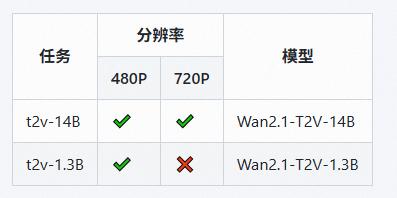
模型支持两种文本到视频模型(1.3B 和 14B)和两种分辨率(480P 和 720P)。
WAN-VACE is not a T2V model per se, but rather R(reference)2V, Can be understood as Video ControlNet for WAN , so there is no way to provide a T2V workflow. The CausVid accelerator is a distillation accelerator technology that can be used on WAN-VACE to provide 4-8 steps of accelerated generation.
WAN-VACE本身不是T2V模型,而是R(参考)2V,可以理解为WAN的视频CN,因此无法提供T2V工作流程。CausVid加速器是一种蒸馏加速技术,可用于WAN-VACE,提供4-8步加速生成。
Introduction
VACE is an all-in-one model designed for video creation and editing. It encompasses various tasks, including reference-to-video generation (R2V), video-to-video editing (V2V), and masked video-to-video editing (MV2V), allowing users to compose these tasks freely. This functionality enables users to explore diverse possibilities and streamlines their workflows effectively, offering a range of capabilities, such as Move-Anything, Swap-Anything, Reference-Anything, Expand-Anything, Animate-Anything, and more.

VACE是一款专为视频创建和编辑而设计的一体化模型。它包括各种任务,包括视频生成(R2V)、视频到视频编辑(V2V)和屏蔽视频到视频剪辑(MV2V),允许用户自由组合这些任务。此功能使用户能够探索各种可能性,并有效地简化他们的工作流程,提供一系列功能,如移动任何内容、交换任何内容、引用任何内容、扩展任何内容、为任何内容设置动画等。
About CausVid-Wan2-1:
5-16 The PERFECT solution to CausVid from Kijai (Best practices)
Wan21_CausVid_14B_T2V_lora_rank32.safetensors · Kijai/WanVideo_comfy
Through weight extraction and block separation,
KJ give us a universal CausVid LoRA in rank32 for Any 14B WAN model,
EVEN including FT models and I2V model!
Although this may not have been CausVid's initial intention, by flexibly adjusting the LoRA parameters (0.3~0.5), we have achieved unprecedented availability on home grade graphics cards!
KJ-Godlike also provides a 1.3B bidirectional inference version of LoRA export file
Wan21_CausVid_bidirect2_T2V_1_3B_lora_rank32.safetensors
same time, we also noticed that xunhuang1995 uploaded the Warp-4Step_cfg2 autoregressive version 1.3B CausVid model from: tianweiy/CausVid
相与为壹,全部在万
Best Adaptation for WAN-VACE full Models
5/15 REDCausVid-Wan2-1-14B-DMD2-FP8 Uploaded 8-15 steps CFG 1
本页面右侧下载列表,Safetensors 格式,workflow 在 Trainning data 压缩包内
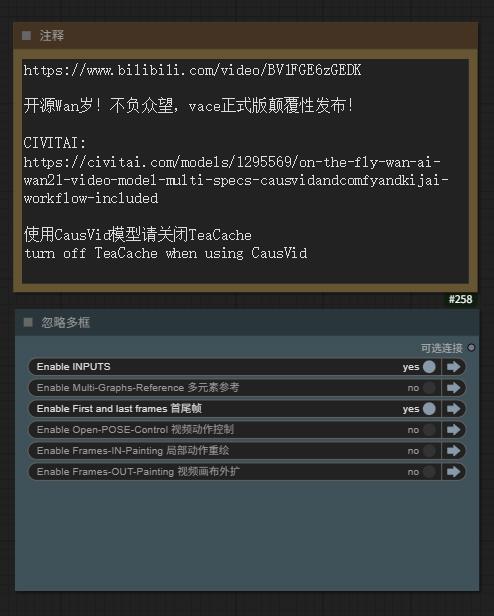
The download list on the right side of this page is in Safetensors format, and the workflow is included in the Training data compressed file. The example images and videos also include workflows (yes, you can directly throw the original video files into ComfyUI and try to capture the workflow)
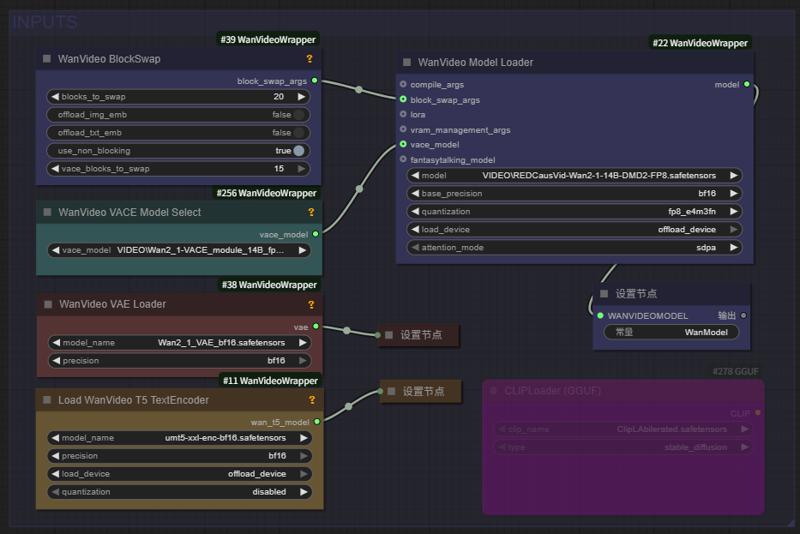
5/15 Aiwood WAN-ACE Fully functional workflow Uploaded
5/15 ComfyUI KJ-WanVideoWrapper have been updated
5/14 autoregressive_checkpoint.pt 1.3b Uploaded , PT UNET Loader
5/14 bidirectional_checkpoint2.pt 1.3b Uploaded , PT UNET Loader
NEW Sampler Flowmatch_causvid in KJ-WanVideoWrapper
Releases from:
⭐ leave a star⭐
[ The adaptability test results of WAN1.2 LoRAs for VACE show that about 75% of I2V/T2V LoRA weights can take effect, but the sensitivity is reduced ( try to increase the LoRA weight ,more than 100% Sometimes it can be helpful ) ]
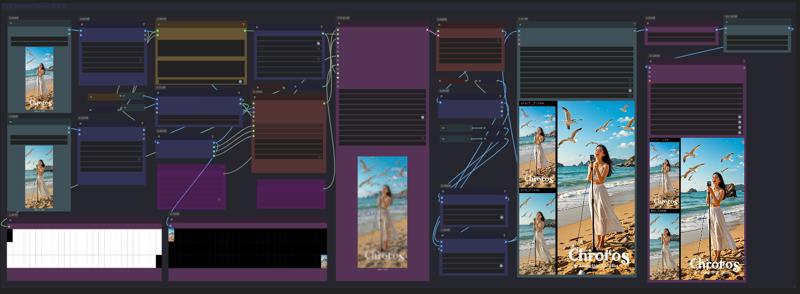
Fullview of Aiwood WAN-ACE Fully functional workflow:
source: https://www.bilibili.com/video/BV1FGE6zGEDK ⭐ leave a star⭐
 CausVid 加速器项目页 https://causvid.github.io/
WAN-VACE 模型的参数和配置如下:
📌 Wan2.1-VACE provides solutions for various tasks, including reference-to-video generation (R2V), video-to-video editing (V2V), and masked video-to-video editing (MV2V), allowing creators to freely combine these capabilities to achieve complex tasks.
👉 Multimodal inputs enhancing the controllability of video generation.
👉 Unified single model for consistent solutions across tasks.
👉 Free combination of capabilities unlocking deeper creative
📌 Wan2.1-VACE为各种任务提供解决方案,包括参考视频生成(R2V)、视频到视频编辑(V2V)和屏蔽视频到视频剪辑(MV2V),允许创作者自由组合这些功能来实现复杂的任务。
👉 多模态输入增强了视频生成的可控性。
👉 统一的单一模型,实现跨任务的一致解决方案。
👉 自由组合功能,释放更深层次的创造力
WAN实时生成来了!Hybrid AI model crafts smooth, high-quality videos in seconds
The CausVid generative AI tool uses a diffusion model to teach an autoregressive (frame-by-frame) system to rapidly produce stable, high-resolution videos.
Wan2.1based 混合AI模型在几秒钟内(9帧/秒)制作出流畅、高质量的视频
CausVid生成AI工具使用扩散模型来指导自回归(逐帧)系统快速生成稳定的高分辨率视频。
From Slow Bidirectional to
Fast Autoregressive Video Diffusion Models
CausVid https://causvid.github.io/
tianweiy (Tianwei Yin)
RedCaus/REDCausVid-Wan2-1-14B-DMD2-FP8 Uploaded / WAN-VACE14B 最佳适配
CausVid/autoregressive_checkpoint uploaded / 自回归模型基于 WAN1.3B 已收录
CausVid/bidirectional_checkpoint2 uploaded / 双向推导模型基于 WAN1.3B 已收录
Kijai/Wan2_1-T2V-14B_CausVid_fp8_e4m3fn.safetensors / HF仓库 WanVideo_comfy
⭐ leave a star⭐

licensed by Creative Commons Attribution Non Commercial 4.0
Thank you for this friend's additional comment. I was too excited last night and didn't sleep, so I stopped updating before finishing:
We’ll need to use the official Python-based inference codes
1) Clone https://github.com/tianweiy/CausVid and follow instructions to install requirements
2) Clone https://huggingface.co/Wan-AI/Wan2.1-T2V-1.3B into wan_models/Wan2.1-T2V-1.3B
3) Put the pt file inside checkpoint_folder/model.pt
4) Run inference code, python minimal_inference/autoregressive_inference.py --config_path configs/wan_causal_dmd.yaml --checkpoint_folder XXX --output_folder XXX --prompt_file_path XXX
Reddit posts about CausVid: https://www.reddit.com/r/StableDiffusion/comments/1khjy4o/causvid_generate_videos_in_seconds_not_minutes/
https://www.reddit.com/r/StableDiffusion/comments/1k0gxer/causvid_from_slow_bidirectional_to_fast/
We have tested the CausVid based on Wan1.3b version, which has incredible speed, and are currently testing the 14B version produced by lightx2v.
 LightX2V: Light Video Generation Inference Framework
Supported Model List
How to Run
Please refer to the documentation in lightx2v.
⭐ leave a star⭐
通义实验室 WAN 2.1 Model Zoo
Institute for Intelligent Computing专注于各领域大模型技术研发与创新应用。实验室研究方向涵盖自然语言处理、多模态、视觉AIGC、语音等多个领域。我们并积极推进研究成果的产业化落地。实验室同时积极参与开源社区建设,全方位拥抱开源社区,共同探索AI模型的开源开放。
Developer / Models Name / Kijai`s ComfyUI Model
RedCaus/REDCausVid-Wan2-1-14B-DMD2-FP8 Uploaded / WAN-VACE14B 最佳适配
CausVid/autoregressive_checkpoint included / 自回归模型基于 WAN1.3B 已收录
CausVid/bidirectional_checkpoint2 included / 双向推导模型基于 WAN1.3B 已收录
CausVid/wan_causal_ode_checkpoint_model testing / 自回归因果推导 测试中
CausVid/wan_i2v_causal_ode_checkpoint_model testing / 文生图模型 测试中
lightx2v/Wan2.1-T2V-14B-CausVid unqualify / 自回归模型14B AiWood实测不达标
lightx2v/Wan2.1-T2V-14B-CausVid quant unqualify / 自回归模型14B量化版 实测不达标
Wan Team/1.3B text-to-video included / 文生视频1.3B 已收录
Wan Team/14B text-to-video included / 文生视频14B 已收录
Wan Team/14B image-to-video 480P included / 图生视频14B 已收录
Wan Team/14B image-to-video 720P included / 图生视频14B 已收录
Wan Team/14B first-last-frame-to-video 720P included / 视频首尾帧 已收录
Wan Team/Wan2_1_VAE included / KiJai‘s WAN视频VAE 已收录
ComfyORG/Wan2.1_VAE included / Comfy‘s WAN视频VAE 已收录
google/umt5-xxl umt5-xxl-enc safetensors included / TE编码器 已收录
mlf/open-clip-xlm-roberta-large-vit-huge-14 safetensors included / CLIP编码器 已收录
DiffSynth-Studio Team/1.3B aesthetics LoRA 美学蒸馏-通义万相2.1-1.3B-LoRA-v1
DiffSynth-Studio Team/1.3B Highres-fix LoRA 高分辨率修复-通义万相2.1-1.3B-LoRA-v1
DiffSynth-Studio Team/1.3B ExVideo LoRA 长度扩展-通义万相2.1-1.3B-LoRA-v1
DiffSynth-Studio Team/1.3B Speed Control adapter 速度控制-通义万相2.1-1.3B-适配器-v1
PAI Team/ WAN2.1 Fun 1.3B InP 支持首尾帧 / Kijai/WanVideo_comfy
PAI Team/ WAN2.1 Fun 14B InP 支持首尾帧 / Kijai/WanVideo_comfy
PAI Team/ WAN2.1 Fun 1.3B Control 控制器 / Kijai/WanVideo_comfy
PAI Team/ WAN2.1 Fun 14B Control 控制器 / Kijai/WanVideo_comfy
PAI Team/ WAN2.1 Fun 14B Control 控制器 / Kijai/WanVideo_comfy
PAI Team/ WAN2.1-Fun-V1_1-14B-Control-Camera / Kijai/WanVideo_comfy
IIC Team/ VACE-通义万相2.1-1.3B-Preview / Kijai/WanVideo_comfy
IC ( In-Context ) Controler 多模态控制器 :
ali-vilab/ VACE: All-in-One Video Creation and Editing / Kijai/WanVideo_comfy
Phantom-video/Phantom Subject-Consistent via Cross-Modal Alignment
KwaiVGI/ ReCamMaster Camera-Controlled 镜头多角度 / Kijai/WanVideo_comfy
Digital Character 数字人 via Wan2.1 :
ali-vilab/ UniAnimate-DiT 长序列骨骼角色视频 / Kijai/WanVideo_comfy
Fantasy-AMAP/ 音频驱动数字人 FantasyTalking / Kijai/WanVideo_comfy
Fantasy-AMAP/ 角色一致性身份保留 FantasyID / Fantasy-AMAP/fantasy-id
Uncensored NSFW 解锁版本:
REDCraft AIGC / WAN2.1 720P NSFW Unlocked / forPrivate use【非公开】
CubeyAI / WAN General NSFW model (FIXED) / The Best Universal LoRA
昆仑万维发布 SkyReels based on Wan2.1
Skywork / SkyReels-V2-I2V-14B-720P / Image-to-Video / Kijai/WanVideo_comfy
Skywork / SkyReels-V2-I2V-14B-540P / Image-to-Video / Kijai/WanVideo_comfy
Skywork / SkyReels-V2-T2V-14B-540P / Text-to-Video / Kijai/WanVideo_comfy
Skywork / SkyReels-V2-T2V-14B-720P /Text-to-Video / Kijai/WanVideo_comfy
Skywork / SkyReels-V2-I2V-1.3B-540P / Image-to-Video / Kijai/WanVideo_comfy
AutoRegressive Diffusion-Forcing 无限长度生成架构
Skywork / SkyReels-V2-DF-14B-720P / Text-to-Video / Kijai/WanVideo_comfy
Skywork / SkyReels-V2-DF-14B-540P / Text-to-Video / Kijai/WanVideo_comfy
Skywork / SkyReels-V2-DF-1.3B-540P / Text-to-Video / Kijai/WanVideo_comfy
昆仑万维发布 SkyReels 视频标注模型:
Skywork / SkyCaptioner-V1 Skywork (Skywork) / Skywork/SkyCaptioner-V1
Tiny AutoEncoder / taew2_1 safetensors / Kijai/WanVideo_comfy
A tiny distilled VAE model for encoding images into latents and decoding latent representations into images
WAN Comfy-Org/Wan_2.1_ComfyUI_repackaged
【例图页面蓝色Nodes或下载webp文件-可复现视频工作流】
Gallery sample images/videos (WEBP format) including the ComfyUI native workflow
This is a concise and clear GGUF model loading and tiled sampling workflow:
Wan 2.1 Low vram Comfy UI Workflow (GGUF) 4gb Vram - v1.1 | Wan Video Workflows | Civitai
节点:(或使用 comfyui manager 安装自定义节点)
https://github.com/city96/ComfyUI-GGUF
https://github.com/kijai/ComfyUI-WanVideoWrapper
https://github.com/BlenderNeko/ComfyUI_TiledKSampler
* 注意需要更新到最新版本的 comfyui-KJNodes GitHub - kijai/ComfyUI-KJNodes: Various custom nodes for ComfyUI update to the latest version of Comfyui KJNodes
Kijai ComfyUI wrapper nodes for WanVideo
WORK IN PROGRESS
@kijaidesign 's works
Huggingface - Kijai/WanVideo_comfy
GitHub - kijai/ComfyUI-WanVideoWrapper
主图视频来自 AiWood
https://www.bilibili.com/video/BV1TKP3eVEue
Text encoders to ComfyUI/models/text_encoders
Transformer to ComfyUI/models/diffusion_models
Vae to ComfyUI/models/vae
Right now I have only ran the I2V model succesfully.
Can't get frame counts under 81 to work, this was 512x512x81
~16GB used with 20/40 blocks offloaded
DiffSynth-Studio Inference GUI
Wan-Video LoRA & Finetune training.
DiffSynth-Studio/examples/wanvideo at main · modelscope/DiffSynth-Studio · GitHub

💜 Wan | 🖥️ GitHub | 🤗 Hugging Face | 🤖 ModelScope | 📑 Paper (Coming soon) | 📑 Blog | 💬 WeChat Group | 📖 Discord
Wan: Open and Advanced Large-Scale Video Generative Models
通义万相Wan2.1视频模型开源!视频生成模型新标杆,支持中文字效+高质量视频生成
In this repository, we present Wan2.1, a comprehensive and open suite of video foundation models that pushes the boundaries of video generation. Wan2.1 offers these key features:
👍 SOTA Performance: Wan2.1 consistently outperforms existing open-source models and state-of-the-art commercial solutions across multiple benchmarks.
👍 Supports Consumer-grade GPUs: The T2V-1.3B model requires only 8.19 GB VRAM, making it compatible with almost all consumer-grade GPUs. It can generate a 5-second 480P video on an RTX 4090 in about 4 minutes (without optimization techniques like quantization). Its performance is even comparable to some closed-source models.
👍 Multiple Tasks: Wan2.1 excels in Text-to-Video, Image-to-Video, Video Editing, Text-to-Image, and Video-to-Audio, advancing the field of video generation.
👍 Visual Text Generation: Wan2.1 is the first video model capable of generating both Chinese and English text, featuring robust text generation that enhances its practical applications.
👍 Powerful Video VAE: Wan-VAE delivers exceptional efficiency and performance, encoding and decoding 1080P videos of any length while preserving temporal information, making it an ideal foundation for video and image generation.
This repository features our T2V-14B model, which establishes a new SOTA performance benchmark among both open-source and closed-source models. It demonstrates exceptional capabilities in generating high-quality visuals with significant motion dynamics. It is also the only video model capable of producing both Chinese and English text and supports video generation at both 480P and 720P resolutions.

Description
Comfy-Org/Wan_2.1_ComfyUI_repackaged
Wan 2.1 repackaged for ComfyUI use. For examples see: https://comfyanonymous.github.io/ComfyUI_examples/wan
---
Wan 2.1 Models
Wan 2.1 is a family of video models.
---
Files to Download
You will first need:
Text encoder and VAE:
umt5_xxl_fp8_e4m3fn_scaled.safetensors goes in: ComfyUI/models/text_encoders/
wan_2.1_vae.safetensors goes in: ComfyUI/models/vae/
---
Video Models
files go in: ComfyUI/models/diffusion_models/
These examples use the 16 bit files but you can use the fp8 ones instead if you don’t have enough memory.
---
Workflows
---
Text to Video
files (put it in: ComfyUI/models/diffusion_models/). You can also use it with the 14B model.
---
Image to Video
Note this example only generates 33 frames at 512x512 because I wanted it to be accessible, the model can do more than that. The 720p model is pretty good if you have the hardware/patience to run it.
FAQ
Comments (181)
When I use the kijajWanVEA, I get error; VEA object has no attribute 'vea_dtype' How to fix that?
The native sampler and Kijai nodes use different VAE, so please pay attention to distinguishing them
Not sure what i am doing wrong but even with tritton and age installed it says its going to take over an hour! on my 3090 lol
The generated size should be as low as possible, and the number of frames sampled at the same time should be as small as possible. Test it first and then gradually increase it.
@METAFILM_Ai I left it at default of one the videos metadata for the steps/frames resolution, I even tried the 480p one and changed the resolution accordingly.
With the built in comfyui method (though text to video) it takes 10 minutes or so (same with hanyuan) I am at a loss as to why its so slow using the workflow of your example videos, not sure what i have set up wrong
sooo , same here, finally made wan2.1 work, hunyuan video on 720p takes like maybe 3 minutes if I just do 20 steps and like 97 frames. I got sage and teacache on tho, but it is insane.
Now ... compared to that
I just downloaded all the models the workflow came set up with, did not change any settings, made an image in flux to 480x824 and right now it seems like this will be about an hour to do. So heeeeelllll naaaaaah wtf, there is no actual way this should take that long. Something ain't right here.
Edit> card is 5090
Edit 2> I am a moron, I kept seeing the size in the promt so figured maybe I can use that size, it worked pretty well on 720x720 , okay so now it is on 6 steps, 1 second 720x380/ish size. So far it is indeed 133 seconds to generate that one second, so I am guessing I can probably bump this thing up to 3,4,5 seconds but have to consider very small size video, probably 720p would not work.
now I am testing it with 480x288 , it took 250 second to do a 5 second long video 20 steps, pretty accurate even without lora. Imma try this with actual realistic size for my card, and tweek some settings, I tink even smaller models could produce pretty good quality to spare some VRAM, I am on 98% with the freaking 5090 , but , the temperature actualld doesn't eve go above 55, so it's a pretty energy efficient workflow and model. Hunyuan with teacache and sageattention can go up to 71 ... okay the average is 65 and the peak temp is 71, but my peak temp with this is literally like 55,56.
Sorry for the novelle.
@sacrificegoat154 the novel is helpful. i will need to revisit this. I assumed the default values found in the meta data of the example files as the ones to use....seems I assumed wrong. Side note, my 3090 is totally not jealous of your 5090...nope...not one bit... :)
The Kijai versions do not state what they are. I guess they are repacked FP8? Are they are different to the official Comfy versions?
Yes, the Kijai version was released earlier than ComfyORG, with both BF16 and FP8 versions available
@METAFILM_Ai the problem I am having is garbled output using the 720p fp8 i2v. fp8 e4m3fn works fine but not so great quality. I tried a iv 720p Q8 gguf (not sure where I got it from now) which gave worse results. Tons of aliasing and fizzing. I heard there is supposed to be a proper gguf gor 14b 70p i2v based off of bf16 (fp16?). I need an official build of that to test. I am grabbing the Comfy repackaged i2v 14b fp8 model from huggingface at the moment to see if it is the same garbled mess I am getting with kijai's fp8.
i loaded the wanAIWan21VideoModelSafetensors_comfyorgI2v480pGGUF with wanAIWan21VideoModelSafetensors_comfyorgWan21Vae what for clip and clip_vision shall i download? i want to use it on image2video
There are differences between ComfyORG's Wan21Vae and Kijai versions VAE , that need to be distinguished. Just use a unified version for clip T5 and clip-vision, which can be found at the end of the list page above.
@METAFILM_Ai the comfyorg gguf file which i have downloaded where do i put it? I ask because i put it as a diffusion_model but i see that it's a checkpoint ? the problem is that i don't see the results i see in the photos.I want to have an easy time when i want to generate a video where the pussy can be seen easily and not with difficulty
@METAFILM_Ai can you explain more please because the infos under the post are not very informative that's why i would like to know how to load the model is it just with unet loader gguf or do i have to do it other way?
@john455454674 GGUF is a Diffusion Model, which can be placed in the UNET or Diffusion Models directory of ComfyUI under Models
Where is the wan work flow? ty
Webp format videofiles contain workflows, which can be dragged to ComfyUI to view
@METAFILM_Ai whats a webp?
@METAFILM_Ai and where is the webp
there is no webp format, only png and drag does'nt work
any difference for the comfyui repackaged GGUF on this post from the ones from city96? there's so many god damn models that is hard to know which is best
As long as the quantitative specifications are the same, which model to use is actually almost the same
@METAFILM_Ai nice, i'll test it when it's released from the early access because it looks super lightweight also, i've contributed some buzz. thanks.
I have the issue on ComfyUI where is keeps disconnecting whist trying to load IMG2VID. Is that because I have a RTX 2070 with 16 GB of RAM?
I have also encountered this situation, which is caused by Insufficient CPU memory(RAM) NOT Insufficient video memory(VRAM)
Thanks for this solid workflow. Would it be possible to integrate more than 1 Lora?
Okay, I will be testing some popular LoRA recently and providing WEBP Video with Lora loader (including workflow)
Thank you for this! May I ask how to increase the seconds of the video? Thank you!
WAN 2.1 's training foundation is 16 frames per second, and each additional 16 frames is equivalent to an extra 1 second of content. Of course, you can customize how many frames per second you want during synthesis
@METAFILM_Ai Got it! Thank you so much!
what was done to this model to make it different from the rest?
Not doing anything, And there's no difference. We sharing models, providing workflow, sharing solutions to problems. Thats all =)
bro, the models are good, especially regarding character consistancy, but, the expression on penis and pussy are a bit wired.. could you fix them on next version? maybe fp16 version?
I purchased your new gguf by the way
This is a model trained by a large company, we just made it more active. Indeed, we are training LoRA, and currently more and more LoRAs are emerging.
great work!
I can't find 'Hunyuan text_encoder; found under 'load wanVideoClip; which one?
Is there a concise list of the various models needed?
It seems that you are using Hunyuan video workflow, and the correct workflow is using WAN's models At the top of this model page, there is a complete list.
@METAFILM_Ai sorry, I just dropped one of your video files on comfyui for the workflow.
which version should I download (RTX 3080 10GB)
Use the 480P version of the model and set 20-30 Blocks swapping in the workflow
Is this censored? I am trying to do a parody with kens hadouken but it never actually hits the other person, or if it reaches them, they dont fall to the ground
The model has indeed undergone some adjustments and opened up many review restrictions, and Lora's author may provide better suggestions.
can someone point me to an upscaling workflow using the webm/webp from the "stock" workflow? I am using the standard workflow because it processes faster until i get the desired result from batches, but once its done, the quality is low.
You can take a look at the workflow I recommend, or search for some more advanced gameplay
what is the difference between this model here and the model from comfyui?
The same, And there's no difference. We sharing models, providing workflow, sharing solutions to problems. Thats all =) the Kijai version was released earlier than ComfyORG, with both BF16 and FP8 versions available
@METAFILM_Ai Does this model have no nsfw?
@KDDKBD its does NSFW!! Thank god!
I was so sick of the stupid censored Minimax and Kling models!!!
Guys please give me hint on rtx4080 with model to pick.?
Use the 480P version of the model and open 10-20 Blocks swapping in the workflow
Do any one know how to make a vid2vid?
If im using empty embeds it show "Clip encoded image embeds must be provided for I2V (Image to Video) model"
If im using WanVideo ImageClip Encode the dimension never fit "WanVideoImageClipEncode
Sizes of tensors must match except in dimension 0. Expected size 21 but got size 61 for tensor number 1 in the list."
No such shit, that would be stupid. You can only take out one frame from a vid and you start with img2vid from that frame
Find a V2V exclusive workflow on CIVITAI and take a look
i think you need the T2V model for v2v
hey guys,
Can someone make some NSFW Workflow available for beginners like me?
there is no webp format, only png and videos are in mp4 and drag does'nt work....
Thanks
To download videos in .webp, make sure to download the videos using the download button at the top right when you open one. If you right click and select save as it will save as an .mp4 in Chrome
@funscripter627 thanks, but it's still mp4
Both MP4 and WEBP file formats are available, and many excellent workflows are also recommended on the model page.
@METAFILM_Ai Hi. Is there any other places to download the webp or json workflow files? Clicking the download button also only gives me a mp4 file like "WanVideo_2_1_00011.mp4". I tried on Edge and Safari.
@1027691161356 I just download a couple of .mp4 files using the download button and they all contain the workflow for comfyui. I downloaded the first couple of vids from the 'Kijai-Wan2.1-I2V-14B-480P' version.
I was originally under the impression that only the .webp files contained the workflow but I was wrong.
@funscripter627 i dont get it , how do i extract the json workflow from a mp4 ?
@funscripter627 but how do i extract the json file from it ?
@hiukiny162 You don't have to extract anything. You can just drag the file from the folder where you saved it into your browser tab where comfyui is running. If it contains a workflow it will load it automatically.
Having the same issue, downloaded all the files and they're all mp4's and tried dragging them all over but they all say Unable to find workflow in "file name" been trying to get comfyui wan working all day but it just doesn't...
sometimes it's work now....
NSFW does not work for me. Can't achieve anything decent. Can someone give me something that I can reproduce? Like a pic of your whole workflow with a prompt, seed and the result?
yes, same problem for me 😒
You can download video files in WEBP format, throw them into ComfyUI to view the workflow, or search for LoRA usage in CIVITAI.
@METAFILM_Ai Nothing downloads as webm? Neither Edge or Chrome will download this as webp. How the heck are you downloading this.
@trashkollector175 If you are using ComfyUI just use the video helper suite to save the video as an mp4. LoRA can also help with NSFW like the titty drop lora for wan or the general NSFW lora for wan.
@trashkollector175 Format doesn't matter, i drag mp4 or webp to comfyui and it opens me a workspace, but some guys are hiding their stuff on purpose and it will/can be empty
@METAFILM_Ai Thanks. It took me some time to fully comprehend 😂
@thiefandliar It's not working for me with mp4 using the portable version. I am running the latest version of comfy. When I select the mp4, it does nothing.. No error message.. nothing.. and when I look at the console there is nothing... If I had an error message of some kind I would provide it.. I converted the mp4 to webp, but then comfy said "it can't find the workflow in the webp", lol. At this point I really don't give a *****
It works with something like the titty drop lora, otherwise it's painful even on batch I would get like 10% success rate. Most people are using complex worklows that don't work or are too slow for my setup for some reason. The original example workflow works at decent speed but the saved file is only webp or WebM for whatever reason. I'm new to this, but I can at least generate something. Let me know if you need help.
you can try my workflow for wan2.1 and test if this helps you https://civitai.com/models/1382864/wan21-image-to-video-workflow
@tawsLoRa I am getting the following error "WanVideoModelLoader" Should never be installed with your workflow. I have no idea how to fix it. Also, I didnt find the place to enter num_frames, i just see the parameter exists but never found it. The resolution is also where? Thanks
@CasualGamers you need to open Comfyui-Manager and then click install missing nodes.
The workflow uses the WanVideoWrapper https://github.com/kijai/ComfyUI-WanVideoWrapper
and if you dont have the Comfyui-Manager https://github.com/ltdrdata/ComfyUI-Manager
also you need the latest version of comfyui
i try to generate video with 512* 512 and 480*832 i i use model480p and it blank_image how to fix it?
error:
C:\Users\---\Downloads\Compressed\ComfyUI_windows_portable_nvidia\ComfyUI_windows_portable\ComfyUI\custom_nodes\comfyui-videohelpersuite\videohelpersuite\nodes.py:105: RuntimeWarning: invalid value encountered in cast
return tensor_to_int(tensor, 8).astype(np.uint8)
C:\Users\---\Downloads\Compressed\ComfyUI_windows_portable_nvidia\ComfyUI_windows_portable\ComfyUI\comfy\utils.py:825: RuntimeWarning: invalid value encountered in cast
Try upgrading the ComfyUI environment
@METAFILM_Ai i upgrade update_comfyui_and_python_dependencies and workflow kjai2v-480 but blank image other workflow it work fine
Does this work on linux with an AMD GPU, and how the hell do i even use it if so? I've never used comfy before and it is immensely unintuitive
That should be easier than AMD on windows from what people comment. Generally you need to fiddle with drivers and dependencies a bit, but it's possible, details depend on the exact GPU. Cannot tell you much more, as I chose the pain of getting AMD for Windows and it's been a PITA, but it can be made to work.
How can I actually download this workflow?
It says in the description that the workflow is included in the gallery sample videos in WEBP format, but the sample videos seem to be MP4 that doesn't include a workflow.
I was wondering the same thing... why not just attach the workflow... wth
The other MP4 Videos have a workflow but not the one with the girl in a silver swimsuit. The issues is the workflow also changes for each video.
@Devilday666 but how do i extract the workflow from a mp4 file ?
@hiukiny162 Download the MP4 video and drag and drop it into the workflow.
@Devilday666 i use mimic pc , i can't drag the file into workflow , can someone share a screen cap?
how to you get higher resolution? my videos always look low quality, but the post here look better
Gallery sample images/videos (WEBP format) including the ComfyUI native workflow
This is a concise and clear GGUF model loading and tiled sampling workflow:
Wan 2.1 Low vram Comfy UI Workflow (GGUF) 4gb Vram - v1.1 | Wan Video Workflows | Civitai
What GPU do people actually use for Wan video generation, wondering if I should get a 3090 or 5070 Ti. Is a lower VRAM GPU actually viable? Or is the models for Wan actually way slower with only 16GB of VRAM, even if the GPU itself is way faster?
Thankful for any answers!
Better get a 24Gb or more graphics card. honestly I have a 3080ti and always running into out of memory.
I run on a graphics enabled EC2 instance on AWS running an A10G
wait for 5080 24gb ver its coming!
I use an Evga RTX 3090 FTW3 Ultra Gaming 24GB GDDR6X, the results are quite spectacular but it's not that fast, I think I have non-optimal settings, I'm trying to fine tune it
On RTX 4000 you get FP8 which if the model uses, you get a decent speed boost. I use a 4070 Super which is similar to what you want, it's got an ok speed, but you probably have to stick to 480p or simpler workflows due to memory constraints. All other workflows I have tried aside from the "stock" one are dogshit slow, so I added loras to the original workflow example from git and mostly using that. I can get 320x240 81 frames in about 10-12 minutes. I do that until i get the prompt right and then run a batch at 640x480 overnight. I am thinking about upscaling later with whatever model is decent. If that seems reasonable to you, the 4070Ti is a decent enough choice.
3070 takes 27 minutes with lora and 15 without lora at 480x976
@NiftyyKnight Can you share your workflow? I was getting way worse results with 3070 so I upgraded to 4070s
@NiftyyKnight How many frames are you generating for those numbers?
very nice model
wheres the workflow
Try in my profile, the very first image that looks low/choppy framerate is from a webp file that should have the simplest workflow
Gallery sample images/videos (WEBP format) including the ComfyUI native workflow
This is a concise and clear GGUF model loading and tiled sampling workflow:
Wan 2.1 Low vram Comfy UI Workflow (GGUF) 4gb Vram - v1.1 | Wan Video Workflows | Civitai
Nipples are weird, I get 10% success rate on realistic looks nipples, the rest of the time, I get something like a piercing in the nipple. I write "realistic breast anatomy" or "realistic looking nipples" but the problem persists. Anyone got tips of what to do in the prompt to get realistic looking nipples?
if anyone facing the same issue, I solved it using these on the negative prompt: "jewelry, piercing, metallic, glossy, artifact, chrome, shiny artifacts"
probably a dumb question but can I use this on Auto1111?
Pretty sure the answer is no. (and neither Forge). Looks like ComfyUI is the only option for all things WAN. (Although, I did see YT video about SwarmUI allowign ComfyUI).
I am on the same boat and I think I will eventually migrate over to ComfyUI. It looks overwhelming but I feel like Forge/A1111 are no longer being updated these days.
@Tezozomoctli comfyui is so intuitive and so easy to set up and has so many premade workflow templates that you can literally be up and running in minutes. The only "learning curve" would be the nodes, which you get an understanding of when you try out your first workflow, and the actual "comfyui manager" setup situation, but once you have comfyui manager up and running and are able to update, download nodes, etc in the manager, then its pretty easy from there... and even that's not TOO daunting... its just the first couple of times you try to get something like manager installed you might miss a step or something and it may take a second to figure out, but once you do, you get the eureka moment and everything clicks and its literally the most robust, easy to use, yet, highly customizable AI workflow on earth.
@BreezyHeezy I want to believe that this is the case. But, nearly every workflow that I try to install, that doesn't come embedded in Comfy, seems to have custom nodes that refuse to be recognized.
@lavasplit753 git clone is your best friend, also wget "url here" is your best friend as well. Sometimes, a little coding knowledge goes a very long way in these cases. I suggest, if I may, that if you don't already have some super basic terminal skills (putty, powershell, jupyterlab, etc,) that you get some of those skills. It makes a nearly impossible task (finding and installing custom nodes from outside of comfy manager) into a literal 3 click super fast ftp transfer. And you can even save your git and wget type codes on a cheat sheet in a text file, AND you can lock it as "read only" so you don't screw up the codes accidentally while copying/pasting until you get the hang of it and start remembering them. In A.I. its not "necessary" to have coding experience, but even a little bit will open doors for you. (I'm writing this assuming you don't have much coding experience, but if you do, then you already know what I mean) At that point, when you get your codes straightened out, its literally a matter of typing the node name in duck duck go and finding where its hosted, then getting the direct download link. Wget and git clone will handle the rest. Also, you will need your api token for that type of download from civit, and often you'll have to rename the file and its extension if you use wget to download from civit. If you're running locally, that won't be an issue becuase you can just direct download into your machine. Like I said, I'm typing this under the assumption that you don't know code, but if you do, then you already know what I'm saying. lol
@BreezyHeezy Y'know what? After reading this, I'm going to go for it.
@BreezyHeezy I got comfyui a few weeks ago, and learned the terminal launch and nodes well. my issue is whenever I come to download the required nodes from an online workflow, my comfyui won't always download the nodes completely (there are errors or missing files). what do you recommend?
When I generate with ComfyUI, a prompt pops up: UnetLoaderGGUFAdvanced
empty(): argument 'size' failed to unpack the object at pos 2 with error "type must be tuple of ints,but got numpy.float64" What is the problem
update the gguf node and try again
I'm pretty new to video models, what's the proper format for weighting sentences or pieces of sentences higher in the prompt on this one? Also is there any other useful prompting tricks to isolate, blend elements, or add random selection like with wildcards on image models? I already know use <pad><pad> to separate sections, but that's about all I could find.
There is no checkpoint loader in the workflow you linked to. But when I use any ComfyUI checkpoint loaders it errors at the start saying that it can not detect the model type of this checkpoint. Can someone point me in the right direction? Could renaming the safetensors file have anything to do with it?
'NoneType' object has no attribute 'encode_image'
what should i do
I got the issue resolved following this:
https://github.com/1038lab/ComfyUI-OmniGen/issues/37
make sure you have Windows 11 SDK and MSVC build tools installed in visual studio
@ColdBread i did, "AttributeError 209 clipvisionencode"
It seems like you dont have a clip vision model loaded, https://github.com/comfyanonymous/ComfyUI/issues/5559
either set the strength to 0 or load a clip vision model.
@ColdBread i think i got some wrong with model and folder, i dont know , i try to follow it https://comfyanonymous.github.io/ComfyUI_examples/wan/ everything is work
This is the workflow im using, it has a really good guide to where to download everything you need. theres also a simple version if you dont need the upscale or interpolation stuff:
workflow:
https://civitai.com/models/1309369?modelVersionId=1592466
guide:
https://civitai.com/articles/12339
@ColdBread thanks, let me try
@royxyou2303 No problem man, let me know if you have any trouble getting it to work.
@ColdBread is good, i try to use other workflow, all be right, just sometimes i gen video from asian photo, that became a Westerner XD , that fun
ApplyRifleXRoPE_WanVideo报错怎么解决
not sure if i am using this wrong, but it takes several hours longer to generate a video if i use this 2.1 t2v model than if i use the t2v that comes with comfyui.
does it take longer for everyone (sometimes 8-9 hours), or am i using the wrong settings?
im using a 4090 running local and its adding a good 15 to 20 minutes to my gens as well. usual gen time for me is 4 mintes with this checkpoint 19 to 20 minutes
Why does my process automatically exit the program when it reaches WanVideoModelLoader, and the log shows pause?
为什么我的进程到达WanVideoModelLoader的时候会自动退出程序,并且日志显示pause?
I also suffered until I increased the swap size to about 65GB. As a result, my RAM consumption during the process is ~80 at peak
guys. does this work on colab SD?
I am looking to make longer videos is there away to make the videos longer than 81 frames maybe like 2 minute long video or something?
there are video extend workflows on this site
Are the kijai-wan2.-i2v-14b 720p and comfyORG i2v-720 p GGUF models the same base model or entirely different models?
Couldn't find documentation clarifying their relationship.
Also, are both of them generally compatible with generating NSFW content?
Thanks!
this was in top spot for the bids, how is it that we cant generate with it?
Wan and other video ckpts aren't supported yet (aside from the handful we currently have). They did mention on stream they were working on/looking to adding Wan on site.
Can I use this with my 4060 8G graphics card?
cool
Has anyone tested the 14b quants on hardware with shared memory (amd apu/m-series arm)? I wanna try this model but don't wanna spend the time downloading only to find it doesn't work.
screw it gonna find out for myself i guess
Takes 30 mins to gen anything on my rig and I just end up with a pixellated mess :(
what video card are you using?
@FEARNIME I'm on a 4090 and I'm also ending up with a pixelated mess of green static. But I'm just now trying to learn to use this. Not sure if I downloaded the wrong model, trying to use the wan video template already in comfyui by default.
@daemondenpublic402 Try spending a few dollars on a runpod with a 24GB 4090 (or greater) so that you can learn how to use it without waiting half an hour to see what you did wrong. Then you can use your local 4090 and get a good result 7 times out of 10. Look up "runpod wan i2v one click deploy".
RTX3060 12GB is my card at the moment. I cant run the 14B one, but the 1.3 one I can.
请问你这个是一键整合包吗?
不是的,伙计,这个是模型的权重文件
@METAFILM_Ai 收到,谢谢
how to use this with auto1111
I think there's an extension that puts in a 'Comfy'-like tab but you'd probably be better off just using Comfy outright what with updates and such. It's not nearly as daunting as it looks and you get more control over things you'd normally have to leave to Auto/Forge to do. Oh also Forge is superior to Auto1111 in terms of speed of production btw.
Got a missing node that's not taken care of by the Manager fed by the prompts: 'workflowwanparam' which gives: 'Cannot execute because a node is missing the class_type property.: Node ID '#74.' I must have missed something.
XXX, X, PG-13, PG, R, Adult content, Porn
Anybody share with me google colab notebook?
I would also like to know if anyone has tested it on Google Collab machines, both in the free version and in the paid version. If anyone can give feedback, I would be very grateful.
Does anyone know if there's a video tutorial on how to get this working properly? It's for homework :D
https://www.youtube.com/watch?v=0jSDmLtNe_k&t=26s about 14:30 in
@Zeus1111 hero :3
14B-720P only 15GB?No way,I saw a fp-8 version with 17GB.Could someone explain?
Do you have any plans to add FP4 models?
NF4/FP4 is too unstable for videos
wan2.1_i2v_480p_14B_bf16.safetensors
Safe32.8 GB
What I find in huggingface obvisouly this model have 32.8GB.But in this website,this model only have 15GB.What 's difference?
This is a FP8 or what?
How do you install/use this?
There are a large number of workflows and tutorials in the Civit community. Search for them
Guys pelase can somebody help how to use thsi comfyui and make thsi videos in inet no good tutorials
There are a large number of workflows and tutorials in the Civit community. Search for them
@METAFILM_Ai ... wow that was helpful...
Can i use this in Forge ui or A1111?
Idk if there's been any major change lately, but since WAN came out that has always been a no. Must be ComfyUI.
My Brother, switch to Comfy. i know it looks daunting but its better in the end. more customization and its faster. You can schedule prompts with different loras ahead of time. intrupting is faster. they are no longer going to be updating forge. I did it a month ago and im not going to lie that shit was rough. but i got it and its way better. plus comfy gets all the new toys.
@Azkckr69 from what I understand, Comfy doesn't have a NSFW faceswap node.
@wollyzor it does, reactor (the new one) can be made NFSW with one single change to a file.
GGUF model not working.
Unetloader(GGUF) node returns error:
empty(): argument 'size' failed to unpack the object at pos 2 with error "type must be tuple of ints,but got numpy.float64"
Use the correct GGUF loader
Details
Files
onTHEFLYWanAIWan21VideoModel_comfyorgI2v720pGGUF.gguf
Mirrors
onTHEFLYWanAIWan21VideoModel_comfyorgI2v720pGGUF.gguf
Mirrors
wan2.1-i2v-14b-720p-Q8_0.gguf
onTHEFLYWanAIWan21VideoModel_comfyorgI2v720pGGUF.gguf
wan2.1-i2v-14b-720p-Q8_0.gguf
wanAIWan21VideoModelSafetensors_comfyorgI2v720pGGUF.gguf
wan2.1-i2v-14b-720p-Q8_0.gguf
wan2.1-i2v-14b-720p-Q8_0.gguf
Wan2.1-I2V-14B-720p-Q8_0.gguf
wan2.1-i2v-14b-720p-Q8_0.gguf
wan2.1-i2v-14b-720p-Q8_0.gguf