


The "PRO PHOTOSHOOT ULTIMATE - FLUX CONSISTENT CHARACTER & CLOTHES" workflow is an advanced creative toolkit designed to ensure consistent character representation and clothing styles across a variety of images. Ideal for artists, designers, and content creators, this workflow integrates multiple powerful tools to create dynamic, cohesive visuals while maintaining a high standard of quality.
Key Features:
Flux Consistent Character Design: Leverage advanced algorithms to maintain character consistency in various poses and outfits, allowing for fluid storytelling across images.
Detailed Clothing Customization: Utilize the PULID system to create intricate clothing designs and styles, ensuring that outfits are visually appealing and true to your creative vision.
Dynamic Pose Integration with OpenPose: Employ the OpenPose technology to easily manipulate character poses, providing a natural and realistic look that enhances your compositions.
LORA Support for Enhanced Flexibility: Incorporate LORA models to expand your creative possibilities, enabling the addition of diverse character attributes and styles to fit any narrative or theme.
Streamlined Workflow for Efficiency: Designed for ease of use, this workflow allows for quick adjustments and rapid iterations, ensuring that you can focus on creativity without getting bogged down by technical details.
Whether you’re creating a series of character illustrations, developing a unique fashion campaign, or designing a visual story with engaging characters, the "PRO PHOTOSHOOT ULTIMATE - FLUX CONSISTENT CHARACTER & CLOTHES" workflow empowers you to produce stunning, cohesive images that captivate your audience and convey your artistic vision.
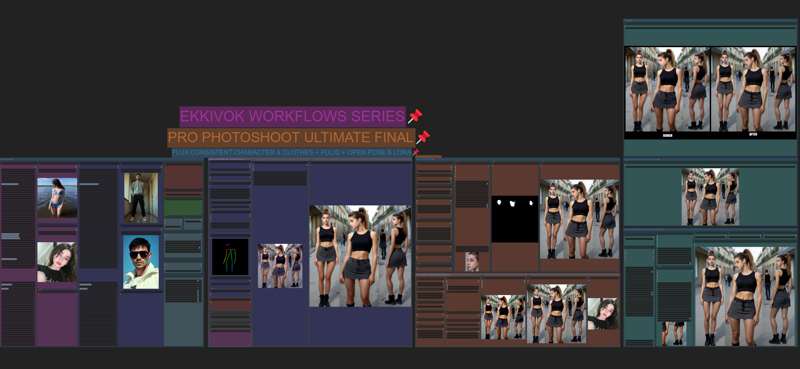
Whether you're capturing portraits, landscapes, or product shots, the "PRO PHOTOSHOOT ULTIMATE" workflow equips you with the tools to achieve professional results. Transform your creative vision into reality and produce breathtaking images that resonate with your audience.
Description
FAQ
Comments (17)
It looks really professional, I already install the missing custom nodes and it looks fine. But now I don't know how to start :) Do you have any tutorials? Thank you, I can't wait to use it!
hi mate how are you ? hmm no but i let some notes inside the WF a like of "how to use it" ^^
i didn't made any tutorials yet, by lack of time, but i will do, till this time can i help you ? what is your issue?
can you tell me more about that ?
@EKKIVOK Do you have a youtube account?
@lei123 not yet ^^
@EKKIVOK hi! I don't know how to explain that... I already tried to use the workflow but in some part of the process it gets to an error related to Pulid, and it is happening with another workflow. Someone told me to update comfy, but the error persists, so I don't know what to do, but I really would love to use succesfully your workflow cause the results look amazing. Do you have an IG, maybe I could share you some screenshots there
@adrian1111 sometimes it can happens, PulID have some several issues with other nodes, check in comfyui manage -> Nodes -> topleft -> import failed -> try to fix the failed imported node :)
@EKKIVOK there wasn't nodes in "import failed". The error it show me is this:
ControlNetApplyAdvanced.
'NoneType' object has no attribute 'copy'.
# ComfyUI Error Report ## Error Details - **Node Type:** ControlNetApplyAdvanced - **Exception Type:** AttributeError - **Exception Message:** 'NoneType' object has no attribute 'copy' ## Stack Trace ```
And a loooooooot more of text... :(
@adrian1111 it's not a problem with my workflow but a missing nodes called "Controlnet" you need that nodes to get this working properly, you can find that particular node here : https://github.com/Kosinkadink/ComfyUI-Advanced-ControlNet
@EKKIVOK the problem was I din't have the right controlnet model, I installed it and now it's working. 4:35 am here. Now I have this error:
SamplerCustomAdvanced
forward_orig() takes from 7 to 9 positional arguments but 10 were given...
I'll keep solving this in a few hours, time to sleep. Thank you mate!!!
@adrian1111 no problem mate, for the advanced sampler you will find that one on advanced nodes i guess it's common to use it now, so i assume you will find it on every nodes pack :)
@adrian1111 - Go into your ComfyUI folder, open a command line and enter the following:
git reset --hard cc9cf6d1bd957d764ad418258b61d7e08187573b
wow thanks, this workflow is no joke !
I don't really know what I'm doing but i made it work without real trouble.
glad to hear that mate :) i hope it will you a lot, some new stuffs are about to be release soon :)
This is great. Do you have any documentation to go along with this? I am getting errors when running the script. Everything from Node error saying that it needs an input, to loras that are missing. I tried to find the associated loras, but no luck. Any guidance would be appreciated.
Creating and sharing these amazing workflows is a great courtesy. Thank you.
However,
removing workflows that don't work and disrupt the system is equally valuable courtesy.
Please be mindful.