


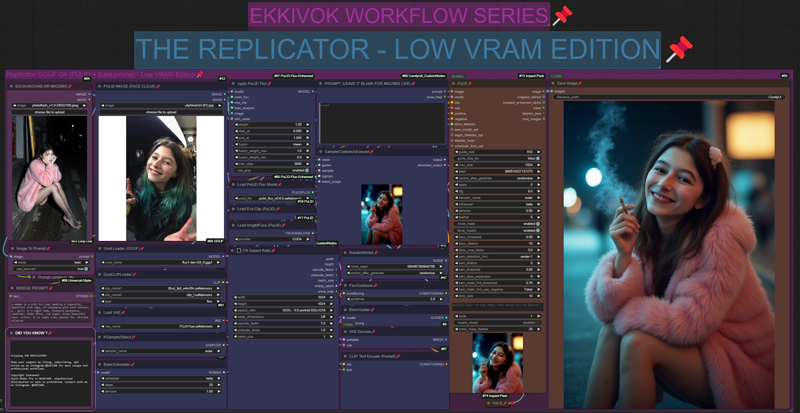
The "The Replicator GGUF Q4" workflow by EKKIVOK is designed to perform high-quality image-to-image transformations with extensive flexibility.
Workflow Components:
Loaders:
UNETLoader - Handles UNET processing using the flux1DevFp8_v10 model.
VAELoader - Manages VAE operations using FLUX1\ae.safetensors for advanced encoding and decoding.
DualCLIPLoader - Embeds CLIP guidance, improving image conditioning.
Samplers & Noise Handling:
KSamplerAdvanced (1ST PASS & FINAL PASS) - These are core nodes for generating samples and refining images, ensuring desired noise patterns and consistency.
RandomNoise - Adds controlled noise for image generation and enhancement.
Detailing Nodes:
FaceDetailer, UltralyticsDetectorProvider, and Eyes Detailing Nodes - Multiple detailer nodes focus on specific areas like eyes, face, and hair, enhancing clarity in these critical regions.
Upscaling & Sharpening:
CR Upscale Image & Sharpen (mtb) - Upscales images and applies sharpening techniques, enhancing details and refining edges.
Other Key Elements:
ModelSamplingFlux & CR Text Replace - These nodes adjust the image sampling process and replace text-based elements for better contextual output.
This powerful configuration allows for in-depth image transformations while maintaining quality, detail, and style consistency.
Support Me and My Work <3
Hey there! If you enjoy using my workflows and find them helpful in your projects, consider supporting my work. You can follow me on Instagram at @ekkiv0k to stay updated on the latest workflows, creative projects, and insights. Your support means the world and helps me bring more high-quality, professional workflows to the community !
Description
FINAL VERSION
FAQ
Comments (2)
Does PULID img have to be the same aspect ratio as input image? Asking because I'm getting a blank black image as output and trying to pinpoint the problem.
No, but try to get an image ID with the face clearly visible, for your problem it's maybe cause a missing models or an incorrect models loaded in the workflow :/