


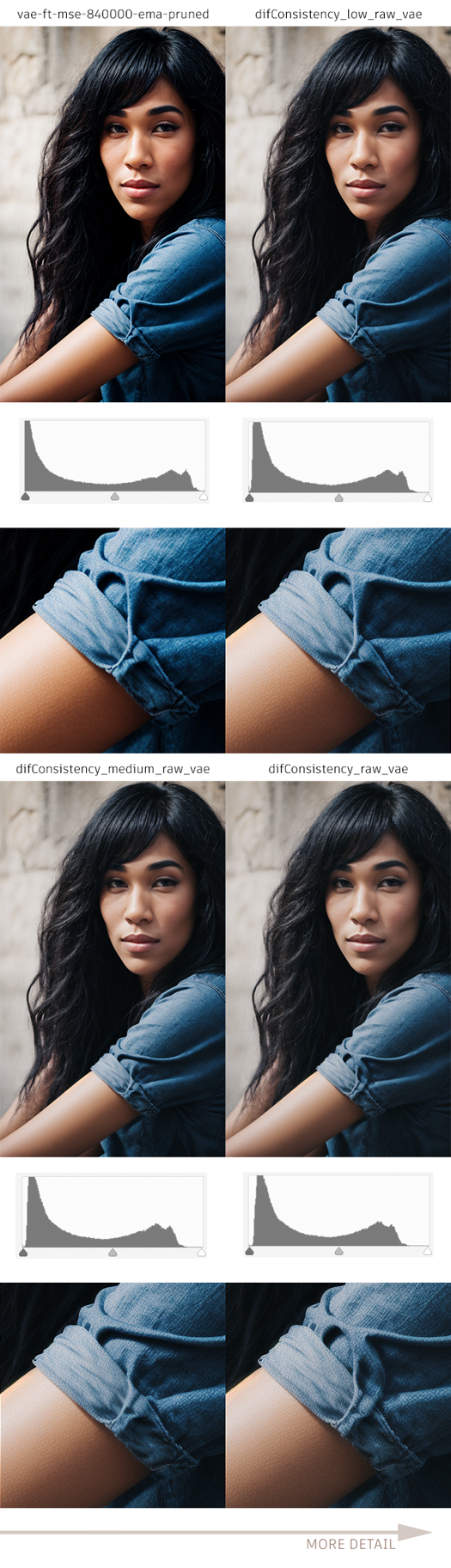
VAE with higher gamma to prevent loss in dark and light tones.
Complete article explaining how it works
https://civarchive.com/articles/462
Package contents:
Checkpoint SD 1.5: https://civarchive.com/models/87371
Embedding NEGATIVE: https://civarchive.com/models/87375
Lora DETAIL: https://civarchive.com/models/87378
Lora PHOTO: https://civarchive.com/models/87376
Lora Dark Theme (THIS): https://civarchive.com/models/87575
VAE RAW (THIS): https://civarchive.com/models/88390
More examples here:
Description
VAE with higher gamma to prevent loss in dark and light tones.
Package contents:
Checkpoint SD 1.5: https://civitai.com/models/87371
Embedding NEGATIVE: https://civitai.com/models/87375
Lora DETAIL: https://civitai.com/models/87378
Lora PHOTO: https://civitai.com/models/87376
Lora Dark Theme (THIS): https://civitai.com/models/87575
VAE RAW (THIS): https://civitai.com/models/88390
More examples here:
FAQ
Comments (7)
So it just desaturates?
If you observe the example, it adjusts the black and white balance, affecting saturation and introducing more noise. It is not meant for obtaining a final image but rather for subsequent editing in an editor. This VAE may not be suitable for your needs.
See: https://civitai.com/images/1113636?modelVersionId=94036
You would want this VAE if you were taking your images from SD into photoshop or some other editor where you would be editing... After your edits you'd then adjust saturation, white and black points, etc for the output desired - eg for print, for screen, for phone....
Look at the sample image with the little graphs at the bottom. The gray areas are the range of tones in an image. As you make changes to brightness or contrast or hue or saturation, the gray area can move to the left or the right. Any part of the gray area that moves past the edge of the graph means that data is lost. Like if all the pinks get pushed so far to white. They become a uniform white. No more range of tones. Wen you try to get them back, they are just a blob of whatever single tone you move them to. The detail is lost forever. This VAE moves the left and right sides of the gray area in the graph in towards the center from the edges of the graph. So now it is less likely that edits will move something off the graph. You are right it looks like less saturation, but really it is mapping the saturation to a compressed range, so you have room to make changes, and when you are done, you can expand the saturation back to where you want it, and still have detail in the extreme ends.
I'm curious how one makes refinements/trains a VAE. Also is it possible to ask for a safetensor version?
Second on the request for a Safetensor VAE
This is very well done, Your sample images explain clearly what it does. And for people who make sizable swings in a photo editor, this will save many images from being ruined. Thank you!!
Details
Available On (1 platform)
Same model published on other platforms. May have additional downloads or version variants.