
What is this?
tl;dr - If you have hundreds, or thousands, of LoRAs and use ComfyUI then this is made for you.
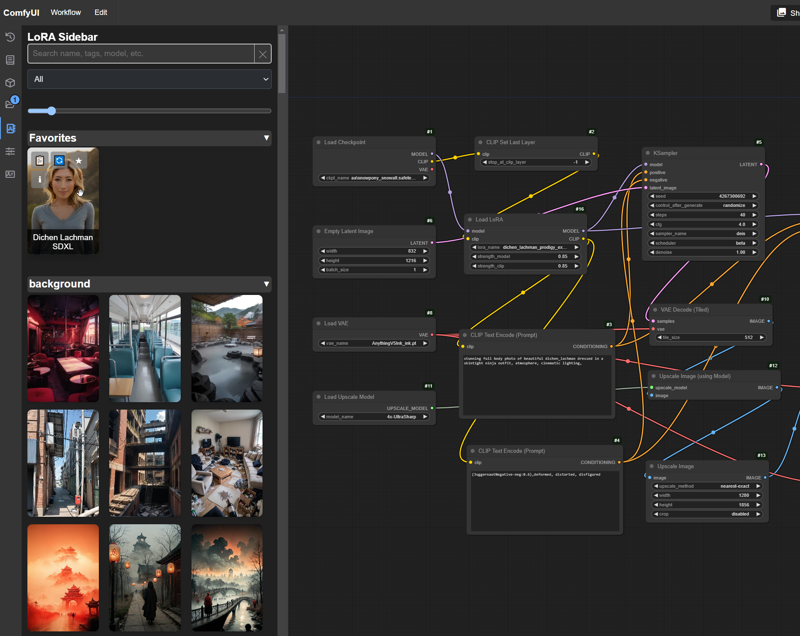
Custom node to provide front-end UX that creates a visual library of all your LoRAs. It's designed to be fast, slim, and make using LoRAs in Comfy a lot more fun for visual users - especially if you have lots of LoRAs. Should make people used to A1111 and other UI heavy platforms feel more at home. Supports several existing data files out of the box if you've already got them. (civitai.info, stability matrix, and rgthree) If you've got lots of LoRAs, this sidebar could be your new best friend!
 Updates
V1.2
More external data changes, expanded support to both Stability Matrix data files as well as rgthree metadata. Reduced external calls on processing even more so should be even faster, loading additional data on demand in background. I don't plan to add anymore metadata support at this time, so this should be the last major data support change for a while
Custom images now can be easily added to any LoRA Info window by just placing the images in the LoRA's base directory (where the preview.jpg and info.json live) and REFRESHING the LoRA - this also makes setting them as the thumbnail super easy
Can now replace the default LoRA thumbail via the LoRA Info popup
Enhanced LoRA Info popup image handling, added hi-rez pop out
Added Favorites category override to keep it expanded even if you have categories minimized (Nice QoL buff for those with large datasets)
Fixed some bugs
V1.1
Now supports using existing data and images that follow the civitai.info format, this reduces duplication and also greatly speeds up processing of LoRAs that have it
Fixed a bug with the way subdirs were calculated, now drag and drop should be much more reliable
Added detection for old data files and reprocessing logic, I won't change this unless I have to, but being able to check it is important (cause I changed it this time 😛)
Overhaul of stored data to lay groundwork for future updates
Can now search for "lycoris" in the search box to quickly find all your lycos 🥳
Features
- Sidebar that automatically generates a visual library of all your LoRA models
- Designed to be super fast for searches
- Easily filter LoRAs by base model (and any search term, obviously)
- View LoRA details via LoRA Info popup, includes important model info and has easy to copy trained words and tags
- Drag and drop LoRAs to create or update LoRA nodes on the canvas
- Drag and drop images from the LoRA Info popup to load entire workflows (if metadata exists)
- Categorize and sort your LoRAs in multiple ways such as folder structure and automatic or custom tags
- Works with custom LoRAs - see usage notes below
- Provides NSFW protection for all those LoRAs that you don't remember downloading 😁
- Battle tested with very large (9000+ models) LoRA libraries
- Supports symlinks!
- Supports video preview files, because why not
Installation
Manual
- Download and unzip the file contents into your ComfyUI custom_nodes directory and you're done, as usual no dependencies or anything else to install!
Github
https://github.com/Kinglord/ComfyUI_LoRA_Sidebar
- git clone this repo into your ComfyUI custom nodes folder
- There are no python dependencies for this node since it's front end only, you can also just download and extract the node there and I won't tell.
- Make sure to enable the new menu in the ComfyUI settings
- After install you probably want to go into Lora Sidebar Settings and configure things to your liking. If you have a very large collection and want to use categories I suggest using the collapsed default setting.
- The sidebar will automatically detect and start to process all your LoRAs when you open it. This can take a while!
Registry / Manager
- Coming Soon
NOTE - This sidebar will process and download images into the loraData directory within the custom node. This is so everything can be fast, but it does take ~1MB of space per 10 LoRAs. A collection of ~9500 LoRAs was ~1GB.
Usage
- Open the sidebar and start the initial import / process of your LoRAs
- If you have a lot of LoRAs this can take a while. The reason this is so slow is because I've used SAFE rate limits for the CivitAI API. If you know where to look in the code you can change it, but I don't recommend it. The process will run the background and if you close Comfy before it finishes it will resume where it left off.
- Use the search box to quickly search for any LoRAs
- The sidebar is fastest using no categories and just doing raw searches, I know it's not for everyone but you can give it a try.
- Filter by base model using the dropdown
- Add LoRAs to your favorites by clicking on the ⭐ (remove them by clicking it again)
- View LoRA details by click on the i button, this popup contains lots of useful data and lets you copy tags and delete LoRAs
- Copy the lora trained words by using the 📋 button
- Refresh LoRA details with the...refresh button
- Drag and drop the LoRA images to create a LoRA node on your canvas, or drop them on a LoRA node to update it
- Only supports default (core) ComfyUI nodes for now
- Use the slider at the top to quickly change the size of the LoRA Previews
- Update LoRA previews and/or data by editing the preview image and info files in the LoRA folder in the custom node's loraData folder - this is the best way to get custom LoRAs working fully and all the data is local only
- Customize the look and feel with the settings
Settings
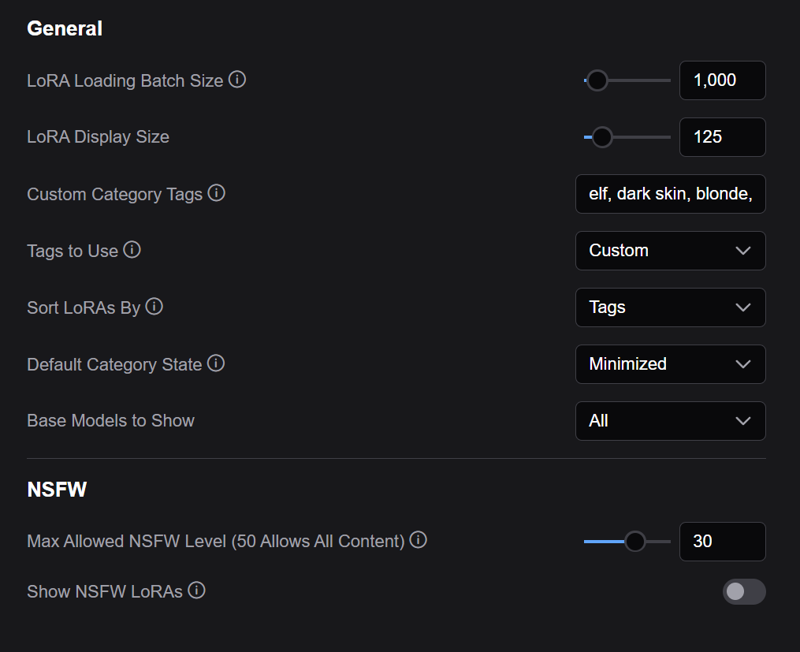 This plugin has a host of settings to customize the appearance and sorting. Settings that aren't (hopefully) self explanatory have tooltips to describe how they are used. The one that most people will want to mess with here are the custom tags for sorting, if you don't use your directory structure for that. Because of the performance hit I do recommend giving it a swing with the default None and see if that does the trick, but I get browsing isn't as fun that way. Honestly if you don't have 3k+ LoRAs it really doesn't matter.
Limitations
- Drag and drop only supports core Comfy nodes, if you have some custom nodes you use please open an issue and I can add support for whatever
- Sorting does make the sidebar perform worse than with sorting off, it's not really noticable unless you have a lot of LoRAs though
- Sometimes with large LoRA libraries the sidebar won't initially load everything right, closing and reopening it fixes it (or hitting the X button on the search box) - this doesn't affect searching at all
- Sliders don't really look great and they don't use the right node. If you have sliders and use them frequently I strongly suggest looking into my Slider Sidebar
- This isn't a LoRA management tool so it's not made to help you manage your LoRA files
- With large datasets it can cause some timeouts, they are harmless but they do clutter the server logs a bit
Requirements
- This is a front end plugn so you must use the new menu for to work, you can enable it in the ComfyUI settings (Top or Bottom doesn't matter)
- ComfyUI 0.1.3+
- There's no additional python requirements since it's just a frontend UI.
Why
 There have been other solutions for dealing with LoRAs visually in ComfyUI, but none of them hit the mark for me, and most of them made working with LoRAs slower than normal. I wanted something that made working with LoRAs easier and faster, without any added bloat. I actually had worked on this and stopped when I heard about the new built-in model browser. However, I used it a few days ago and I have too many LoRAs and it crashed the front end. So, I wouldn't recommend trying to use that if you have a bunch like I do. 😄 This plugin was designed for true LoRA "power users" and to make their lives easier in ComfyUI.
Credits
LoRA Creators for all the great content they produce!
Comfy Org (Duh)
https://github.com/comfyanonymous/ComfyUI
Compatability
Tested on ComfyUI 0.2.0
Should work on any version 0.1.3+
Description
Now supports using existing data and images that follow the civitai.info format, this reduces duplication and also greatly speeds up processing of LoRAs that have it
Fixed a bug with the way subdirs were calculated, now drag and drop should be much more reliable
Added detection for old data files and reprocessing logic, I won't change this unless I have to, but being able to check it is important (cause I changed it this time 😛)
Overhaul of stored data to lay groundwork for future updates
Can now search for "lycoris" in the search box to quickly find all your lycos 🥳
FAQ
Comments (18)
Does this allow dragging and dropping into a text box to add the lora in the <lora:_name_> format? There's a number of (custom) nodes which automatically apply loras from text prompts with the A1111 syntax.
It doesn't but I could look into adding that. When you use this kind of tool then you also put weights with it or no? Like is it <lora:_name_:weight> ?
Pinging one more time :D
@KingLord sorry, yeah you can add weights and clip weight (even block weights for Impact node pack) but I almost always just use a single weight with the <lora:path/name:weight> format. If no weight is specified it defaults to 1.0 internally.
Clip weight can be added with another ':' after the lora weight. Block weights syntax is a lot more complicated, so I won't get into that.
The nodes I'm using are these ones:
https://github.com/ltdrdata/ComfyUI-extension-tutorials/blob/Main/ComfyUI-Impact-Pack/tutorial/ImpactWildcard.md#special-syntax-for-impactwildcardencodedetailer-wildcardinspire-wildcard
@Bbbrrr Got it, thanks for the reply. Sounds like <lora:path/name:weight> is probably the safest default here so I'll see what I can do when I worked on more drag and drop stuff.
"Drag and drop images from the LoRA Info popup to load entire workflows (if metadata exists)".
Custom Lora with local image file:
I get the full LoRA preview with preview image but In the LoRA Info popup the image is not visible, even with the right path information in the json file:
"url": "D:\\full_path_to_image\\preview.jpeg", for example. A browser opens this path without problems. What do I wrong??
For security reasons most browsers won't let you load files through a web app that read a file directly on your hard drive. It works if you put a file into the browser manually, but not if I try to load it. You can try to use a relative path from the lora folder, like ../.././preview.jpeg but I'm pretty sure that will also get denied. If you want to add custom images in the array just let me know where they are coming from or if I can load them from the lora folder and I'll make it work.
@KingLord Thanks again for your fast reply. Seems my question was not realy understandable.
What I want is just to use your feature: "Drag and drop images from the LoRA Info popup to load entire workflows". Civitai LoRAs working perfect. But I have problems with my local custom LoRAs, cause I can`t get the preview image visible in the "LoRA Info popup".
I am doing the following:
1. Copy a preview image (with comfyui workflow metadata) to my following (Windows) folder: ...\custom_nodes\ComfyUI_LoRA_Sidebar\loraData\flux_test_lora\preview.png for example.
2. Editing the json file (trained_words, baseModel).
As far as it works well: I get the LoRA at the sidebar with the preview image at the right base model. In the "LoRA Info popup" I get all changed informations - but here the preview image is not visible. So I can`t drag and drop the image to load the workflow. Therefore I tought I have to edit the "images" part in the json file. But I had no luck, even with relative path.
I hope you can understand me now - and of course you may have a solution :-)
@KingLord I just did the update to v1.1.
I just copied the new files in the existing directory and overwrited the old files with the new ones. After restarting comfyui all LoRAs have been re-processed. Unfortunately all my former manual changes in the json files have been overwritten.
Please have a look at this - or is there a better update strategy??
The problem with the "LoRA Info popup" still exists. The preview image is not available there.
@arkinson Version 1.2 should do everything you want without you having to edit any json files. Simply copy the images into the base folder for the LoRA and the sidebar will pick them up (same folder the info.json is in). If they are from a popular external data tool, they should be picked up automatically without having to do anything at all.
The info.json file is really meant for the sidebar to manage things, and not for user editing. It will get updated by the program and while I don't usually overwrite anything, I had to redo it while working on external data support. If you can tell me what parts of that you see yourself wanting or needing to edit I can be more careful in future updates, but hopefully you won't need to mess with anything image related.
Actually I think I did ignore one use case, right now if you have custom loras a reprocess will nuke any changes there, which is obviously bad. I'll fix that on the next version so that if there's any information for a custom lora it's preserved since I don't have any data there to manage anyway!
@KingLord You are updating faster then I can run :-) Thank you so much for your work!
I did the update to v1.2 via the manager this time. After restarting comfyui it asked for reprocessing all LoRAs. After clicking on OK it just updated the processed_loras.json within a second. After it every thing worked well - even the former manually edited info.json files.
The preview image I still have to rename to preview.jpg/jpeg/or png. My preview images are local jpg files or localy generated by comfyui as png files.
I would like to suggest you an idea that probably coud solve the problems with custom LoRAs for me and maybe other users without touching the info.json files as well as everything in the custom_nodes directories:
In my LoRA directories I have a defined file structure for every LoRA. Every LoRA file name starts with the base model name (flux, pony, sdxl, sd15) followed by the LoRA name. For most of my LoRAs I already have preview image files with the same filename as the LoRA (cause some nodes use it already). And it would be not too much work to create txt files containing the trigger words - for example:
flux_loranamewhatever1.safetensors
flux_loranamewhatever1.jpg/jpeg/png
flux_loranamewhatever1.txt
sd15_loranamewhatever2.safetensors
sd15_loranamewhatever2.jpg/jpeg/png
sd15_loranamewhatever2.txt
Would it possible that you can read these data automaticly from the LoRA directories?
Another consideration would be - we could change/dedit the nessesary informations directly in the sidebar (editing the trigger words and basemodel and drag and drop an preview image to the sidebar). But I don`t know if this is possible in genaral.
@arkinson Did you try just putting the files in the folder and not renaming them? The image gallery should pick up any images you place in the lora folder and put them in the gallery, and from there you can select any of them as your preview. Let me know if that's not working for some reason.
I need to step away from handling special data to get some features done, but I'll think about support some custom lora structure. If there is a txt file or something what format does that look like, or were you just thinking you COULD make one? If a lot of people are using custom loras I can do a more intense hash check to pull what data I can out of the lora metadata itself. I wasn't sure how many people would have these.
@KingLord Just to be clear about wich LoRA folder we are talking about: I copy the image (without renaming) to:
...\custom_nodes\ComfyUI_LoRA_Sidebar\loraData\loraexample - right? So I have 3 files there: info.json, preview.jpeg (the original placeholder image) and the new image file.
In the sidebar gallary I see only the placeholder image - even after restarting comfyui + browser refresh.
After deleting the placeholder image and renaming my image to preview it is visible in the sidebar.
To your second question about the txt files. No, I haven`t any txt files in my LoRA directories yet. It was just a suggestion.
I don`t know how "easy" it is to read the metadata from the safetensor files. For myself I used kohya, onetrainer, civitai and at least comfyui for training. I belive for most users it is important to get the right base model, the trigger word(s) and the preview image of course.
@arkinson Oh, I think I know what's happening, I forgot to include some instructions there, my bad. You are putting things in the right folder, but it won't pick up any new images there until you hit the Refresh button on the lora item. It doesn't smart detect new images there. When you hit refresh it should scan and pick up any new images you've placed in there. If this still doesn't work let me know 😂
Thanks for the other info!
@KingLord No, unfortunately that doesn't work either. With all custom LoRAs I generally get the error message: "Failed to perform hash lookup for LoRA ...."
I would like to ask you again, is it possible to integrate inputs/editing options directly into the sidebar? If you could enter "trained_words" and "baseModel" directly in the sidebar and drag and drop the preview image into the sidebar, that would still be a lot of manual work, but otherwise perfect.
Please tutorial and video usage. I didn't understand yet.
I'm not really a tutorial vid kinda guy but once I clean this up a bit more hopefully someone that reviews these things will give it an overview, if not I can try to put something together. The settings page has, hopefully, clear help text for everything there.