
What is this?
tl;dr - If you have hundreds, or thousands, of LoRAs and use ComfyUI then this is made for you.
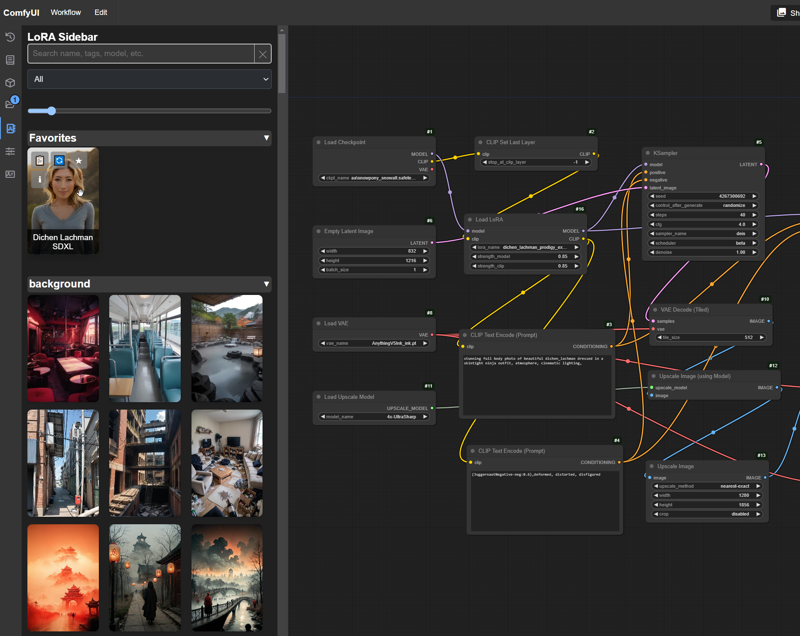
Custom node to provide front-end UX that creates a visual library of all your LoRAs. It's designed to be fast, slim, and make using LoRAs in Comfy a lot more fun for visual users - especially if you have lots of LoRAs. Should make people used to A1111 and other UI heavy platforms feel more at home. Supports several existing data files out of the box if you've already got them. (civitai.info, stability matrix, and rgthree) If you've got lots of LoRAs, this sidebar could be your new best friend!
 Updates
V1.2
More external data changes, expanded support to both Stability Matrix data files as well as rgthree metadata. Reduced external calls on processing even more so should be even faster, loading additional data on demand in background. I don't plan to add anymore metadata support at this time, so this should be the last major data support change for a while
Custom images now can be easily added to any LoRA Info window by just placing the images in the LoRA's base directory (where the preview.jpg and info.json live) and REFRESHING the LoRA - this also makes setting them as the thumbnail super easy
Can now replace the default LoRA thumbail via the LoRA Info popup
Enhanced LoRA Info popup image handling, added hi-rez pop out
Added Favorites category override to keep it expanded even if you have categories minimized (Nice QoL buff for those with large datasets)
Fixed some bugs
V1.1
Now supports using existing data and images that follow the civitai.info format, this reduces duplication and also greatly speeds up processing of LoRAs that have it
Fixed a bug with the way subdirs were calculated, now drag and drop should be much more reliable
Added detection for old data files and reprocessing logic, I won't change this unless I have to, but being able to check it is important (cause I changed it this time 😛)
Overhaul of stored data to lay groundwork for future updates
Can now search for "lycoris" in the search box to quickly find all your lycos 🥳
Features
- Sidebar that automatically generates a visual library of all your LoRA models
- Designed to be super fast for searches
- Easily filter LoRAs by base model (and any search term, obviously)
- View LoRA details via LoRA Info popup, includes important model info and has easy to copy trained words and tags
- Drag and drop LoRAs to create or update LoRA nodes on the canvas
- Drag and drop images from the LoRA Info popup to load entire workflows (if metadata exists)
- Categorize and sort your LoRAs in multiple ways such as folder structure and automatic or custom tags
- Works with custom LoRAs - see usage notes below
- Provides NSFW protection for all those LoRAs that you don't remember downloading 😁
- Battle tested with very large (9000+ models) LoRA libraries
- Supports symlinks!
- Supports video preview files, because why not
Installation
Manual
- Download and unzip the file contents into your ComfyUI custom_nodes directory and you're done, as usual no dependencies or anything else to install!
Github
https://github.com/Kinglord/ComfyUI_LoRA_Sidebar
- git clone this repo into your ComfyUI custom nodes folder
- There are no python dependencies for this node since it's front end only, you can also just download and extract the node there and I won't tell.
- Make sure to enable the new menu in the ComfyUI settings
- After install you probably want to go into Lora Sidebar Settings and configure things to your liking. If you have a very large collection and want to use categories I suggest using the collapsed default setting.
- The sidebar will automatically detect and start to process all your LoRAs when you open it. This can take a while!
Registry / Manager
- Coming Soon
NOTE - This sidebar will process and download images into the loraData directory within the custom node. This is so everything can be fast, but it does take ~1MB of space per 10 LoRAs. A collection of ~9500 LoRAs was ~1GB.
Usage
- Open the sidebar and start the initial import / process of your LoRAs
- If you have a lot of LoRAs this can take a while. The reason this is so slow is because I've used SAFE rate limits for the CivitAI API. If you know where to look in the code you can change it, but I don't recommend it. The process will run the background and if you close Comfy before it finishes it will resume where it left off.
- Use the search box to quickly search for any LoRAs
- The sidebar is fastest using no categories and just doing raw searches, I know it's not for everyone but you can give it a try.
- Filter by base model using the dropdown
- Add LoRAs to your favorites by clicking on the ⭐ (remove them by clicking it again)
- View LoRA details by click on the i button, this popup contains lots of useful data and lets you copy tags and delete LoRAs
- Copy the lora trained words by using the 📋 button
- Refresh LoRA details with the...refresh button
- Drag and drop the LoRA images to create a LoRA node on your canvas, or drop them on a LoRA node to update it
- Only supports default (core) ComfyUI nodes for now
- Use the slider at the top to quickly change the size of the LoRA Previews
- Update LoRA previews and/or data by editing the preview image and info files in the LoRA folder in the custom node's loraData folder - this is the best way to get custom LoRAs working fully and all the data is local only
- Customize the look and feel with the settings
Settings
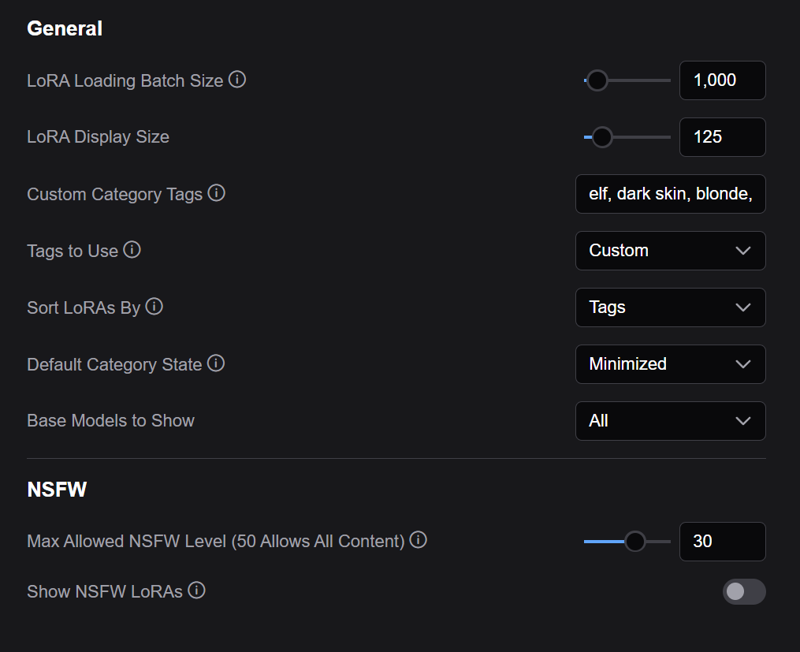 This plugin has a host of settings to customize the appearance and sorting. Settings that aren't (hopefully) self explanatory have tooltips to describe how they are used. The one that most people will want to mess with here are the custom tags for sorting, if you don't use your directory structure for that. Because of the performance hit I do recommend giving it a swing with the default None and see if that does the trick, but I get browsing isn't as fun that way. Honestly if you don't have 3k+ LoRAs it really doesn't matter.
Limitations
- Drag and drop only supports core Comfy nodes, if you have some custom nodes you use please open an issue and I can add support for whatever
- Sorting does make the sidebar perform worse than with sorting off, it's not really noticable unless you have a lot of LoRAs though
- Sometimes with large LoRA libraries the sidebar won't initially load everything right, closing and reopening it fixes it (or hitting the X button on the search box) - this doesn't affect searching at all
- Sliders don't really look great and they don't use the right node. If you have sliders and use them frequently I strongly suggest looking into my Slider Sidebar
- This isn't a LoRA management tool so it's not made to help you manage your LoRA files
- With large datasets it can cause some timeouts, they are harmless but they do clutter the server logs a bit
Requirements
- This is a front end plugn so you must use the new menu for to work, you can enable it in the ComfyUI settings (Top or Bottom doesn't matter)
- ComfyUI 0.1.3+
- There's no additional python requirements since it's just a frontend UI.
Why
 There have been other solutions for dealing with LoRAs visually in ComfyUI, but none of them hit the mark for me, and most of them made working with LoRAs slower than normal. I wanted something that made working with LoRAs easier and faster, without any added bloat. I actually had worked on this and stopped when I heard about the new built-in model browser. However, I used it a few days ago and I have too many LoRAs and it crashed the front end. So, I wouldn't recommend trying to use that if you have a bunch like I do. 😄 This plugin was designed for true LoRA "power users" and to make their lives easier in ComfyUI.
Credits
LoRA Creators for all the great content they produce!
Comfy Org (Duh)
https://github.com/comfyanonymous/ComfyUI
Compatability
Tested on ComfyUI 0.2.0
Should work on any version 0.1.3+
Description
This works in ComfyUI no matter what base model you're using. It has built in filtering for Flux, Pony, SDXL and SD1.5. I put the base model as Pony just because it has an insane number of LoRAs.
FAQ
Comments (13)
When you choose the Lora does it automatically writes the trigger word like in A1111?
No is the short answer. There's a clipboard button on each LoRA preview that copies them to the clipboard. I could make something work like my Prompt Gallery where you can select a node for the text to auto populate, but otherwise Comfy has no idea where the text should actually go since the prompt could be anywhere. The other issue with this is some LoRAs have multiple trigger words, or even clusters of trigger words. I tried to make these super easy to copy from the info popup so you can paste them where you want, but guessing the best default behavior wasn't something I could do. Happy to hear any thoughts or ideas on what a good default would be and I can see about setting that up!
First of all, thank you for this Custom Node; are you God, perhaps? Thank you! God exists! I’ve always wished for this. The topic brought up in this comment is really close to my heart because I keep switching from Comfy to Forge for this exact simple reason that, incredibly, no one in the ComfyUI community has managed to solve yet.
If anyone can please fix this or knows of another node that does exactly this (adds triggers to the prompt), I beg you to let me know, because I can’t stand constantly switching from one software to another, dealing with all the updates, conflicts, and frustrations involved. It’s like a curse.
I’d love to stay on Comfy once and for all and leave everything else behind, but I just can’t do it.
really nice
This is amazing! With this, I finally feel like making the jump to ComfyUI.
Thank you! If you have any feedback or suggestions feel free to drop them in here, I do actually check. ;)
Subdir gives paths that are too long, for example 'webui\models\Lora\xl\' is too long, it should be 'xl\'. For a different folder it calls 'loras\' when there should be no path at all.
Hey there, I did a lot of testing with this but there's a chance some unique setups could be causing some issues. I'm not really sure what's going on with your case though, so you can reply here or msg me with more details. There are 2 paths the sidebar uses, one is the full model path, the other is a short path that is used for categories and for populating nodes. You said that paths are too long, but I don't know what that really means or what's going on. Are the categories not labelled correctly, are the nodes not populating with the right directory? Etc.
I noticed that you mentioned webui so I assume you're pulling loras from something like an A1111 installation? Is this setup as an extra model path in comfy with the yaml file?
This should be fixed in v1.1 of the sidebar. Please let me know if you run into any issues using the new version!
gut, Waldemar, gut!
Just testing your node. It seems to work pretty well with civitai Loras. It`s realy amazing to get all the data and images on the fly. Thank you for the great work!
Some questions for custom Loras:
1. Preview images:
File format seems only to be: "preview.jpeg"?
Files like "xyz.jpg" seems not to be accepted. It would be nice if you didn't have to rename every preview file.
And - Is it possible to use more then 1 preview image?
edit:
Please, can you give an example how to edit the <"images": [],> part in the json file for local stored png images - so it is visible/usable to genarate the workflow from the Info-menue.
2. Updating/refreshing data base:
What is the right way to update/refresh the database after manually editing json-files and preview images to get the changes displyed:
- click "Refresh node definitions" in comfyui, or
- refresh brower, or
- restart comfyui + refresh browser?
3. Editing json files:
Is there any "trick" to simplify editing - cause seems to be some work to edit every single file for a whole range of Loras....
Sure, let me try to go through this. I'm always working on it because I'm not sure how everyone will try to use it. :D
1.
- It currently uses preview.jpg/jpeg/png/mp4 etc. as the preview for the LoRA
- It's possible to use an image that's not preview.jpg, I can make this change without a lot of effort
- It's technically possible, but how would this work? If there's multiple preview images would they rotate on hover, or how is that used?
- I would not edit the images section because that can get updated, but I know what you are asking for, and I could support it in the code. Where are these files going to be? Would they all be in the folder alongside the preview image? If you already have them somewhere I can try to load them from there if they are with the lora?
2.
- A browser refresh should clear the session state I used to cache items, you should not need to restart comfy
3.
- There could be, depending on what you are trying to edit :D I was hoping that people wouldn't need to manually edit the json file that much, if you can give me some examples of what you're doing and I think about how to manage it properly
@KingLord Thank you so mutch for your fast reply. I did a lot of testing - mostly try and error - in the meantime. I am realy keen to get it working, cause I have a lot of custom LoRA`s.
1.
- I have tested again: all file types working. Perfect! - Error was on my side.
- using preview images that are not named preview: It would just a little bit more easy to copy any preview file to loraData/loraname without renaming it to preview - but it`s not a big problem of course :-)
- more than one preview files: For my usecase that is realy not important. One image is perfect. I just was unsure about the naming convention of the preview file and thought it could work like the image loading from civitai....
- Visibility of preview image in the "Info popup menue": It is coresponding to my other comment - I think it is better to discuss it there.
2. Browser refresh works perfect. Thank you.
3. json files: Ok - I thought there would be some magic tool ;-) In my case I have to change for every custom LoRA:
- "trained-words" (no problem)
- "baseModel" (ok - I can copy the right model name from other civitai files)
- "images" ??? (Please look at my other comment.