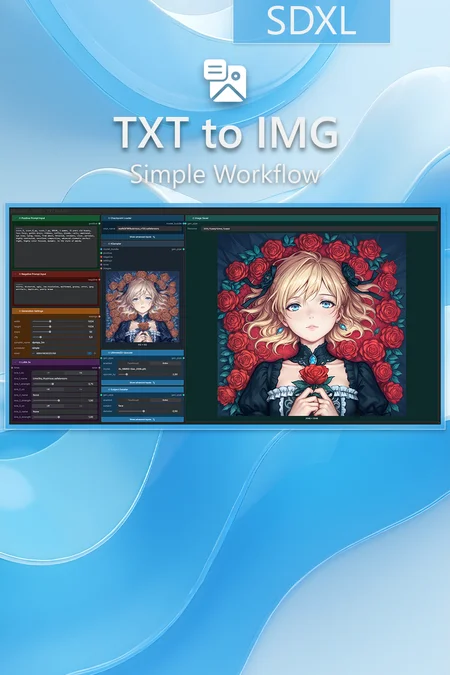

✨ SDXL — Text to Image — Simple Workflow
A clean, all-in-one SDXL text-to-image workflow built entirely with the UmeAiRT Toolkit for ComfyUI.
Only 8 nodes. No spaghetti wires. Just load your model, write your prompt, and hit generate.
You can find a step-by-step guide to this workflow in this article: link
⚠️ IMPORTANT — Nodes 2.0 Required
This workflow is built for the Nodes 2.0 (Vue) interface of ComfyUI. If you don't enable it, the workflow may have display problems.
How to activate Nodes 2.0:
Open ComfyUI
Go to Settings (⚙️ icon, bottom-left)
Find "Use Nodes V2 (Vue)" and toggle it ON
Refresh the page
Load the workflow
If you prefer the classic interface, check out my Legacy version of this workflow instead (link).
🎯 Features
Text-to-Image generation with any SDXL/ILLUSTRIOUS/PONY checkpoint
Built-in upscaler — high-quality tiled upscaling (toggleable on/off) Slower than a classic upscaler, but significantly better quality
Subject Detailer — automatic face or body enhancement (toggleable on/off)
Full metadata embedding — your images are saved with all generation parameters, ready for online publishing and remixing
3 LoRA slots — with individual on/off toggles and strength control and you can connect as many other lora modules to each other for as many LoRA as you want.
📦 Custom Node Required
Only one custom node to install:
Install via ComfyUI Manager (search "UmeAiRT") or use the UmeAiRT Auto-Installer.
The Toolkit packages everything internally — upscaler, face detailer, metadata saver. No other custom nodes needed.
📂 Files you need
An SDXL model : like this one in ComfyUI/models/checkpoints/
An upscale model (optional) : like this one in ComfyUI/models/upscale_models/
As many LoRAs as you like (optional) : like this one in ComfyUI/models/loras/
For the Subject Detailer (optional, download automatically by my toolkit) :
A BBOX detector model : like this one in ComfyUI/models/ultralytics/bbox/
A SAM model : like this one in ComfyUI/models/sams/
A SEGM detector model : like this one in ComfyUI/models/ultralytics/segm/

Description
🔄 Full Nodes 2.0 rewrite
Rebuilt entirely with the UmeAiRT Toolkit pipeline (only 1 custom node needed)
Upscaler, Subject Detailer and metadata saver now built-in with on/off toggles
8 nodes total — clean, visual, beginner-friendly
⚠️ Requires "Nodes V2 (Vue)" enabled in ComfyUI settings
FAQ
Comments (10)
I like this workflow, its more than double the speed of the last one. what took me about 30-40 seconds now takes me 10-15. the only complaint i really have is the current lora stack. you don't have much control over it as it only allows values from 0.0-2.0 and some loras work with negative values or higher values on a scale. i switched back to the multi lora from the previous workflow for that reason. great job, i hope the wan2.2 and other video workflows get the same treatment.
i also found a workflow that has IPA and holds character consistancy across poses and prompts well. Would you consider a similar workflow? this one isn't well organized. and is no longer maintained. I got it working just updating the IPAdapter names in the workflow. an update changed the internals.
https://civitai.red/models/287147/workflow-consistant-character-maker
I agree you cant use slider loras with negative value!
I didn't know negative values were used for LoRa; I'll correct that. What value would you recommend? From -5 to 5? More?
@UmeAiRT honestly i've seen some sliders (a bit niche) go as high as 30. but i'd say for those maybe just a manual entry to be optional? most sliders wouldn't go above -3 to +3. so 5 sounds reasonable.
@dxjaymz @Sirkura I changed the slider from -5 to 5 and added information about the selected LoRa and an option to copy the LoRa tags: https://media.discordapp.net/attachments/1378838190336508044/1499010385104207962/image.png?ex=69f33db6&is=69f1ec36&hm=1307857ba10437e10fc0ea89568638c29bd596babb305b358df952f1c8f40446&=&format=webp&quality=lossless

It's not a good idea to pack data into packages. Conditionally, I need to zoom in on the image to convert it to i2i and perform other manipulations with third-party nodes, but I can't do this because your nodes only exchange data in packets and they don't have nodes that can open and repackage them.
I've actually already created nodes for “pack” and “unpack.” Which nodes are missing? I'll add them.
@UmeAiRT I would like to be able to work with latency and images separately
@mrcalmstone (Assuming autocorrect changed 'latents' to 'latency'). Please note that this specific workflow is strictly a TXT to IMG generator. Adding zooming, cropping, and i2i manipulation tools here is completely out of scope for this pipeline. If you want to transition into an i2i process, you can use the 'Unpack' node to extract the standard IMAGE, and route it to your own custom i2i setup, or use a dedicated i2i workflow.
My workflows are designed and optimized for a specific task. If you have suggestions for other tasks, please let me know (here or on Discord) so I can implement them.
Is anyone having issues with upscale in V4?