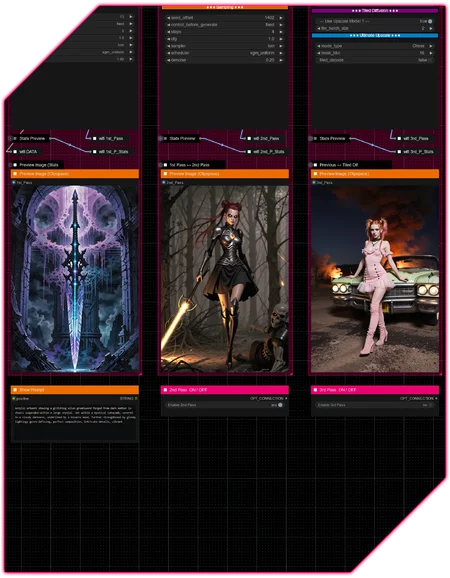









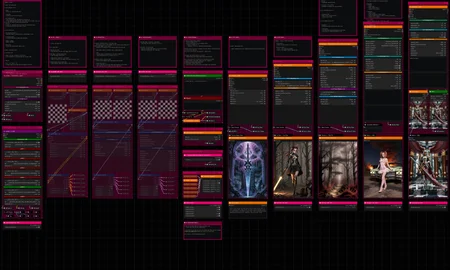

Hello there and thanks for checking out this workflow!
What's new in v11? : Major Changes; rework of the entire workflow to utilize SubGraphs!
—Purpose—
Built to provide a versatile and modular all-in-one workflow for SDXL/Pony/llustrious and SD15 streamlining the most useful features focused on efficiency and structure.
—Features—
Full metadata; recognized by CivitAI
LoRA loaders
Wildcard prompting
ControlNet
IPAdapter + FaceID
Installation and download guide for models and nodes
Multiple passes with optional upscales
— 1st : Detail Daemon Sampling + Variation Seed
— 2nd : Detail Daemon + PAG + Tiled Diffusion or UltimateSDUpscale
— ADetailer
— Inpainting
—Custom Nodes—
All of which can be installed through the ComfyUI-Manager
—Troubleshooting—
If nodes show up red (failing to load), check the 'Install Missing Custom Nodes' tab of the ComfyUI Manager for the missing node packs and install them.
Please check if all custom node packs load properly after installing, i.e. no
(IMPORT FAILED)messages next to any of them in the console upon ComfyUI startup.Always reload/drag'n'drop the original, downloaded workflow file into ComfyUI to reload an intact version of the workflow.
→ The last opened workflow that appears on startup only shows a cached version.
—Thanks—
The workflow would not be possible as is without these custom node packs. If you want to support the custom node creators, give them a ⭐ on their github repos! Thank you!
Feel free to ask any questions, share improvements or suggestions in the comment section!
Also let me know if you encounter any confusing points I can elaborate on and focus on improving for the next update!
Description
v4
— rework of IPAdapter and ControlNet sections
— resized samplers to accomodate live-previews
— turned on saving of .json files of the workflow by default
v4.1
— fixed issue with ADetailer and Inpainting passes caused by introduction of LTXV-scheduler by the Impact-Pack
— updated notes
FAQ
Comments (26)
Hey there! I'm trying to get your workflow here working but I'm having a major issue. For starters I'm using the closed beta of comfyui, don't know if that matters but... In comfy I get an error on the 3dr pass of, NameError 9941:20 MathExperssion|pysssss. I have looked all over this workflow trying to find where this error is. When I installed the workflow and all required nodes, even after closing and reloading the workflow from file, most of the settings where either NAN, or had totally incorrect input data, (numbers in place of select from drop down). I tried to copy the settings from the workflow image the best I could, but something somewhere is broken and I just can't seem to find it. I posted my log to pastebin. If it's not too much trouble maybe you could take a look and tell me what I'm missing and where, it seems like there is a lot more wrong according to the log... https://pastebin.com/bfttPdZu
Thanks
Update, it makes it through the first pass but nothing after, pass2 gives me ValueError 9853:13 SimpleMath+. I was assuming that the :13 ment the 13 line in the node interface but that doesn't make sense because that would be seed control or scheduler. I don't know I'm at a loss at this point...
@Mystic419 Hey there, do you mean you're testing on the desktop standalone version of ComfyUI? By the looks of the log everything within the group nodes seems scrambled and connected wrongly, which might very well be a beta version issue. ComfyUI has a general problem with group nodes being re-created, by refreshing or adding a new copy through the node menu, which would result in all settings, even the internal ones I built and saved it with, to be reset.
Maybe, just a theory, due to me building the workflows in the regular ComfyUI version and being on a different update etc., some sort of auto-conversion recreates everything and busts every single group node in the process. Wouldn't be surprised if that was the case 😄
I am surprised you could make it work through a pass at all. Looking into it now there is an issue within the ADetailer and inpainting passes due to the impact pack's addition of the LTXV scheduler, which disconnects a part within those two nodes. But that's an easy fix and not the cause of your issues.
This part right here:
ValueError 9853:13 SimpleMath+
Refers to the 13th node within group node with ID 9853, ("Sampler — Upscale w/ Model") [2nd Pass], which is a "SimpleMath+" node that does nothing else than take the global seed and add its own seed offset on top, while ensuring the value doesn't go higher than 2^50.
Can you check whether or not you run into the same issues using the regular ComfyUI?
@redpinkretro OK, well it kinda works... It makes it through the first 3 passes but part way through the ADetailer it stops...
Here is the log.
I always install 1 node at a time to catch any errors and everything installed fine and I have all the necessary files. Comfyui is up to date also... I can't get it to save at any of the steps either.
@Mystic419 This is looking good! Seems like only the scheduler issue I mentioned is left.
And I just updated the workflow to v4.1, which fixes that. Please let me know if it runs fine for you!
@redpinkretro OK. All 3 passes and the AD pass work and save but inpainting works but not save no matter what I give it for a save path. here is the error...
got prompt
Failed to validate prompt for output 10098:20:
* Dictionary to Console 10098:1:
- Required input is missing: dictionary
Output will be ignored
Failed to validate prompt for output 10098:1:
* (prompt):
- Required input is missing: dictionary
Output will be ignored
Prompt executed in 1.91 seconds
It seems the save node for inpainting is broken, since :1 is filename and there is no :20 unless its hidden, and dictionary? I don't know... After a little tweaking I'm getting good images but they need inpainting.
@Mystic419 That looks like you disabled the 1st Pass, which includes the metadata processing and supplies it to all the save nodes via "DATA".
Using Inpainting can be done by setting the global seed to fixed and having the seed_offset of the inpainting pass increment.
@redpinkretro DOH!!! I'm an idiot... Lol! It works just fine, it's me that's broken and not programed properly! There isn't much on youtube and since you seem you know what your doing can you point me to some good and reliable resources on grouping nodes like this? Thanks for all the help and the great workflow!
@Mystic419 Don't worry, it's running now and that's all that matters 👌
Everything I know about group nodes comes from trial and error. I don't even know if there are actual ressources about it. But given how many quality of life updates it desperately needs, I guess any tutorial would look like a hacky makeshift solution 😅
Something you can do is copy a group node, drag it off into an unobstructed area (I use lots of vertical space) and then right-click on a group node and select "Convert to nodes" to break it open; to see how I wired it and handle things structurally. There are a lot of things to keep in mind and I could probably write a book about it at this point. Each group node is basically its own workflow in a way.
When you then select "Manage Group Nodes" from the right-click menu, you can see a dropdown list at the top right, which shows all the built group nodes of the workflow, as well as copies of whatever their instances present in the workflow were named to.
This is where you sort all the nodes within, label widgets, show/hide in- and outputs.
I know this is just a very vague overview of it, but I can't write that book just now 😅🙏
@redpinkretro It's all good! I've been playing around with it a little. Just a note, you can't group nodes like this in the new standalone version of comfy at all! You might want to mention something about that on your web page of the workflow, save people the headache... It's listed in the context menu but it does nothing... You can break nodes apart but you can't make them. Well, thanks for your help and the hard work on the workflow!
Peace!
@Mystic419 I didn't know that. But being a beta-version they might be leaving it out until they have the system reworked before introducing it. Group nodes are an incredibly powerful feature, but just so janky in its current state.
I'll definitely leave a note on that though, thanks for mentioning it! 👌
OK, I broke apart the first pass and added the detail daemon sampler and put the node back together, and have everything working but how do I change the color of the title back to orange?
I am using the blibla-comfyui-extensions node pack, which has extended color customization options.
@redpinkretro YES, thank you! Now it doesn't look out of place.
The latest update to comfyui standalone (closed Beta) now works with your workflow! I was able to load it with no errors. If you haven't tried Detail Daemon, you should. I prefer it over Lora's and with the Detail Daemon Sampler I feel I have more granular control over details and you can go into the neg to remove detail. All off my latest images, (all turning out awesome thanks to your workflow), I have embedded your slightly modified workflow in all of my images. All I did was remove the sampler in the first pass and replaced it with the Detail Daemon Sampler and hidden all the inputs except the detail amount selector. If left at 0.0 it acts like a normal sampler, but I think it would be a nice addition to your workflow.
@Mystic419 That's great to hear! Funny you mention that. I just built a Flux outpainting workflow, but wasn't satisfied with the amount of detail, so I tried noise injection, which did work kind of alright, but not well with the noise_mask setting, so I just tried Detail Daemon there and it's great 😊👌
Will definitely incorporate it into the SDXL/Flux Advanced workflows. Thank you for the input! 🙏
Tried this, but after installing missing nodes and restarting it still indicates it can't find a lot of nodes, over 20 nodes. and manager is blank now when checking missing nodes. I also updated comfyui again stumped. Why is it when i load this workflow after installing all missing modules that it says i am still missing all of these?
InversionDemoLazySwitch(In group node 'workflow>IPAdapter FaceID — AIO')
workflow>IPAdapter FaceID — AIORemove from workflow
workflow>Sampler — Upscale w/ ModelRemove from workflow
workflow>Stats Preview IIRemove from workflow
workflow>Stats PreviewRemove from workflow
workflow>IPAdapter ClipVision Enhancer — AIORemove from workflow
workflow>Sampler — Tiled Diffusion —OR— Ultimate UpscaleRemove from workflow
workflow>IPAdapter Prep Image InputRemove from workflow
workflowLoRA Signal III
workflowIPAdapter Control
workflowControlNet Control
workflowStats Preview II
workflowConditioning — Default
workflowSave — Pass IV
workflowFormat Fix IV
workflowSampler — Meta II
workflowSampler — Upscale w/ Model
workflowSampler — Tiled Diffusion —OR— Ultimate Upscale
workflowADetailer — AIO
workflowInpainting — AIO
workflowLoader — LoRA
workflowIPAdapter ClipVision Enhancer — AIO
workflowIPAdapter FaceID — AIO
workflowLoader — Checkpoint + Latent
Hey there, sorry to hear that.
1.) Did you go through this procedure to get the execution-inversion pack installed?
► In case of "execution-inversion-demo-comfyui" you need to set the "Channel" setting to "Channel: dev". (Found in the top left of the ComfyUI Manager Menu)
→ Do not forget to turn the channel setting back to default again afterwards
2.) Does the console show any node packs with a (IMPORT FAILED) message next to them upon starting ComfyUI?
@redpinkretro I tried this. while i helped install the demo, I am still getting this list of missing nodes and i even set security to low too in the comfyui manager config:
workflowLoRA Signal III
workflowIPAdapter Control
workflowControlNet Control
workflowStats Preview II
workflowConditioning — Default
workflowLoader — LoRA
workflowSampler — Meta II
workflowSave — Pass IV
workflowControlNet — AIO
workflowIPAdapter FaceID — AIO
workflowIPAdapter ClipVision Enhancer — AIO
workflowLoader — Checkpoint + Latent
workflowADetailer — AIO
workflowInpainting — AIO
workflowSampler — Upscale w/ Model
workflowSampler — Tiled Diffusion —OR— Ultimate Upscale
I am noticing now an import issue with ComfyUI-NAI-styler, so this is my next clue i'll work on
@zengrath I am noticing a ">" symbol missing in the list of missing nodes.
e.g.: workflowLoRA Signal III ↔ instead of workflow>LoRA Signal III
When a workflow with missing group nodes is saved, for whatever reason, it strips that ">" symbol and ensures they won't load properly ever :D
Try loading the originally downloaded workflow file again, it might just work.
@redpinkretro Thank you! Yes i am no longer getting missing node popups now. Look forward to trying your workflow when i got a moment, looks amazing thank you. I hope comfyui team can make this less confusing in future or implement a fix. as a newbie this was very misleading making me think i was still missing nodes!
@redpinkretro New error, Seed,"float() argument must be a string or a real number, not 'NoneType" with no indication which node is giving me this issue. I am scouring this workflow to try and find a seed field for example that is blank but having no luck yet. Due to how all the area's of workflow is red, it's not clear to me which part of process failed. I will keep looking but any ideas?
Or i am just not using it properly. i'll keep trying.
@redpinkretro ok this workflow is impossible to trouble shoot. I tried enabling ipadapter flow now i get error that IPadapter model is not found, but no where in the block of ipadapter block is there a place to select model, all windows have input and output model or input model , but i don't see initial source model node, and there no lines that i can trace. comfy ui doesn't give me absolutely no hint to which node is giving me the error, it doesn't take me to part of UI that has error. and UI is so full of red backgrounds and windows that if any of one nodes is changing it's border or anything to indicate which one is being worked when error pops up, i can't figure it out. on simpler workflows, i can see which node fails because it's usually got a green border indicating it's one being processed or turns red. i can't see it here, too much going on. Unless comfy ui has a way to pinpoint where issue is, no way i can figure this out as a newb. like the SEED null error, i can't find any place there is a null seed field. The global seed looks fine to me.
@zengrath The seed error sounds like the global seed was disabled, or at least indicates a seed input is not receiving signal. A screenshot would help me with that if you can provide one and just https://wormhole.app/ it.
About the IPAdapter, the corresponding models are all chosen depending on the selected <preset> widgets in "IPAdapter ClipVision Enhancer — AIO" and "IPAdapter FaceID — AIO" respectively and look for those models in the IPAdapter directories.
If this is the first time you are using an IPAdapter you need download those models first, as that is not fully automated yet. But as far as I know it is planned to make all those auto-download in the future.
You can either check this installing section on the IPAdapter repo https://github.com/cubiq/ComfyUI_IPAdapter_plus?tab=readme-ov-file#installation and then use the ComfyUI manager's "Model Manager" to download them to their respective locations; typing "ipadapter" and "insightface" into the search field at the top should find all required models.
Or you can potentially "shortcut" the process by just installing the models I have installed according to this screenshot https://wormhole.app/64YRN#bsosmCcMMmVNHcw9zbxt1A
This will likely contain some unnecessary ones, but most are not that large in size anyway.
First time setup of IPAdapter is a bit of a hassle unfortunately, but a one-time effort that is really worth it.
this workflow killed my comfyui
@redpinkretro
@vanwaar495 Hey there, that sounds quite dramatic, what happened?
Luckily my workflows aren't capable of that, so if you provide me with some information about the issues you're facing, I can give some tech support and try to figure out what hit the fan. There is a lot that can go wrong in ComfyUI 😄