


Over 60% faster Rendering with enable_sequential_cpu_offload set to false
For >=24gb vram
You can now prepare your image with my Outpainting FLUX/SDXL for CogVideo
Animate from still using CogVideoX-5b-I2V
Make sure all 3 parts of the .safetensors down loaded models/CogVideo/CogVideoX-5b-I2V/transformer
diffusion_pytorch_model-00001-of-00003 4.64 GB
diffusion_pytorch_model-00002-of-00003 4.64 GB
diffusion_pytorch_model-00003-of-00003 1.18 GB
https://huggingface.co/THUDM/CogVideoX-5b-I2V/tree/main/transformer
I found this on the github page it looks like the error some people are having:
https://github.com/kijai/ComfyUI-CogVideoXWrapper/issues/55
if taking a long time to render : in CogVideo Sampler try changing the "steps" from 50 lower to something like 20 or 25 you may get very little motion but it might work.
It looks like it only wants 49 in "num_frames"
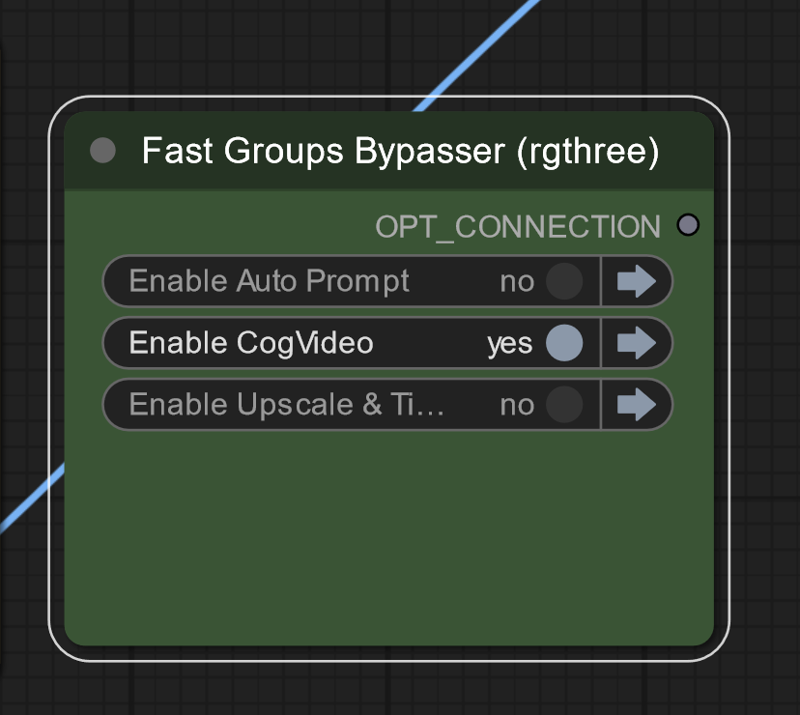 On lower vram systems run groups separately
Description
Enjoy the video gallery
this version Broke with last update
FAQ
Comments (45)
is it possible to hook up a lora?
as of right now I don't think so
Create the initial image with the lora and use that for the video. That might give you what you want.
It holds exactly to the input frame as the first frame
I'm getting a pytorch error in the cogvideo sampler, tensor a must match tensor b at non-singleton dimension 1.
I was just running a test render with the cat image and all settings left at default apart from running at fp16 since I don't have BF16.
make sure all 3 parts of the .safetensors down loaded models/CogVideo/CogVideoX-5b-I2V/transformer
diffusion_pytorch_model-00001-of-00003 4.64 GB
diffusion_pytorch_model-00002-of-00003 4.64 GB
diffusion_pytorch_model-00003-of-00003 1.18 GB
@David_Davant_Systems I have that and the 2b version (I read on the github page that the 5b version is designed more for bf16).
@beitris On lower vram systems run groups separately might help
Facing the same error ,were you able to solve ?
-Error no file named diffusion_pytorch_model.bin found in directory C:\Users\Administrator\Desktop\ComfyUI_windows_portable_nvidia\ComfyUI_windows_portable\ComfyUI\models\CogVideo\CogVideoX-5b-I2V.
@pankajrh_206394656 https://github.com/kijai/ComfyUI-CogVideoXWrapper/issues/55
please write prompts for cog u used
I added them
what formats can u use? i tried to reverse the 480x720 one but didnt work
I think it's locked down, you can't change the resolution, format, framerate, etc.
cogvideo sampler doesn't seem to be loading. stuck on 0% for 30mins. I do have the 3 pytourch models downloaded, and I have 12GB of vram, but I'm running the groups separately just incase that isn't enough. Any thoughts on what I'm doing wrong?
in CogVideo Sampler try changing the "steps" from 50 lower to something like 20 or 25 you may get very little motion but it might work. it looks like it only wants 49 "num_frames"
Works well and runs super fast (4090 RTX). Just wish we had more flexiblity on the resolution, fps and duration. Thank you so much for posting your workflow.
I am glad I help
hi there, how fast do you mean?
@machengcheng2016415 On average it takes me about 5 minutes for each run. Pretty much always bounces between 6.14-6.18 s/it. I have seen YT posts from other 4090 owners and this seems typical. It looks like it's always around 16-17GB of VRAM usage. Would be interesting to hear back from 4080 or 4070 Super Ti guys to see how long it's taking them.
For people who are looking for the 3 parts of the .safetensors
https://huggingface.co/THUDM/CogVideoX-5b-I2V/tree/main/transformer
I cloned that repo, but apparently I'm missing "diffusion_pytorch_model.bin", which is not found in there 🤔
Would you know where that is to make the (Down)load CogVideo Model node work?
@David_Davant_Systems I realized the file names were not the same as Huggingface sometimes add the folder name as prefix of the file name when downloaded. Works now!
This took a while to finally get a result. My work laptop at 12GB vram couldn't handle this. Had to re-setup everything on my personal PC and this is using 22-23GB vram. Really love this!
Would be interesting to have a list of camera movements to try out. I had an idea to rotate vertical image horizontally, animate it, and rotate it back vertically, but it seems Cog need to understand the subject.
Also, sometimes there are no results, only particles floating slightly around. Any advice on making the subject move?
Great question, I haven't found anything constant , "rotate camera around ______" works most of the time changing seed and CFG values might help I have had CFG up to 20
Is there a way to batch a whole folder of images? That would make this workflow 100x better. Load in a bunch of images then come back in a few hours.
I will look into it, you should be able to copy the nodes from my other workflow, https://civitai.com/models/725408/image-batch-watermark-and-logo in the meantime
I either use DirGirPicker + Gir Loopy Dir custom node or the Load Random Image from Hakkun custom node to load random image or files:
https://github.com/AshMartian/ComfyUI-DirGir
https://github.com/tudal/Hakkun-ComfyUI-nodes
Download VAE and TRANSFORMER from:
https://huggingface.co/THUDM/CogVideoX-5b-I2V/tree/main
When you download files check if the names are correct, in my case downloaded file looks like this transformer_config.json -> u should rename it to "config.json"
The structure and filenames should look like this:
...ComfyUI_windows_portable\ComfyUI\models\CogVideo\CogVideoX-5b-I2V\transformer
config.json
diffusion_pytorch_model.safetensors.index.json
diffusion_pytorch_model-00001-of-00003.safetensors
diffusion_pytorch_model-00002-of-00003.safetensors
diffusion_pytorch_model-00003-of-00003.safetensors
...ComfyUI_windows_portable\ComfyUI\models\CogVideo\CogVideoX-5b-I2V\vae
diffusion_pytorch_model.safetensors
config.json
Wondering how do we make this like animatediff or KlingAI with a start and end frame, and have the model interpolate the in between.
Great question, any that can use a start and end like Tooncrafter makes really tiny images
@David_Davant_Systems ooh never heard of tooncrafter, thanks for sharing it. Just took a look and it seems to be generating a sequence image.
I was hoping more so for a workflow that created two keyframe, or user input of two keyframes, and then the model will create a video based on those two images, start and end. The video will start and end with those two frame and fill everything in between 47 frames of what it thinks happens in between those frames.
I read somewhere that this was possible for the CogVideoX5B I2V, but haven't verified it.
@askyasky if you can find a relable way to do a morph with this version of CogVideo let me know.
looking at the documentation it's extremely lock down even to the amount of tokens
https://huggingface.co/THUDM/CogVideoX-5b-I2V
@askyasky if you find info on how to do a morph with this version of cogVideo let me know
it's very locked down including how many tokens are allowed in the prompt
@askyasky I use a Cog workflow that does use a first, last and I think an in between (I’m on holidays at the moment, soaking in the sun, so message me to remind me next week if you want)
Is 1 hour for a video render considered normal with no upscaling? Running on a 4070 Super 16GB
I made an update try with version 3.0
@David_Davant_Systems amazing! Went down from 150s / it to 25s/ it! What did the trick? Changing the scheduler?
@thevrvarren650 a bunch of things, the main one was a memory leak caused by the text nodes of all things
@thevrvarren650 Can you post a new comment of the speed your getting now?
@David_Davant_Systems I'm still struggling with Out of memory errors roughly half the time, they seem to be in the CogVideo Decode node. Enabling VAE tiling seems to help but they still happen occasionally.
Speed wise it varies pretty wildly: 30s/it on average. It starts at 15 or faster but then slows down through the process.
@David_Davant_Systems I think I've found the right settings for 16GB
- Precision: fp16
- fp8 transformer: fastmode
- enable_sequential_cpu_offload = false
- VAE tiling enabled in Decode node
It completes at ~80% memory usage, 9.5 s / it on average, I don't seem to be getting out of memory errors anymore.
@thevrvarren650 i had 2 not use fastmode but the rest of it got it working for m, n ive got 4080 - default setting from workflow gave me OOM
@thevrvarren650 can you please share the workflow ? I am strugling to understand why the Cogvideo Model node is different from yours, and i don't have the same settings, any clue ?