


Flux Street V1 8GB Vram/32GB Ram friendly
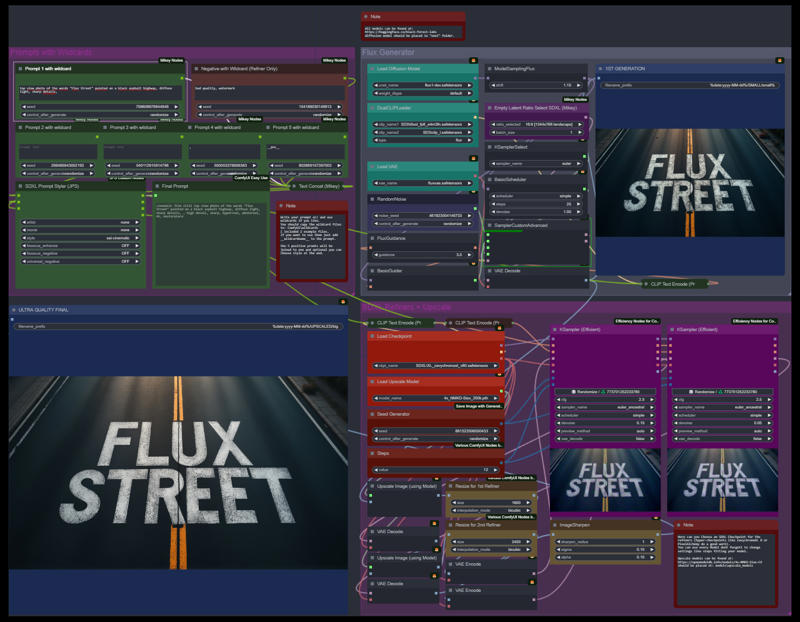
I´ve created this workflow based on my Quality Street workflow to get the best quality in best time even with a 8GB GPU.
This workflow includes:
Promts with wildcard support
3 example wildcards
basic generation using the Flux model
a 2 steps SDXL refiner with upscaling to get the best quality possible
I have used only important custom nodes. Maybe you have to install the missing ones in the Comfyui manager and also update Comfyui to the latest version.
Please give me a good review if you like it :-) 

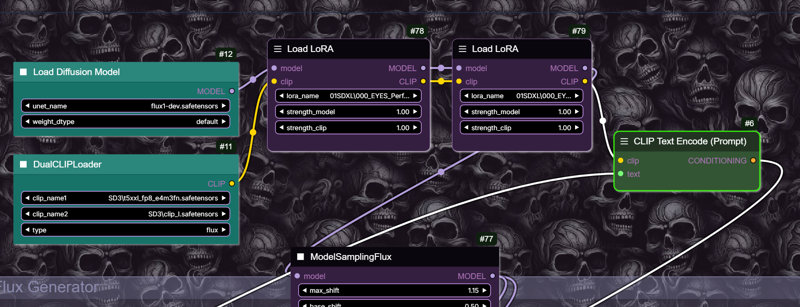
How to add Flux-Loras:
Click right on the Clip Text Encoder and expand it.

Connect the Lora Loader between Loaders and next nodes:
Description
FAQ
Comments (40)
nice, though me thought the reverse gonna be cool, say making concept from 1.5/XL (allowing old loras into flux) then adding detail and upscale via flux (as refiner)
i cant find node Seed Generator and easy showAnything, pls help me
did you try with missing nodes in the manager? but you don't need both. you can right click on sampler and change the seed input to widget. show any just shows the prompt.
@WhatDaFAI yes the manager does not show that missing node.
the Seed Generator node is part of the Comfy-UI-NegiTools model (https://github.com/natto-maki/ComfyUI-NegiTools)
Your workflow looks great! Do you know if we can add a Lora? If so, how?
Flux doesent support Loras yet.
@WhatDaFAI With Flux supporting Loras now, is it possible to add a multi lora loader to this workflow? I have tried to add one but I am a comfyui noob
@Visidious99 at the moment im very busy so im not sure i will have time to update it this weekend. But take a look at the description - i just added how you have to add the lora loaders to it.
@WhatDaFAI Thanks for replying, I was able to figure out how to do it, all good now thank you again!!
Error: "When loading the graph, the following node types were not found:
ModelSamplingFlux"
Updated ComfyUI and also nothing in missing nodes Manager.
That's strange, that node came yesterday with the comfyui update. But you can remove that node and the workflow should work without it. Just connect the model to the next node.
It doesn't load all the nodes required and there doesn't appear to be a reference on where they can be found. What follows is a summary of the error messages:
When loading the graph, the following node types were not found:
JWImageResizeByLongerSide
JWInteger
SDXL Prompt Styler (JPS)
easy showAnything
Open Comfyui manager and look for "install missing nodes" thats the easiest way to get them.
I second this. None of the missing node are in the manager.
i have one missing "undefined" node and it is not found by the manager. all other nodes are installed by the manager.
also make sure you have updated everything, both comfyui and all your plugins
is there a way to turn off the refiner?
yes you can bypass the 2 ksampler or add a groups bypasser like fast groups bypasser from here to switch the whole group off: https://github.com/rgthree/rgthree-comfy
yes - do not use this workflow at all, just make your own, and adapt it to your needs
i have an error message and the black blank image is generated. "/home/image/ComfyUI/nodes.py:1446: RuntimeWarning: invalid value encountered in cast
img = Image.fromarray(np.clip(i, 0, 255).astype(np.uint8))
model weight dtype torch.float16, manual cast: None"
sorry i cant help with that - looks like a python programm error. You can just try to update all nodes and comfyui in the manager and check if all models are at the right places. or try th 8fp clip.
And we have new way to run Flux ez with 1 click: https://civitai.com/models/628682/flux-1-checkpoint-easy-to-use
Where is fluxvae.safetensor located?
you need the ae.sft file i think
its under ComfyUI\models\unet
If you don't have it, you can download it from the Huggingface page of the Flux model ( https://huggingface.co/black-forest-labs/FLUX.1-dev/tree/main ). Download the file "ae.safetensor" and place it in the appropriate folder. You can optionally rename it to "fluxvae.safetensor". Then you can pick it from the "Load VAE" node in ComfyUI.
im getting an error in dualclip loaded. which model do i load there?
somehow this workflow uses 23GB of VRAM just to generate 1st pass. so it takes 60 seconds with flux schnell on 3090 while other workflows generate images in 4 secs. something is off
which is the workflow which generates in 4secs
@txhno idk was some basic one with flux schnell 4 steps.
but here i think i just used the wrong weights settings (default, which is fp16 instead of fp8).
but now that nf4 flux is out i think that's the way to go anyway. and I'm switching from comfy to forge for a while
This worked great for me. Thank you, great workflow and customization!!!
When loading the graph, the following node types were not found:
JWImageResizeByLongerSide
Seed Generator
JWInteger
easy showAnything
I went into the manager and installed missing nodes but it fails import of 126,179,423
On console it says 'object is not subscriptable'
Runing on linux not winblows
Im running it under window. But you can replace the nodes because they all have very basic functions. Easy show anything you can just remove.
Great Workflow! Used the NF4 checkpoint with it and ended up with really nice images in the end.
Thanks for your hard work!
Is it possible to use the basic generation by SDXL, and refine using FLUX GGUF?
yes it's possible, but you have to replace the sampler and models. But generally that works too.
This is what I was thinking of doing. Ever figure it out?
This is my favorite Flux workflow. I hope you someday do a similar one for HiDream. The SDXL refinement helps a lot with the shiny skin texture that Flux and HiDream suffer from.
Great workflow just the best