


06/04/2025
Updated workflow for for V 0.2 Nunchaku nodes!
Added support for ControlNets.
Added support batch image upscaling.
Can now use First Block Cache optimization. (set to 0.150 as default in the Nunchaku node)
04/12/2024 - Fixed Bug with "NAN" in image saver mode since last ComfyUI release.
This ComfyUI Workflow takes a Flux Dev model image and gives the option to refine it with an SDXL model for even more realistic results or Flux if you want to wait a while!
Version 5.1: (fixed missing positive prompt on upsacler 13/Nov/2024)
Lying Sigma Sampler node for increased details.
Custom Scheduler node to reduce "Flux Lines"
Flux Inpainting
Triple Clip Loader
Cleaned up some spaghetti with Anything Everywhere nodes (but it is still a spaghetti monster).
I don't really use the SDXL "Refiner" section anymore as my Flux models have now surpassed my SDXL models in image quality, must of the images I post go thought the SD Ultimate [Tiled] Upscaler ar between 0.33 and 0.39 denoising.
Version 4:
Added Flux SD Ultimate Upscale
Added Force Clip to CPU selector
Neatened up a few nodes and groups (still work to be done tidying things up a lot)
Version 3:
Made several improvements, Now has Flux or SDXL upscale re-routing, load image, Sepate T5 and Clip Prompts and now there are Loras out to actually use with it.
I recommend this lora for details: https://civarchive.com/models/636355/flux-detailer
And these for nudity:
https://civarchive.com/models/640156/scg-anatomy-flux1d?modelVersionId=715962
https://civarchive.com/models/639094/rnormalnudes-for-flux?modelVersionId=716917
Version 2:
I took out TensorRT in favour of adding in A Controlnet Canny and Lora Support (as these are not compatible with TensorRT).
Also now supports negative prompting and CFG for better prompt following.
Version 1.
Can use TensorRT to speed up SDXL generation by 60%
it also has many post-processing and blending image nodes to help perfect the outputs.
Modifying the "denoise" amount is not very intuitive, but if you want a higher denoise value to change the output more you can increase the number of SDXL steps, while fewer SDXL steps will give an image more similar to the flux output.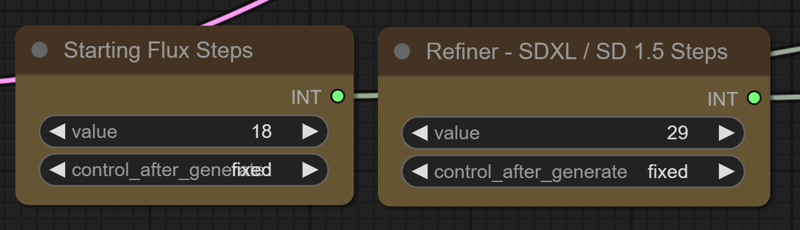
TensorRT Instructions (verson 1) : https://github.com/comfyanonymous/ComfyUI_TensorRT
If you don't want to use TensorRT just pull the model from the SDXL Checkpoint Loader to the Ksampler instead.
The TensorRT Build Settings I use on a RTX 3090: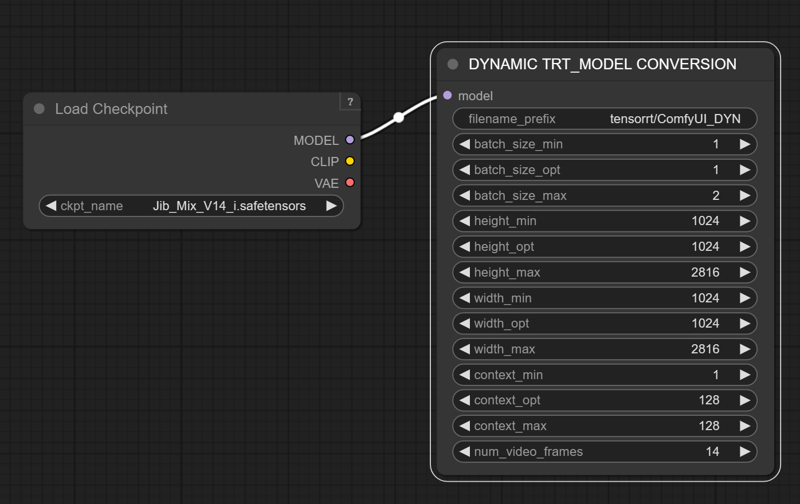
Description
Initial Release
FAQ
Comments (11)
what are tech specs - RAM+VRAM to run it?
I heard that some people with 12GB of Vram can run Flux, but it is very slow. I have a RTX 3090 (24GB) and 64GB Systems RAM. It helps to have lots of System ram to fit the T5 Encoder into. Setting the model and T5 to fp8 makes a huge difference, for me it is taking 30 seconds to make the flux image and 30 seconds to refine it.
@J1B OK, that is what I was reading on Reddit too, TY!
@OliviaRossi if you run in in fp8 mode, it increases the speed significantly with a inconceivable reduction in quality that you'll only notice on a pixel by pixel comparison.
@TheP3NGU1N I have to try it!
Hi, thanks for the workflow, can you post the settings of the tensort version you created, mine give me black screens
Yes I will DM you a screen shot of the setting I used.
I have removed TensorRT from my new Version 2 of the workflow in favour of Controlnet and Lora Support.
Still couldn't send an image in DM's so I added it to the model instructions.
@J1B Thanks a lot, perfect work !