
06/04/2025
Updated workflow for for V 0.2 Nunchaku nodes!
Added support for ControlNets.
Added support batch image upscaling.
Can now use First Block Cache optimization. (set to 0.150 as default in the Nunchaku node)
04/12/2024 - Fixed Bug with "NAN" in image saver mode since last ComfyUI release.
This ComfyUI Workflow takes a Flux Dev model image and gives the option to refine it with an SDXL model for even more realistic results or Flux if you want to wait a while!
Version 5.1: (fixed missing positive prompt on upsacler 13/Nov/2024)
Lying Sigma Sampler node for increased details.
Custom Scheduler node to reduce "Flux Lines"
Flux Inpainting
Triple Clip Loader
Cleaned up some spaghetti with Anything Everywhere nodes (but it is still a spaghetti monster).
I don't really use the SDXL "Refiner" section anymore as my Flux models have now surpassed my SDXL models in image quality, must of the images I post go thought the SD Ultimate [Tiled] Upscaler ar between 0.33 and 0.39 denoising.
Version 4:
Added Flux SD Ultimate Upscale
Added Force Clip to CPU selector
Neatened up a few nodes and groups (still work to be done tidying things up a lot)
Version 3:
Made several improvements, Now has Flux or SDXL upscale re-routing, load image, Sepate T5 and Clip Prompts and now there are Loras out to actually use with it.
I recommend this lora for details: https://civarchive.com/models/636355/flux-detailer
And these for nudity:
https://civarchive.com/models/640156/scg-anatomy-flux1d?modelVersionId=715962
https://civarchive.com/models/639094/rnormalnudes-for-flux?modelVersionId=716917
Version 2:
I took out TensorRT in favour of adding in A Controlnet Canny and Lora Support (as these are not compatible with TensorRT).
Also now supports negative prompting and CFG for better prompt following.
Version 1.
Can use TensorRT to speed up SDXL generation by 60%
it also has many post-processing and blending image nodes to help perfect the outputs.
Modifying the "denoise" amount is not very intuitive, but if you want a higher denoise value to change the output more you can increase the number of SDXL steps, while fewer SDXL steps will give an image more similar to the flux output.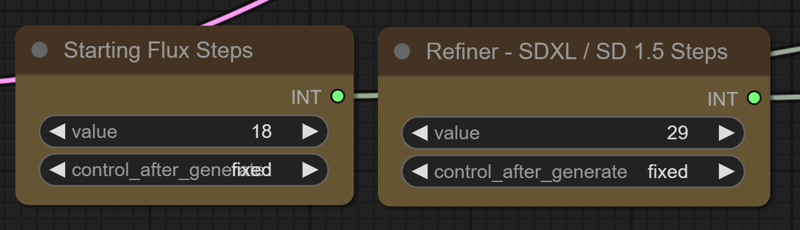
TensorRT Instructions (verson 1) : https://github.com/comfyanonymous/ComfyUI_TensorRT
If you don't want to use TensorRT just pull the model from the SDXL Checkpoint Loader to the Ksampler instead.
The TensorRT Build Settings I use on a RTX 3090: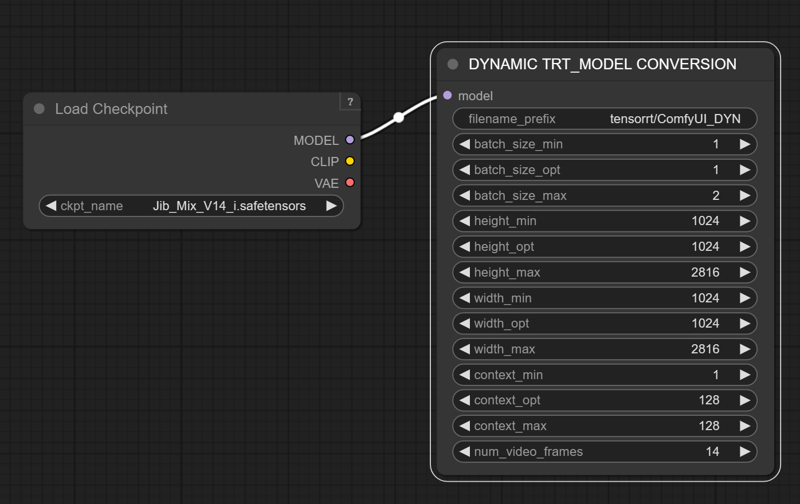
Description
Updated for V 0.2 Nunchaku nodes.
Added support for Control Nets.
Added support batch image upscaling.
can now use First Block Cache optimization.
FAQ
Comments (30)
Not able to load the nunchaku nodes, I've updated everything and even git clone but no luck, any idea?
Missing Node Types
When loading the graph, the following node types were not found
NunchakuTextEncoderLoader
NunchakuFluxDiTLoader
Ahh Linux....
@greentheory I am running it in Windows, took me a while to get it going as well, but it is worth it!
Have you installed the main Nunchaku project as well? https://github.com/mit-han-lab/nunchaku
The easy way is to pick the right wheel for your installed version of torch and Python from here: https://huggingface.co/mit-han-lab/nunchaku/tree/main
I used this one as I have torch 2.6 and Python 3.12 installed https://huggingface.co/mit-han-lab/nunchaku/blob/main/nunchaku-0.2.0%2Btorch2.6-cp312-cp312-win_amd64.whl
e.g Run: pip install https://huggingface.co/mit-han-lab/nunchaku/resolve/main/nunchaku-0.2.0+torch2.6-cp311-cp311-linux_x86_64.whl
(for Python 3.11)
to test if everything is installed ok run: Python
>>> import nunchaku
and if that comes up with any errors work though them with ChatGPT.
otherwise you should be good to go.
SVDQuantTextEncoderLoader
SVDQuantFluxDiTLoader
SVDQuantFluxLoraLoader
Missing and unavailable for download, please suggest a solution
It could be a lot of issues.
Did you install the main Nunchaku project in your environment?: you need to do that.
https://github.com/mit-han-lab/nunchaku
The easy way to do that is to pick the right pre compiled wheel for your installed version of torch and Python from here: https://huggingface.co/mit-han-lab/nunchaku/tree/main
I used this one as I have torch 2.6 and Python 3.12 installed https://huggingface.co/mit-han-lab/nunchaku/blob/main/nunchaku-0.2.0%2Btorch2.6-cp312-cp312-win_amd64.whl
e.g Run: pip install https://huggingface.co/mit-han-lab/nunchaku/resolve/main/nunchaku-0.2.0+torch2.6-cp311-cp311-linux_x86_64.whl
Then install the Nunchaku nodes (You might need to install via git URL in comfyUI manager.)
https://github.com/mit-han-lab/ComfyUI-nunchaku
My best advise is to talk though any errors with ChatGPT (Other LLM's are available)
@J1B Thanks for your work and reply, I'll give it a try!
@J1B Hey, I'm currently trying to install nunchaku, in which folder should I install it?
I don't think it matters where you install it.
If you run pip install https://huggingface.co/mit-han-lab/nunchaku/resolve/main/nunchaku-0.2.0+torch2.6-cp311-cp311-linux_x86_64.whl , it will install it in your default python path, which for me was C:\Users\jib\AppData\Local\Programs\Python\Python311\Lib\site-packages\nunchaku\
Or if you are using a dedicated virtual python environment for ComfyUI activate that first and it will go in the Venv folder I guess.
Note: We've renamed our nodes from 'SVDQuant XXX Loader' to 'Nunchaku XXX Loader'. Please update your workflows accordingly. 打开工作流json文件,手工把里面的内容替换一下就行了,比如SVDQuantFluxDiTLoader替换成NunchakuFluxDiTLoader
how to switch to Txt to Image?
Use the Stages quick node to turn off the controlnet and Upscale groups. and just use 1. Lying Sigma Noise Flux Generation or 2. Basic Txt to Image (or both).
Thank you, installation worked like a charm. But... how come there is so much hand errors in this wf out of the box?
I haven't seen a big increase in hand errors with this model, but the extra noise the Perturbed Attention and Lying Sigma nodes inject can cause issues with hands I guess, on the "1. Lying Sigma Noise Flux Generation" group , that is why I also have the "2. Basic Txt to Image" Group and I usually run them both enabled for 50/50 generations types.
Thanks for the fast answer! Yeah, i had that also in the basic text to image group, however, but after switching the First Block Cache off it seems better
@aitrancer I think the Quantization may have made hands slighty worse, but the 4x speed increase means I just roll again, or you can use inpainting.
thx, good workflow and model. but why when i change prompt node "Positive Flux Guidance" take so long time? out of 66 seconds, 6 seconds is generation, and the rest is the processing of the prompt. if I do not change the prompt, everything is great andfast, 6 seconds per picture, but if I change the prompt, the total generation time is the same as with a regular quants.
I'm using t5 fp8 and clip_l
It is because of the clip force node after the clip text loaders being set to cpu, if you have enough vram set it to load the T5 in vram by setting it to cudu:0 and it will be quicker after each prompt change, but use more vram.
@J1B i see, thanks. ima gpu poor, so i'll just keep it the same, it's faster anyway
Hi, seems like Basic Txt to Image - generates small grey squares always, so only Lying Sigma Noise Flux Generation - is producing results in this workflow. Maybe im doing something wrong? I havent changed anything in your workflow and reinstalled it just in case, still text to image is not working. Maybe Noise Flux Generation is always better than Text To Image, and we shouldnt use it at all?
(at least its working fast on my 3070 with 8gb vram, thank you for that!)
Nunchaku V2 is broken (maybe wrong file?)
Nunchaku workflow is broken:
Old Nodes (SVD), change it to NunchakuNodes
t2i generating only black boxes
I couldn't run these
Yeah the developers changed the node names, I could just take the version 1 workflow down (as it is outdated) or update it.
V2 loads fine for me though, are you sure your Nunchaku nodes are loading correctly?
Did you install the other required Nunchaku project? : https://github.com/mit-han-lab/nunchaku
can't find where to download "OverrideCLIPDevice"
It is part of this node pack https://github.com/city96/ComfyUI_ExtraModels
Can you please share the most basic t2i workflow with vanilla nodes (only using custom nodes when actually necessary)? I'm trying to understand how this is supposed to work before I try anything fancy or custom. I have a typical Flux workflow but with Nunchaku model and clip loaders. And I get nonsense image generations that aren't related to the prompt.
The models loaded:
jib-mix-svdq as the model
t5xxl fp16 (tried 8 as well)
Long-ViT-L14BEST-GmP-smooth-ft (tried clip_l as well)
I could try that. It sounds like you might have the control net section turned on?
Nunchaku installed correctly after hours. Really stupid. Now after prompt processing I get:
Error:
NunchakuFluxDiTLoader
'config'
Super helpful error, I know. Any idea what that means or how I could start figuring out how to fix it? The log only additionally mentions KeyError.
Also, I don't really understand why your Nanchuku workflow has no lora loaders.
I know your pain, it is a difficult install.
You definitely installed the separate nunchaku project following the instructions there?
My first version Nunchaku Workflow has the lora loader, I must have accidently taken it out for the V2.
Nunchuku is not working on my machine right now, after I updated Torch and CUDA versions to try and get SageAttention2 working for Wan 2.1.
So I cannot test it right now.
Comfyui Dependencies are a nightmare!
Ah I think this is my issue: https://github.com/mit-han-lab/ComfyUI-nunchaku/issues/301
The lastest ComfyUI release has broken Nunchaku
"ComfyUI-nunchaku-0.3.2 fails to show the "Nunchaku FLUX DiT Loader" Node and "Nunchaku FLUX.1 LoRA Loader" Node.
.But the problem was resolved after I downgraded the version to 0.3.1."
But not sure your issue is the same, it could be so many differnet things, Python, Torch, Cuda versions are quite common ones.
@J1B not disliking the comment, disliking the pain of working with Comfy dependencies.