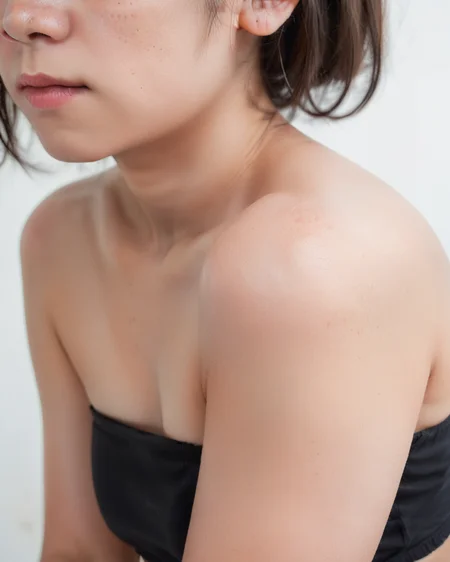
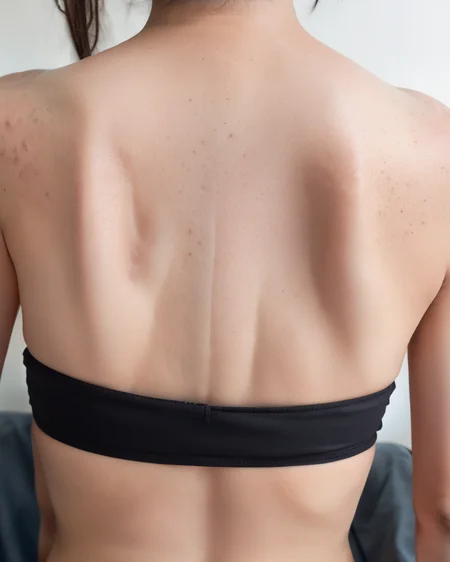
The photorealistic models for pony have made amazing progress, but the skin is too perfect, lacking a sense of realism. Therefore, I created a LORA to express features like blemishes and wrinkles, enhancing the realism of the skin.
Thank you for 1000 👍️!
Though I am still in the process of trial and error, I have uploaded a new model that can be used differently from the v0.1beta version.
v0.1gamma(new!)
v0.1gamma is a model that trained using a dataset that enhances the realism of the skin more strongly compared to v0.1beta.
However, it also has a greater impact on composition and body shape, so it is not necessarily superior to v0.1beta. If you're interested after looking at the sample images, feel free to give it a try.
v0.1beta
For many people who want to add a bit of skin texture, v0.1beta is more suitable. If the effect of v0.1gamma is too strong, please continue using v0.1beta.
Base prompt: real skin
Additional prompt: body freckles,mole,
LORA have trained on ponyv6, it should be usable with other pony derived models as well.
For more advanced use, utilizing the following A1111 extensions can also be very effective.
Due to issues with the training images leading to close-up outputs, I recommend using Lora Block Weight extension to apply the LORA from the later steps.
<lora:SkinRealityv1_ponyv6_loraplus:1.15:start=15>
If the facial rendering becomes distorted, please use Adetailer extension and set a prompt without the LORA description.
Description
First release.
For many people who want to add a bit of skin texture, v0.1beta is more suitable. If the effect of v0.1gamma is too strong, please continue using v0.1beta.
FAQ
Comments (13)
This kind of lora is definitely on the right track for improving realism models. The faces have mostly stepped out of uncanny valley, so now the smaller details like this should be the focus. Well done.
Wow, really good, and i had no idea you could sneak a lora in at certain step range... that's a game changer.
I had some incredible results with some models, but with others - it resulted in deformed figures. When I removed the steps it worked better. What could be causing this? Are the steps necessary? Thank you
This LoRA has a side effect where, even when trying to render the entire body, certain parts of the body tend to be more prominently drawn. The purpose of delaying the application of the LoRA using "steps" is to prevent this. Therefore, if you can achieve the desired composition without using steps, there's no need to use them.
Please use "steps" only if the composition doesn’t turn out as intended.
Additionally, step=15-28 is specified based on the assumption that the Sampling steps are set to 28. So, it’s more accurate to use start=15 instead of step=15-28. I Fixed the sample.
Thanks very much for your help.
constantly gives good results across a wide range of pony models
<lora:SkinRealityv1_ponyv6_loraplus:1.15:start=15>
is the start=15 nessisary if using on civitai gen? and what does it tell it to do? first time seeing start=
By using the lora-block-weight feature, it becomes easier to prevent the face from being out of frame. However, it cannot be used in civitai gen, but if you are not encountering such issues, it's unnecessary.
could you update the prompt/description with working Lora Block Weight extension functions? im a noob and cant figure out how to set up the extension to do anything, no matter what i mess with in the extension the resulting image is the same.
The LoRA block weight extension is not absolutely necessary. If you don't use LBW, you can simply reduce the LoRA weights for usage.
@markwatkin i understand that and i have gotten some great results with your lora but it sounds like a really cool feature if i can figure it out. not only for your lora but also others, especially the ones that add detail. anyway thanks and keep up the great work!
@block777 Thanks.
To use LBW, you just need to install it like any other extension, turn on the checkbox, and write prompts as shown in the examples. That alone should make a difference.
However, the effects of LBW are highly unstable, so you need to use the XYZ plot to determine the optimal values for each situation.
Details
Files
Available On (2 platforms)
Same model published on other platforms. May have additional downloads or version variants.