


The zip file contains the ComfyUI workflows which were used to generate the movie clips and the logo in the short film "Frostveil - Call to the Heroes":
Logo
To make a logo, use the workflow named workflow_logo.json. It uses LayerDiffusion and ControlNet to help match the wanted text and font while preserving a transparent background:
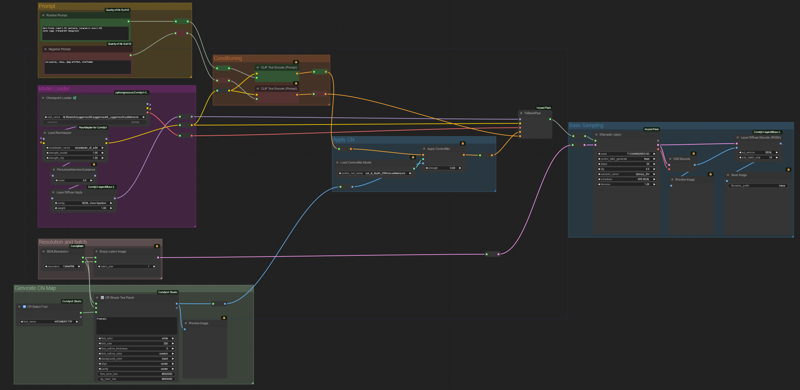 It can generate the following logo:
 Clips
Clips
Use the workflow named workflow_clips.json. It looks like this: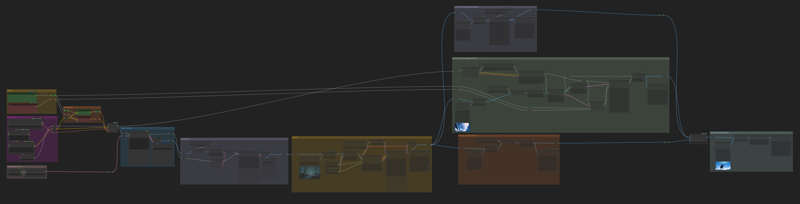 The workflow itself is divided in the following sections:
Configuration groups: on the very left, where you will set your image resolution, checkpoint and LoRas, and the positive and negative prompts.
Base sampling: to quickly generate many images until you find one you like.
Upscale 2x: to enhance the image quality
Image-to-video: this uses SVD1.1 and generates 25 frames worth of data in a resolution of 1024x576.
Video upscaling: there are multiple available options here: SUPIR, CCSR and regular model upscale. I used almost exclusively SUPIR for the video Call to the Heroes.
Frame interpolation: this last node will bring your upscaled video to 24 fps so it looks smooth.
Thanks to the ComfyUI community for making this possible!