CivArchive
    MistoLine - v1.0
    Preview 11793687

    Control every line!

    MistoLine: A Versatile and Robust SDXL-ControlNet Model for Adaptable Line Art Conditioning

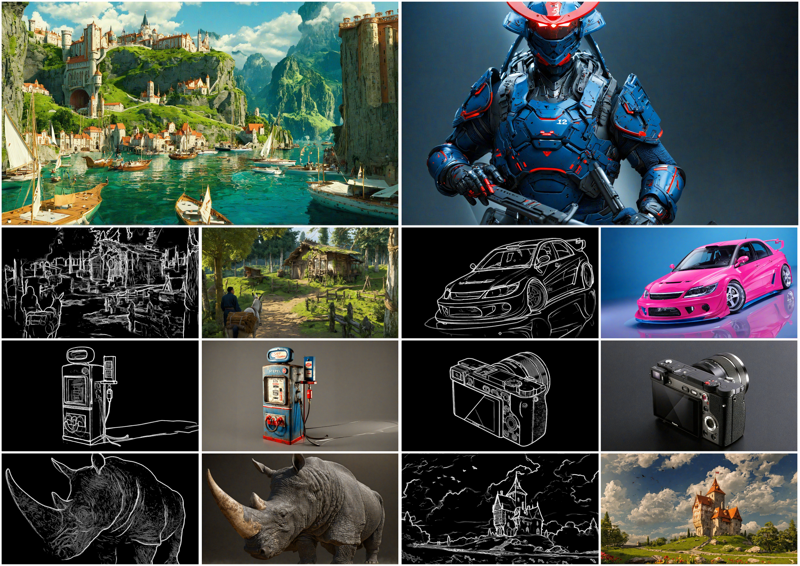
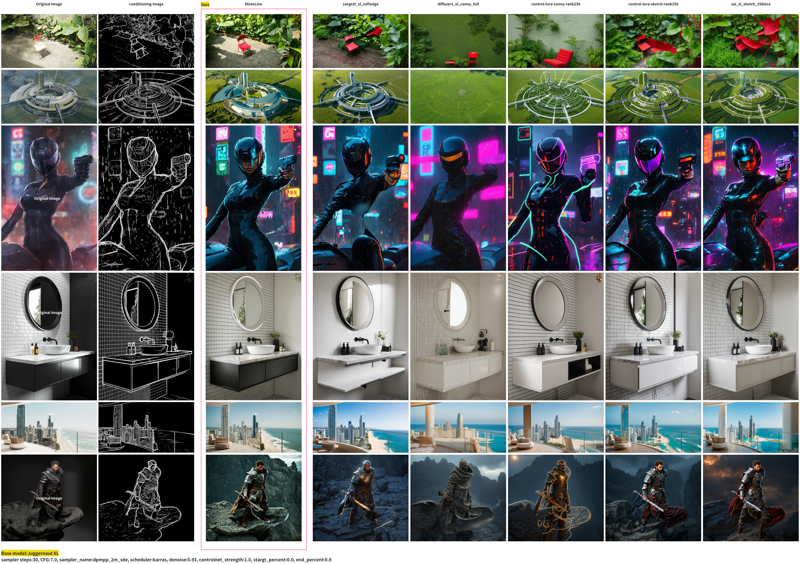
    MistoLine is an SDXL-ControlNet model that can adapt to any type of line art input, demonstrating high accuracy and excellent stability. It can generate high-quality images (with a short side greater than 1024px) based on user-provided line art of various types, including hand-drawn sketches, different ControlNet line preprocessors, and model-generated outlines. MistoLine eliminates the need to select different ControlNet models for different line preprocessors, as it exhibits strong generalization capabilities across diverse line art conditions.

    We developed MistoLine by employing a novel line preprocessing algorithm (Anyline) and retraining the ControlNet model based on the Unet of stabilityai/stable-diffusion-xl-base-1.0, along with innovations in large model training engineering. MistoLine showcases superior performance across different types of line art inputs, surpassing existing ControlNet models in terms of detail restoration, prompt alignment, and stability, particularly in more complex scenarios.

    MistoLine maintains consistency with the ControlNet architecture released by lllyasviel, as illustrated in the following schematic diagram:
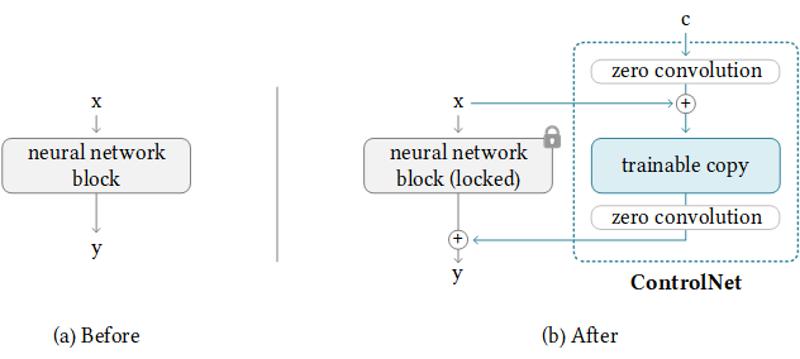
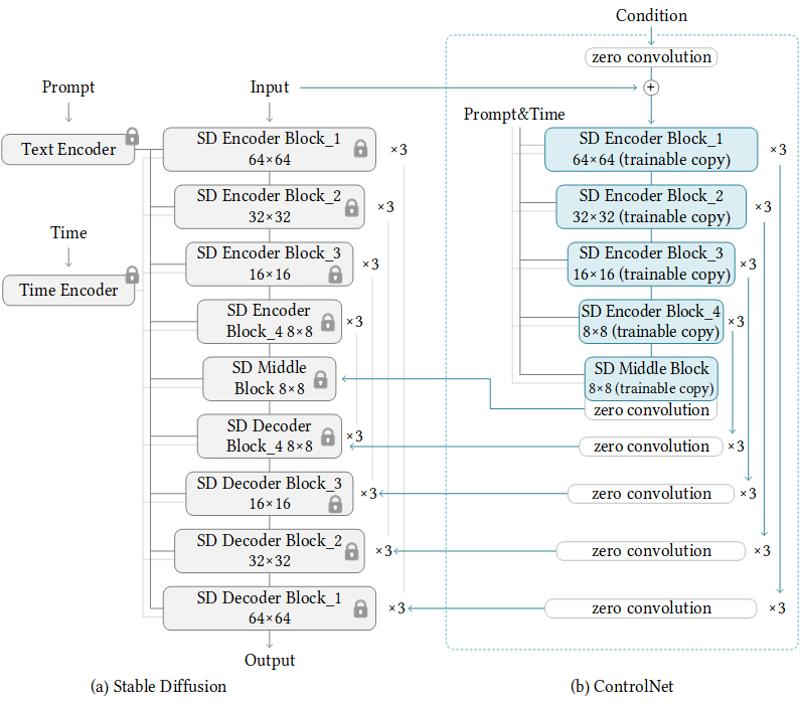
    reference:https://github.com/lllyasviel/ControlNet

    More information about ControlNet can be found in the following references:

    https://github.com/lllyasviel/ControlNet

    https://huggingface.co/docs/diffusers/main/en/api/pipelines/controlnet_sdxl

    The model is compatible with most SDXL models, except for PlaygroundV2.5 and CosXL. It can be used in conjunction with LCM and other ControlNet models. We have open-sourced the corresponding model weight files for non-commercial use by individual users.

    Apply with different line preprocessor
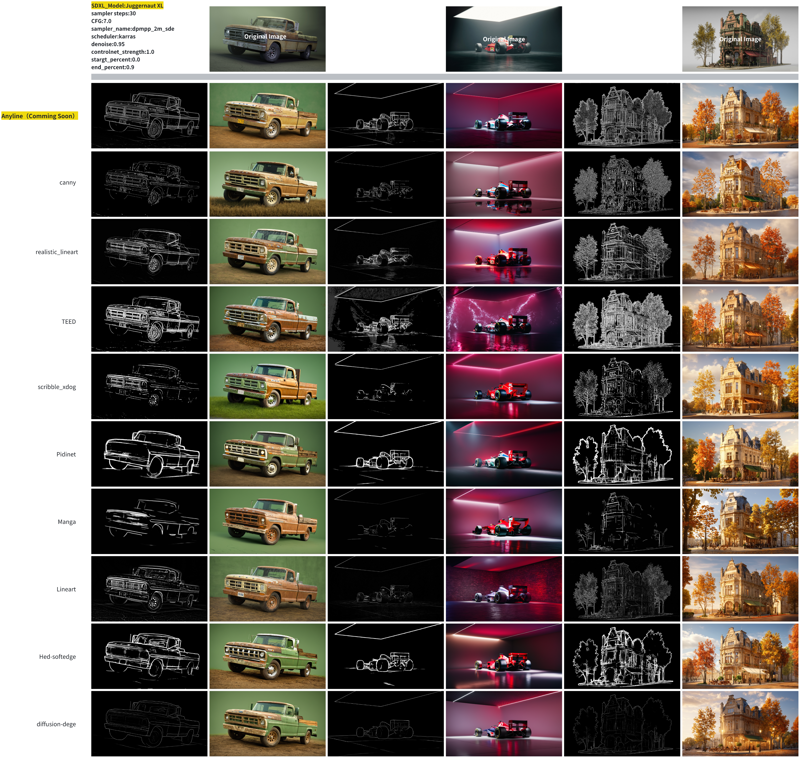
    Mistoline compere with other Controlnet
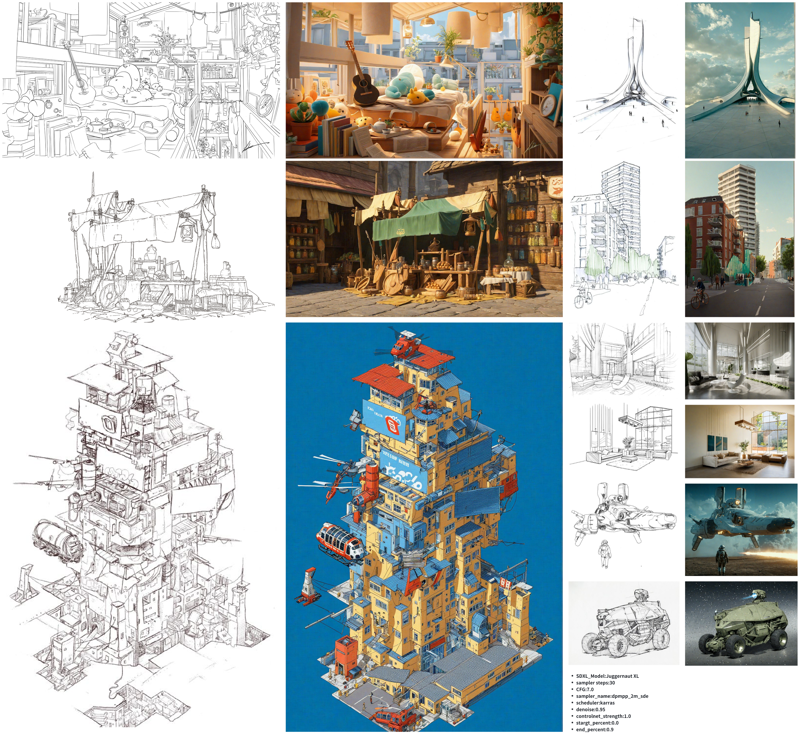
    Application examples

    Sketch rendering

    The following case only utilized MistoLine as the controlnet:
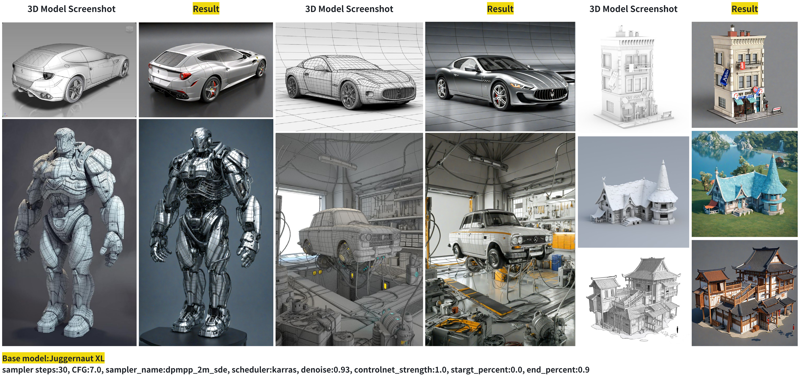
    Model rendering

    The following case only utilized Anyline as the preprocessor and MistoLine as the controlnet.
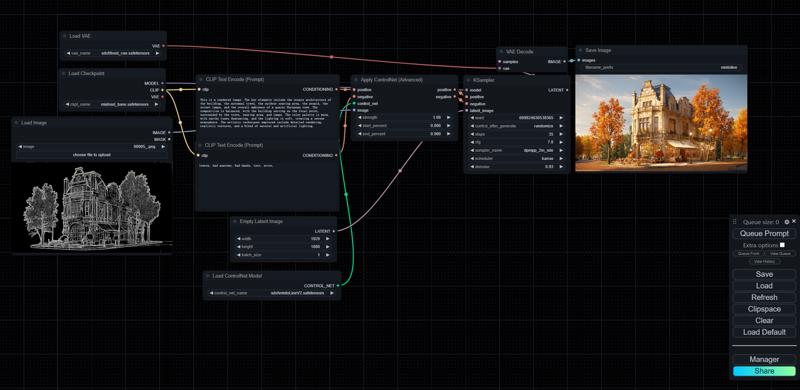
    ComfyUI Recommended Parameters:
    sampler steps:30

    CFG:7.0

    sampler_name:dpmpp_2m_sde

    scheduler:karras

    denoise:0.93

    controlnet_strength:1.0

    stargt_percent:0.0

    end_percent:0.9

    Checkpoints

    • mistoLine_rank256.safetensors : General usage version, for ComfyUI and AUTOMATIC1111-WebUI.

    • mistoLine_fp16.safetensors : FP16 weights, for ComfyUI and AUTOMATIC1111-WebUI.

    ComfyUI Usage
    中国(大陆地区)便捷下载地址:

    链接:https://pan.baidu.com/s/1DbZWmGJ40Uzr3Iz9RNBG_w?pwd=8mzs

    提取码:8mzs

    Citation
    @misc{

    title={Adding Conditional Control to Text-to-Image Diffusion Models},

    author={Lvmin Zhang, Anyi Rao, Maneesh Agrawala},

    year={2023},

    eprint={2302.05543},

    archivePrefix={arXiv},

    primaryClass={cs.CV}

    }

    Description

    FAQ

    Comments (23)

    serget2May 12, 2024· 3 reactions
    CivitAI

    You have a better image of that workflow, because that chinese site is down for some reason, or maybe just a PNG that you made with this workflow?

    TheMisto_AI
    Author
    May 17, 2024· 3 reactions

    We just published our own line preprocessor: Anyline. You can check it here: https://github.com/TheMistoAI/ComfyUI-Anyline

    There is a simple ComfyUI example provided.

    serget2May 17, 2024

    @TheMisto_AI thx, I'll try it out this weekend

    serget2May 25, 2024

    @TheMisto_AI in that image they are using a "resize image"-node I do not have not do I know where it comes from? any ideas?

    serget2May 25, 2024

    @TheMisto_AII think I have it, it's the one from palant, right?

    ThePuppetMay 12, 2024· 7 reactions
    CivitAI

    Could you please do an example workflow

    TheMisto_AI
    Author
    May 14, 2024
    Here is a simple comfyUI workflow: { "last_node_id": 37, "last_link_id": 60, "nodes": [ { "id": 7, "type": "CLIPTextEncode", "pos": [ 404, 401 ], "size": { "0": 425.27801513671875, "1": 180.6060791015625 }, "flags": {}, "order": 6, "mode": 0, "inputs": [ { "name": "clip", "type": "CLIP", "link": 5 } ], "outputs": [ { "name": "CONDITIONING", "type": "CONDITIONING", "links": [ 13 ], "slot_index": 0 } ], "properties": { "Node name for S&R": "CLIPTextEncode" }, "widgets_values": [ "lowres, bad anatomy, bad hands, text, error, missing fingers, extra digit, fewer digits, cropped, worst quality, low quality, normal quality, jpeg artifacts, signature, watermark, username, blurry, artist name, trademark, watermark, title, multiple view, reference sheet, mutated hands and fingers, poorly drawn face, mutation, deformed, ugly, bad proportions, gross proportions, malformed limbs, missing arms, missing legs, extra arms, extra legs, fused fingers, too many fingers, long neck, tatoo, amateur drawing, odd eyes, uneven eyes, unnatural face, uneven nostrils, crooked mouth, bad teeth, crooked teeth, photoshop, video game, censor, censored, ghost, b&w, weird colors, gradient background, spotty background, blurry background, ugly background, simple background, realistic, out of frame, extra objects, gross, ugly, tiling, poorly drawn hands, poorly drawn feet, poorly drawn face, out of focus, blurry, very long body, duplicate, morbid, mutilated, extra fingers, mutated hands, poorly drawn eyes, cloned face, disfigured, deformed, cross-eye, extra limbs, missing limb, malformed hands, mutated, morbid, mutilated, disfigured, extra arms, extra hands, mangled fingers, contorted, conjoined, mismatched limbs, mismatched parts, bad perspective, black and white, oversaturated, undersaturated, bad shadow, cropped image, draft, grainy, pixelated" ] }, { "id": 25, "type": "VAELoader", "pos": [ -203, 67 ], "size": { "0": 315, "1": 58 }, "flags": {}, "order": 0, "mode": 0, "outputs": [ { "name": "VAE", "type": "VAE", "links": [ 40 ], "shape": 3, "slot_index": 0 } ], "properties": { "Node name for S&R": "VAELoader" }, "widgets_values": [ "sdxl\\fixed_vae.safetensors" ] }, { "id": 3, "type": "KSampler", "pos": [ 1285, 269 ], "size": { "0": 315, "1": 262 }, "flags": {}, "order": 8, "mode": 0, "inputs": [ { "name": "model", "type": "MODEL", "link": 57 }, { "name": "positive", "type": "CONDITIONING", "link": 38 }, { "name": "negative", "type": "CONDITIONING", "link": 39 }, { "name": "latent_image", "type": "LATENT", "link": 2 } ], "outputs": [ { "name": "LATENT", "type": "LATENT", "links": [ 7 ], "slot_index": 0 } ], "properties": { "Node name for S&R": "KSampler" }, "widgets_values": [ 342210673726235, "randomize", 20, 7, "dpmpp_2m_sde", "karras", 0.93 ] }, { "id": 4, "type": "CheckpointLoaderSimple", "pos": [ -206, 168 ], "size": { "0": 315, "1": 98 }, "flags": {}, "order": 1, "mode": 0, "outputs": [ { "name": "MODEL", "type": "MODEL", "links": [ 57 ], "slot_index": 0 }, { "name": "CLIP", "type": "CLIP", "links": [ 3, 5 ], "slot_index": 1 }, { "name": "VAE", "type": "VAE", "links": [], "slot_index": 2 } ], "properties": { "Node name for S&R": "CheckpointLoaderSimple" }, "widgets_values": [ "bestSDXL.safetensors" ] }, { "id": 8, "type": "VAEDecode", "pos": [ 1658, 173 ], "size": { "0": 210, "1": 46 }, "flags": {}, "order": 9, "mode": 0, "inputs": [ { "name": "samples", "type": "LATENT", "link": 7 }, { "name": "vae", "type": "VAE", "link": 40 } ], "outputs": [ { "name": "IMAGE", "type": "IMAGE", "links": [ 9 ], "slot_index": 0 } ], "properties": { "Node name for S&R": "VAEDecode" } }, { "id": 14, "type": "ControlNetApplyAdvanced", "pos": [ 867, 660 ], "size": { "0": 315, "1": 166 }, "flags": {}, "order": 7, "mode": 0, "inputs": [ { "name": "positive", "type": "CONDITIONING", "link": 12 }, { "name": "negative", "type": "CONDITIONING", "link": 13 }, { "name": "control_net", "type": "CONTROL_NET", "link": 10 }, { "name": "image", "type": "IMAGE", "link": 60 } ], "outputs": [ { "name": "positive", "type": "CONDITIONING", "links": [ 38 ], "shape": 3, "slot_index": 0 }, { "name": "negative", "type": "CONDITIONING", "links": [ 39 ], "shape": 3, "slot_index": 1 } ], "properties": { "Node name for S&R": "ControlNetApplyAdvanced" }, "widgets_values": [ 1, 0, 0.9 ] }, { "id": 13, "type": "ControlNetLoader", "pos": [ 370, 986 ], "size": { "0": 407.4871520996094, "1": 58 }, "flags": {}, "order": 2, "mode": 0, "outputs": [ { "name": "CONTROL_NET", "type": "CONTROL_NET", "links": [ 10 ], "shape": 3, "slot_index": 0 } ], "properties": { "Node name for S&R": "ControlNetLoader" }, "widgets_values": [ "sdxl\\mistoLineV2.safetensors" ] }, { "id": 6, "type": "CLIPTextEncode", "pos": [ 415, 186 ], "size": { "0": 422.84503173828125, "1": 164.31304931640625 }, "flags": {}, "order": 5, "mode": 0, "inputs": [ { "name": "clip", "type": "CLIP", "link": 3 } ], "outputs": [ { "name": "CONDITIONING", "type": "CONDITIONING", "links": [ 12 ], "slot_index": 0 } ], "properties": { "Node name for S&R": "CLIPTextEncode" }, "widgets_values": [ "The image showcases a majestic castle situated on a hill, surrounded by lush greenery. The castle has multiple turrets, a prominent flag, and is constructed with a mix of stone and wood. In the foreground, there's a pathway leading to the castle, surrounded by flowers and rocks. The sky is clear with a few birds flying, and the overall atmosphere is serene and peaceful. The art style is reminiscent of fantasy or fairy tales, with vibrant colors and a touch of whimsy.\n" ] }, { "id": 5, "type": "EmptyLatentImage", "pos": [ 458, 828 ], "size": { "0": 315, "1": 106 }, "flags": {}, "order": 3, "mode": 0, "outputs": [ { "name": "LATENT", "type": "LATENT", "links": [ 2 ], "slot_index": 0 } ], "properties": { "Node name for S&R": "EmptyLatentImage" }, "widgets_values": [ 1920, 1080, 1 ] }, { "id": 9, "type": "SaveImage", "pos": [ 1937, 235 ], "size": { "0": 1387.391845703125, "1": 665.9559326171875 }, "flags": {}, "order": 10, "mode": 0, "inputs": [ { "name": "images", "type": "IMAGE", "link": 9 } ], "properties": {}, "widgets_values": [ "mistoline" ] }, { "id": 10, "type": "LoadImage", "pos": [ -771, 504 ], "size": { "0": 900.4772338867188, "1": 586.2821655273438 }, "flags": {}, "order": 4, "mode": 0, "outputs": [ { "name": "IMAGE", "type": "IMAGE", "links": [ 60 ], "shape": 3, "slot_index": 0 }, { "name": "MASK", "type": "MASK", "links": null, "shape": 3 } ], "properties": { "Node name for S&R": "LoadImage" }, "widgets_values": [ "7_merge (1).png", "image" ] } ], "links": [ [ 2, 5, 0, 3, 3, "LATENT" ], [ 3, 4, 1, 6, 0, "CLIP" ], [ 5, 4, 1, 7, 0, "CLIP" ], [ 7, 3, 0, 8, 0, "LATENT" ], [ 9, 8, 0, 9, 0, "IMAGE" ], [ 10, 13, 0, 14, 2, "CONTROL_NET" ], [ 12, 6, 0, 14, 0, "CONDITIONING" ], [ 13, 7, 0, 14, 1, "CONDITIONING" ], [ 38, 14, 0, 3, 1, "CONDITIONING" ], [ 39, 14, 1, 3, 2, "CONDITIONING" ], [ 40, 25, 0, 8, 1, "VAE" ], [ 57, 4, 0, 3, 0, "MODEL" ], [ 60, 10, 0, 14, 3, "IMAGE" ] ], "groups": [], "config": {}, "extra": {}, "version": 0.4 }
    yofoton174609May 14, 2024
    CivitAI

    Is it possible to make franco grinani lineart with this? I can't seem to get them fancy lines..

    eurotakuMay 20, 2024

    this is a controlnet model to create images from lineart maps, not a model to create lineart images :)

    yofoton174609May 21, 2024

    @eurotaku yeah but franco grignani is especially difficult. Im desparate to make it work : P . And mistoline is the worlds best lineart tool right now it seems. (Im Sorry for making a bad comment. I can delete my comment if you want sorry). Oh well either way! thanks for sharing the controlnet ! :)

    eurotakuJun 22, 2024

    @yofoton174609 no problem. just wanted to point out that the purpose of this model is not to create lineart outputs but to guide the generation of images with other models with masks or maps, that look like lineart. these can be created with so called preprocessors, ai models that translate a source image into a mask/map that this controlnet model can use. the creator of this model have created their own preprocessor for that called anyline, but if you want to generate proper images in a certain artist's lineart style, then you are better off searching for a model trained on that artist's artwork, a style lora e.g. or you train your own one on our on site training service :)

    666reptilianoMay 18, 2024
    CivitAI

    add version 2 of mistoline please. mistolineV2

    zGenMediaMay 25, 2024

    Where can we find it?

    1892173Jun 4, 2024

    afaik there is no v2

    slartibart353May 20, 2024· 1 reaction
    CivitAI

    ok... i found the HowTo A1111/Forge Controlnet model for mistoline (https://github.com/TheMistoAI/ComfyUI-Anyline?tab=readme-ov-file#use-in-a1111-sd-webui-controlnet) - but where do i get the preprocessor?

    slartibart353May 21, 2024

    @Rovor that's the model :) i need the preprocessor

    PressWagonMay 22, 2024· 1 reaction

    @slartibart353 I don't believe they've released their preprocessor yet, but it works great with traditional lineart preprocessors anyway

    feiyuhuahuoJun 3, 2024· 1 reaction

    As the description above, seems this model doesn't have a preprocessor, it can use any type of SD 1.5 ControlNet line preprocessor, I think

    PressWagonJun 3, 2024· 1 reaction

    @feiyuhuahuo The preprocessor is Anyline which is implemented for ComfyUI here https://github.com/TheMistoAI/ComfyUI-Anyline

    whatishereSep 9, 2024

    I thought misto line is a per-processor, why this all so confusing :D . So misto line is a Lora of SD 1.5 or what is it?

    whatishereSep 9, 2024

    someone please share a ComfyUI or other workflow if you assembled it to work in a correct way? pls pls pls

    andrewzhu202210952Oct 14, 2024
    CivitAI

    Hi, I want to know whether it can be used for commercial use. I noticed that the description says that "We have open-sourced the corresponding model weight files for non-commercial use by individual users.

    ". I'm not sure whether the "corresponding model" refers the model herein.