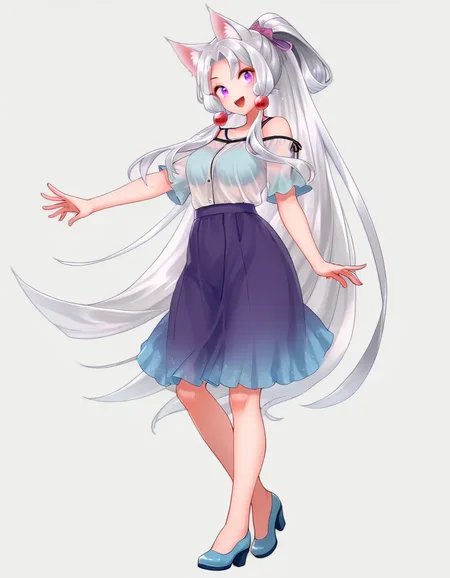
This guide explains my method for training character models.
Using 20 images, you can create a SDXL Pony LoRA in just 15 minutes of training time.
This guide assumes you have experience training with kohya_ss or sd-scripts. It skips over tool operation details.
In creating this training, I referred to the excellent guide at the following URL: https://civarchive.com/models/281404/lora-training-guide-anime-sdxl
【Training Environment】
Recommended VRAM: 12GB or higher (Confirmed working on RTX 4060Ti 16GB)
*Can be trained with 10GB VRAM if using the FP8 option.
【Tools Used】
kohya_ss GUI: https://github.com/bmaltais/kohya_ss
I installed kohya_ss using Stability Matrix: https://github.com/LykosAI/StabilityMatrix
Pony Diffusion V6 XL:https://civarchive.com/models/257749?modelVersionId=290640
zunko_dataset(20 image&tag):https://files.catbox.moe/lnelg0.zip
zunko_Exclude_tag_list.txt: https://files.catbox.moe/2jbc93.txt
kohya_ss preset(zunko_pony_prodigy_v1.json):https://files.catbox.moe/t5clrs.json
【Training Data】
Number of images: 20-40
Using more than this may decrease reproducibility. Consistent quality is more important than quantity.
It's best if the images are from the same illustrator, TV series, etc. with a consistent art style.
For fan art, try to gather illustrations with as consistent an art style as possible.
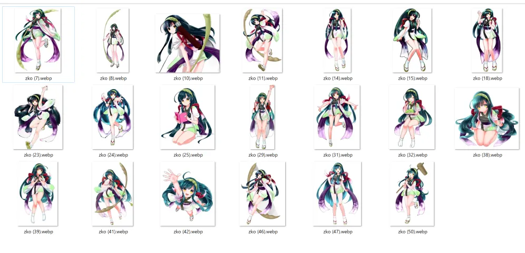
For this, I borrowed publicly released AI training data from the Japanese ZUNKO project: https://zunko.jp/con_illust.html
I selected 20 illustrations of zunko in the same outfit, converted the 768x1024 PNGs to WEBP format.
*The sd-script supports WEBP files which have a much smaller file size, so I prefer using them.
【Tagging】
Using webui's wd14tagger to re-tag the images:
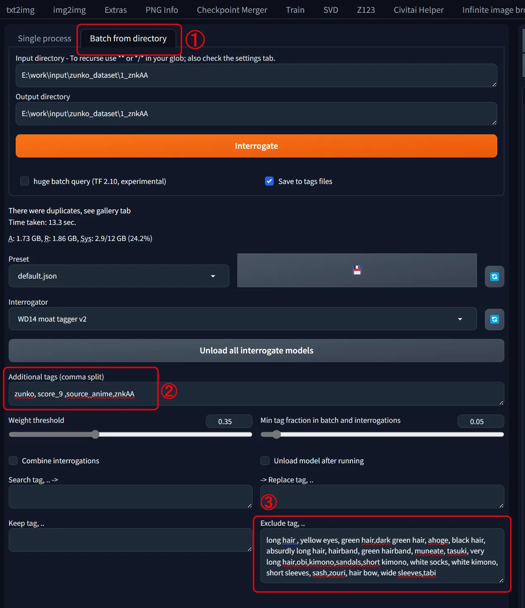
Model: moat-tagger-v2
Weight Threshold: Default 0.35
select「Batch from directory」
set input & output directory path
Additonal tags "zunko,score_9,source_anime,znkAA"
Character Name: zunko
Trigger Word: znkAA
Quality Tags: score_9, source_anime
Excluded Tags
- Remove all character traits (green hair, yellow eyes, long hair...)- Remove clothing traits except one (kept "japanese clothes")
I've attached a list of the words I excluded, so pasting that into the excluded tags field should give the same result.Ideally, we want to consolidate into the trigger word, but with few training steps it's hard for the model to learn "znkAA" refers to the outfit.
So instead, I have the model absorb the outfit traits into the existing concept it recognizes as clothing: "japanese clothes", adding "znkAA" as a supplement.
- Leave tags for character poses, compositions, and undesirable objects (bows, books, food, etc.)
【Start Training】
Launch khya_ss and select the "LoRA" tab. Be careful not to open a LoRA preset while the DreamBooth tab is selected.
I've attached a preset, so download that and "Open" it from the settings.
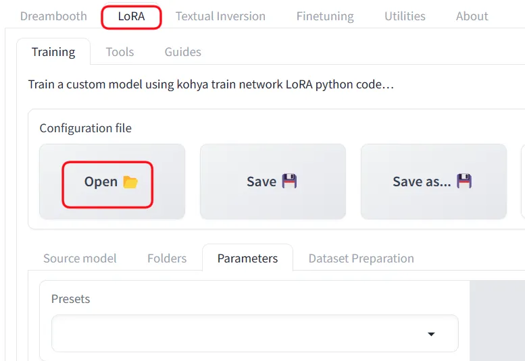
Adjust the file and Source model paths for your environment. Also adjust the Mixed precision and Save precision setting based on your accelerator (e.g. fp16).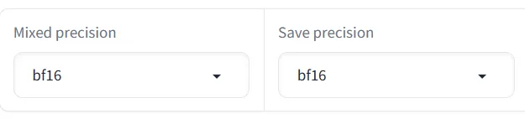
Base Settings:
Optimizer: prodigy, LR Scheduler:1
dim: 16,Network Alpha: 2
batch: 3,repetition: 1,epoch: 50
If you get an OOM error due to low VRAM, try checking the fp8 training option.
On my setup, 50 epochs took 14 minutes. Time will vary based on your PC specs.
【Selection】
Finally, review the results and pick your preferred epoch. 50 epochs is just a guideline - the final epoch isn't necessarily best.
The settings save every 10 epochs, but saving every 5 may be better.
If the training data and model are well suited, it may converge quickly.
Description
This was created using the Tohoku Itako image from https://zunko.jp/con_illust.html.
FAQ
Comments (28)
This is awesome that you're helping the community with this! I hate that most keep there 'secret training methods' gatekept behind paypal and the like. Doing that though makes it so people continue to train inefficiently and much larger lora sizes than needed.
I've learned a good bit through trial and error myself but one thing I still haven't figured out is about dim sizes; how small is too small and how big is too big when it comes to dim sizes? I remember reading somewhere one of the dim sizes makes it easier to mix with other loras if the size is larger, and the other one calls on the subject easier?
Oh, and also I was curious if you know the MAX dimensions of the pictures themselves should be? Some of them I have the original which is like massive size of 5k x 5k, and I know I should probably make it smaller but the smaller I make it the more details I know I'll lose out on, what's the sweet spot?
About Dim Size:
It's challenging to definitively recommend a specific Dim size as quality tolerance varies among users.
Based on experience, even a Dim 8 LoRa with SDXL can produce satisfactory results for character reproduction.
As I focus solely on character LoRas, not art styles or compositions, I can't comment on those aspects.
From a learning perspective, increasing the Dim size necessitates a proportional increase in training iterations to maintain quality. Personally, I find Dim 128 too time-consuming for single character creation, so I often opt for Dim 8 or 16 as a compromise.
About Image Size:
For SDXL training specifically, since it ultimately processes at 1024x1024, an ideal image size would be a multiple of 64 close to this resolution.
However, image size has become less of a concern recently due to SD-Scripts' automatic resizing feature, which efficiently handles size reduction.
The primary drawback of oversized images is increased GPU memory consumption, which can limit batch sizes and extend training time.
Aligning the long side to 1024 pixels is generally the most resource-efficient approach.
That said, I recommend preserving original full-size images for future use, anticipating potential new models capable of training at higher resolutions.
I've previously regretted having only 512x512 images for SD 1.5.
@am7coffeelove I see, well thanks so much for informing me of this! I didn't know it could limit batch sizes. Yeah when making loras I always keep the 'originals' in there own folder and make copies to edit and crop as needed. For resizing images upscalers for anime I usually use 4x_fatal_Anime_500000_G with 0.2 of a 4x-AnimeSharp as secondary. For more realistic I go just 4x-UltraSharp25_4x_foolhardy_Remacri75 but some images that I can only find that are like abysmal quality (240x320) I usually can't work any magic to upscale these images to anything usable.
SD 1.5: 512x512 (or less, multiples of 8)
SDXL: 1024x1024 (or less, multiples also, such as 1024x576, 768x1024, etc.)
Forget 5K insanity. AI doesn't record pixels, it understands concepts. You won't gain anything using bigger pictures. In my experience, training with too big pictures makes a LoRA that behaves like an image you'd generate in 2048x2048 out of the box. You'll get tons of deformities.
Sweet spot= respect picture dimensions at which base models are trained. That's how you'll get the best results.
@hansolocambo that's fair enough, but what about the loss of little details that may be intrinsic to the character? Add some images cropped to that detail as close as possible while keeping some other points of reference in the image? e.g. if there's a certain piece of jewellery or tattoo, crop into the character's ear still showing enough of their head for the model to recognise the location, or their arm but have enough of the arm showing so it knows where the tattoo is? If so the higher res images will be useful as you can crop and not lose too much detail.
Thanks for a good training guide. I use it all the time.
Now, I have a question about “batch size”.
I usually create Lora with batch size 2. For example, if I have a character data set that contains “full body” and “portrait” images that are very different in composition, Lora may output a black image with batch size 2. And this will return to normal output when the batch size is changed to 1.
Do you know the reason for this? Is this something that can be avoided?
Unfortunately, I'm not familiar with any cases or causes where differences in batch size during training result in black screens.
I don't have knowledge of this specific issue.
@am7coffeelove All right. Thanks for the reply.
Do you have --no-half-vae and --disable-nan-check in you command line arguments for the generator you're using after? I've found this cleared up most of my blank image generations on a lot of SDXL loras
Thank you for your guide, it really helps a lot :)
I made an article based on your tutorial for thoses who have only 8GB video card :
https://civitai.com/articles/6438
This also works pretty well on realistic datasets, not just anime. Set of 40 images (no regularization) took me half hourish to train on an RTX 4070 super and only used around 11.5 gb of vram with batch size 3 and all 1024x1024 images. Thank you for putting this up :)
What did you train it against? I tried this and the faces got super messy.
@websteria a friend of mine who likes the art I make of her. gotta use high quality pics of whatever the subject is. also overfitting can cause the faces to go quickly into uncanny valley.
I have the same GPU! But with 50 epochs I have a ~2 minutes gap between every epoch, so the whole training is about 105-110 minutes. I don't understand why this is happening. Did I understand correctly that in the "Dataset Preparation" section I need to set the number of repetitions to 1?
Hey, 4060ti 16GB user here, even though I use your settings, with a dataset of 23 images it takes half an hour, why is it taking twice as much as yours?
It may speed up after a bit. There's also --network_train_unet_only which you can add to the additional parameters section
gradient checkpointing, maybe persistent data loader, maybe no half vae, cache latents
the author may have also adjusted the train steps? I'm unsure
make sure your image folder starts with a low number the sample folder is set to 1_name so its doing 23x1 if your folder is set like mine was 100_name then it was doing 23x100 the number on the folder your images are in tells koya how many times to run a step on it. so 2300 was about 2hrs on at 4060 ti instead of just 23 in 15mins. i was trying to figure out why mine was taking so long too.
@saogalaxy This explains why mine is taking, right now, around 2 hours estimated. Poor my 3090, she can't never catch a break with such a dumbass owner xD
@saogalaxy Thanks, it was already name 1_mylora so that is not the issue.
@blackfuture82729 I used to get really fast training, but after the pytorch and nvidia driver updates, it's slowed down as well. It's stable though, so meh. I assume eventually the drivers will give better and speed will return, or the industry is making it slow on purpose, to encourage purchases of newer hardware ... <<< that one ... smh
Hi OP, Is this guide still up to date? Like are you still sing this presets or have you found a better one?
wd14-tagger it doesn't work, stable diffusion doesn't see it, how can this be fixed?
How did you install the extension ? Are we talking A111 and forks here (Forge, etc.) ?
If so, I installed and re-installed A1111, Forge, many times over the last few years and wd14 extension always installed fine.
Extensions > Install from URL > Paste the git repository and click Install:
https://github.com/toriato/stable-diffusion-webui-wd14-tagger.git
this guid is perfect. the last 10 loras i have made i have used your .jason and tips for pony and Illustrious models and it just work perfectly. thank you again for sharing
Using Civitai to create LoRA, would the end result also be good?
thx for your wonderful guide. may I ask why do you removed character and outfit traits from the tags?
Ohh i try and failed to finetuned the V7 and V8.5 but i didnt think of training a lora model based on one of them! gonna try that for sure. The model i trained with the base sdxl doesnt work nice with the ponys checkpoint...