
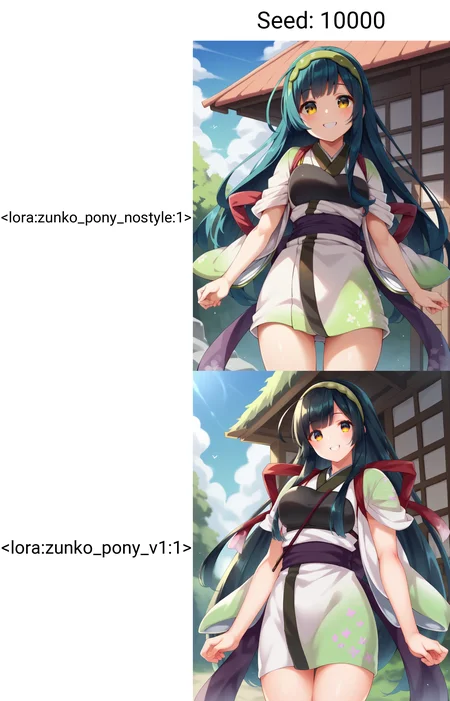
This guide explains my method for training character models.
Using 20 images, you can create a SDXL Pony LoRA in just 15 minutes of training time.
This guide assumes you have experience training with kohya_ss or sd-scripts. It skips over tool operation details.
In creating this training, I referred to the excellent guide at the following URL: https://civarchive.com/models/281404/lora-training-guide-anime-sdxl
【Training Environment】
Recommended VRAM: 12GB or higher (Confirmed working on RTX 4060Ti 16GB)
*Can be trained with 10GB VRAM if using the FP8 option.
【Tools Used】
kohya_ss GUI: https://github.com/bmaltais/kohya_ss
I installed kohya_ss using Stability Matrix: https://github.com/LykosAI/StabilityMatrix
Pony Diffusion V6 XL:https://civarchive.com/models/257749?modelVersionId=290640
zunko_dataset(20 image&tag):https://files.catbox.moe/lnelg0.zip
zunko_Exclude_tag_list.txt: https://files.catbox.moe/2jbc93.txt
kohya_ss preset(zunko_pony_prodigy_v1.json):https://files.catbox.moe/t5clrs.json
【Training Data】
Number of images: 20-40
Using more than this may decrease reproducibility. Consistent quality is more important than quantity.
It's best if the images are from the same illustrator, TV series, etc. with a consistent art style.
For fan art, try to gather illustrations with as consistent an art style as possible.
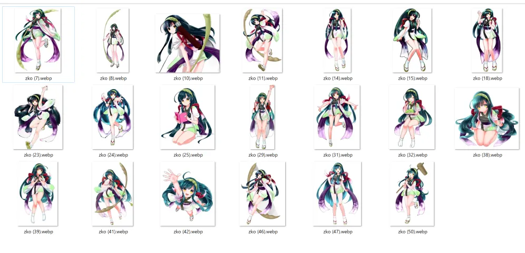
For this, I borrowed publicly released AI training data from the Japanese ZUNKO project: https://zunko.jp/con_illust.html
I selected 20 illustrations of zunko in the same outfit, converted the 768x1024 PNGs to WEBP format.
*The sd-script supports WEBP files which have a much smaller file size, so I prefer using them.
【Tagging】
Using webui's wd14tagger to re-tag the images:
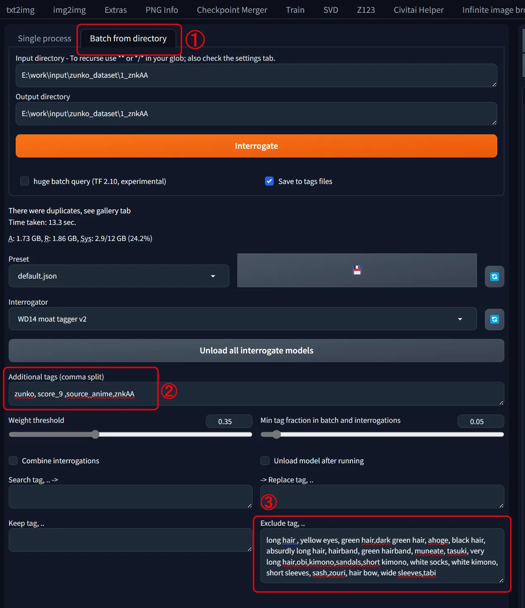
Model: moat-tagger-v2
Weight Threshold: Default 0.35
select「Batch from directory」
set input & output directory path
Additonal tags "zunko,score_9,source_anime,znkAA"
Character Name: zunko
Trigger Word: znkAA
Quality Tags: score_9, source_anime
Excluded Tags
- Remove all character traits (green hair, yellow eyes, long hair...)- Remove clothing traits except one (kept "japanese clothes")
I've attached a list of the words I excluded, so pasting that into the excluded tags field should give the same result.Ideally, we want to consolidate into the trigger word, but with few training steps it's hard for the model to learn "znkAA" refers to the outfit.
So instead, I have the model absorb the outfit traits into the existing concept it recognizes as clothing: "japanese clothes", adding "znkAA" as a supplement.
- Leave tags for character poses, compositions, and undesirable objects (bows, books, food, etc.)
【Start Training】
Launch khya_ss and select the "LoRA" tab. Be careful not to open a LoRA preset while the DreamBooth tab is selected.
I've attached a preset, so download that and "Open" it from the settings.
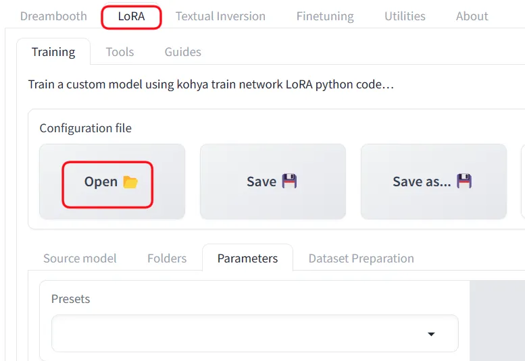
Adjust the file and Source model paths for your environment. Also adjust the Mixed precision and Save precision setting based on your accelerator (e.g. fp16).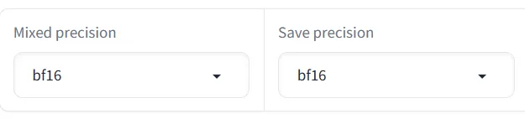
Base Settings:
Optimizer: prodigy, LR Scheduler:1
dim: 16,Network Alpha: 2
batch: 3,repetition: 1,epoch: 50
If you get an OOM error due to low VRAM, try checking the fp8 training option.
On my setup, 50 epochs took 14 minutes. Time will vary based on your PC specs.
【Selection】
Finally, review the results and pick your preferred epoch. 50 epochs is just a guideline - the final epoch isn't necessarily best.
The settings save every 10 epochs, but saving every 5 may be better.
If the training data and model are well suited, it may converge quickly.
Description
FAQ
Comments (55)
When we tried it, this setup was very speedy and reproducible.
It is very helpful to make a lot of progress.
Creating Lora for SDXL, which used to take about 5 hours, is now down to about 20 minutes.
GPU:4070ti
Agreed, my previous setting used like 5-6 hours with RTX3090, now with the setting OP provided, lora now can be made under 1 hour with the same dataset, and is much more flexible too.
Do you know what difference does it make whether you set 1 repeat for 50 epoch or say 10 repeats for 5 epoch?
I've tested and seen it does make a significant difference but I can't extrapolate anything concrete, or even tell which method is better.
I've been going with low number of epoch and adjusting repeats for each dataset to add up to 2 or 3 thousand steps, for convenience, but seeing your config doing the opposite, I wonder if you have a reason for doing so.
Since Prodigy uses an adaptive learning rate, setting a larger number of epochs, such as 50 epochs with 1 repeat, would be more beneficial than setting a smaller number of epochs with multiple repeats, like 5 epochs with 10 repeats.
The adaptive learning rate mechanism in Prodigy automatically adjusts the learning rate based on the gradients, allowing the optimization process to converge faster and more stably over a larger number of iterations.
Therefore, with Prodigy, it is generally recommended to set a higher number of epochs and let the optimizer handle the learning rate adjustments efficiently over the course of training, rather than relying on multiple repeats of fewer epochs.
This is the case when the optimizer is Prodigy.
For other optimizers where the learning rate is set manually, it would be better to use the conventional number of epochs and repeats as that approach has a proven track record.
@am7coffeelove Thanks, very helpful explanation.
I have just done more testing, and indeed, high epoch with prodigy has made it much better especially at learning concepts that require modification of the image's composition, like with placement and interactions of multiple people and objects. (It might also make it better at learning bad aspects from your dataset, though! Dataset and captions always remain the most important.)
When I previously tried prodigy, the vram requirement appeared too high for my 12gb, so I kept using Adam8bit, but prodigy worked with your preset, so I just started using it. I think it might have been the rank at 32 that made vram too high. So far prodigy at rank 16 seems like a good compromise though.
Also, if you're interested to try them, these settings https://files.catbox.moe/syqtsg.png I have tested a lot and they consistently give better results, and with the couple I've tried today, they also seem to improve loras that use prodigy. (lora type is locon) I mostly do unusual concepts though, so I can't guarantee it'll do better for characters.
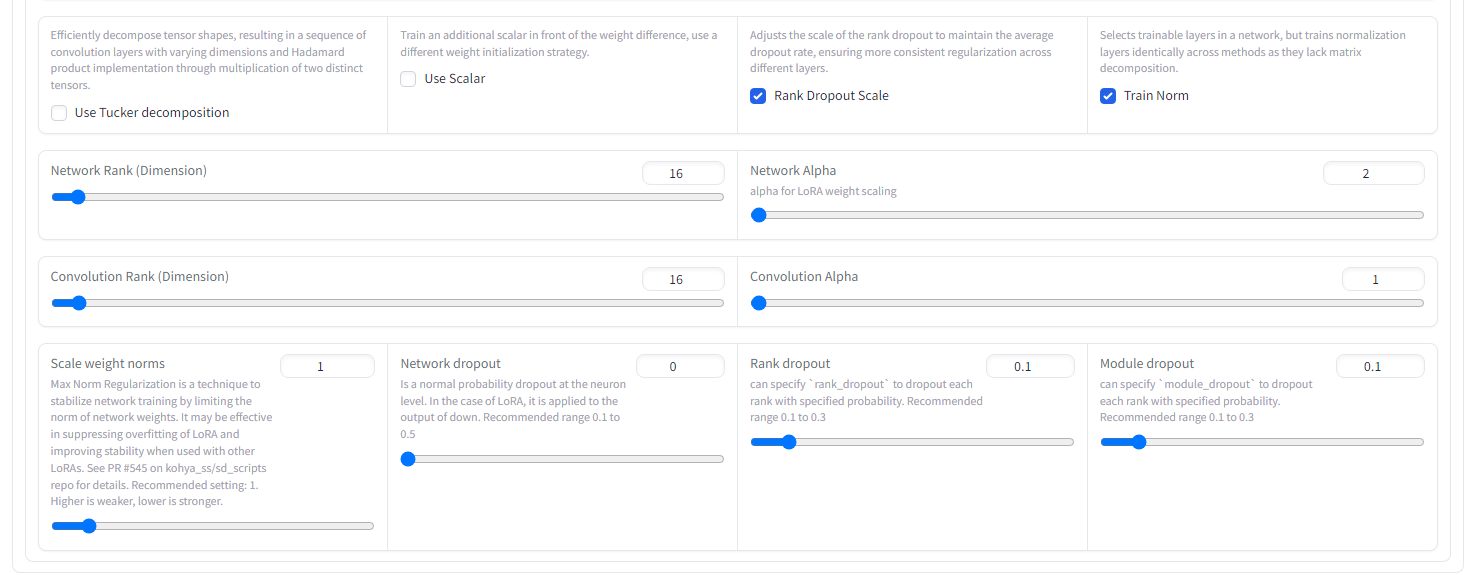
Wow this actually works, really well too. Thank you so much, so much better than anything out there.
I'm getting this error: ValueError: The config file at C:\Users\aaa/.cache\huggingface\accelerate\default_config.yaml had unknown keys (['downcase_fp16']), please try upgrading your accelerate version or fix (and potentially remove) these keys from your config file.
Can you help me please?
Regarding errors with the training tool, I'm not sure, so please check with the tool's developers.
does anyone know a way to run kohya on Paperspace?
Does this work with realistic subjects, or only anime?
For realistic, you can follow the same steps but SDXL base model probably makes more sense than PonyXL.
@realechelon Hmm I suppose so. SDXL base hasn't been giving accurate results. I'm not sure I'm it's my settings. I'll try this guide using SDXL base and see if that works better. In theory, using the base will make the lora play better with more models, right?
@vokar28 Yeah, you could try something like Juggernaut?
@realechelon but what if you want to do everything Pony can do, but look realistic?
Don't know what I'm doing wrong but when I try this my training literally takes days. I'm using a 4090, with plenty of RAM and storage, and a new i9. I have no idea what I'm doing wrong. I can't find any preset file to use.
set 1_ in your img folder
I installed kohya from StabilityMatrix, it hava plenty of presets
@LeskiSTL what does 1_ do? I was told to set 100_
@gynoidneko It's the number of image repeats per epoch, for this config the epoch is set to 50 so increasing the image repeats is pointless and overcooks the model
work well, thank you~
Great guide bro! ^^
50 epochs took 4 hours for me. Nvidia 4080 with 16GB VRAM. Don't see how it can be 15 minutes
How many images and repeats did you have? The 15mins clearly refers to when you have 1000 steps. I have a 3060 12gb and I can run it in 45mins to an hour.
Can't load tokenizer for 'openai/clip-vit-large-patch14'. If you were trying to load it from 'https://huggingface.co/models', make sure you don't have a local directory with the same name. Otherwise, make sure 'openai/clip-vit-large-patch14' is the correct path to a directory containing all relevant files for a CLIPTokenizer tokenizer.
what can I do
Wouldn't using images of the same style simply cook the style in the character lora? Personally I don't want that, I want as much control over the style and colors as possible. Are you sure this is the best way to go about it?
You are correct about 'cooking it in', which seems to be what the author intended to do... character and style in one. I normally train style and characters separately, but that takes 100+ carefully selected and captioned images and 48-72 hours of train time on the 4060.
@ClassicalSalamander That is a pretty insane but effective way to do it, though sometimes you don't have enough images, time or patience to go through all that for a single character... I guess block weight editing is still the best way to go about it in case of style ovrlerfit.
Hi, could you make a video, it would be much easier that way. Since the new versions of kohya_ss GUI are very different from the images you used in the tutorial
Have you had any good results with DoRa?
Very good guide! The only thing is that i cant set LR-scheduler to 1. I just picked cosine.
Very useful training guide, I base on it to start my lora training
i was running into crashing problems in A1111 with the "buck resolution steps" set to 254, the dial maxed out at 128 and that fixed it for me
受教了 感謝!!
Really nice,THANK U!!!
Maybe this is a dumb question.
Where can I find the attachment? Or is there a way to somehow turn the LoRA file into a json file?
Or is there a way to turn the above string into a json file?
Please help me.
[Tools used] The link to the attached file is provided below.
The following links are the same:
zunko_dataset(20 image&tag):https://files.catbox.moe/lnelg0.zip
zunko_Exclude_tag_list.txt: https://files.catbox.moe/2jbc93.txt
kohya_ss preset(zunko_pony_prodigy_v1.json):https://files.catbox.moe/t5clrs.json
turn the text into a .json by pasting it into notepad and saving it as a .json file: use 'save as' and set 'save as type' to all and then save the file as [filename].json
Really nice guide! You shoud make an article about it!
Any idea why mine is showing an ETA of 6+ hours? My image folder name contains "1_", I'm using 50 images (900 steps), and everything else is identical to what you used. I have a 4070, so even hardware wise, I don't think the time should be that drastically different.
There's a possibility that the LR Scheduler value is not set to '1'.
Other than that, I can't think of any other potential issues.
@am7coffeelove Gotcha, I'll check it out, thanks.
This doesn't work anymore, at least not for me. It even gets a divide by zero error, for no comprehensible reason. Attempting to update Kohya with its own .bat just makes it unusable because apparently it decides to install the wrong version of python to even use it.
Can someone please finally develop something to train LoRAs that actually works and doesn't require ridiculous amounts of jumping through hoops with the most unstable and inconsistent coding language known to man? Please?
downloading the config json isnt working any more. Can you put it up again?
kohya_ss preset(zunko_pony_prodigy_v1.json):https://files.catbox.moe/t5clrs.json
This is the link to the json file. The download was successful.
The catbox.moe link is permanent. Could you please try again?
@am7coffeelove It worked the next day, thank you.
tis the lora gonna be flexable with the model style ,or gonaa take the dataset style,?
The LoRa created using the method I introduced will be overwhelmed by the style of the dataset.
the resulting output will predominantly reflect the characteristics and style of the training dataset.
The reason for this is that we are running an excessive number of training steps in Prodigy, which tends to lead to overfitting.
@am7coffeelove Could you elaborate on this? What optimizer would have less overfitting?
@DreamImg
I believe Prodigy is the best option.
In my explanation I set it to 50 epochs, but in reality, it's able to reproduce the results quite well from around 30 epochs.
50 epochs would certainly work, but it might be a bit excessive. There's likely a better setting somewhere between 30 and 50 epochs.
Prodigy tends to learn rapidly, which makes it difficult to fine-tune smaller details.
Although it's not recommended because it takes more than twice as long to train, I personally also enjoy taking time to experiment with optimizers like AdamW or Lion using a trial-and-error approach.
@am7coffeelove hi another question , to capture diffrent outfitt, we put all images in one folder or diffrent folders?
@fuinypain It's fine to put all the images in one folder
Do you have an idea how you would try to minimize style learning if you were trying to train a concept (for example a non-specific subject interacting with a specific object) but had to work with a limited dataset, in which one style is predominantly present?
One effective approach to minimize style influence is to train using a model that has already merged the style you wish to exclude from learning. By training with a style-merged model, you can focus on learning the character attributes while eliminating unwanted style elements.
The following examples illustrate this concept. Both use the same dataset (zunko_dataset) with identical Prodigy learning settings and epoch counts. The upper image demonstrates significantly reduced influence from the original art style (though some minimal influence remains).
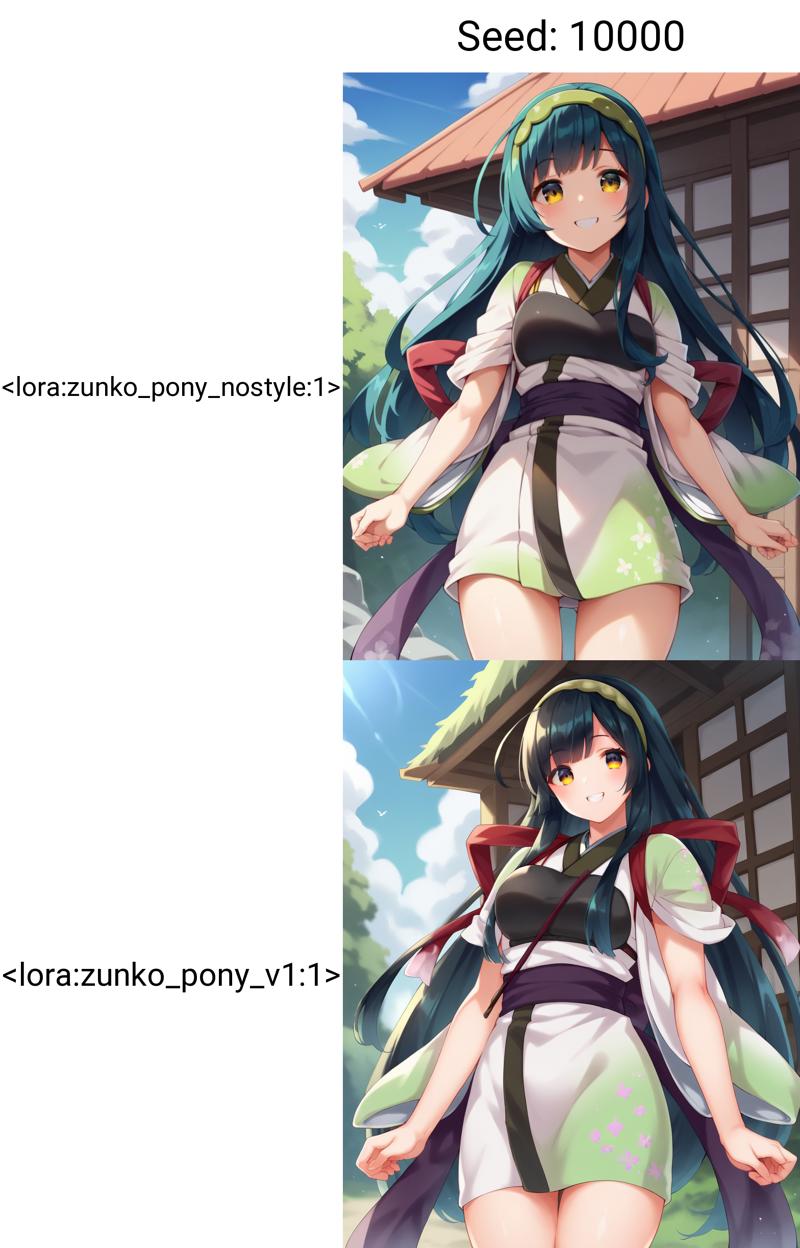
The key difference between these examples lies in the base model used for training. The upper image, trained using a model with pre-merged styles.
Here's a step-by-step guide to implement this technique:
STEP 1: Create a LoRa (LoRa-A) of a different character with the same style.
Optimally, use a LoRa of a different character drawn by the same artist, maintaining consistent art style.
For this demonstration, I created a LoRa using illustrations of "Touhoku Itako" sourced from https://zunko.jp/con_illust.html.
STEP 2: Merge LoRa-A with the base model and initiate training.
For SD-Scripts, add the option "--base_weights=file path of LoRa-A created in STEP 1" to your training command. This will automatically merge the LoRa and commence training at runtime.
The training settings adhere to the Prodigy settings outlined in the guide. The sole addition to the execution command is the "--base_weights" argument.
This method allows for more targeted learning, focusing on character-specific attributes while minimizing undesired style influences.
Many thanks! I will try this out. :)