


https://wallofthieves.com/
Stable Detail Slider
Belive it or not, but i have never made a detail slider before. Its in a way the easiest slider to make, but also the hardest slider to perfect.
I wanted it to be stable in both direction, for all type of images, both photo and anime.
It was also important for me that it is what it say it is, a DETAIL slider.
I did not want my slider to affect color balance, contrast, exposure etc, and thats why it has taken me so long to create a detail slider im happy with.
If you want some tips from me on how to train good Slider LoRAs, look at my respons to "namole5990210" in the discussion section below, where i explained some of my tricks i have learned from my over 1000 failed LoRAs.
Recommended range:
Short prompt or detailed scene: -4.0 to 4.0
Portraits or simple scenes etc: -6.0 to 6.0
Can be used outside of this range as well, but it depends on prompt, other LoRAs etc.
Description
FAQ
Comments (39)
Legend!
Mate, I'm usually not the one to praise or give compliments. But honor where honor is due.
My lora folder system used to be like "Body" "Turbo" etc. Now there sits a "Loraholic" folder among the other folders.
Also before I never used Sliders because the effect was at times unhinged. Now, I have an own slider loras node in my workflow. I had to call it what it is: "Loraholic Sliders" because it only consists of your sliders.
Thanks for your hard work! It's nothing short of amazing!
Thats exactly how i want people to know me by. The Sliders that do what they should, and nothing more. Good stuff.
Looking great as always! I don't know if you accept suggestions, but do you think a thin/thick eyebrows slider would be possible? Specific eyebrows thickness seems impossible to prompt for as far as I tried.
Seems like a simple one. Will look into it.
That would be a nice lora to have!
@arnvc I currently use something along the lines of "prominent bushy eyebrows". Words like "wild" and putting that part as first face detail help a bit. I'm curious how you currently deal with achieving thick eyebrows?
@LukeLuke45646 I stopped trying, I tried "thin eyebrows" before and it just made the eyebrow bushier just because the word was present in the prompt.
ohh god. This went borat fast..
Some major skintone leakage, but it was only a test to check the prompting.
https://i.gyazo.com/6cb357fc84e4779de3c167cf0bfe9fee.png
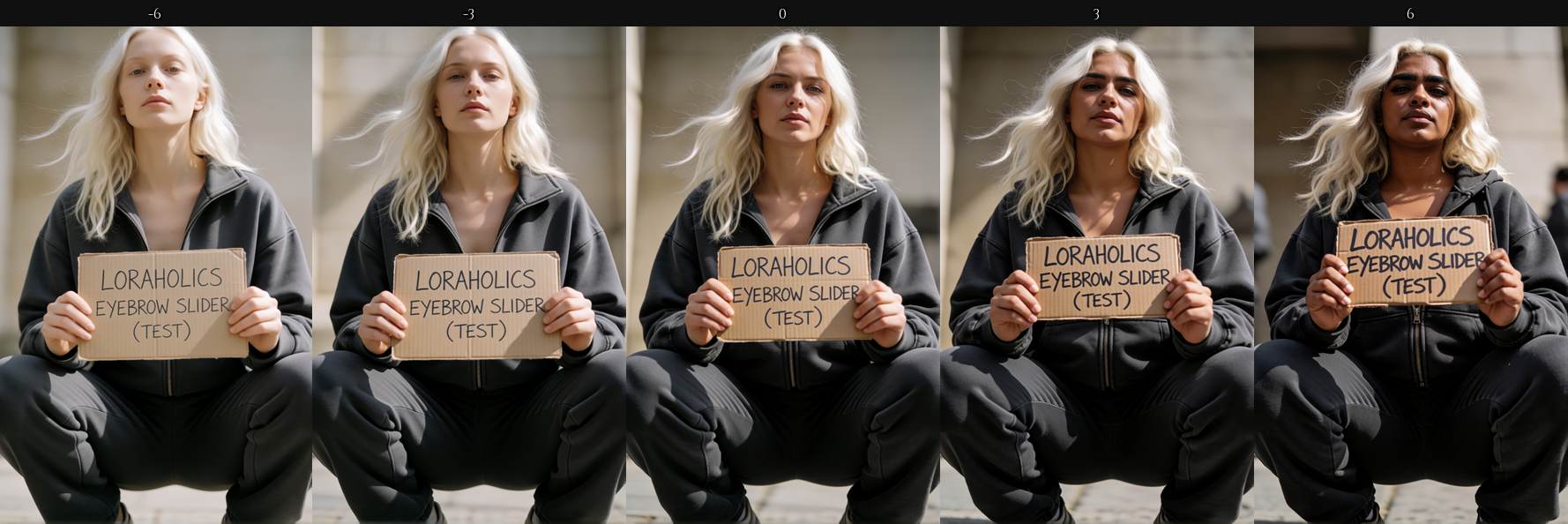
@Loraholic Looks promising!
@arnvc Been there many times. Prompting to reduce something without negative prompting is a nightmare. I gave it a couple of shots to find something that works until Borat hides his face 😂
It's not an aesthetic I'm usually going for so I'm not sure if any hit the spot for you:
"her eyebrows are just a sharp fine line"
"her eyebrows are as thin as a pencil line"
"faint thin pencil-thin plucked eyebrows"
"faint thin pencil-thin over-plucked eyebrows"
"faint thin pencil-thin eyebrows"
"faint thin razor-thin plucked eyebrows"
@LukeLuke45646 tested with these in different combinations.
"thick bushy eyebrows, dense full brows with heavy hair growth"
"prominent bold eyebrows, wide dark full brows thick with hair"
"heavy dense brows, the eyebrows broad and bushy across her brow"
"full thick eyebrows with dense coarse brow hair, strong prominent brows"
"very thin sparse eyebrows, narrow plucked brows with barely any hair"
"pencil-thin eyebrows, fine faint brows reduced to a thin sparse line"
"minimal sparse brows, the eyebrows narrow and faint with sparse fine hairs"
"finely plucked narrow eyebrows, a thin delicate line of sparse brow hair"
@Loraholic You're a saint! Thanks, mate. I'll give them a shot
Eyebrow color, too. I really dislike asking for a blonde and getting someone with dark eyebrows. I don't know if Krea 2 suffers from this problem but it's a common issue with many other models/loras. I hope an eyebrow slider will work on males. Dark beard shaving shadow and similar on blond and ginger men is also annoying.
Do you happen to have a guide or tutorial on how you are making the Krea2 loras? I have a lot of concepts I'd like to try making sliders for and would love to know what your best practices are and what tool you are using? I've been using AI-Toolit and I seems like things change quite drastically between strengths, altering way more than I'd like about the way people look.
Here are the main settings I'm using:
Transformer: float8.
Target type: LoRA
Linear Rank: 4
Batch size: 1
Steps: 300
Learning rate: 0.001
Timestep type: Weighted
Timestep bias: Balanced
Loss type: Mean Squared Error
Unload TE: True
As an example of what is going I tried to make a weight slider and used a target class of "person" and a positive of "woman who is skinny" and a negative of "woman who is plus-sized" without an anchor class.
It does make a skinny or heavy woman but it also changes what they look like a lot.
He included some info in his gaping one. It looks like he is using rank1 and high steps to keep them small and flexible with multiple other loras.
"So i trained this 7mb Rank1 LoRA on a 25-image dataset. And i want to share the setting i used if anyone else want to make fun small LoRAs like this.
LR: 0.00002
Steps: 10000 (batch 1), but half or less would probably do as well.
Timestep Type: Linear
Timestep Bias: Low Noise
Loss Type: Wavelet
Dataset: 25 images with captions. No faces.
Res: 768x768 or similar"
Setting is good. Could probably turn Rank down to 2 or even 1.
The higher rank, the more unwanted effect will also fit in the LoRA.
But your prompting need a lot of work. Krea2 uses a LLM as text encoder, so it need sentences. So target would be something like "the body weight of the person" or even "the body weight and size of the person".
And in pos and neg you should also write more. "The person is large. the body weight of the subject is full" etc. You can write it as a prompt, and it will have way more effect. And here is where you form what type of "large" you want. I would probably focus a bit on ass and breasts as well. Just dont go ham. A balanced prompt is much better them a prompt that focuses on one thing.
And anchor is THE most important part of training a Slider LoRA. Without anchor, your LoRA will drift in all kind of directions. I often use more time on the achor then the other 3 combined.
With a weight LoRA a minimum would be something like "apparent age. ethnicity. the overall skin tone", and maybe also "the type of clothing she wears. The pose" etc.
"apparent age" is one of the things i use in every single Lora i make. My current achor on a LoRA im training noe is a bit wild since im training a special LoRA atm. But it is 340 letters long to put it into perspective.
Hope this helps.
And to add something to the end. You wont be able to train a propper NSFW LoRA without some modifications to ai-toolkit. But everything you can manage to prompt on the normal Krea2 model you should be able to make a Slider LoRA out of.
Happy training.
@EndlessShadow
That is for normal LoRAs. For Sliders its a bit different. As a beginner his current setting is good, since its very obvious when something is wrong. Instead of training for 1000 steps before thing start to show, and its not the things you want thats happening.
And one more thing. Dont sample in ai-toolkit, since its sampling on raw, and that takes forever.
Sample in comfy with turbo instead.
If you train on runpod or vast just download checkpoints as they are done, and sample right away.
At least every 20 steps. But i often like to sample every 10 steps when things start to happend.
@Loraholic I really appreciate this. I’m also working on making slider LoRAs. What do you mean by the “anchor” part? Do you mean that we should literally type something like: “apparent age, ethnicity, the overall skin tone, the type of clothing she wears, the pose”?
Can you give an example? For example, if you make a LoRA that changes hair to blond (something simple), what would the prompt/anchor look like?
@vitipan420920
positive_prompt: "an extremely tall person, towering in height, their body long and stretched upward"
negative_prompt: "an extremely short person, small and petite in height, their body compact and low"
target_class: "the persons height"
anchor_class: "exposure. apparent age. ethnicity. the head size. the body weight. the body shape. the pose. the clothing. the background."
Copy pase config for a height slider.
Just think of anchor as you just telling the model, straight out what you dont want yo change that you suspect will be affected by the LoRA you are making.
Sometimes you also need to compensate in the pos/neg. But anchor is usually enough.
For my areola slider, i used large areola, small breasts the last 50 steps or so to balance out the breast size, since it had drifted.
But it was only a little since i had robust anchors that almost held the breast size at bay.
@Loraholic This is all great information. Last question, what about your dataset images. For this blond person one do you include photos of just random people with any hair color. With regular LoRA you make a dataset that match the thing you want to make, but is this different? Do you use close up or far away pictures?
@vitipan420920 I have a standard dataset i use for all slider that is 10 different images all made from Krea2. mixed between closeup, portrait, fullbody and a couple of random poses. All at different ages, skin color and hair color.
@Loraholic Interesting. I haven't made any Krea lora's, but I played with LTX slider loras. I was using the AkaneTendo25/musubi-tuner fork for LTX. I actually added a load of features, including anchor_class which it was missing before and helped feature blur a lot. Though when I run it, I usually only sample every 100 steps, between 800 and 1800 steps. I also added an option to do a forward pass on multiple images each pass instead of randomly picking one from the set each step to prevent bounce between 2 images. Hadn't made anything worth sharing yet though.
@Loraholic Can you show me the specific parameters for training the slider lora?(i'm using aitoolkit)
Another question is whether the natural language caption used for the same pair of images should be the same or different ?(I trained on the tag system model with same caption workvery well)
@lse14 I dont think get what you are asking. But everything to know about prompts is:
Sliders dont use prompts from images. It only uses the 4 prompts in the config, Target, Positive, Negative and Anchor. And all these should have natural language. Even target.
Anchor should have short 2-3 word sentences seprarated by periods. NEVER comma.
If you read my other answers in this discussion, i have given a complete config, with all four prompts. When i answered vitipan420920
@Loraholic Sorry for not expressing myself clearly. The way I trained the slider lora is to first train an overfitting lora, then merge it with the base model, and finally train the slider on the merged model(After practice, this method works well on sdxl and anima models),But I still couldn't successfully train with this method on Krea2.
@lse14 wtf. That sounds like a bad way of training. You are training a LoRA on content that dont exist there in the official model. My guess would be to not do it that way XD
I prompt good, and train low and slow. For the most part. And some times i train multiple Rank1 LoRAs and merge them.
@Loraholic However, this is a mature technique in SDXL and Anima, designed to maximize the extraction of differences between image pairs. It works remarkably well with only a handful of image pairs. The only issue is that I still haven't been able to find the right training parameters for K2 :(
@lse14 The more you know. I started training in december, so i dont know any of the old ways. But my guess it that old habits from those type of models are bad habits. I would concider myself pretty decent at making sliders now, and i just use stock settings for Krea2 most of the time. While i put extreme amount of hours into test how the model reacts to different prompts and ways of prompting.
And i have never used keyword for a LoRA and gotten a good result usually there is little to no effect from keywords the few times i have tried.
You are doing great work. I hope you would consider a jewelry slider as I often get random necklaces, earrings, and belly button piercings unprompted. I want to do a -6.0 and never have to worry again. (On the flip side, I do want to have choker necklaces; side nose, eyebrow, lip piercings, or other alt/goth piercing if prompted or if there was a punk slider that was positive while jewelry was negative. Would that even work?)
I tried that on ZIT, and remember it was a nightmare.
It will not be on the top of my list, but maybe some day.
Man, thank you for this. I never really thought about how much REDUCING detail in some cases makes a photo better and vice versa.
You have added another nice tool to my belt, thank you.
That one is incredible. I mean, most of your loras are incredible, but that one is the single most incredible of all.
Fantastic lora, it changes nothing of the composition, just adds or removes detail.
The perfect slider!
Works well, one minor issue is that it tends towards warmer (yellow/brown) tones as weight increases.
Details
Files
detail_slider_krea2_loraholic.safetensors
Mirrors
detail_slider_krea2_loraholic.safetensors
detail_slider_krea2_loraholic.safetensors
detail_slider_krea2_loraholic.safetensors
detail_slider_krea2_loraholic.safetensors
Detail Slider - Krea2 - -6 +6.safetensors
detail_slider_krea2_loraholic.safetensors
detail_slider_krea2_loraholic.safetensors
detail_slider_krea2_loraholic.safetensors
detail_slider_krea2_loraholic.safetensors
detail_slider_krea2_loraholic.safetensors
detail_slider_krea2_loraholic.safetensors
detail_slider_krea2_loraholic.safetensors
detail_slider_krea2_loraholic.safetensors
detail_slider_krea2_loraholic.safetensors
detail_slider_v1_by_loraholic.safetensors
Detail Slider - Krea2 - -6 +6.safetensors