


Introduction
💪 UniFlex isn't just a workflow...it's a unified flexible and extensible modular framework, where things look and work roughly the same regardless of the model used or imaging task required. The most commonly used tools for local AI image generation are at your fingertips, while a suite of power tools are at the ready when needed.
The workflow is heavily annotated 🗒️ and includes a number of pre-configured samples 📦 for you to learn and build, without needing to buy access or dig through intentional obfuscations (e.g., node stacking). Native ComfyUI nodes have been used as much as possible, with the Core 🦴 edition requiring only ONE custom node package!
🔮 Krea 2 remains the flagship model for the latest major version. However, other models supported with annotations, instructions, and/or pre-configured sample workflows include Anima (incl. Anima-LLLite); Bernini-R; Boogu-Image [Edit]; Chroma1-HD; FireRed-Image-Edit; Flux.1 Dev; Flux.2 Klein 9B; Ideogram 4; JoyAI-Image-Edit [Plus]; Mage-Flow [Edit]; Qwen-Image [Edit]; SDXL (incl. Illustrious, Pony, etc.); and Z-image.
Development and testing occurred on the following system:
Operating system: Linux Mint 22.3 Cinnamon with 124 GB RAM
Processor: 11th Gen Intel© Core™ i9-11900 @ 2.50GHz × 8
Graphics card: NVIDIA GeForce RTX 3060 with 12 GB VRAM
Browser: Google Chrome
Please report bugs 🪲 or errors 🚫, as well as successes 🤞 and requests/suggestions 📝. Post and share your SFW creations!!! I spent a lot of time working on this project (((for no 💰))), so I hope others make good use of it and find it helpful.

Power Tools *
Background Removal & Segmentation:
ControlNets, Detailing, & Inpainting:
🔮 Krea 2 reference images controls —so fun!...kind of like Flux Redux
LanPaint with Crop-and-Stitch
LLMs for Text & Vision:
Prompting:
LLM-driven prompt enhancers
Wildcards (OutputLists Combiner)
Upscaling:
Model-based, PiD †, RTX Super Resolution, SeedVR2 †, SesquiLSR, and SUPIR †
XY Plots:
XY plots (OutputLists Combiner)
* = stripped down Core 🦴 edition is also included in the download package; † = native ComfyUI implementation
What's New?
[13.x] This major version represents a culmination of the incremental improvements made through the 12.x series, with some additional changes to custom node packages and QOL improvements. At this point, I think the workflow is about as clean as I can get it, given the functions being implemented and current stage of ComfyUI development. 🔮 Krea 2 remains the flagship model, with additional components and settings particular to its use.
[12.x] This major version basically represents a culmination of the incremental improvements made through the 11.x series, with some additional changes to custom node packages, QOL improvements, and a new color scheme. 🔮 Krea 2 remains the flagship model, with additional components and settings particular to its use. [12.3] Added support and pre-configured samples for Anima-LLLite, Mage-Flow —Turbo, and Mage-Flow-Edit —Turbo. [12.3] Added SesquiLSR latent upscaling; getting much better results than ComfyUI's native methods. [12.3] Added SPEED sampler for potentially faster rendering. [12.3] Cleaned up the Prompt Builder subgraph; gives better demonstration of some possibilities for constructing wildcard prompts. [12.3] Collapsed many of the GetNodes into subgraphs for a cleaner look. [12.3] Trimmed down annotations and instructions in the core workflow that mostly applied to the main workflow or covered more complex configurations. [12.3] Restructured the Prompt group by moving several components into the Prompt subgraph. [12.3] Found some speed optimizations by removing preview image and text nodes inside subgraphs that were running for no reason (in most cases). [12.3] Added a "boosted settings" pre-configured workflow, with additional LoRAs, faster sampler, K2 native schedulers, and latent upscaling automatically enabled. [12.3] Additional tweaks and QOL improvements. [12.2] Added Krea2Edit back in after several alternatives were reviewed. [12.2] Made some tweaks to the default settings that should give better (cleaner, sharper) results...maybe? [12.2] Additional tweaks and QOL improvements. [12.1] Replaced as many nodes from the Easy-Use and rgthree packages as possible, with the former no longer required at all and the latter only used for the Switchboard (which can be removed if a user wants to just mute groups by scrolling around). The core workflow was also trimmed of custom nodes and now requires just ONE (KJNodes)!
Known Issues
[13.x] 🛑 LAYOUT NOT COMPATIBLE WITH NODES 2.0 🛑
[13.x] The included pre-configured sample workflows are provided for proof of concept, but the most up-to-date workflows will always be the 🔮 Krea 2 and 🔮 Krea 2 —Core workflows.
[13.x] Several argument flags are known to have incompatibilities with many models and configurations, so start ComfyUI without them when testing things out. These are known to have been problematic for me: --fast, --force-channels-last, --fp8_e4m3fn-unet, and --use-sage-attention.
Quick Start
Install or update ComfyUI to the very latest version. Follow the official Comfy documentation or your favorite YouTube installation video, if needed.
Check that ComfyUI Manager is available, or install it.
Download the 🔮 Krea 2 model, along with its text encoder and VAE, from the Comfy-Org Hugging Face repository.
Open the pared down Core 🦴 edition of the 🔮 Krea 2 workflow in ComfyUI. (Later you can try the main workflow.)
Use the Manager to Install Missing Custom Nodes.
Restart ComfyUI.
Open the workflow again and follow the General Workflow Defaults instructions. For now, it will basically be to load your diffusion model, text encoder (CLIP), and VAE (01a), and then temporarily bypass the LoRAs subgraph (03c; only the subgraph, not entire sub-group).
Run the default text-to-image recipe 🥣.
If everything passes, inside the LoRAs subgraph (03c) re-enable the turbo LoRA, if needed.
Enjoy your generated image creations! 😎
Navigation
The workflow is structured for flexibility. Many unconnected nodes have intentionally been included to provide options and ideas for endless tweaking. (The workflow does not employ Anything Everywhere, so if a node connection looks empty, it really is empty.)
In the Switchboard group (in the main workflow), flip the yes|no 🔵 toggles to mute or unmute groups and the jump arrows ➡️ to quickly move to particular groups for adjustments. 🛑 Do NOT run the workflow with all switches flipped to yes!

Once you have the main diffusion model, text encoder (CLIP), VAE, and LoRAs in their correct working locations for your setup, you should be able to just ignore any additional missing model errors if they appear. If the scary red boxes bother you, in the Comfy > Workflow section of the settings, turn off Show missing models warning. (Alternatively, almost all of the problematic groups/subgraphs can just be deleted and the default workflow recipes should still work.)

In the rgthree settings (if installed), it is also recommended to show fast toggles in group headers for muting.

In the Lite Graph section of the settings, enable the fast-zoom shortcut and set the zoom speed to around 1.5–1.75. The workflow was built with a snap to grid size of 20.
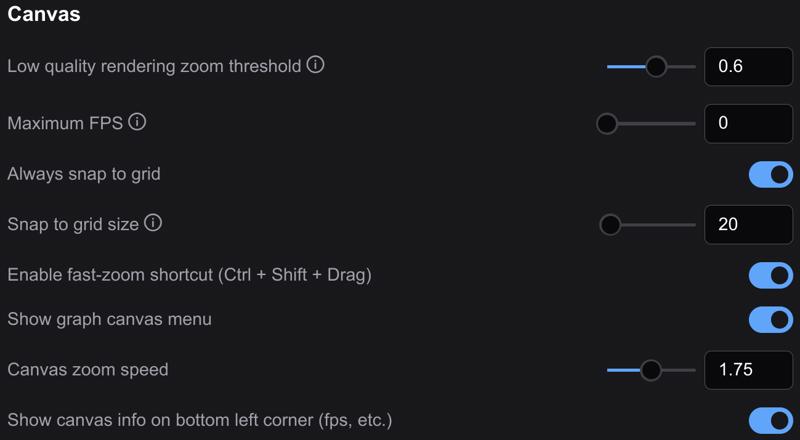 Most of the workflow is unpinned 📌, so grab any empty space with your mouse to navigate around. You are welcome to pin 📌 anything you like to prevent accidentally moving groups or nodes.
Recipes
Run the default text-to-image recipe 🥣 to confirm you have the basics configured correctly before too much tweaking. Once you have the workflow running, drag-and-drop your rendered image back onto the ComfyUI canvas to continue working. This ensures you will always have a good default workflow as fallback. 🏅
The workflow is heavily annotated 🗒️ and includes a number of pre-configured samples 📦 for you to learn and build!
Description
See workflow description.
FAQ
Comments (16)
This looks really cool, but there does not appear to be any documentation on the models.
It would be very helpful to include links to the models and which folders they are put in. It isn't always obvious, and given the deeply nested workflows it will likely take several restarts and digging through all your nested subgraphs to get everything sorted out.
Hmmm, actually there are like 20 model errors. I downloaded 4 or 5 and then thought the enable all the switchboard options and there are now 20 models I have to download.
Mind you I have over 1.2TB of models. I've done this before, but it would really help (given all the documentation work you have already done) if there was a writeup on the workflow that helped me save a couple hours work just to test drive this.
edit, at least one model can't be found:
universal_fast/longCLIPDistilled_distilledCLIPL.safetensors
Well, I gave it a shot. Hopefully others will have more luck than me. After trying to locate and download what felt like 10-15+ models, updating my comfy and fiddling for several hours the workflow still has 7 errors, missing node pack comfyui-kjnodes (1) (which shows installed but whatever). I'm done.
I appreciate your honest feedback...
I've tried to address some of your frustrations in v11.3 by adding quite a lot of additional annotations, links, and default ComfyUI folder structure regarding the models. --I "blanked out" my model folder structure to find and figure out what I could reasonably alleviate, without sacrificing the capabilities of the workflow... I will follow with some suggestions:
STRATEGY ONE
* Just load one of the default ComfyUI templates and run that instead. (I don't really understand what you are even wanting to use my workflows to do.)
STRATEGY TWO
* Still do the default ComfyUI template thing first.
* Now, open my CORE workflow, not main workflow.
* Install the five custom node packages required; try switching all of these to nightly versions...including KJNodes (or delete and reinstall fresh). Disable all other custom node packages and/or "try reinstall" if you really have to.
* Locate your diffusion model, CLIP, and VAE (according to your folder structure, which you confirmed worked in the default template).
* Bypass (temporarily) the LoRAs subgraph.
* By this, if done correctly, the workflow should run and there should be no errors of any kind.
STRATEGY THREE
* Still do BOTH of the previous strategies first.
* Now, open the main workflow.
* Before installing additional custom node packages or trying to locate additional missing models (you're killing yourself for nothing and not understanding what you are doing), locate your diffusion model, CLIP, and VAE, just like before and these are literally the only models YOU need!
* Next, look where red warning boxes are appearing. Ask yourself, do I really need this?....probably not! Any of these can safely be deleted: all of the "accessory groups" (e.g., LLM, Background Removal, and Upscalers), additionally the entire Secondary Models group, ControlNets group, Model Patches subgraph, and Specialty Renders groups can just be straight-up deleted! Fixed: no more scary red boxes for missing models (which you never needed to begin with). The default recipes will still run, regardless of whether there are red boxes for missing models or not...and the red boxes can just be turned off by flipping a switch in the ComfyUI settings anyway, if they really bother you so much.
* After saving, now try to install any additional custom node packages from their NIGHTLY versions that haven't already been accounted for. Also "try reinstall" if glitches arise. One of the nodes remaining in the Acceleration | Specialty subgroup may not show up in ComfyUI Manager. It, too, can just be deleted. Whatever is left, which shouldn't be much, let me help you figure it out. (I have some strategies that have helped when I can't get all of my many custom node packages to play nicely together.)
BONUS TIPS (FOR THE FUTURE)
* Upload the workflow JSON file to an AI chatbot, like Google Gemini or Claude.
* Ask it to give you a list of all of the models used in the workflow, with their ComfyUI or primary source download links, along with the default ComfyUI folder structure.
* Ask it for help in sorting out which are vital for the workflow to run and which can be postponed for later.
* Ask it for the ComfyUI default equivalent for any oddball or obscure model.
Well, anyway, I'm sorry you've given up. I've been right there with you myself...just sorry my workflows caused so many headaches. However, I think your brain is just kind of clogged with it now...trying to turn on all workflow groups and just randomly plug in missing models--without a plan, purpose, or understanding other than to get rid of a red box--is just madness and wasted time.
Thank you for the response.
I was frustrated trying to find all the models and I should have tried some of the smaller workflows first. I just wanted to test drive something from someone that knows what they are doing and see what is possible (I have never tried to build anything this ambitious)
Your suggestions are solid. I'll give it another go.
@kaptainkory A quick followup. I used Claude to analyze your krea2-code workflow. Found 9 models, 6 exact matches on HF, 3 "best guess" candidates (these are the ones that trip me up)
I already have a couple reliable simple krea2 WF that I use, but I was interested in improved prompt enhancement and getting more out of krea2 realism and subject expressions.
I 'm using the ComfyUI-Model-Installer node, but it is struggling with most of the models in these WF's too. So, I am using Claude to create a skill to supplement the download node. The skill will use the node as the engine and do the research, find and download all the models. I'm hoping this will make it less painful to try some ones new WF (since apparently there are dozens of similar but not quite the same) variations of the same models, I mean do I really need 15 different qwen3b/4b models?)
@pakfur993 thanks for the follow-up. I'm interested to hear about any additional progress you make and discoveries, but in particular if there are still hang-ups with my particular workflows, please let me know. I'd also love to see any (SFW) sample images you are able to generate.
I think a lot of custom workflows are NOT going to follow the ComfyUI default folder structure. My main reasons are because 1.) I have soooo many models, LoRAS, etc. they just have to be compartmentalized and 2.) I put my most used models on my much faster NVMe hard drive, but it has limited storage capacity.
If you already have some simple Krea 2 workflows that are already working for you, but want to add something a little extra (e.g., the prompt enhancer from my workflow), you can just copy-and-paste it in...but you'll have to know a little about how to connect everything. If you need something customized like this, I can take a look.
@kaptainkory So, still can't get a simple T2I flow to work. Good news is this has helped me build a skill + scripts to download models and rewire a workflows model links so setting up a new workflow is easier. Bad news, I have no idea how to run these without getting missing input errors.
But i am still confused. I am trying the uniflex-11-3\uniflex-11-3--krea2.json. No matter how I disable the CANVAS section, or parts of it, so it is just T2I (which the instructions seem to imply you can do) I get missing input errors elsewhere. I took a pass at the example krea2 WF too, same problem. can't seem to do a simple T2I.
@pakfur993 try this, if you would...
1. Download the latest version (v11.6). I've made some tangible changes since v11.3.
2. Confirm the --core workflow runs under your configuration: open in ComfyUI; install/update custom nodes; switch to your Krea 2 model, text encoder (CLIP), and VAE; bypass the LoRAs subgraph (just the subgraph, not sub-group) for now. Do not touch anything else and run it.
3. Assuming you had success, do the SAME with the main workflow (uniflex-11-5--krea2.json).
...I need to know pretty particularly where these steps are failing to help problem solve it. One thing to definitely check is in Manger: filter by "Import Failed"...it should be empty!
Good news, the krea2-core workflow works!
I'm curious if it is possible to do pure t2i workflows? I don't see how to disable canvas without getting input errors in the rendering engine section. I glanced at some of the other example flows and it appears as though they all include a Canvas/Rendering engine section, but I have not wired them up to try it out.
I'd like to play around with some of the flows, but I am not sure I always want or have a reference image.
Edit: Got it. I read the instructions lol. I set the latent switch to 0 and it ignores the example.png image, effectively making it T2I.
Cool. thanks for all the amazing work. A bit tough to figure out a few of the renamed models, but the rest of it looks fun Thanks for sharing.
@pakfur993 Glad to hear of the progress!!! My GPU is tied up at the moment, so I'm not able to test this right now, but these steps should give you a 100% T2I --core workflow:
1.) Delete everything in 02a.
2.) Delete everything in 02b, except the Image Saved get node. Add a Preview Image node and connect these together.
3.) Connect the Empty Latent subgraph to the Latent set node in 02d; delete everything else in this group.
4.) Delete the Image Loaded get node in 03a.
That should be it.
I can see 11.8 in changelog but don't see it as download variant
...still "baking". ;-)
Check now, as v12.0.
@kaptainkory Where in your workflow can I set the image resolution for generation?
@MrDxrk if you need exact width and height for text-to-image, replace the Empty Latent subgraph (02d) with an EmptySD3LatentImage node.