






V3.2:
2026-08-10:Notice: Due to a node conflict from a recent ComfyUI update, please update Anima-LLLite and download Anima3_T2I_V3.2_0810.zip.
Two similar workflows featuring different approaches for the second-pass upscale.
Anima3_T2I_V3.2_SDUpscale: Upscaled via Ultimate SD Upscale. Minor optimizations to nodes and parameters of V3.1.
✔Stable at low denoise values (<0.4), supports upscaling beyond 2x (4MP).
❌the image becomes unstable at high denoise values.
Anima3_T2I_V3.2_HiresUpscale: High-Res Upscale (via second-pass resampling).
✔High-quality output at higher denoise (>0.4). Personally recommended: 1.5x upscale (2.25MP) with 0.65 denoise.
❌Upscaling beyond 2x (>4MP) is very unstable, and low denoise settings may occasionally cause a grainy texture.
V3.1:
This version ensures that Civitai can properly parse the required metadata in saved images, which includes all model info.
V3.0:
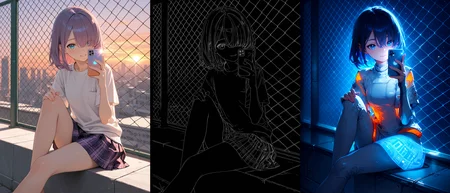
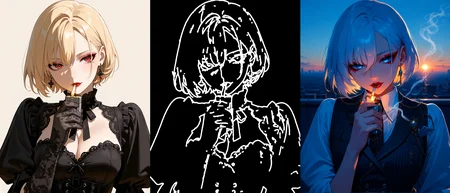
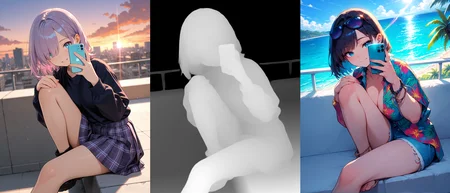
Add a bypassable ControlNet (Anima-LLLite). Big thanks to Kohya for creating this ControlNet.
Introduction Page: https://huggingface.co/kohya-ss/Anima-LLLite
recommended CN file: anima-lllite-any-test-like-v2.safetensors https://huggingface.co/kohya-ss/Anima-LLLite/tree/main
custom node: https://github.com/kohya-ss/ComfyUI-Anima-LLLite
V2.0:
Add face detailer and hand detailer.
V1.0:
A simple text-to-image workflow for Anima with Ultimate SD Upscale. (If you notice unnatural transitions when increasing the denoise value in the Upscale node, try increasing the tile_padding, such as 256.)
Thanks to @Boerboer, @sam_tofu and @RavirKun for the suggestions.
Thanks to @UmeAiRT and @CptCharname! I’ve learned so much from studying their workflows.
Resources:
Anima (Base model): https://civarchive.com/models/2458426/anima?modelVersionId=2945208
CLIP: https://huggingface.co/circlestone-labs/Anima/tree/main/split_files/text_encoders
VAE: https://huggingface.co/circlestone-labs/Anima/tree/main/split_files/vae
Anima Style Gallery: https://anima.mooshieblob.com/
Anima Artists and Characters: https://animadex.net/?mode=characters
The following are just my personal preferences. Feel free to swap them out for files that suit you better.
Upscale Model: https://huggingface.co/FacehugmanIII/4x_foolhardy_Remacri/tree/main
face_yolov8n: https://huggingface.co/Bingsu/adetailer/blob/main/face_yolov8n.pt
hand_yolov8s: https://huggingface.co/Bingsu/adetailer/blob/main/hand_yolov8s.pt
PitHandDetailer-v2-Test-v9c: https://huggingface.co/iahhnim/adetailer_collection/blob/main/PitHandDetailer-v2-Test-v9c.pt
Description
Add ControlNet (Anima-LLLite)
FAQ
Comments (13)
im not sure if im doing it right? but the "AnimaLLLiteApply" is not installed. . . i already cloned it to the custom_nodes folder . . .
Without more info, it's hard to give a precise solution. However, here are some standard troubleshooting steps:
1. Verify the folder structure is correct and that the plugin isn't accidentally nested (e.g., a folder inside a folder).
2. Fully shut down the ComfyUI terminal and restart it.
3. Try running pip install -r requirements.txt, though this specific node doesn't have any unusual dependencies.
@SAN0 okay i initially did it right, i have restart the comfyui ui at that time it was not refreshed, but i restarted again, and it fixed, just the model is missing, all good.
@SAN0 I want to put your workflow into the resources on Civitai, but I can't seem to do it. I'm not sure why it isn't appearing in the search.
Also, I used to have "Resize and Fill" in Forge before. Is there a way to use something other than center crop? Do any other crop methods exist in Comfy? (I'm new to Comfy because of Anima.)
@monicalucci Thanks for the feedback! ~ If you want my workflow to appear in your resources, the only way I’m aware of is to add a post or a review in the gallery section at the bottom of my workflow page. (I’m not a Civitai expert, so there might be other ways, but they aren't very obvious.)
Regarding 'Resize and Fill': in the ControlNet section of my workflow, the 'Upscale Image' node actually performs that exact function. You can also find similar functions by searching for 'Image Resize' in your node menu,
@SAN0 how do i do that? can u check the workflow i use from this image?
@monicalucci Not quite sure what you mean! I looked at the image, but that workflow belongs to another user. Do you want to know how to use 'Resize and Fill' inside that one? Please let me know specifically what you need help with! ~
@SAN0 yea it's not the same workflow like in here, but i combined it, only took the controlnet group part, yes i want to know about the resize and fill way, and also if i remember correctly in forge i was able to like strengthen the preprocessor so it can processed more lines (im not sure if im describing it correctly), not the controlnet strength, it's called "threshold" if i remember correctly.
@monicalucci The node I mentioned basically handles the conversion to a specific resolution—if crop is disabled, it's essentially 'filling.' Regarding thresholds, ComfyUI does have nodes with that parameter, but the AIO (All-In-One) node I used is a simplified version and lacks those sliders. I suggest looking for the standalone preprocessor nodes within the ControlNet Aux suite; those specific nodes will give you full control over thresholds.
@SAN0 if i set it 'disabled' the processed image is stretched to the prompt, let say i load image that is 832x1216, and my input is 768x1344, the controlnet preview will be stretched, about the threshold i found the node called 'canny edge' so i can control the threshold there accurately.
@monicalucci Got it. You can use the Resize Image V2 node in KJNodes, which can fully meet your needs.
I was only testing with a tangled, messy setup before, but thanks to your cleanly organized workflow, I feel like I can finally play around with it properly 😊 Thanks!
So glad it helped! I really love the images you've shared. Hope you have a blast playing around with Anima! ~ ✨