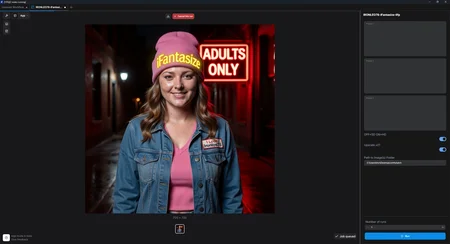
iFantasize - APP MODE for N00BS - Wan2.2 3-Prompts - 20 Seconds NSFW
1.0 This version use ONLY NATIVE NODES, with a load image button.
1.1 THIS VERSION USES a WAS NODES to ENABLE a load from folder option.
Put one or many images in a folder, set it's path, Generate all night!
https://huggingface.co/Ironleo78/iFantasize
MODELS: https://huggingface.co/Ironleo78/iFantasize/tree/main
Output example on Hugging Face, look for the only mp4 file: https://huggingface.co/Ironleo78/iFantasize/blob/main/OUTPUT_EXAMPLE.mp4
Simplified 3-Prompts APP MODE with the possibility to toggle HD or SD and also option to toggle finale video x2 upscaling.
Enter your three prompt, try to always use a phrase like: the subject keeps looking at the viewer, so eyes color don't change from 1 prompt/part to the other.
The result is 20 seconds at 15 FPS video with strong NSFW possibilities
Two options can be easily toggled SD/HD and Upscaling X2 ON/OFF (Applies to the end video and eats more VRAM)
Install the latest version of Comfy here: https://www.comfy.org/download then close Comfy.
Runf Comfy, choose your gpu, let comfy set all up, the CLOSE COMFY and....
Install ALL models from here: https://huggingface.co/Ironleo78/iFantasize/tree/main
in the Comfy/Models appropriate folders:
HIGH DIFFUSION Download to folder \ComfyUI\models\diffusion_models
LOW DIFFUSION Download to folder \ComfyUI\models\diffusion_models
Text Encoder Download to folder \ComfyUI\models\text_encoders
VAE Download to folder \ComfyUI\models\vae
Upscale_model Download to folder \ComfyUI\models\upscale_models
Run Comfy again.
Drag a Workflow on Comfy and start Generating Fantasies!
Description
iFantasize - APP MODE for N00BS - Wan2.2 3-Prompts - 20 Seconds NSFW
This version use a custom WAS-NODE.
And has a LOAD IMAGE(S) FROM PATH input.
This version let's you put one or more pictures in a folder, set the path and generate over-night :)
https://huggingface.co/Ironleo78/iFantasize
MODELS: https://huggingface.co/Ironleo78/iFantasize/tree/main
Output example on Hugging Face, look for the only mp4 file: https://huggingface.co/Ironleo78/iFantasize/blob/main/OUTPUT_EXAMPLE.mp4
Simplified 3-Prompts APP MODE with the possibility to toggle HD or SD and also option to toggle finale video x2 upscaling.
Enter your three prompt, try to always use a phrase like: the subject keeps looking at the viewer, so eyes color don't change from 1 prompt/part to the other.
The result is 20 seconds at 15 FPS video with strong NSFW possibilities
Two options can be easily toggled SD/HD and Upscaling X2 ON/OFF (Applies to the end video and eats more VRAM)
Install the latest version of Comfy here: https://www.comfy.org/download then close Comfy.
Runf Comfy, choose your gpu, let comfy set all up, the CLOSE COMFY and....
Install ALL models from here: https://huggingface.co/Ironleo78/iFantasize/tree/main
in the Comfy/Models appropriate folders:
HIGH DIFFUSION Download to folder \ComfyUI\models\diffusion_models
LOW DIFFUSION Download to folder \ComfyUI\models\diffusion_models
Text Encoder Download to folder \ComfyUI\models\text_encoders
VAE Download to folder \ComfyUI\models\vae
Upscale_model Download to folder \ComfyUI\models\upscale_models
Run Comfy again.
Drag a Workflow on Comfy and start Generating Fantasies!
FAQ
Comments (1)
Do you have any output examples? Maybe share on your HuggingFace?