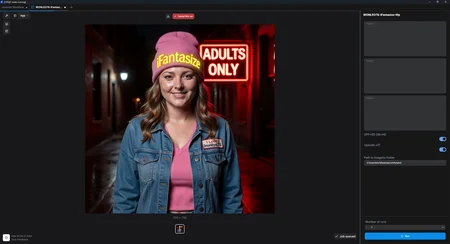
iFantasize - APP MODE for N00BS - Wan2.2 3-Prompts - 20 Seconds NSFW
1.0 This version use ONLY NATIVE NODES, with a load image button.
1.1 THIS VERSION USES a WAS NODES to ENABLE a load from folder option.
Put one or many images in a folder, set it's path, Generate all night!
https://huggingface.co/Ironleo78/iFantasize
MODELS: https://huggingface.co/Ironleo78/iFantasize/tree/main
Output example on Hugging Face, look for the only mp4 file: https://huggingface.co/Ironleo78/iFantasize/blob/main/OUTPUT_EXAMPLE.mp4
Simplified 3-Prompts APP MODE with the possibility to toggle HD or SD and also option to toggle finale video x2 upscaling.
Enter your three prompt, try to always use a phrase like: the subject keeps looking at the viewer, so eyes color don't change from 1 prompt/part to the other.
The result is 20 seconds at 15 FPS video with strong NSFW possibilities
Two options can be easily toggled SD/HD and Upscaling X2 ON/OFF (Applies to the end video and eats more VRAM)
Install the latest version of Comfy here: https://www.comfy.org/download then close Comfy.
Runf Comfy, choose your gpu, let comfy set all up, the CLOSE COMFY and....
Install ALL models from here: https://huggingface.co/Ironleo78/iFantasize/tree/main
in the Comfy/Models appropriate folders:
HIGH DIFFUSION Download to folder \ComfyUI\models\diffusion_models
LOW DIFFUSION Download to folder \ComfyUI\models\diffusion_models
Text Encoder Download to folder \ComfyUI\models\text_encoders
VAE Download to folder \ComfyUI\models\vae
Upscale_model Download to folder \ComfyUI\models\upscale_models
Run Comfy again.
Drag a Workflow on Comfy and start Generating Fantasies!
Description
iFantasize - APP MODE for N00BS - Wan2.2 3-Prompts - 20 Seconds NSFW
https://huggingface.co/Ironleo78/iFantasize
MODELS: https://huggingface.co/Ironleo78/iFantasize/tree/main
Simplified 3-Prompts APP MODE with the possibility to toggle HD or SD and also option to toggle finale video x2 upscaling.
Enter your three prompt, try to always use a phrase like: the subject keeps looking at the viewer, so eyes color don't change.
The result is 20 seconds at 15 FPS video with no sound (LTX2.3 Workflow WITH SOUND coming soon)
Two options can be easily toggled SD/HD and Upscaling X2 ON/OFF (Applies to the end video and eats more VRAM)
Install the latest version of Comfy here: https://www.comfy.org/download then close Comfy.
Runf Comfy, choose your gpu, let comfy set all up, the CLOSE COMFY and....
Install ALL models from here: https://huggingface.co/Ironleo78/iFantasize/tree/main
in the Comfy/Models appropriate folders:
HIGH DIFFUSION Download to folder \ComfyUI\models\diffusion_models
LOW DIFFUSION Download to folder \ComfyUI\models\diffusion_models
Text Encoder Download to folder \ComfyUI\models\text_encoders
VAE Download to folder \ComfyUI\models\vae
Upscale_model Download to folder \ComfyUI\models\upscale_models
Run Comfy again.
Drag a Workflow on Comfy and start Generating Fantasies!
FAQ
Comments (1)
Do you have any output examples? Maybe share on your HuggingFace?