STATEMENT OF INTENT
My workflow itself and example videos that are clearly SFW have been unfairly blocked by Civitai moderators. If this situation continues, I will leave Civitai and migrate to Hugging Face.
Important Notice
Optimized to work with the latest version of ComfyUI (v0.18.1 + Frontend 1.42.8).
The latent upscaler ltx-2.3-spatial-upscaler-x2-1.1 has been released.
Version 1.0 had an issue where a strange overlay appeared at the end when generating long videos (241F+), but this has been fixed in 1.1.
Updating is strongly recommended.
Overview
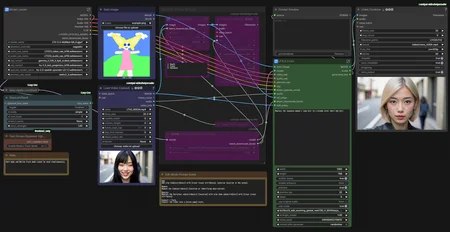
A simple LTX-2.3 Video-to-Video workflow.
You can choose the reference from the original video using Depth, Canny, or OpenPose (default).
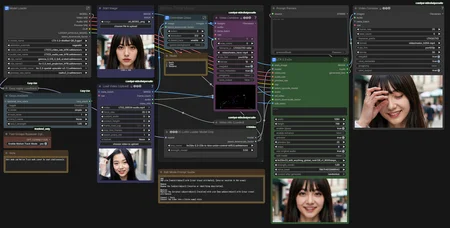
An inpaint Edit Mode has been added. You can "add," "delete," and "replace" elements using prompts (it's not universally applicable).
How to Use
• Motion Track Mode
Set Enable Motion Track Mode to yes and disable bypass.
Set Edit Mode to false.
Load the start image you want to animate.
Load the source video for tracing.
Specify a simple prompt (examples: comic style, dancing).
• Inpaint Edit Mode
Set Enable Motion Track Mode to no and enable bypass (not strictly required, but otherwise unnecessary processing will occur).
Set Edit Mode to true.
Load the video you want to edit.
Specify the edit in the prompt.
[Add]
Add a/an [subject/object] with [clear visual attributes], [precise location in the scene].
[Remove]
Remove the [subject/object] [location or identifying description].
[Replace]
Replace the [original subject/object] [location] with a/an [new subject/object] with [clear visual attributes].
[Convert / Style]
Convert the video into a [style name] style.
Description
Added Inpaint Edit Mode
v1.2.2 : Updated: Inpaint Edit Mode.
FAQ
Comments (18)
Can this run on 24GB VRAM?
Yes. I am running this workflow on an RTX 3090(24GB VRAM) with 64GB RAM.
I"m getting the following error:
TypeError: expected str, bytes or os.PathLike object, not NoneType
"C:\Users\XXXXXXXX\AppData\Roaming\uv\python\cpython-3.12.11-windows-x86_64-none\Lib\subprocess.py", line 608, in list2cmdline for arg in map(os.fsdecode, seq): ^^^^^^^^^^^^^^^^^^^^^ File "<frozen os>", line 859, in fsdecode
Have you downloaded all the required models and selected them in Model Loader (and LTX-2.3 v2v) Subgraph? If everything is set correctly, then this is a ComfyUI issue, so please contact the official support.
Very neat. What exactly are we supposed to use for the Start Image if we are doing a video edit like "Add a red baseball hat on the child"? I just don't get what the start image should be in that case.
In Edit mode, a starting image is not required. Please describe what should be placed where, following the prompt template. If you don't see the desired effect, try increasing the LoRA strength above 1.0.
Hi! Can you tell me why I can't get this to work with audio? If I don't disconnect all the audio wires, I get this error:An error occured in the ffmpeg subprocess:
[aac @ 0000013b74a63180] Input contains (near) NaN/+-Inf
[aost#0:1/aac @ 0000013b74d10b80] Error submitting audio frame to the encoder
[aost#0:1/aac @ 0000013b74d10b80] Error encoding a frame: Invalid argument".
It seems that the LTX-2.3 v2v node is outputting corrupted audio data (NaN/Infinity values), which causes FFmpeg to crash during the encoding process.
Just to confirm: does the source video include audio? Videos without audio (i.e., silent videos) are not supported at the moment. If there’s demand, I can add support.
@javawock7618 Yes, the video has sound. I also tried turning off “use orginal audio” (false), but the only thing that helps is disconnecting the audio cables completely from everywhere, if i want output results. I used version 1.1.2 yesterday and it worked without any issues. Then I updated ComfyUI using ‘update all’ and installed ExifTool, and after that neither version 1.1.2 nor this latest version has worked with audio.
In between, I also had a workflow where LTX23_audio_vae_bf16.safetensors needed to be in the checkpoint folder, but I tested having it only in the correct VAE folder and I still get the same error.
The issue is inside the LTX-2.3 v2v subgraph, but I just don’t know what else I can do about it anymore…
@Xurtan Thank you for the detailed report. Just to confirm one more prerequisite: since you are using version 1.1.2, are you trying to use Motion Track mode or Edit mode?
I saw a post like this on Reddit. It seems others are running into the same error, and it’s likely related to the source video's length or dimensions. If your video is 125 frames, try loading it at 121 frames instead. (Per LTX2 requirements, the length must be a multiple of 8 + 1)
https://www.reddit.com/r/StableDiffusion/comments/1qpfkek/ltx2_issue_input_contains_near_naninf/
Also, just to be sure, does this error occur during the Video Combine stage(final output)? Or does it happen at a different point in the process?
@javawock7618 I am currently using version 1.2 and everything runs normally until the very last step, where the 'Video Combine' node finishes loading and I get that error.
I tried routing the audio directly from the 'Load Video' node to 'Video Combine' (bypassing the LTX-2.3 v2v subgraph), and that way the original audio works in the video. However, I am currently unable to generate new audio or use the original audio through the LTX-2.3 v2v subgraph.
I've tested multiple different videos of various lengths, and I always get the same error. Before I ran 'Update All,' everything worked perfectly. I haven't encountered issues with other workflows yet after the updates.
I'm determined to troubleshoot this to the end because this motion tracking workflow you've created is honestly one of the best I've come across! :D
@Xurtan Thank you for your support. I understand the situation: it works fine when the source video connects directly to Video Combine, but fails when passed through the LTX-2.3 v2v Subgraph.
This suggests a high probability that the audio is either not being generated or the data is corrupted. Since I can’t reproduce the error on my end, could you try connecting a PreviewAudio (or SaveAudio) node directly to the audio output of the LTX-2.3 v2v? I'd like to confirm if the audio itself is being processed correctly.
@javawock7618 I tested the Preview Audio node after the LTX-2.3 v2v subgraph with use_original_audio set to false. The audio output is generated, but it is completely silent, and the video is sent separately to the Video Combine node.
When I tried setting use_original_audio to true, the audio remained silent, but the video also turned completely black. In both cases, the result is an empty audio track, and using the original audio source causes the video output to be 'empty' / pure black as well.
@Xurtan Thank you for running those tests. It seems that the audio generation isn't working correctly, although there isn’t anything particularly complex about the process.
While the root cause remains unclear for now, I’ll explore some alternative workarounds. Please give me a little more time to look into this.
@javawock7618 Thanks a lot for the effort! This workflow was actually working great just a moment ago. It’s a bit of a tricky situation since no one else has run into or reported the same issue (at least not yet). I don’t really know what else I can do on my end, but I’m just glad I can at least get perfect motion detection from the video :D
@javawock7618 At last, when I tried updating everything today (update all), I got your workflow working again! I’ve been trying to update every day, and apparently one of the updates had broken something. But now it works! I wanted to let you know right away that the issue was most likely caused by an update breaking something earlier.
I have a few questions regarding:
Image Alignment: Is it mandatory to use an initial image that perfectly matches the starting frame of the reference video (i.e., having the exact same OpenPose skeleton)?
Frame Rate: Should the movement reference video be converted to 25 FPS for optimal execution?
Subgraph Error: I am encountering errors within subgraphs despite having the latest version of ComfyUI installed.
Please provide guidance on how to resolve these issues. Thank you.
I upload video and character reference but getting the same video in output. lol