


LTX-2.3 Image to Video AudioSync Simple V4b (NEW)
[2026/03/19] Corrected the location of the Clear Cache All and Clean VRAM Used nodes.
v4: High-speed upscaling is now possible with "RTX Video Super Resolution"
Added VRAM and cache purge nodes for more stable rendering.
Thanks to matros99's suggestion!
This workflow enables
high-speed upscaling of RTX Video Super Resolution
without any loss of image quality.
The initial scale value is "2"(Within a subgraph node)

Note: The ComfyUI-LTXVideo node does not work with PyTorch Version 2.12.0+cu130.
The model used is the same as V3
Custom Nodes
https://github.com/Lightricks/ComfyUI-LTXVideo
https://github.com/rgthree/rgthree-comfy
https://github.com/kijai/ComfyUI-KJNodes
https://github.com/Kosinkadink/ComfyUI-VideoHelperSuite
Added custom node
https://github.com/yolain/ComfyUI-Easy-Use
https://github.com/Comfy-Org/Nvidia_RTX_Nodes_ComfyUI
Tested with ComfyUI 0.16.4
ComfyUI versions 0.17.x and later are unstable, so please do not update to version 0.17 until a stable version is released.
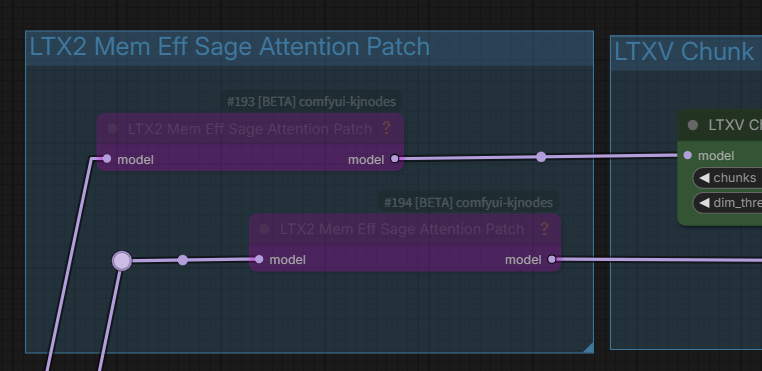
Notes on the LTX2 Mem Eff Sage Attention Patch
In some cases, "Sage Attention Patch" nodes may be used for RTX 50xx GPU users (CUDA conflict). If it works fine for them, they shouldn't change anything.
Notes on the RTX-VSR Problem
If anyone having dependency errors for RTX nodes in comfyui Portable here's the solution :
https://github.com/Comfy-Org/Nvidia_RTX_Nodes_ComfyUI/issues/11
Thank you for the information from learnrijo !
Discontinued
I stopped releasing version 3 because I have a superior V4 workflow.
LTX-2.3 Image to Video AudioSync Simple V3.2c
Update latent_upscale_models to ltx-2.3-spatial-upscaler-x2-1.1.safetensors
Hotfix for x2 spatial upscaler for long video generation (v1.1).
Includes mel-Band RoFormer version (Mel-Band RoFormer separates audio to improve lip-sync accuracy.)
Override gemma-3-12b text encoder in TextGenerateLTX2Prompt with new Lora
If TextGenerateLTX2Prompt refuses to generate a prompt, TextGenerateLTX2Prompt "no".
TextGenerate may be rejected if the I2V image or prompt is sensitive.

Note: ComfyUI version 0.17 or later,the subgraph display breaks. Please do not update yet.
The official Comfy video_ltx2_i2v_AudioSync workflow has been launched,
replacing the current native workflow. Both are functionally almost the same, but the official one may be better.
Therefore, there is no longer any need to stick to the native workflow,
and V3 uses Some memory reduction custom nodes.
Test images and audio included
Required : ComfyUI 0.16.x
Requires audio data such as MP3 and one image
Required SageAttention
Recommended: gemma-3-12b-it-abliterated_heretic_lora_rank64_bf16.safetensors,
checkpoints
ltx-2.3-22b-dev-fp8.safetensors
or
ltx-2.3-22b-dev-nvfp4.safetensors (for Blackwell GPU) Image quality degrades
text_encoders
gemma_3_12B_it_fp4_mixed.safetensors
loras
ltx-2.3-22b-distilled-lora-384-1.1.safetensors
gemma-3-12b-it-abliterated_heretic_lora_rank64_bf16.safetensors or
gemma-3-12b-it-abliterated_lora_rank64_bf16.safetensors
latent_upscale_models
ltx-2.3-spatial-upscaler-x2-1.1.safetensors
Custom Nodes
https://github.com/Lightricks/ComfyUI-LTXVideo
https://github.com/rgthree/rgthree-comfy
https://github.com/kijai/ComfyUI-KJNodes
https://github.com/Kosinkadink/ComfyUI-VideoHelperSuite
LTX-2.3 Image to Video AudioSync Simple Native Workflow(v1.1)
All ComfyCore Node-Native Workflow [2026/03/08]
Required : ComfyUI 0.16.4
Requires audio data such as MP3 and one image
Comfyui 0.16.4 template base + audio sync added mod +
No custom nodes are required, but the latest ComfyUI (0.16.4) is required.
There is an unknown effect at the end, but I don't know how to solve it.
ZIP file contains one test image and sound
If you get OOM in VAE Decode (Tiled) at long lengths, try lowering the temporal size, however lowering it too much may result in noise and ghosting. It's trial and error.

" yes" to enable Prompt enhancement
" no" to bypass prompt enhancement
If text generation is refused " no"
Disable_i2v " true " to T2V (Maybe it works?)

When using TextGenerateLTX2Prompt (Prompt Enhancement), it may take some time to generate.
checkpoints
ltx-2.3-22b-dev-fp8.safetensors
text_encoders
gemma_3_12B_it_fp4_mixed.safetensors
loras
ltx-2.3-22b-distilled-lora-384.safetensors
latent_upscale_models
ltx-2.3-spatial-upscaler-x2-1.0.safetensors
No custom nodes required
tested on :ComfyUI version: 0.16.4, Python: 3.12.12, pytorch : 2.10.0+cu130
Geforce RTX5060Ti16GB, 64GB System memory
V2.1:Added T2V switch [2026/03/08]
LTX-2.3 Image to Video AudioSync Simple Workflow(v2.1)
One image and audio required
Uses ComfyUI template models except for checkpoints (ltx-2.3-22b-dev-fp8,safetensors : 29.1GB)
It is likely to work because it conforms to the ComfyUI template workflow.
Added T2V switch (2026/03/08)
Set disable_i2v to "true" for T2V, but if Image Latency Switch is "true", the specified image size and ratio will be used, so it is better to set Image Latency Switch to "false" and switch to EmptyLTXVLatent (false).


TextGenerateLTX2Prompt performs image analysis and prompt enhancement. It is memory-efficient when used with the Gemma-3-12B text encoder as the LLM.

NSFW may not be prompted?
If it doesn't work as expected, try "Bypassing TextGenerateLTX2Prompt"

checkpoints
ltx-2.3-22b-dev-fp8.safetensors
text_encoders
gemma_3_12B_it_fp4_mixed.safetensors
loras
ltx-2.3-22b-distilled-lora-384.safetensors
latent_upscale_models
ltx-2.3-spatial-upscaler-x2-1.0.safetensors
MelBandRoFormer_comfy
MelBandRoformer_fp32.safetensors

Custom Nodes
https://github.com/Lightricks/ComfyUI-LTXVideo
https://github.com/rgthree/rgthree-comfy
https://github.com/kijai/ComfyUI-KJNodes
https://github.com/kijai/ComfyUI-MelBandRoFormer
https://github.com/Kosinkadink/ComfyUI-VideoHelperSuite
https://github.com/pixelpainter/comfyui-mute-bypass-by-ID
tested on :ComfyUI version: 0.16.0, Python: 3.12.12, pytorch : 2.10.0+cu130
Geforce RTX5060Ti16GB, 64GB System memory
LTX-2 Image to Video AudioSync Simple Workflow(V.1)
A simple workflow incorporating AudioSync into ComfyUI video_ltx2_i2v template workflow
If the audio data is longer than 60 seconds, the image may be distorted.
2D: Anime-style images may be distorted.
I have never created a video with a lot of movement, so in that case, please use it with some tweaks to the prompts or change various LoRa settings.
It uses LoRa : ltx-2-19b-ic-lora-lipdubbing.safetensors to accelerate lip sync, so if you need something else, replace it with Camera LoRa etc.
May not work in low memory environments
Tested on ComfyUI 0.15.1: GeForce RTX5060Ti 16GB, 64GB system RAM
Generation time of over 20 minutes for a 60-second video
Requires audio data such as MP3 and one image
Required SageAttention
checkpoints
- ltx-2-19b-dev-fp8.safetensors
text_encoders
- gemma_3_12B_it_fp8_scaled.safetensors?download=true
-ltx-2-19b-embeddings_connector_distill_bf16.safetensors?download=true
loras
- ltx-2-19b-distilled-lora-384.safetensors
-ltx-2-19b-ic-lora-detailer.safetensors?download=true
- ltx-2-19b-ic-lora-lipdubbing.safetensors?download=true
latent_upscale_models
-ltx-2-spatial-upscaler-x2-1.0.safetensors
MelBandRoFormer_comfy
-MelBandRoformer_fp32.safetensors?download=true
Model Storage Location
Custom Nodes
https://github.com/Lightricks/ComfyUI-LTXVideo
https://github.com/pythongosssss/ComfyUI-Custom-Scripts
https://github.com/kijai/ComfyUI-KJNodes
https://github.com/Kosinkadink/ComfyUI-VideoHelperSuite
https://github.com/kijai/ComfyUI-MelBandRoFormer
If Sage-Attention is not installed, use the LTX2 Mem Eff Sage Attention Patch as a bypass group node. This will increase the generation time.



Description
All ComfyCore Node-Native Workflow
Required : ComfyUI 0.16.4
No custom nodes are required, but the latest ComfyUI (0.16.4) is required.
Test images and audio included