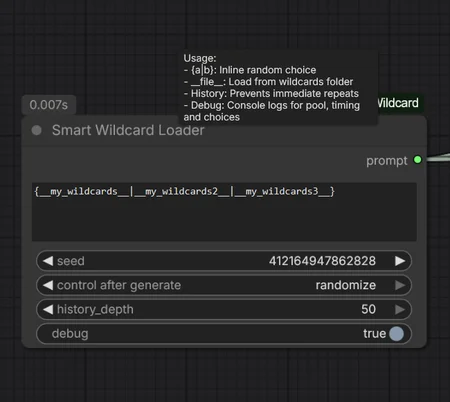
I use many wildcards, but I often felt like I was seeing the same results too often. So, I 'VibeCoded' this node with a memory feature to avoid the last (x) used wildcard words.
I'm just sharing it with the community – if you need help, I'll try my best, or you can always ask Gemini or ChatGPT.
Have fun!
Update Notes: v1.1
New Features & Improvements:
Recursive Search: Wildcards are now found automatically in subfolders (e.g.,
__hero__finds/wildcards/rpg/hero.txt).Integrated Styles: New dropdown menu to quickly apply aesthetic styles (e.g., Psychedelic, Surreal, Cyberpunk) as a prefix.
Smart Empty-Check: The node will not process or add styles if the text input is empty, preventing accidental resource waste.
Enhanced Debugging: Console now logs the selected item, total pool size, and remaining items in the current history cycle.
Stability: Improved regex parsing and bracket
{a|b}resolution to prevent crashes from malformed syntax.
Smart Wildcard Loader: Quick Start
Update Notes: Smart Wildcard Loader (v1.03)
Improved Parsing & Debugging
Robust Wildcard Handling: The parser now intelligently ignores incomplete or unclosed markers (e.g.,
__unfinished_tag), preventing prompt corruption.Enhanced Debugging: Added console warnings for invalid markers and missing wildcard files when
debugis enabled.
New Features (v1.02)
Auto-Pool Mode: Set
history_depthto 0 to automatically detect file length. It will exhaust every single line before any word repeats.Reset Button: Use the
reset_historytoggle to instantly wipe the memory and all frequency stats.Frequency Tracking: If
history_depth > 0, the console highlights repeated picks in RED and tells you exactly how often they have appeared.Skip Counter: Tracks the node's "workload" by counting how many lines were skipped to respect your history settings.
1. Setup
File: Save
SmartWildcard.pyinComfyUI/custom_nodes/.Folder: Create a
wildcardsfolder in your mainComfyUI/directory.Content: Put your
.txtfiles (one option per line) inside that folder.
2. How to Use
Inline:
{red|blue|green}picks one color directly from your text.Files:
__subjects__picks a random line fromwildcards/subjects.txt.Multi-Pick:
__colors__+3picks 3 unique colors from the file.Pattern Search:
__*locati*__finds any file containing "locati" (likelocations.txtorold_location.txt).Nested: You can mix them! Example:
{__hero__|__villain__} in __*world*__.
3. Settings Explained
history_depth: * 0 (Recommended): The "Auto-Pool". Remembers everything until the file is empty.
1+: Fixed memory. Remembers the last X items and blocks them.
reset_history: Set to
Trueto clear the brain. (Turn back toFalseafter one run).debug: Enables the color-coded live feed in your terminal.
4. Reading the Debug Logs (Console)
🟢 [CHOICE]: The word picked from your file.
🔴 (Repeat!): Only appears if a word is picked again (helps you tune your history depth).
🟡 [STATS]:
Pool 400/452means 400 fresh lines are left;Skipsshows how many were blocked.🔵 [RESET]: The pool was empty, so the node started a new cycle.
🟣 [TIMER]: Shows exactly how many milliseconds the processing took.
Why use this?
Total Variety: Ensures you see every single line of your wildcard files before a repeat occurs.
Deep Logic: Files can contain other tags, allowing for infinitely complex prompt chains.
Efficiency: All memory is stored in RAM. It’s fast and resets when you restart ComfyUI.
Description
FAQ
Comments (5)
You learn something new every day! I wasn't aware of that feature, so thank you for pointing it out. I have already integrated it into the current build.
@Keksethief Wow! Thank you!
Very nice and useful, thank you.
I'm glad you found the node useful.
Looks like we don't have an active mirror for this file right now.
CivArchive is a community-maintained index — we catalog mirrors that volunteers upload to HuggingFace, torrents, and other public hosts. Looks like no one has uploaded a copy of this file yet.
Some files do get recovered over time through contributions. If you're looking for this one, feel free to ask in Discord, or help preserve it if you have a copy.