
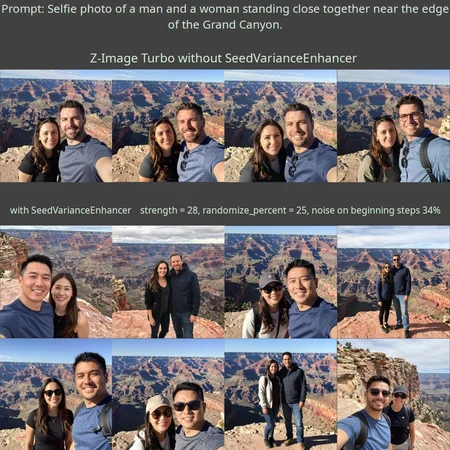
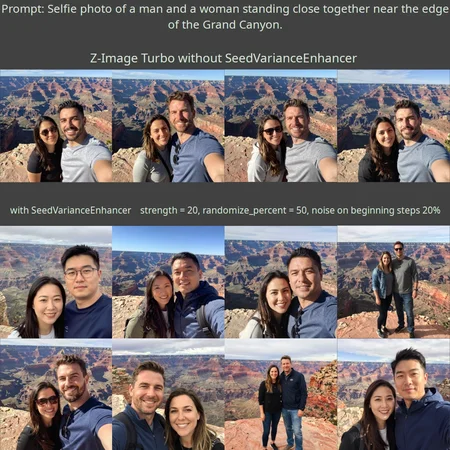
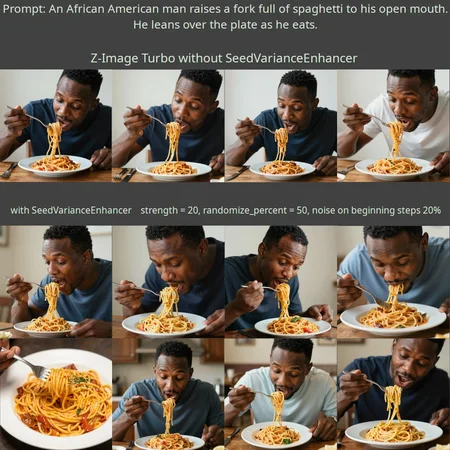
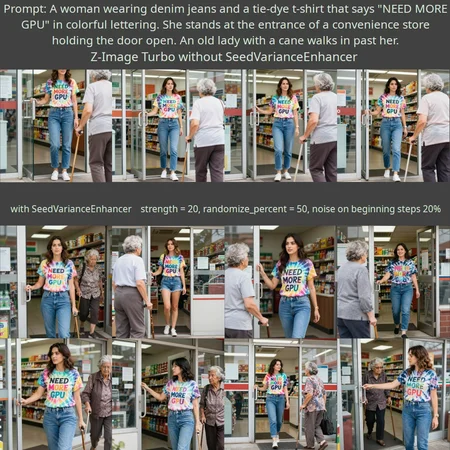
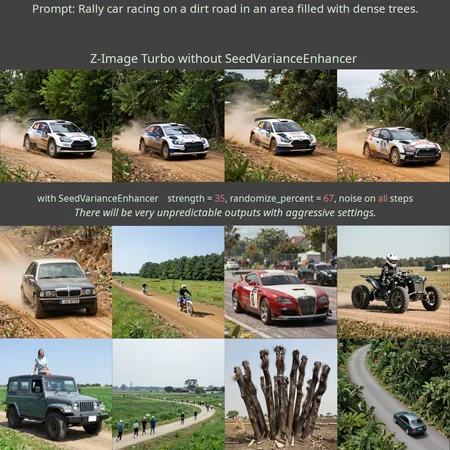
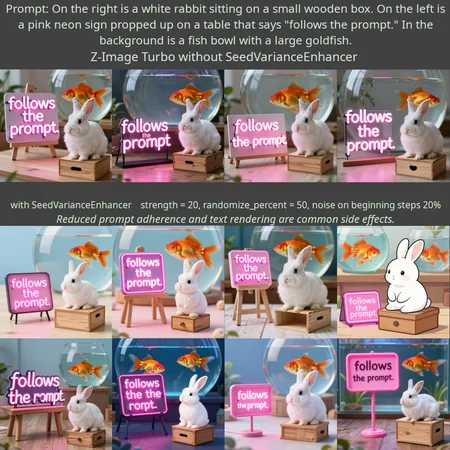
SeedVarianceEnhancer is a ComfyUI node that adds randomness to the text embedding, resulting in more diverse, and sometimes surprising image outputs. It is optimized for use with Z-Image Turbo.
You can now find the project on GitHub:
https://github.com/ChangeTheConstants/SeedVarianceEnhancer
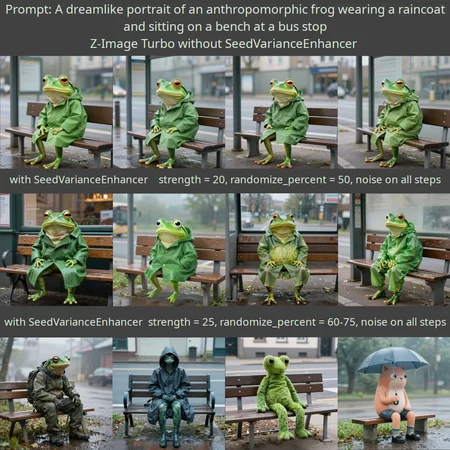
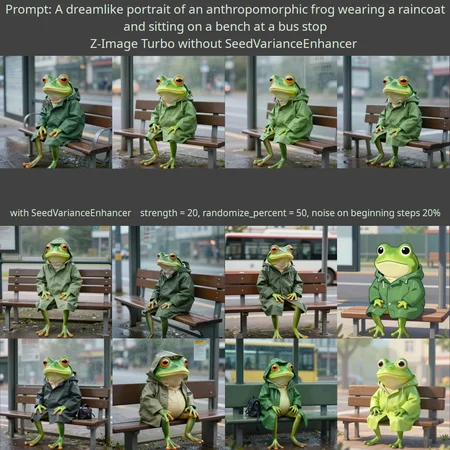
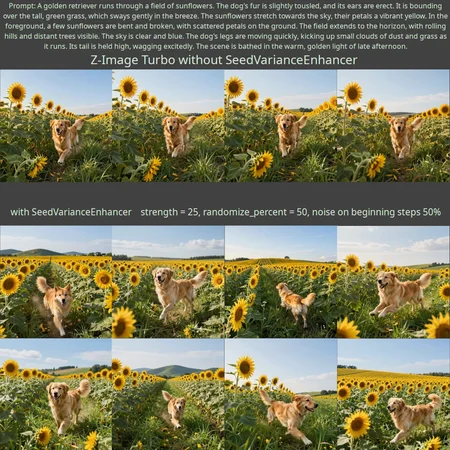
As impressed as I was with the release of Z-Image Turbo, I was frustrated by the low diversity of its outputs. So I created SeedVarianceEnhancer as a hack to add a bit of chaos into the generation process. It adds random noise to the text embedding, altering the model's understanding of the prompt. When used with the default settings, you should get much greater variety in outputs without having to manually change the prompt. If you want to have some fun, turn up the settings and you will get outputs you wouldn't even think to ask for. SeedVarianceEnhancer trades prompt adherence for diversity. Some outputs will be failures, but if you generate numerous outputs with different seeds, you may find you like many of them more than what you would have gotten without SeedVarianceEnhancer.
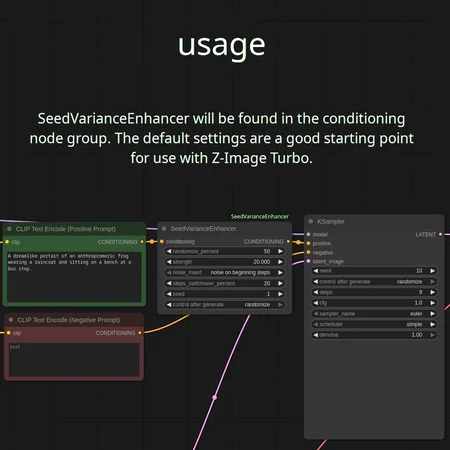
Just place the SeedVarianceEnhancer node between the positive prompt and the sampler.
The default settings should add noticeable diversity without much compromise in prompt adherence. Strength settings in the range from 15 to 30 while leaving the other settings default is a good place to start experimenting. There are also a few other settings for tweaking. Randomize_percent controls how much of the embedding is altered by noise. By default, noise will only be used in the beginning steps of generation. The noise_insert setting also lets you choose to use the noisy embedding for the entire generation process or just the end. The steps_switchover_percent adjust the timing of the switch between noisy and original embeddings if noise_insert is not set to all steps.
The default settings generally work well, but some prompts will benefit greatly from modified settings. There are cases in which a prompt will generate very broken images with the default settings, but will also yield great results with modified setting. Experimentation may be required to achieve good results. Try decreasing steps_switchover_percent to 10% while also increasing strength to 40.
Version 2.0 introduces two new features. A new masking feature helps protect important portions of the prompt from the added randomness. Reference the demonstration slides and the readme. The second new feature prints to the console statistical information about the embedding to assist in finding good strength values when using other models.
Version v2.1 improves compatibility with models that use the umt5-xxl text encoder, such as Wan. Feel free to report any successes or failures here or in the GitHub discussions section. I have done only limited testing and I don't yet know if users are finding the node useful with other models.
Version v2.2 is the variations upon variations update. Chaining nodes now works better, allowing you to add additional randomness on top of a previously generated image. It is also now possible to add text to the end of prompts without completely changing the image. Visit the GitHub page for a short video demonstrating these techniques. v2.2 will not reproduce images made with v2.1 unless you add 1 billion to strength, which triggers a reversion to old behavior.
For those that are interested, more detailed technical information about usage is within the readme included in the zip file.
SeedVarianceEnhancer will work for other models, but the optimal settings for those models may be very different. Enable log_to_console to see suggested strength values.
Installation:
Extract the contents of the zip file and place the SeedVarianceEnhancer directory in your ComfyUI/custom_nodes directory. Launch or restart ComfyUI. You will find the SeedVarianceEnhancer inside the advanced/conditioning node group.
Description
Initial release!
FAQ
Comments (42)
works great!, but I ran it through ai and got this, although likely hallucination by ai, but I dont know coding.
Minor Bugs Found-
The code contains two small programming errors that might cause it to crash or behave unexpectedly:
Missing Import: The code calls logging.warning(...) inside the else block (lines 28-29), but import logging is missing from the top of the file. If you pass data that isn't a Tensor, the script will crash with a NameError.
The break statement: On line 31, there is a break command inside the for loop. This causes the code to only process the first chunk of conditioning and ignore any others. If you are using complex conditioning (like concatenating multiple prompts), this node will ignore everything after the first part.
Thanks for the feedback and interest. Yes, I am aware of the unusual break statement. I structured the code like that because I was experimenting a lot, and decided later on not to handle cases where there would be more than one conditioning item. I figured I might figure out a way to handle that scenario eventually, but never did. I mentioned compatibility issues in the readme. The logging function worked during test, so I guess importing of logging is not necessary. I am not sure how it would crash when passed data that isn't a Tensor, because I check that it is with an if statement, unless I am overlooking something. Anyway, I would be glad to release an updated version if people experience problems.
@ChangeTheConstants it works fine so far on my end
The seed variance node does a great job!
It works really well!! Thank you. But is this also possible on qwen image?
I expect it likely will work, but the optimal strength settings may be very different. I did a quick test with Chroma HD and found very low setting in the range of 0 to 1 worked. Qwen Image is a bit too chunky for my hardware, so I never tried it.
Great node! Easiest method to add powerful variations to Z-Image model. Thank you!
If I use this node, will I still be able to recreate an identical image using the same seed? Or does this node always add a randomness even amongst images on the same seed? I think that's an important question to address in your node description.
The node has its own seed, which is separate from the sampler's seed. If you don't change the prompt or the node's settings, the output leaving the node will not change. You can run multiple generations using different sampler settings and get similar images. You can also make small changes to the randomize_percent and strength settings, and continue to get roughly the same image. Changing the prompt is tricky. The embedding's dimensions must not change, which is very roughly equal to the number of words in the prompt. You may get away with changing single words, such as sitting to standing, or red to blue, and still get a similar image. If you want to try, you can add a second SeedVarianceEnhancer node after the first. If you use very low strength and randomize_percent settings on the second node, while changing only the second node's seed, you should get more variations on your previous image. Chaining of nodes probably won't work if you use "noise on ending steps," because of limitations in how my node handles inputs.
this is fantastic! I had been expecting to use the non-distilled Z_Image, but with this node, the Turbo model is extremely compelling. Much thanks
This is exactly what I was missing, thank you very much! And I tried it on SD and WAN 2.2 - works on everything, but requires some tweaking of the parameters.
For very low step count workflows though it would be cooler if you could implement the "steps_switchover" not as a percentage, but as a direct number of steps, which would be easier to read, at least for me. Unless you had any specific reason you thought it would be better to make it as a percentage.
I think it would be better as a direct step count number because it is kinda not very straightforward when the total step count is below 10, especially when you have high and low noise models like for WAN 2.2, and it is also very important to be precise.
So when I experiment with total step counts and switchover I have to keep my calculator open... And I don't know how exactly it behaves with irregular numbers. Does it round them down or up?
Anyways, that is my only wish, otherwise I very much like what you did!
I'm glad it's working well for you. Thanks for reporting back that it works for SD and WAN 2.2. That's good to know. You make a good point about percentage versus timesteps. I acknowledge that it is not ideal the way it is. I am not that familiar with programming for ComfyUI. I was figuring things out as I went. I only knew that I could specify start and end times as a percent. After having just taken a look into ComfyUI/comfy/samplers.py. I see that it is indeed possible to define timestep_start and timestep_end. The questions is, how do I change it now without causing confusion? I will look into it.
@ChangeTheConstants Thank you!
@Sererinity Upon further investigation, I realized that those values (timestep_start and timestep_end) were not what I thought they were. There doesn't seem to be any straightforward way to set steps directly, or at least no way that I can make sense of. Use this formula: (100/TOTALSTEPS) * STEPS - 1
@ChangeTheConstants The hero of a modern time!
@ChangeTheConstants Holy shit man this node actually fixes that annoying slow motion look of Wan 2.2 This is actually huge.
Update: it also makes everything tinted blue in Wan for some reason...
It s working great and makes this model viable , thanks
Do you have a GitHub repository link? I hope to download this plugin through GitHub.
Okay. It's now on GitHub: https://github.com/ChangeTheConstants/SeedVarianceEnhancer.
@ChangeTheConstants thanks for upload
Working! Thank you! :-)
PERFECT!! this should be a must have in general, please make it avaible through manager go go go
Your "go go go" convinced me. It's now on GitHub: https://github.com/ChangeTheConstants/SeedVarianceEnhancer. I don't use manager. Is there anything more I need to do?
Wow, just... wow. This changes everything! Which is actually unwelcomed, if it happens to random elements of my prompt.
But... what if I split up my prompt and apply the enhancer only to the parts I want to vary, then concatenate it all... holy crap it works!
This is like wildcards, but so much better? I... I've got stuff to work out. See y'all next year.
Brilliant idea! I am going to go test that out for myself.
Can you share an example on how you are doing it? I use concatenation in a specific Workflow with a LLM adapter, but this is slightly different. I'm having difficulty ensuring the elements of my subject stay consistent.
@BladeRunner1988 I don't have a WF yet which produces good reliable results, as the process is a bit tricky.
For starters, you split your prompt in two 'CLIP text encode (Prompt)' boxes. If you use the 'Conditioning (Concat)' node, you'd want to plug the parts that shouldn't vary into the 'conditioning to' socket, the enhanced part in the other.
For example, you could keep your character description (appearance, pose, outfit, etc.) in one box (without SVE) and background, lighting, etc. in the other (with SVE), run generations with different seeds in the SVE node, but same seed for your sampler, and you should get some background variation while your character stays mostly the same. Or vice versa.
What makes this process so tricky is that prompt order matters, as well as concat order and that changing one token always has some effect on the rest. And I found that some things (like hairstyles) change faster than others. It's a bit messy, is what I'm saying. So, I don't know if I ever figure out a reliable wf, but SVE does a great job either way. And you can still combine it with Detail Daemon or similar nodes.
@tomuco2 The new masking feature introduced in version 2.0 was inspired by your idea. Thanks for the inspiration.
@ChangeTheConstants Lol, my first post on civitai and I already made a difference! You're welcome.
And V2 is VERY much appreciated! I (or rather the Qwen LLM I use to write the prompt) put a short description of the scene at the start of a prompt, before I get into the details. Like "A photo of a woman dancing on the stage at a concert." Now your mask let's me target that part easily, without having to split the prompt, and the result is amazing!
Very good. Thanks.
Great work! I was messing about with stuff to do this and you did a great AiO job. Very grateful
Wow. This is such a brilliant concept, with so much space to play around with. Guess I'll have to put a few more dozens of hours into Comfy...yet again😂
It's worth putting in the readme that shift value has a massive influence on this node's effect. High shift value will essentially disable the seed variance with the default crossover percent
I tested shift values as high as 50 and I was still getting diversity, albeit with very reduce image quality. I wonder if the high shift value combined with some other aspect of your workflow were responsible for your results. I'm using the basic workflow from https://github.com/comfyanonymous/ComfyUI_examples/tree/master/z_image
Thanks. Hmm, I'll check my workflow for errors
you can also try 2 advanced k-samplers, the first only 1 step without prompt, the second takes the image with rest noise and does the rest (eg maybe 10 total steps, sampler 1: start at 0 end at 1, sampler 2: start at 1 end at 10). works really good.
I don't understand what I'm doing wrong, but I still get almost identical images. With or without this node. The same thing happens with two k-samplers. Could it be the video card? (I'm using 2080Super 8gb) Maybe its architecture doesn't support certain processes with this z-model? For example sage-attention not supporting on 10xx and 20xx gtx.
Terrariyum pointed out that high shift values can negate the node's effect. I kept shift at 3 during testing. If that fails, use the workflow from https://github.com/comfyanonymous/ComfyUI_examples/tree/master/z_image.
This worked great thanks.
Can it work with QWEN Image Edit ?
When I'm trying set the img1 as face, and other only prompts - it returns raw img1.
With z-image works great.
I have not used Qwen Image Edit myself, but I believe I read a comment somewhere that it did work to some extent. The settings will probably need to be adjusted. The optimal strength value varies depending on the text encoder and model. I hope that people will share their successes at https://github.com/ChangeTheConstants/SeedVarianceEnhancer/discussions.