

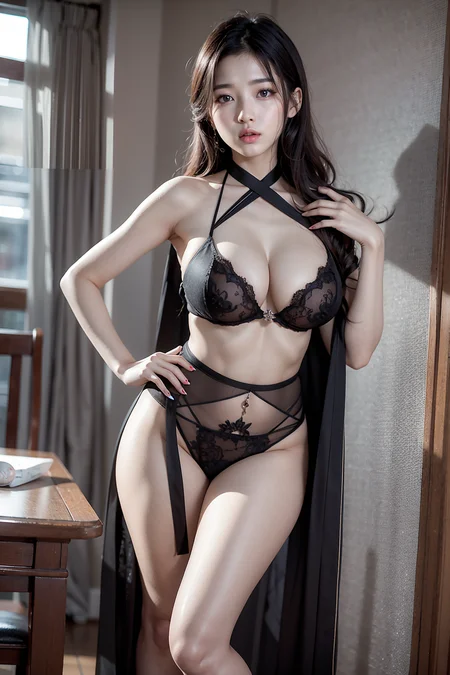


2024.05.06 : v6a, v6b
2024.01.20 : v5c
This model was created after a brief hiatus.
It was developed with the mindset of starting anew. It may feel quite different from the existing models up to v4.
Please understand that I have only performed a simple merge.
I am adhering to a very restrictive copyright policy due to copyright issues with the merged model.
Your understanding is appreciated.
I used extension BMAB
https://github.com/portu-sim/sd-webui-bmab?tab=readme-ov-file
Sampler : DPM++ SDE Karras, DPM++ 2M Karras, DPM++ 2S a
Step : 20~25
cfg : 7.5 ~ 12.5
05-14 : v4.0
This model has tried to change so that both Westerners and Asians can express it well.
In addition, we tried to make dark expression more active.
As a result, the overall tone of the person comes out dark, but it looks better on a dark background.
* The example photos I upload are just examples, and SD environments are all different, so even if you use the same prompt, you may get different results.
Please see the image as an example only. *
Make good use of light-related prompts.
05-01 : v3.0
In version v2.3, the anime tendency was slightly visible, so I tried to make it more realistic again.
04-24 : v2.3
This version has changed mixing ratios compared to the previous v2.2 and includes some experimental attempts. As always, extensive testing has not been conducted.
I uploaded the pruned version separately, but it is currently downloading only the full version maybe there is a problem with Civitai. I will solve the problem and upload the pruned version within the 25th
Upload pruned model finished
04-10 : v2.2
I attempted to improve the skin tones and lighting and shadows, which were previously awkward. I have noticed a difference in the image, but I have not had the opportunity to thoroughly test the changes due to my limited skills.
VAE : vae-ft-mse-840000-ema-pruned
Steps: 50, Sampler: DPM++ SDE Karras, CFG scale: 20, Size: 512x768, Model hash: a8907e32c0, Denoising strength: 0.35, Clip skip: 2, Hires upscale: 2, Hires steps: 20, Hires upscaler: R-ESRGAN 4x+, Dynamic thresholding enabled: True, Mimic scale: 10, Threshold percentile: 99.95, Mimic mode: Cosine Up, Mimic scale minimum: 0, CFG mode: Half Cosine Down, CFG scale minimum: 15, Eta: 0.2, DDetailer prompt: "", DDetailer neg prompt: "", DDetailer model a: "bbox\mmdet_anime-face_yolov3.pth [51e1af4a]", DDetailer conf a: 30, DDetailer dilation a: 4, DDetailer offset x a: 0, DDetailer offset y a: 0, DDetailer preprocess b: False, DDetailer bitwise: None, DDetailer model b: "None", DDetailer conf b: 30, DDetailer dilation b: 4, DDetailer offset x b: 0, DDetailer offset y b: 0, DDetailer mask blur: 4, DDetailer denoising: 0.35, DDetailer inpaint full: True, DDetailer inpaint padding: 32, DDetailer cfg: 11
04-01 : v2.0
As always, I didn't conduct many tests. However, I did notice a slight improvement in prompt recognition.
I'm not entirely certain if it's an actual upgrade from the v1 version or not.
Steps: 40
Sampler: DPM++ SDE Karras
CFG scale: 20
HIRES. FIX
R-ESRGAN 4X+
STEP : 20
DENOISING : 0.35
UPSCALE : 2
Dynamic Thresholding
MIMIC CFG SCALE : 10
PERCENTILE : 99.95 OR 99.9
MIMIC SCHEDULER : COSINE UP
MINIMUM VALUE OF MIMIC : 0
CFG SCHEDULER : HALF COSINE UP
MINIMUM VALUE OF CFG : 0
Ddetailer
bbox\mmdet_anime-face_yolov3.pth
Denoising strength(Inpaint) : 0.35
Mimic CFG Scale : 15 (custom ddetailer setting)
----------------------------------------------------------------------------------
03-17 : v1.0
I have updated the model with the extension "safetensors" upon the request of someone else, while keeping it the same as the existing model.
----------------------------------------------------------------------------------
This is a realistic model that I personally merged.
There is limited information due to a small number of tests conducted.
This is an example of a prompt used
ultra realistic details, sharp focus, detailed skin, (21 years old pretty korean girl:1.2), (kpop idol:1.2), (korean beauty:0.8), (korean mixed),
(large breasts),
Negative prompt: Drawings, abstract art, cartoons, surrealist painting, conceptual drawing, graphics, (low resolution:1.4), (blurry:1.3), (strabismus:1.1),
(worst quality:1.3), (low quality:1.3), (thick thighs:1.2), collage, (makeup:0.8), nsfw, bad proportions, earings, floral print, loli, big eyes, (watermark:1.2), letter, (abs:1.2),
Steps: 40, Sampler: DPM++ SDE Karras, CFG scale: 7.5, Seed: 3203463706, Size: 768x512, Model hash: 1d8d6e1204, Denoising strength: 0.35, Clip skip: 2, Eta: 0.2
HIRES. FIX
R-ESRGAN 4X+
STEP : 20
DENOISING : 0.35
UPSCALE : 2
Dynamic Thresholding
CFG : 20
MIMIC CFG SCALE : 5
PERCENTILE : 99.95 OR 99.9
MIMIC SCHEDULER : COSINE UP
MINIMUM VALUE OF MIMIC : 0
CFG SCHEDULER : HALF COSINE DOWN
MINIMUM VALUE OF CFG : 10
Description
In version v2.3, the anime tendency was slightly visible, so I tried to make it more realistic again.
FAQ
Comments (24)
I love you so much heni! v3 is insane. Can't wait for next update!
While creating up to version 3, I couldn't find a goal for future changes (or perhaps the upgrades so far haven't brought significant changes), so there are no plans for versions beyond v3 at the moment.
Nonetheless, thank you for appreciating my model. I hope you make good use of version 3.
heni do you have discord by any chance?
My email address is [email protected]. You can contact me there if you wish.
As the version goes up, learning goes well, but the image resembles chiloutmix. Personally, I think v1.0 is more realistic.
Thank you for updating it, but personally, I think the previous version is much more realistic and makes face look prettier.
So, I'm still using version 2.2.
2.2 is best
Henmix30 is too slow when loading. Takes more than about 630 seconds to run web-ui and get on the screen. In the case of henmix23, I never thought about waiting, but this version is so embarrassing.
works normal on me, prolly the latest SD webui update screw it up or something change in your setting
Loaded for me in under 3 seconds. So I think the problem is on your end.
这个模型很真实,但是必须要结合Adetailer或者DDetailer使用,不然画面非常渣。另外还有两个问题,一个是出图速度极其的慢,二是用了这两个插件以后,跑3张图只有第一张能被controlnet控制。
我也發現畫面很朦, 請問怎樣提升畫面
@wswtimmy 去github搜索after detailer插件手动安装。参数你就用模型的样例图直接导入就好了。但是速度实在是太慢了。另外只能用文生图的高清修复,不能通过图生图进行修复,但是文生图如果用controlnet批量生成只有第一张起作用。这个插件的教程网上基本没有,不知道能不能用其他方式或者插件来提高模型出图的清晰度,因为这个插件实在是太慢太不方便了
@sylarhuanghz 感謝回答, 我還是不懂....想問一下要做到人物皮膚光滑是否一定要用after detailer?
使用秋叶新版的整合包,好像没有描述的这个问题,不知道是否是整合进去了,2060生成500*750 hires放大两倍批量2,耗时144秒
@sylarhuanghz gayhub上搜不到after detailer啊,detailer也搜不到,求给个链接,谢谢
出图速度怎么可能受模型版本影响。。。
速度是你顯卡爛
@a245687 我用的Tesla t4 16g,512*750 hires放大2倍,耗时基本上是12分钟,批量只能设1,设2显存就爆了
你先说下你什么显卡啊,要不然都没法做个参照
this model is fxxking awesome
Am i doing somthing wrong i litterally copy the prompts from posts and its fine, i add somthing like "cyberpunk" and the faces start to break.
Since the sd environment is diverse, it is not possible to know exactly which part is the problem.
Please see the image as an example only
Details
Files
henmixReal_v30_full_fp32.safetensors
Mirrors
henmixReal_v30.safetensors
henmixReal_v30.safetensors
henmixReal_v30.safetensors
henmixreal.safetensors
henmixReal_v30.safetensors
henmixReal_v30.safetensors
henmixReal_v30.safetensors
hnmxrl.safetensors
henmixReal_v30.safetensors
henmixReal_v30.safetensors
henmixReal_v30.safetensors
henmixReal_v30.safetensors
henmixReal_v30.safetensors
henmixReal_v30__safetensor__full__fp32__civitai-41893.safetensors