


The BFS (Best Face Swap) LoRA series was developed for Qwen Image Edit 2509, specialized in high-fidelity face and head replacement tasks with natural tone blending and consistent lighting.
If this model was helpful to you in any way, please consider helping me continue creating more model for the price of a coffee.
Each version builds upon the previous one:
🧠 Focus Faces: precise face swaps, keeping the original head shape and hair while transferring facial identity and expression.
🧩 Focus Head: stronger head swaps, replacing the full head (including hair and pose orientation).
The 2 versions complement each other, one is focused on face swapping and the other is focused on head swapping.
Share your creations that do not involve public figures or individuals who have not given consent. By sharing, you will earn Buzz, and your posts directly help me improve future versions by identifying and correcting potential issues.
Important Note: If you are going to use Qwen Image Edit 2511, update your comfyui before anything else, because without it you may have problems with completely distorted or ugly images.
Workflows:
Head/Face Swap Workflow - Qwen-Image-Edit-2509 | Civitai
My Custom Lightning LoRA:
Custom Lightning - Qwen Image Edit - 2511 | Qwen LoRA | Civitai
Alissonerdx/CustomLightning · Hugging Face
Test V3 here:
BFS Best Face Swap - a Hugging Face Space by Alissonerdx
Face Swap Video Tests (V1):
Face Swap - Qwen Image Edit 2509 (English)
Another important thing is to update ComfyUI. Many people are having terrible results because they haven't updated ComfyUI. The 2511 model has an architecture with a few more layers, and that's why ComfyUI needs to be updated.
About Flux 2:
I've done my best so far, but the results aren't as good as with QWEN. The base Flux 2 model can already handle head swapping, but with some difficulties. The goal of this LoRa was to try and improve that a bit, but I haven't achieved very good results. It might be a configuration issue, so here's this beta version for you to test.
Try with CFG: 8.0
PERSONAL NOTES:
The swap quality will always depend heavily on the quality of your input images. Larger, clean images with little noise or compression artifacts generally produce the best results. Keep in mind that the model always follows the quality of the body image, since it becomes the final rendered frame—so even if the face source is high-quality, a low-resolution or noisy body image will limit the outcome.
Most of the images I generate are created without using the LightX2V lighting LoRA, since I noticed that enabling it tends to make the skin appear more plastic-like and reddish, and finding the right balance requires extra tuning that I didn’t focus on. If anyone has discovered good configurations, feel free to share them in the comments of this template.
In short, using LightX2V makes the model less versatile because it operates with a fixed CFG value of 1.0. So before assuming it “didn’t work,” I recommend first testing the workflow I published without LightX2V to compare the results.
If you’re getting results with too much contrast, overly strong colors, or plastic-like textures while using LightX2V’s lightning models, try reducing the number of inference steps. For example, if you’re using the Qwen Image Edit 2509 Lightning (8 steps) model, try running it with 4 steps instead. The excessive contrast often comes from running too many steps while CFG remains fixed at 1.0.
If you encounter similar issues without using the lighting LoRA, try lowering the steps as well—e.g., from 20 down to around 16 or fewer—and reduce CFG to values like 1.2 or 1.5, which can help produce smoother, more natural results.
Another important detail: in images where the body is positioned farther from the camera, the face region becomes smaller, which can reduce swap accuracy and overall quality. This happens because the model has less pixel information to work with in that small facial area. To handle these cases, you can use my older workflow, which automatically crops the face region from the body image and performs an inpainting-like process to improve results in distant or small-face compositions.
Finally, if you notice loss of similarity between faces or poses—especially when the reference and target images differ significantly in aesthetics or angles—try increasing the strength of your head swap LoRA slightly (for instance, to 1.2 or 1.3) to restore consistency.
⚙️ BFS — “Focus Faces”
Trained on 240 image triplets (face, body, and result),
with a LoRA rank of 16 → later increased to 32,
and gradient accumulation = 2, running for 5500 steps on an NVIDIA L40S GPU.
This version produces stable and detailed face swaps, preserving expression, lighting, and gaze direction while maintaining the body’s natural look.
🔧 Model Notes
You don't need to use my workflow to make this lora work, if you are having problems with it use yours, it is the simple workflow of qwen image edit + lora and the inputs in the right order: face image 1, body image 2.
Quantization: not guaranteed to work below FP8 (avoid GGUF Q4).
Face mask: optional — remove if MediaPipe or Planar Overlay cause issues.
Pose conditioning: use MediaPipe Face Mesh or DWPose if you need more alignment control.
Lightning LoRA: may produce plastic-like skin, especially when mixed with other Qwen-based LoRAs.
⚙️ Recommended Settings
Samplers:
er_sde + beta57 / kl_optimal / ddim_uniform(best results)ddim + ddim_uniform (sometimes most realistic)res_2s + beta57
Don't get attached to one setting, sometimes if it doesn't work well with one, switch to another.
Precision:
🧠 Best:
fp16⚙️ Recommended:
gguf q8orfp8⚠️ Below fp8: noticeable degradation
Inference Tips:
With Qwen Image Edit 2509 Lightining LoRA → use 4 / 8 steps for fast generation.
Without it → use 12–20 steps, CFG 1.0–2.5 for realism.
🧬 BFS — “Focus Head”
The “Focus Head” version was trained as a continuation of Focus Face, extending the dataset and shifting focus toward full head swaps.
It was trained on a NVIDIA RTX 6000 PRO, rank 32, for 12,000 steps, using 628 image pairs (face, body, target, and sometimes pose maps generated via MediaPipe).
🔹 Training Phases
Standard Face Swap – same Focus Face, focusing on facial identity.
Pose-Conditioned Face Swap – added pose maps to align gaze and head angle.
Full Head Swap – replaced the entire head (including hair) for stronger identity control.
After ~2000 steps, the focus moved toward head swap refinement.
At ~4000 steps, the dataset was narrowed to perfect skin-tone matches, and by the end of training,
the dataset evolved from 628 → 138 → 76 high-quality samples for final fine-tuning.
⚠️ Note:
While Focus Face can still perform standard face swaps, it’s more naturally inclined toward full head swaps due to its data balance.
This was intentional in part, but also a side-effect of dataset distribution and mixed conditioning.
⚠️ Important Notice
Do not share results involving real people, celebrities, or public figures.
Civitai’s moderation may disable posts that violate likeness or consent rules.
This model is intended only for artistic and fictional characters, educational use, and AI experimentation.
I take no responsibility for any misuse of this model. Please use it responsibly and respect all likeness rights.
Description
This is an optional version that works nicely. It was trained with only a rank of 4, meaning the LoRa is much shorter and works well in my tests. Feel free to test it and post your results here; this helps improve this LoRa.
One of the big differences in this version is the order of the face and body inputs; now you need to send the body first and then the face, unlike other versions. This was a test I was doing and it ended up this way, so it's very important to keep this in mind. In the latent form, if you're going to pass an image, pass the body image or an empty latent form.
The trigger should be this: "head_swap: start with Picture 1 as the base image, keeping its lighting, environment, and background. remove the head from Picture 1 completely and replace it with the head from Picture 2. ensure the head and body have correct anatomical proportions, and blend the skin tones, shadows, and lighting naturally so the final result appears as one coherent, realistic person."
Note: Often the size of the head depends on the input image, so keep that in mind.
FAQ
Comments (77)
nice! why isnt this version 4? :p
Because there are versions 1 and 2, and this would be version 3, here we have two versions of this LoRa, one focused on face swap and the other on head swap. This would be the head swap version 3; I haven't made a face swap version 2 yet.
Thank you for creating/ sharing this. This makes things so much easier to create a consistent data set.
That's the goal; I've been working on it for over a month, training many, many versions. The difficult part is creating a perfect dataset, since few tools nowadays do that accurately. That's why I'm releasing versions gradually until I have a perfect dataset and perfect lora.
is it possible if you train new version that matches the skin tone of face to to the body.
Yes, it's possible, I just need to assemble a perfect dataset for it. But you can try changing the CFG Norm because you probably use lighting, and that's why the colors change so much in the region that was changed. But I intend to do that. The big question is, who has a perfect dataset for this? I've been working on this LoRa for over a month and still haven't found a perfect dataset. If you use LoRa without lighting, the results will be much better. I posted two examples of this in the LoRa examples, with and without lighting.
@NRDX but you use lightning lora in example "without lora" (according to built in wf), main difference was - 20 steps, different sampler and scheduler, oh and CFGNorm, oh and cfg 2.5 like default. I tried before I lurk same setting without lightning lora (but with cfg 1.0) - and it almost didn't change the face and was like super fast for 20 steps (comparing to 20 steps on res_3s and bong_tangent), so I digged in and... But, without lora it a bit less details and a bit less blurred, bot almost the same like with, I tested. Oh, and with 20 steps it keeps "body picture" eye color, atleast in my case. Maybe seed problem. Also noticed that if "head" picture smiles - almost 80% that final result will also smile, no matter what you add in prompt. -_-
upd: About eyecolor - it maybe case with mine "head" picture: brown eyes, but there were distinct white highlights in the eyes themselves, covering 1/4 of the iris, so the model could have mistaken them for... I don't know what for, but in the end it made the eyes more grey or even green. Different "head" picture fixed that.
@forfreelsd368 Yes, it was a mistake. I ended up updating the workflow after I saw it. That's what happens when you rush to upload the workflow before you have to go to market, haha!
@forfreelsd368 He probably won't follow the prompt because he was heavily conditioned by the caption I used for the command. What you could try is to decrease the strength of the LoRa or change the eye color later in a second pass. You could also do a second pass where, for example, in the first pass (0 to 2 steps) he uses the LoRa, and in the second (2 to 4 steps) he removes the LoRa. Then you can put another prompt and also input the input more times with your reference photo, because then the swap will have already occurred in the first 2 steps, I think.
@NRDX From what I saw (tested swaps with reactor in i2v and t2v wan2.2 models) - second pass will denoise existed swap to unrecognizably different face. Though, maybe qwen did not do so, because he is smart.
As I updwrote, eye color was my mistake with "head" picture. But, with smile on face lowering lora might help a bit. Tests, tests, tests...
Which workflow? You have 3 versions: Face Swap v11, BFS-Workflow.json, and HeadSwap v3.
Try that which built in example pictures. Others are with layerstyle, hate it.
@aungkhant0911 For version 3 you need to use workflow 3. Since these are tests, the idea is to try and improve the previous version, which always ends up changing some things in the workflow as well.
@forfreelsd368 I didn't understand
Face Swap V11 – This was the very first version of the workflow, created before I started training any LoRAs.
BFS – Workflow (Focus Head) Advanced – Based on the first version but now using a LoRA. It allows the use of masks and provides more control over blending.
Head Swap V2 Simple Workflow (With Lighting) – A simple workflow for the Head Swap V2 (Focus Head) LoRA, combined with the Lighting LoRA.
Head Swap V2 Simple Workflow (Without Lighting) – The same V2 (Focus Head) workflow, but this time without the Lighting LoRA (LightX2V acceleration).
Head Swap V3 Simple Workflow (With Lighting) – The simple workflow for Head Swap V3 (Focus Head), using the Lighting LoRA. In this version, the order of the input images has changed, and the prompt has also been updated.
Head Swap V3 Simple Workflow (Without Lighting) – The V3 (Focus Head) workflow without the Lighting LoRA. As with the “With Lighting” version, the input image order and prompt are different from previous versions.
@NRDX oh, sorry, I tried wf's from your list and somewhy always got one with layerstyle nodes, which are almost impossible to implement into my comfy, so I thought all wf's are with those nodes, except the ones from example images. Seems to be, they are - Head Swap V3 Simple Workflow (with or without light lora).
@forfreelsd368 Ah yes, the layer style is not used in Simple Workflows.
bfs_v2_head_000007000.safetensorsThis version is basically ineffective, whether it's my own workflow or the one you provided
I don't think it's ineffective; I used it to generate all the examples and it worked. It might be something you did wrong, or your input examples, or you might not be using the trigger I provided. Many things can cause qwen to not work. Besides that, you shouldn't use the V3 workflow in LoRa V2.
LoRa V3 works very well, the file size has decreased, and it even provides feedback. Additionally, when changing the head, the hair still cannot be completely replaced even if the prompt mentions it; it's necessary to shave the character bald in advance
@luoye8888 That's strange; it must be a very specific case, because I haven't had that problem yet.
From what I gathered from one of the images you posted, you probably used lightx2v. Lightx2v makes everything worse, which is why the hair looks like that. It's not my Lora itself; everything you use for inference (models, Loras, sampler, scheduler) will alter the original result. Remember that when a model is trained, it's not trained with lightx2v, but in a pure way.
Why is image tone turning gray? both loaded images have white background.
https://i.postimg.cc/sxw9DGRn/Capture.jpg
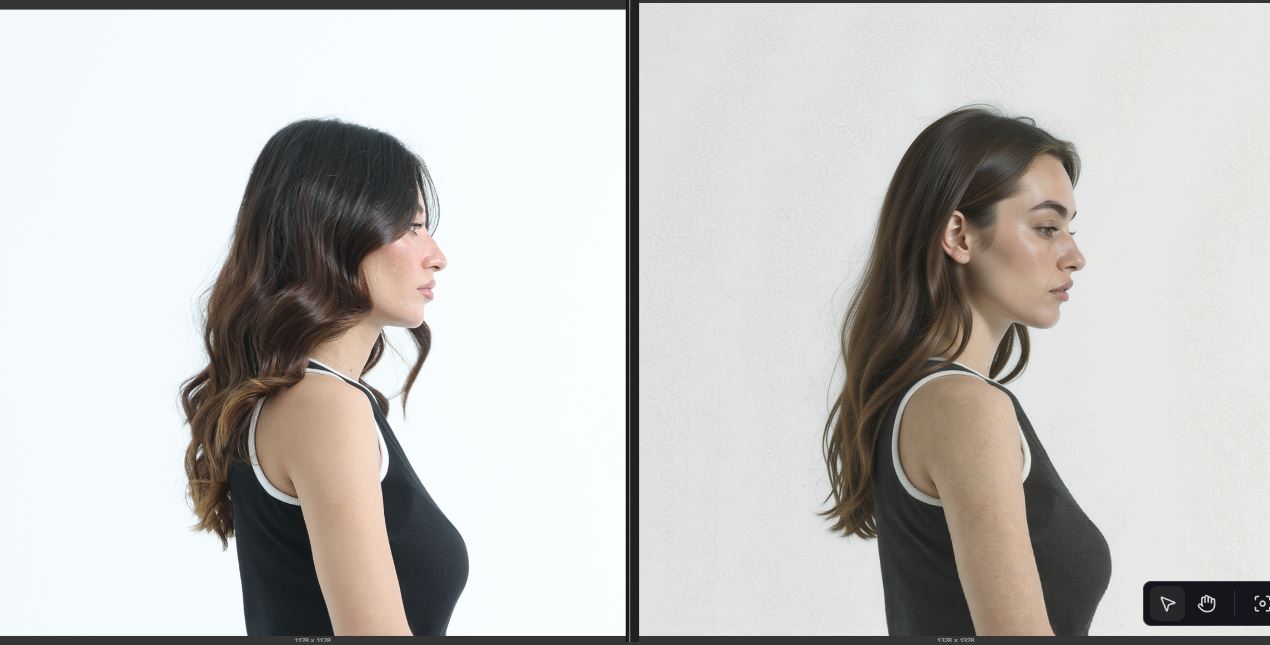
If you use a CFG Norm value below 1, it will remove the heavy coloring created by Lightx2v if you are using it, but this will alter the coloring. If you want the coloring closer to your reference image, set the value to 1.0.
If you notice in the example images I post, some have "CFG Norm" written at the top of the image.
@NRDX got it.. thanks
Your LoRA and workflow just did a miracle for me... I’m now able to swap the face of full photoshoots with a reference face. This is huge! The only drawback is it takes 8–10 minutes to create one image on RTX4090, so a batch of 16 images takes two full hours. I got zero-shot results with some minor discrepancies that can be fixed in Photoshop. Kudos to you and your work.
Thank you so much, haha! It took me a long time to understand how this LoRa needed to be trained and to assemble the datasets I have today. I spent over a month just focusing on that and training many, many models. I spent a lot of money, haha, just to bring this here. In the end, I don't even end up using the models I train; I make them to help the community in some way, always focused on things that are more based on styles and concepts. But thank you very much for the feedback. Regarding the 10-minute per image time, try using the Lightning LoRa and exploring the schedulers and number of steps a bit to get a better result with it, even mixing other LoRas in the process. This is still unexplored for me with this LoRa.
Using lighting LoRa I spend 3 minutes on my 3060. If I had a 4090 it would take no more than a minute!
@LbhMan I've yet to try the Lightning Lora... so far... I'm validating the results, and they are very promising. The consistency is insane.
You ever match the expression of the target photo?
@Ezrtwey390 Yes, face transfer also includes the facial expression. It sometimes changes the expression to match the target photo.
Is it possible to maintain facial expression of target image?
What are your feelings on the effectiveness of the lightning loras for QWEN? I noticed your v3 head swap workflow used the v1.0 lightning lora 4 step at a strength of 0.65, and the workflow uses 4 steps.
I think they trained these Loras without much concern; I don't think they're well-trained. The best they do is really speed up inference because the rest isn't worth it in terms of quality.
And then there is me getting cuda out of memory issues do i use q6 instead of q8? because i have a 4090
You can use whatever quantization you want, but the lower the precision, the worse the quality of the result can be.
@NRDX what model do you suggest for most identical swaps. Mine never look right and I have tried using Q5 and FP8.
@nikolaibloom805 q8 or original model, I need to run some tests to see what the best parameters are, which is why community experiments are so important, but almost no one posts their results, so it's difficult to improve without at least some community feedback.
The quality also depends a lot on the inputs you are providing; if you provide very poor angles of the reference image, the result tends to be worse.
@NRDX I try to match both images where the face is looking in the same direction most of the time and the source images are 1024 cropped headshots from a 4096 image
@nikolaibloom805 But were you able to solve it or not? I didn't understand.
I also have a 4090 and 32GB RAM. To run the model, I close unnecessary programs to free up RAM, since it uses RAM to load the models and VRAM for processing. It’s slower, but it gets the job done. I am using FP8 model.
Hi. I don't understand, nothing is working at my place. https://postimg.cc/qNTrxJKr
I think it's the quantization of your model; it's at q4, which is much lower than what I used for my examples. The lower the quantization, the worse the quality will be.
@NRDX Actually, it doesn't work below Q6. Above that, everything is fine. Maybe you could clarify this for those who are experiencing the same problem.
The res_2s + beta57 combo gives the best consistent results, but it takes the most time, about 8 minutes per generation. I tried the other combos you mentioned, they’re faster but less consistent. Any workaround to balance speed and quality?
One possibility would be to try the LightX2V with that scheduler and sampler, because you reduce the number of steps, or you could really look for another one, there are many that don't have a second stage.
@NRDX right now, I am using qwen edit 2509 fp8 version, with 16 steps, res_2s + beta57, without lightning lora, because lightning lora downgrades the output. RTX4090 with 32gb ram, i9 processor.
@noorhamadani Yes, that's the problem with light2xv. The solution is to try and find another scheduler/sampler. Usually, all those with 2s will do a "second pass," which is a second stage. You could try, if you're using res_2s, halving the number of steps to see if it works well. For example, instead of 20, try 10.
There is something I don't quite understand. There are three images input in the workflow, and it seems that the input "OpenPose" is not working?
So I don't know if you read the post description with the workflows, but if you use version 3 of this LoRa, you won't be using the older workflow versions, but rather version v3.
Version 3 doesn't have OpenPose, but you can try adding it, but I don't know if it will work since LoRa wasn't trained with an OpenPose like Ctrl_img. You would have to try decreasing the LoRa strength and adding OpenPose if it doesn't work with strength 1, but this is using version 3 of workflows, which is a simple workflow.
Face Swap V11 – This was the very first version of the workflow, created before I started training any LoRAs.
BFS – Workflow (Focus Head) Advanced – Based on the first version but now using a LoRA. It allows the use of masks and provides more control over blending.
Head Swap V2 Simple Workflow (With Lighting) – A simple workflow for the Head Swap V2 (Focus Head) LoRA, combined with the Lighting LoRA.
Head Swap V2 Simple Workflow (Without Lighting) – The same V2 (Focus Head) workflow, but this time without the Lighting LoRA (LightX2V acceleration).
Head Swap V3 Simple Workflow (With Lighting) – The simple workflow for Head Swap V3 (Focus Head), using the Lighting LoRA. In this version, the order of the input images has changed, and the prompt has also been updated.
Head Swap V3 Simple Workflow (Without Lighting) – The V3 (Focus Head) workflow without the Lighting LoRA. As with the “With Lighting” version, the input image order and prompt are different from previous versions.
⚠️ Note: The Face Swap V11 workflow requires Torch 2.8.0 to function correctly, as it uses a custom node that depends on it. Some users have reported that updating to this Torch version may cause ComfyUI to break in certain setups. The same issue may also occur with the BFS – Workflow (Focus Head) Advanced, depending on your configuration. Proceed with caution when updating.
Nice
This is the best laura I've seen, respect!
I'm curious to know. What is the benefit of using qwen to face swap instead of SDXL faceID? qwen take more resource and slower.
It's individual to each person; qwen is specialized in editing, the others aren't, aside from the problems that sdxl can generate, which rarely happen with qwen. The issue of slowness, etc., is also individual to each person; if you don't have a good enough GPU, you'll have to stick with sdxl.
I’ve tried using it and it works really well — it’s an excellent workflow and LoRA!
However, sometimes the output has a grid pattern or checkerboard artifacts.
What could be causing this issue?
It could probably be that the resolution is too high; try generating in 1024x1024. Or it could be the CFG; if you're using a CFG higher than 1 and at the same time using a LoRa of Lightning, it could be many things.
Thank you for your hard work creating this. Getting some great results. This might be obvious to others with more experience but if there is multiple faces in the base image, is there an easy way to tell the workflow which face it is you want to change and leave the others untouched. I am finding that it attempts to change every face in the image and I cant create a prompt to stop it. Thanks again for sharing.
I tried to use masking and prompt for that but the workflow somehow still makes changes to all visible faces.
You can try creating a mask around the face you want, cropping the box that surrounds that mask, and using the image from the box to do the swap. You can use this node here which makes everything easier: https://github.com/lquesada/ComfyUI-Inpaint-CropAndStitch
@NRDX Thank you for getting back to me so fast. I am very new to this but I will give that node a go and see how I get on.
@LesterBangs13 Just install this node with the manager, then create a mask using ComfyUI's own load image. If you right-click on the image in the load image, you can open the canvas and create the mask. Then, pass the mask to the ✂️ Inpaint Crop (Improved) node, and it will crop it for you. You can then use this image to perform the swap. After the swap, use ✂️ Inpaint Stitch (Improved) to return the cropped image to its original state.
how much vram i need for this workflow? keep crashing
why you made this struggle : v2 swap from image 1 to image 2 (base image) , then in v3 swap from image 2 to image 1 (image 1 here is vase) ...why ? is it as that or it's a mistake ?!
the prompt is swap face from image 1 or swap face from image 2 ?!
All the models I train are created with the purpose of testing things. Training is not simply taking datasets and throwing them into a tool and that’s it. I experiment with different approaches. That’s why in V3 you first provide the body image and then the face image — it’s not about difficulty. The real difficulty is training; as a user, you only need to use what someone else has already trained.
Everything is written in the information provided. There is even a workflow made specifically for V3 so you don’t run into this issue.
Another thing: there are two models here — you just need to read. One is for face swap, which is the Focus Face, and the other is for head swap, which is the Focus Head. One replaces only the face, the other replaces the entire head.
Running on a 4060Ti 16GB, I always get an error (Reconnecting) after VAE Decoding, anyone who might know the cause?
Depending on which models you are using with 16GB of VRAM, you may be experiencing VRAM shortage issues or something similar.
This is working great with Q5 and 4 steps, but I can't make it maintain the same expression from Input 2, do you have any tips? I tried prompts like "Maintain/keep the same expression from picture 2"
And Im using the V3 Lora
So, in the dataset I got from Face Swap, there weren't that many samples with a perfect expression match. That would be the SOTA for face/head swapping, which is why it ends up not following your additional instruction to follow the expression. What you could do is a second pass after the swap to try to adjust the facial expression.
@NRDX a second pass on the same workflow with the lora or on a basic workflow without lora? some of your examples it followed the expression of the input 2 pretty well, even if can't change the expression it is still a great lora
@newbieAiUser yes, without LoRA or with low intensity
Fantastic LoRa, after a few hours worth of testing I'm getting fast and great results with these settings:
Sampler: res_2s
Scheduler: beta57
Steps: 8
8Steps LoRa: 0.40
Swap LoRa: 1.05
CFG Norm: 0.99
Shift: 1.0
Details
Files
bfs_head_v3_000004000.safetensors
Mirrors
bfs_head_v3_000004000.safetensors
bfs_head_v3_000004000.safetensors
bfs_head_v3_000004000.safetensors
bfs_head_v3_000004000.safetensors
bfs_head_v3_000004000.safetensors
bfs_head_v3_qwen_image_edit_2509.safetensors
QWEN_BestFaceSwapHeadOpt.safetensors
qwen-head-swap-lora.safetensors
bfs_head_v3_000004000.safetensors
bfs_head_v3.safetensors
bfs_head_v3_qwen_image_edit_2509.safetensors
bfs_head_v3_qwen_image_edit_2509.safetensors
bfs_head_v3_qwen_image_edit_2509.safetensors
bfs_head_v3_qwen_image_edit_2509.safetensors
bfs_head_v3_000004000.safetensors
bfs_head_v3_qwen_image_edit_2509.safetensors
bfs_head_v3_qwen_image_edit_2509.safetensors
head_v2_swap_ours.safetensors
bfs_head_v3_000004000.safetensors
bfs_head_v3_000004000 (1).safetensors
bfs_head_v3_000004000.safetensors
Best-Face-Swap.safetensors
bfs_head_v3_000004000.safetensors
BFS-Best-Head-SwapV2.safetensors
bfs_head_v3_000004000.safetensors
bfs_head_v3_000004000.safetensors
bfs_head_v3_000004000.safetensors
bfs_head_v3_000004000.safetensors
2509_bfs_head_v3_000004000.safetensors
qwen_bfs_head_v3.safetensors
bfs_head_v3_000004000.safetensors
bfs_head_v3_000004000.safetensors
bfs_head_v3_qwen_image_edit_2509.safetensors
bfs_head_v3_qwen_image_edit_2509.safetensors
bfs_head_v3_qwen_image_edit_2509.safetensors
QWEN_BestFaceSwapHeadOpt.safetensors
bfs_head_v3_qwen_image_edit_2509.safetensors
bfs_head_v3_qwen_image_edit_2509.safetensors
bfs_head_v3_qwen_image_edit_2509.safetensors
qwen-head-swap-lora.safetensors
bfs_head_v3_qwen_image_edit_2509.safetensors
bfs_head_v3_qwen_image_edit_2509.safetensors
bfs_head_v3_qwen_image_edit_2509.safetensors
bfs_head_v3_qwen_image_edit_2509.safetensors
bfs_head_v3_qwen_image_edit_2509.safetensors
bfs_head_v3_qwen_image_edit_2509.safetensors
qwen-head-swap-lora.safetensors
bfs_head_v3_000004000.safetensors
Mirrors
bfs_head_v3_000004000.safetensors
bfs_head_v3_000004000.safetensors
bfs_head_v3_000004000.safetensors
bfs_head_v3_000004000.safetensors
bfs_head_v3_000004000.safetensors
bfs_head_v3_qwen_image_edit_2509.safetensors
QWEN_BestFaceSwapHeadOpt.safetensors
qwen-head-swap-lora.safetensors
bfs_head_v3_000004000.safetensors
bfs_head_v3.safetensors
bfs_head_v3_qwen_image_edit_2509.safetensors
bfs_head_v3_qwen_image_edit_2509.safetensors
bfs_head_v3_qwen_image_edit_2509.safetensors
bfs_head_v3_qwen_image_edit_2509.safetensors
bfs_head_v3_000004000.safetensors
bfs_head_v3_qwen_image_edit_2509.safetensors
bfs_head_v3_qwen_image_edit_2509.safetensors
head_v2_swap_ours.safetensors
bfs_head_v3_000004000.safetensors
bfs_head_v3_000004000 (1).safetensors
bfs_head_v3_000004000.safetensors
Best-Face-Swap.safetensors
bfs_head_v3_000004000.safetensors
BFS-Best-Head-SwapV2.safetensors
bfs_head_v3_000004000.safetensors
bfs_head_v3_000004000.safetensors
bfs_head_v3_000004000.safetensors
bfs_head_v3_000004000.safetensors
2509_bfs_head_v3_000004000.safetensors
qwen_bfs_head_v3.safetensors
bfs_head_v3_000004000.safetensors
bfs_head_v3_000004000.safetensors
bfs_head_v3_qwen_image_edit_2509.safetensors
bfs_head_v3_qwen_image_edit_2509.safetensors
bfs_head_v3_qwen_image_edit_2509.safetensors
QWEN_BestFaceSwapHeadOpt.safetensors
bfs_head_v3_qwen_image_edit_2509.safetensors
bfs_head_v3_qwen_image_edit_2509.safetensors
bfs_head_v3_qwen_image_edit_2509.safetensors
qwen-head-swap-lora.safetensors
bfs_head_v3_qwen_image_edit_2509.safetensors
bfs_head_v3_qwen_image_edit_2509.safetensors
bfs_head_v3_qwen_image_edit_2509.safetensors
bfs_head_v3_qwen_image_edit_2509.safetensors
bfs_head_v3_qwen_image_edit_2509.safetensors
bfs_head_v3_qwen_image_edit_2509.safetensors
qwen-head-swap-lora.safetensors