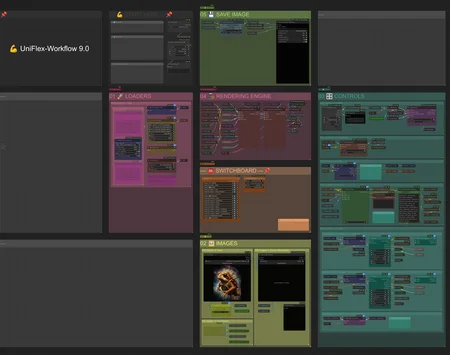
⚠️ NOTICE ⚠️
This workflow got sunk into Civitai Red. It will be resurrected as UniFlex 10.0 on my regular profile.
Introduction
💪 This is my attempt at a unified flexible and extensible workflow framework in the following default variants:
Flux.1 (.2)
Support and instructions for Flux.1 models (e.g., Krea), including Flux Tools, and Flux.2 Dev and Klein.
Qwen-Image (Edit)
Support and instructions for Qwen-Image and Qwen-Image Edit.
SDXL
Support and instructions for SDXL and popular finetunes, such as Illustrious, NoobAI, and Pony; along with SD 1.5 and SD 3.5.
Others *
Support and instructions for Anima, ChronoEdit [finetune of Wan 2.1 I2V]; HiDream; Kandinsky 5 Image Lite; Magic-Wan-Image v2 [finetune of Wan2.2-T2V-14B]; OmniGen2 (native); Wan 2.2 [text-to-image]; and Z-image.
[* = modified from the SDXL workflow and confirmed to run at least a default text-to-image or image-to-image workflow; not all functions, such as ControlNets, work for every model; reference the included models & recipes workflow for implementation instructions]
Many customizable pathways are possible to create particular recipes 🥣 from the available components, without unnecessary obfuscation (e.g., noodle convolution, stacking nodes over others, etc.) and arguably capable of rendering results of similar quality to more complicated specialized workflows.
The workflow was developed and tested on the following system:
Operating system: Linux Mint 22.3 Cinnamon with 124 GB RAM
Processor: 11th Gen Intel© Core™ i9-11900 @ 2.50GHz × 8
Graphics card: NVIDIA GeForce RTX 3060 with 12 GB VRAM
Browser: Google Chrome
Please report bugs 🪲 or errors 🚫, as well as successes 🤞 and requests/suggestions 📝. Post and share your SFW creations!!! I spent a lot of time working on this project (((for no 💰))), so I hope others make good use of it and find it helpful.
Components *
Background Removal:
RMBG, BiRefNet, and SAM/SAM2/SAM3 segmentation
Captioning & Prompt Engineering:
Wildcards (Easy-Use)
ControlNets & Detailing:
Qwen-Image ControlNets: DiffSynth Depth, InstantX Inpainting, etc.
Z-Image ControlNets: Alibaba Fun ControlNet Union 2.1
LLMs for Text & Vision:
Upscaling:
Basic model-based
Thera, InvSR, SeedVR2, Ultimate SD, and SUPIR
(VAE upscaling available in the spices workflow)
XY Plots:
XY plots (OutputLists Combiner)
[* = stripped down Core 🦴 editions are also included]
What's New?
[v9.5.2] Rebuilt LLM group to use native nodes by default; moved LLM Qwen3 VL group to spices workflow. Removed requirement for package by calcuis.
[v9.5.2] Replaced some custom nodes with their core equivalents.
[v9.5.1] Rebuilt Qwen3 VL group after node changes to QwenVL package.
[v9.5.1] Revised Model Details and sampling settings to likely give better default results, especially when using the 2nd sampler as a refiner.
[v9.5.1] Updated LanPaint group.
[v9.5.1] Added preconfigured workflows for Anima, Flux.2 Klein with LanPaint, Magic-Wan-v2, and Magic-Wan-v2 with LanPaint.
[v9.5.1] Added support and model recipe instructions for Anima, Magic-Wan-v2, and Z-Image (base).
[v9.5] Added Flux.2 Klein and Qwen-Image 2512 prompt enhancers to LLM group.
[v9.5] Added Flux.2 Klein preconfigured workflows.
[v9.5] Added Capitan Presets node with specialized sigmas for rectified flow models (e.g., Flux and Z-Image); added requirement for CapitanFlowMatch package.
[v9.5] Added FLUX.2 Klein Enhancer and Edit Controller nodes as conditioning enhancers to Flux.2 Klein workflows; added requirement for Flux2Klein-Enhancer package.
[v9.5] Added Capitan Enhancer nodes as conditioning refiners to Z-Image workflows; added requirement for Capitan Conditioning Enhancer package.
[v9.5] Added TextEncodeEditAdvanced node as a generic prompt type for edit models (e.g., Flux Kontext, Qwen Image Edit, and Flux 2 Klein); added requirement for TextEncodeEditAdvanced package.
[v9.5] Updated some LoRA models used in the workflows to more recent versions and/or added recommendations.
[v9.5] Replaced LayerFilter sharp/soft node—which was sometimes showing as broken after updating—with default sharpen node.
[v9.5] Replaced GGUF loaders with equivalents from package by city96; removed requirement for package by calcuis.
[v9.5] Unlinked the negative prompt node by default, which should shave a few seconds off initial rendering times; although still connected in the SDXL workflows.
[v9.5] All point updates from v9.4.1 to v9.4.3.
[v9.4.3] Moved function for combining positive prompts for 2nd sampler to Conditioning Extras subgraph in Prompt group. [v9.4.3] Added a prompt engineering subgraph to the Prompt group as a more flexible and powerful prompt building tool (e.g., wildcards); replaces the previous Prompt List node. [v9.4.3] Added ScaleROPE node to Model Details subgroups. [v9.4.3] Updated default Qwen-Image (Edit) models and acceleration LoRAs to versions 2511 and 2512. [v9.4.2] Replaced DualCFGGuider with CFGGuider for significantly faster renders!!! Removed related components: Cond. 2 (empty) Prompt node and negative CFG strength settings. [v9.4.2] Corrected small bottleneck slowing processing time (esp. on first render) in conditioning; updated instructions regarding negative conditioning, which is zeroed out by default in Flux and Qwen workflows. [v9.4.1] Fixed double VAE decoding that was adding processing time unnecessarily! [v9.4.1] Flipped order of prompt type list (now alphabetical). [v9.4.1] Added additional text encoder types to spices workflow, including Klandinsky5, Qwen-Image, and Z-Image; with preconfigured workflows for latter two added to download package.
[v9.4] Added some updated preconfigured workflows, including Qwen-Image Edit (w/ simple prompt batch), pi-Flow for Flux.2 (render times are not that bad!) and Z-Image Turbo (w/ LLM + ControlNet + DyPE). [v9.4] Reworked and simplified latter portion of Engine Rendering group, particularly logic regarding crop-and-stitch (used sometimes for inpainting) and VAE handling. [v9.4] Reworked and simplified Loaders group, particularly with VAE handing by moving VAE upscaling nodes, along with new VAE detailing node, to spices workflow. [v9.4] Added instructions and support for running a variety of batch processes, including image refinement (image-to-image), auto-captioning as new prompts (text-to-image), wildcards, background removal, upscaling, and LLM VL applications. [v9.4] Added support for Z-Image Alibaba Fun ControlNet Union 2.1. [v9.4] Added option for Depth Estimation (with DepthAnything v3) in Specialty Nodes subgroup; added requirement for DepthEstimation package. [v9.4] Added preconfigured pi-Flow workflow for Flux.2 to download package. [v9.4] Reworked XY plots group to use OutputLists Combiner, rather than Easy-Use package. Now, any model (not just Flux and SDXL) should theoretically work. [v9.4] Reworked all subgraphs by converting bunches of link widgets to shown widgets, which is probably closer to the intended way to use these. [v9.4] Moved model compatibilities and recipes nodes to separately maintained models & recipes workflow.
[v9.3] Added preconfigured VidFlex-Workflow 0.1 (alpha) for Wan 2.2 to download package; additionally requires PainterLongVideo and VideoHelperSuite packages. [v9.3] Added option for tiled SeedVR2 upscaling; added requirement for SeedVR2 Tiling Upscaler package. [v9.3] Replace Star DyPE node with equivalent DyPE node from another package; removed requirement for Star DyPE package and added requirement for alternative DyPE package. [v9.3] Added instructions and support for running Kandinsky 5 Lite Image model, with preconfigured workflow in the download package. [v9.3] Added Great Conditioning Modifier node, which can help stimulate output variations in certain models (e.g., Qwen-Image and Z-Image); added requirement for NDDG Great Nodes package. [v9.3] Added simple regional prompting options; added requirement for EasyRegion package. [v9.3] Reworked LLMs group to run Qwen3 VL (along with new prompt enhancer options) and moved Gemini and Ollama groups to spices workflow.
[v9.2] Added instructions and support for running ChronoEdit, Flux.2, and Z-image models, with preconfigured workflows for the latter two included in the download package. [v9.2] Added instructions for implementing pi-Flow (an acceleration method), with preconfigured Qwen-image workflow included in download package. [v9.2] Added DyPE nodes (for 4K+ refinement/upscaling) to both sampler groups. [v9.2] Moved Tiled Diffusion node to spices workflow; removed default requirement for Tiled Diffusion package. [v9.2] Reworked VAE loader to include upscale VAE option; added requirement for VAE-Utils package. [v9.2] Reworked Captioners and BG Removal groups; added requirement for JoyCaption and Joy Caption Two - PixelaiLabs Edition packages. [v9.2] Replaced SeedVR2 Tiling Upscaler nodes with equivalent SeedVR2 Upscaler nodes, with built-in tiling options; removed requirement for SeedVR2 Tiling Upscaler package. [v9.2] Replaced nodes from essentials and LayerStyle Advanced packages with other equivalents; removed requirements for essentials and LayerStyle Advanced packages. [v9.2] Removed PC-ding-dong nodes, which never worked reliably anyway and broke completely on a recent ComfyUI update; removed requirement for PC-ding-dong package.
[v9.1] Added SeedVR2 upscaler. [v9.1] Replaced the save image node with an equivalent node from the (already required) Easy Use package; removed requirement for the Image Metadata Extended package.
[v9.0] Reworked the Flexi-Workflow 8.0 by adding in and reconfiguring existing node pathways for newer models (e.g., Qwen-Image Edit Plus, etc.). [v9.0] Reworked the Flexi-Workflow 8.0 by moving many components and functions into subgraphs, greatly reducing the real estate used and simplifying the interface. [v9.0] Reworked the Flexi-Workflow 8.0 by reducing the number of out-dated and/or superseded node groups, largely due to the abilities of newer models (e.g., Flux.1 Kontext and Qwen-Image Edit Plus).
Known Issues
[v9.5] 🛑 DO NOT TURN ON NODES 2.0 🛑!
[v9.5] Starting ComfyUI with the --fast and/or --use-sage-attention arguments are known to interfere with some models, particularly Qwen-Image and Z-Image.
Quick Start
Install or update ComfyUI to the very latest version. Follow your favorite YouTube installation video, if needed.
Check that ComfyUI Manager is available, as it is now integrated into ComfyUI by default.
Download the following models or equivalents:
Flux.1: Follow the Quickstart Guide to Flux.1, if needed.
Qwen-Image: Follow the ComfyUI Qwen-Image Tutorial, if needed.
SDXL: Follow the SDXL 1.0 Overview (possibly slightly outdated), if needed.
SDXL VAE —optional
Open one of the UniFlex-Workflows in ComfyUI. You may want to start with a reduced Core 🦴 edition.
Use the Manager to Install Missing Custom Nodes:
Fresh installation: It is recommended to install just a few custom node packages at a time until you get through all of them. You may need to set security_level = normal- (notice the dash/minus!) in the config.ini file to download some custom nodes.
Updating from a previous workflow version: It is good practice to first backup your Python virtual environment configuration, such as with conda env export > environment.yml. Custom node requirements are likely to have changed significantly, so disable all custom node packages, except for Manager itself. Then, re-enable or install missing custom nodes as required.
Tip to avoid downloading unneeded packages: Delete any unconnected nodes and/or accessory groups (e.g., 20's, 30's, or 99 groups) showing as missing if you know you won't need their functions.
Restart ComfyUI.
Follow the Flux.1, Qwen-Image, or SDXL default recipe 🥣 according to your folder structure and resources.
Run the default text-to-image recipe 🥣.
Enjoy your generated image creations! 😎
BONUS TIP: Drag-and-drop your rendered image back onto the ComfyUI canvas to make any additional workflow revisions. This ensures you will always have a good default workflow as fallback. 🏅
RunPod
Follow the provided guide for Deployment of Flexi-Workflows (or others) on RunPod. —Some instructions now somewhat outdated, but mostly should still be good for reference.
Additional Recommended Installations
For the intended component functionalities using Flux.1, install Flux.1 Tools: Fill, Canny & Depth, Redux, and/or KONTEXT. The Redux model also requires sigclip_vision_384.
For the intended component functionalities using Qwen-Image, install the DiffSynth, InstantX Union, InstantX Inpainting, and/or various Bitwise ControlNet models.
Other ControlNets, such as X-Lab's Canny and Depth, Shakker-Labs's Union Pro, TheMistoAI's Lineart/Sketch, and/or jasperai's Upscaler and other models, are also (theoretically) supported, although results may vary. (The bdsqlsz and kohya models appear to require image dimensions be divisible by 32, which is not guaranteed in the workflow.) Feel free to browse for others.
While you should be prompted to install the necessary custom node packages (~30) via the ComfyUI Manager, I'm listing them here for your reference: Capitan Conditioning Enhancer (capitan01R), CapitanFlowMatch (capitan01R), comfy-plasma (Jordach), ComfyMath (evanspearman)*, ControlAltAI_Nodes (ControlAltAI)*, controlnet_aux (Fannovel16), Depth Estimation (Limbicnation), Detail-Daemon (Jonseed)*, DyPE (wildminder), EasyRegion(EnragedAntelope), Easy-Use (yolain)*, Eses Image Compare (quasiblob)*, Flux2Klein-Enhancer (capitan01R), GGUF (city96)*, Image-Filters (spacepxl), Impact Pack (Dr.Lt.Data)*, Inpaint-CropAndStitch (lquesada), InvSR (yuvraj108c), Joy Caption 2 (Pixelailabs), JoyCaption (1038lab), KJNodes (Kijai)*, LanPaint (scraed), LayerStyle (chflame163), Manager (Dr.Lt.Data), NDDG Great Nodes (NeoDroleDeGueule), OutputLists Combiner(geroldmeisinger), rgthree-comfy (rgthree)*, RMBG (AILab), sd-perturbed-attention (Pamparamm)*, SeedVR2 Tiling Upscaler (moonwhaler), SeedVR2_VideoUpscaler (numz), StrawberryFist VRAM Optimizer (strawberryPunch)*, SUPIR (Kijai), TextEncodeEditAdvanced (BigStationW)*, Thera (yuvraj108c), UltimateSDUpscale (ssit), and WD14-Tagger (pythongosssss). [* = Core 🦴 edition]
Additional packages in the spices workflow: AFFINE (WASasquatch), DFloat11-Extended (mingyi456), Flux2 INT8 Acceleration(BobJohnson24), IF_Gemini (impactframes), ollama (Stav Sapir), pi-Flow (Lakonik), Negative Rejection Steering (Reithan), NN Latent Upscale (Ttl), PowerShiftScheduler (silveroxides), QuantOps (silveroxides), QwenMultiangle (jtydhr88), QwenImageWanBridge (fblissjr), QwenVL (1038lab), RES4LYF (ClownsharkBatwing) —which should really be a standard install anyway, SpectralVAEDetailer (SparknightLLC), TaylorSeer (philipy1219), TiledDiffusion (shiimizu), TwinFlow (smthemex), and VAE-Utils (spacepxl).
Additional recommended add-ons include: Crystools (Crystian), Custom-Scripts (pythongosssss), KikoStats (ComfyAssets - kiko9), LoRA manager (willmiao), N-Sidebar (Nuked88), PNG Info Sidebar (KLL535), Scheduled Task (dseditor), and TF32 Enabler (marduk191).
Recommended upscalers/refiners include 1xSkinContrast-SuperUltraCompact, Swin2SR, 4xPurePhoto-RealPLSKR, Swin2SR Upscaler (x2 and x4), UltraSharpV2, or browse the OpenModelDB.
Accessory models (e.g., SAM2) should download automatically when first run; so just be aware of any delays and check the terminal window to monitor progress.
Navigation
The workflow is structured for flexibility. With just a few adjustments, it can flip from text-to-image to image-to-image to inpainting or application of Flux.1 Tools 🛠️. Additional unconnected nodes have been included to provide options and ideas for even more adjustments, such as linking in nodes for increasing details. (The workflow does not employ Anything Everywhere, so if a node connection looks empty, it really is empty.)
In the Switchboard, flip the yes|no 🔵 toggles to activate or deactivate groups and the jump arrows ➡️ to quickly move to particular groups for checking and making adjustments to the settings/switches.
🛑 DO NOT RUN THE WORKFLOW WITH ALL SWITCHES FLIPPED TO "YES"! 🛑
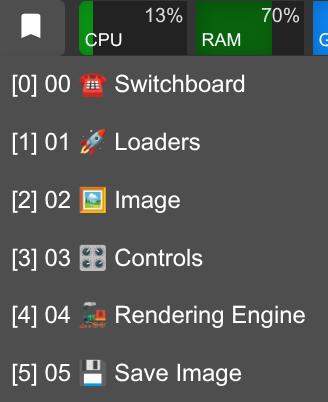
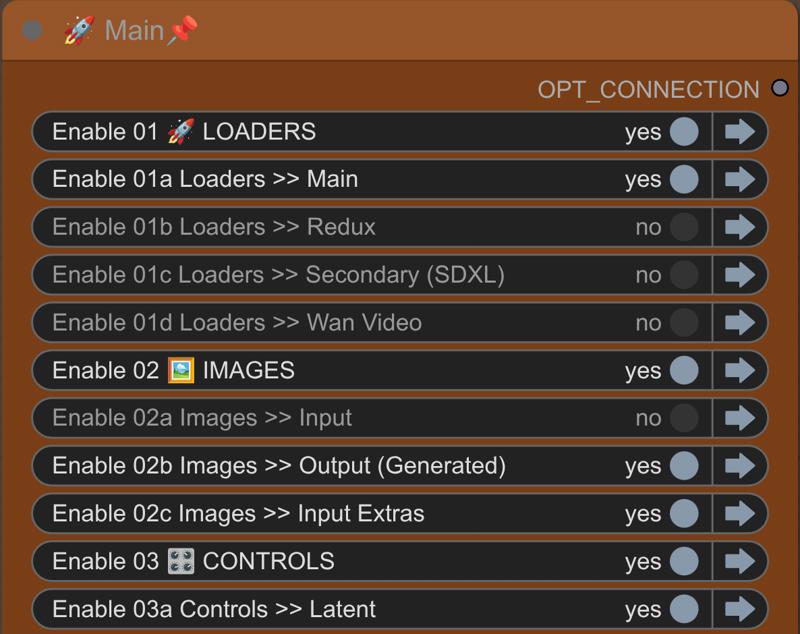 There are also bookmarks 🔖 to help you navigate quickly.
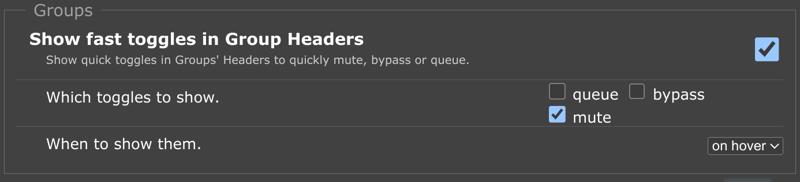
 In the rgthree settings, it is also recommended to show fast toggles in group headers for muting.
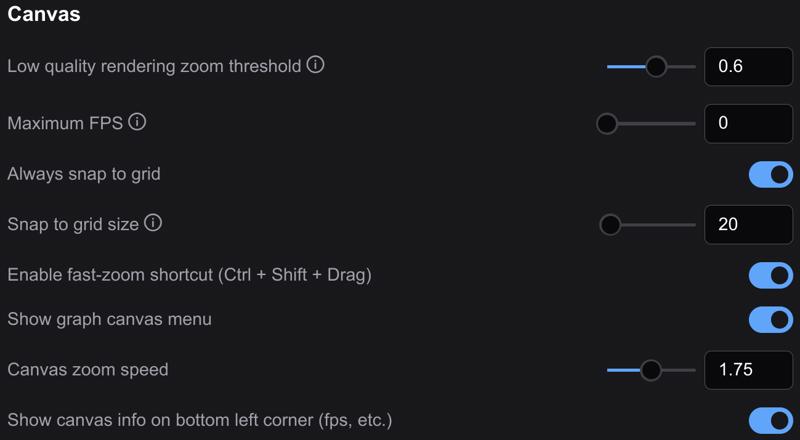
 In the Lite Graph section of the settings, enable the fast-zoom shortcut and set the zoom speed to around 1.5–1.75. The workflow was built with a snap to grid size of 20.
 Most of the workflow is unpinned 📌, so grab any empty space with your mouse to navigate around. You are welcome to pin 📌 anything you like to prevent accidentally moving groups or nodes.
Recipes
This is the default text-to-image recipe 🥣 and should be run first to make sure you have the basics configured correctly.
☎️ ⁘ Toggle on 01a, 02b, 03 all, 04, and 05
03a ⁘ Latent switch = 1 (empty)
03b ⁘ Conditioning switch = 1 (no ControlNets +)
05 ⁘ Save image switch = 2 (generated image)
Once you have the workflow running, it is recommended to drag-and-drop rendered images back onto the ComfyUI canvas to make any additional workflow adjustments. This ensures you will always have a good default workflow as fallback.
Reference the included models & recipes workflow for additional recipes 🥣.
Description
See workflow description.