


Introduction
💪 This is my attempt at a unified flexible and extensible workflow framework in default variants of Flux, SDXL, and Qwen-Image. Additional models also run after minor revisions*:
[Flux —incl. Kontext, Krea, & SRPO] Flux schnell and dev; Chroma [Schnell dedistilled]; Other dedistilled; and SVDQuants —Nunchaku
[SDXL] various finetunes, such as Illustrious, NoobAI, and Pony; SD 1.5; SD 3.5; HiDream; OmniGen2 (native); and Wan 2.2 [text-to-image]
[Qwen-Image —incl. Edit Plus] SVDQuants —Nunchaku
[* = models confirmed to run at least a default text-to-image or image-to-image workflow; not all functions, such as ControlNets, work for every model]
Many customizable pathways are possible to create particular recipes 🥣 from the available components, without unnecessary obfuscation (e.g., noodle convolution, stacking nodes over others, etc.) and arguably capable of rendering results of similar quality to more complicated specialized workflows.
The workflow was developed and tested on the following system:
Operating system: Linux Mint 21.3 Cinnamon with 124 GB RAM
Processor: 11th Gen Intel© Core™ i9-11900 @ 2.50GHz × 8
Graphics card: NVIDIA GeForce RTX 3060 with 12 GB VRAM
Browser: Google Chrome
Please report bugs 🪲 or errors 🚫, as well as successes 🤞 and requests/suggestions 📝. Post and share your SFW creations!!! I spent a lot of time working on this project (((for no 💰))), so I hope others make good use of it and find it helpful.
Components *
Background Removal:
Captioning & Prompt Engineering:
Wildcards (Easy-Use)
ControlNets & Detailing:
Qwen-Image ControlNets: Inpainting, etc.
LLMs for Text & Vision:
Upscaling:
Basic upscaling model(s), Thera, InvSR, Ultimate SD, SUPIR, and tiled diffusion
XY Plots:
XY plots (Easy-Use)
[* = scaled down Core 🦴 editions are also included]
What's New?
[v9.0] Reworked the Flexi-Workflow 8.0 by adding in and reconfiguring existing node pathways for newer models (e.g., Qwen-Image Edit Plus, etc.).
[v9.0] Reworked the Flexi-Workflow 8.0 by moving many components and functions into subgraphs, greatly reducing the real estate used and simplifying the interface.
[v9.0] Reworked the Flexi-Workflow 8.0 by reducing the number of out-dated and/or superseded node groups, largely due to the abilities of newer models (e.g., Flux Kontext and Qwen-Image Edit Plus).
Known Issues
[v9.0] In the Captioners group (31), the Florence2 model is currently out of order. However, forcing transformers<=4.49.0, may allow it to work; noodles will need to be reconnected.
[v9.0] In the Background Removal group (33), the Florence2 + SAM2 model combination is currently out of order. However, forcing transformers<=4.49.0, may allow it to work; noodles will need to be reconnected.
Quick Start
Install or update ComfyUI to the very latest version. Follow your favorite YouTube installation video, if needed.
Install ComfyUI Manager.
Download the following models or equivalents:
Flux: Follow the Quickstart Guide to Flux.1, if needed.
SDXL: Follow the SDXL 1.0 Overview (possibly slightly outdated), if needed.
SDXL VAE —optional
Qwen-Image: Follow the ComfyUI Qwen-Image Tutorial, if needed.
Open one of the UniFlex-Workflows in ComfyUI. You may want to start with a reduced Core 🦴 edition.
Use the Manager to Install Missing Custom Nodes:
Fresh installation: It is recommended to install just a few custom node packages at a time until you get through all of them. You may need to set security_level = normal- (notice the dash/minus!) in the config.ini file to download some custom nodes.
Updating from a previous workflow version: It is good practice to first backup your Python virtual environment configuration, such as with conda env export > environment.yml. Custom node requirements are likely to have changed significantly, so disable all custom node packages, except for Manager itself. Then, re-enable or install missing custom nodes as required.
Tip to avoid downloading unneeded packages: Delete any unconnected nodes and/or accessory groups (e.g., 20's, 30's, or 99 groups) showing as missing if you know you won't need their functions.
Restart ComfyUI.
Follow the Flux, SDXL, or Qwen-Image default recipe 🥣 according to your folder structure and resources.
Run the default text-to-image recipe 🥣.
Enjoy your generated image creations! 😎
BONUS TIP: Drag-and-drop your rendered image back onto the ComfyUI canvas to make any additional workflow revisions. This ensures you will always have a good default workflow as fallback. 🏅
RunPod
Follow the provided guide for Deployment of Flexi-Workflows (or others) on RunPod.
Additional Recommended Installations
For the intended component functionalities using Flux, install Flux Tools: Fill, Canny & Depth, Redux, and/or KONTEXT. The Redux model also requires sigclip_vision_384.
For the intended component functionalities using Qwen-Image, install the DiffSynth, InstantX Union, InstantX Inpainting, and/or various Bitwise ControlNet models.
Other ControlNets, such as X-Lab's Canny and Depth, Shakker-Labs's Union Pro, TheMistoAI's Lineart/Sketch, and/or jasperai's Upscaler and other models, are also (theoretically) supported, although results may vary. (The bdsqlsz and kohya models appear to require image dimensions be divisible by 32, which is not guaranteed in the workflow.) Feel free to browse for others.
While you should be prompted to install the necessary custom nodes (~30) via the ComfyUI Manager, I'm listing them here for your reference: comfy-plasma (Jordach), ComfyMath (evanspearman)*, ControlAltAI_Nodes (ControlAltAI)*, controlnet_aux (Fannovel16), Detail-Daemon (Jonseed)*, Easy-Use (yolain)*, Eses Image Compare (quasiblob)*, essentials (Matteo), gguf (gguf - calcuis)*, IF_Gemini (impactframes), Image-Filters (spacepxl), image_metadata_extension (edelvarden)*, Impact Pack (Dr.Lt.Data)*, Inpaint-CropAndStitch (lquesada), InvSR (yuvraj108c), KJNodes (Kijai)*, LanPaint (scraed), LayerStyle (chflame163), LayerStyle_Advance (chflame163), Manager (Dr.Lt.Data), ollama (Stav Sapir), PC-ding-dong (lgldl), rgthree-comfy (rgthree)*, RMBG (AILab), sd-perturbed-attention (Pamparamm)*, StrawberryFist VRAM Optimizer (strawberryPunch)*, SUPIR (Kijai), Thera (yuvraj108c), TiledDiffusion (shiimizu), UltimateSDUpscale (ssit), WD14-Tagger (pythongosssss); also Negative Rejection Steering (Reithan), NN Latent Upscale (Ttl), PowerShiftScheduler (silveroxides), RES4LYF (ClownsharkBatwing) —which should really be a standard install anyway, and TaylorSeer (philipy1219) in the "spices" workflow. Additional recommended add-ons include: Crystools (Crystian), Custom-Scripts (pythongosssss), KikoStats (ComfyAssets - kiko9), LoRA manager (willmiao), N-Sidebar (Nuked88), PNG Info Sidebar (KLL535), and Scheduled Task (dseditor). [* = Core 🦴 edition]
Recommended upscalers/refiners include 1xSkinContrast-SuperUltraCompact, Swin2SR, 4xPurePhoto-RealPLSKR, Swin2SR Upscaler (x2 and x4), UltraSharpV2, or browse the OpenModelDB.
Accessory models (e.g., Florence 2) should download automatically when first run; so just be aware of any delays and check the terminal window to monitor progress.
Navigation
The workflow is structured for flexibility. With just a few adjustments, it can flip from text-to-image to image-to-image to inpainting or application of Flux Tools 🛠️. Additional unconnected nodes have been included to provide options and ideas for even more adjustments, such as linking in nodes for increasing details. (The workflow does not employ Anything Everywhere, so if a node connection looks empty, it really is empty.)
In the Switchboard, flip the yes|no 🔵 toggles to activate or deactivate groups and the jump arrows ➡️ to quickly move to particular groups for checking and making adjustments to the settings/switches.
🛑 DO NOT RUN THE WORKFLOW WITH ALL SWITCHES FLIPPED TO "YES"! 🛑
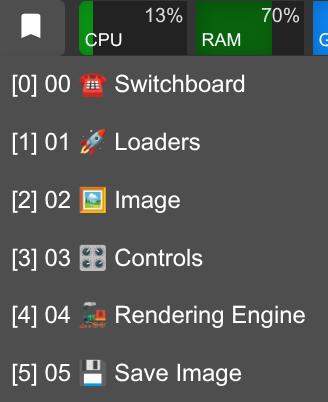
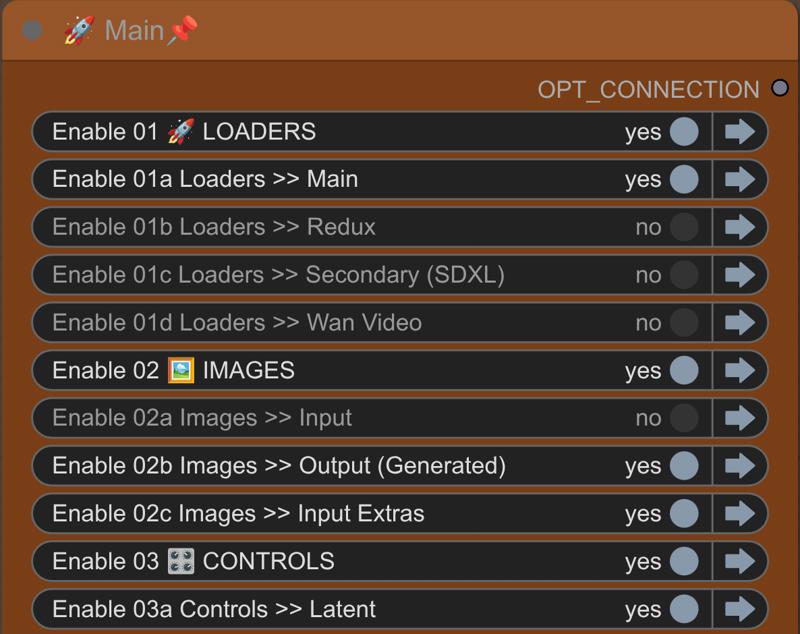 There are also bookmarks 🔖 to help you navigate quickly.
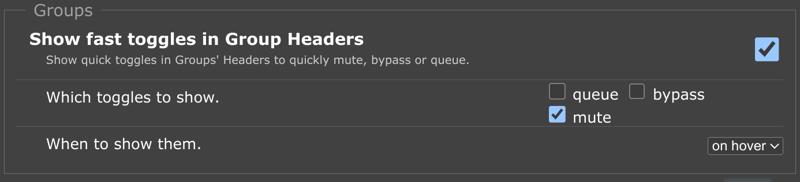
 In the rgthree settings, it is also recommended to show fast toggles in group headers for muting.
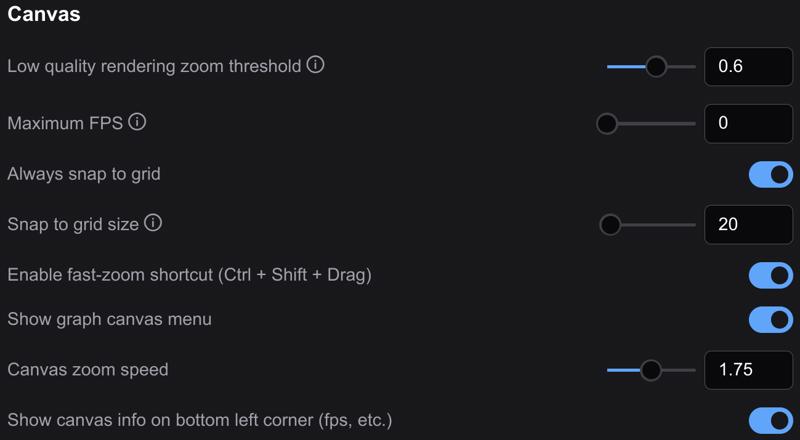
 In the Lite Graph section of the settings, enable the fast-zoom shortcut and set the zoom speed to around 1.5–1.75. The workflow was built with a snap to grid size of 20.
 Most of the workflow is unpinned 📌, so grab any empty space with your mouse to navigate around. You are welcome to pin 📌 anything you like to prevent accidentally moving groups or nodes.
Recipes
This is the default text-to-image recipe 🥣 and should be run first to make sure you have the basics configured correctly.
☎️ ⁘ Toggle on 01a, 02b, 03 all, 04, and 05
03a ⁘ Latent switch = 1 (empty)
03b ⁘ Conditioning switch = 1 (no ControlNets +)
05 ⁘ Save image switch = 2 (generated image)
Once you have the workflow running, it is recommended to drag-and-drop rendered images back onto the ComfyUI canvas to make any additional workflow adjustments. This ensures you will always have a good default workflow as fallback.
Reference the Start Here group to find additional workflow recipes 🥣.
Description
See workflow description.
Looks like we don't have an active mirror for this file right now.
CivArchive is a community-maintained index — we catalog mirrors that volunteers upload to HuggingFace, torrents, and other public hosts. Looks like no one has uploaded a copy of this file yet.
Some files do get recovered over time through contributions. If you're looking for this one, feel free to ask in Discord, or help preserve it if you have a copy.